
You're probably seeing the same pattern many firms are seeing right now. A reviewer opens a complex 1040, notices a changed number, and asks a simple question: why was this changed? The preparer may remember. The source document may exist somewhere in email, a portal, or a PDF binder. The change itself may be visible in the software. But if the reason for the change isn't captured at the time it happened, the firm is left reconstructing intent after the fact.
That's where most audit conversations go sideways.
For tax firms, audit trail software isn't just a technical logging layer. It's the difference between a clean review path and a scramble. It affects partner sign-off, internal quality control, fraud exposure, and how confidently you can answer questions later when no one wants to revisit a file from months ago.
Table of Contents
- Why This Matters More Than Ever for Tax Firms
- Beyond Simple Logs What Is a True Audit Trail
- Key Features to Demand in Audit Trail Software
- Compliance Security and Proactive Fraud Detection
- How to Choose the Right Software A Checklist for Tax Firms
- Implementation ROI and Real-World Use Cases
- Frequently Asked Questions About Audit Trail Software
Why This Matters More Than Ever for Tax Firms
A partner reviewing a return late in the day usually isn't worried about whether a system captured a timestamp. A primary concern is whether the file tells a coherent story. If taxable Social Security changed, if a brokerage figure was revised, or if a filing status input was updated, the reviewer needs to know who touched it, what changed, and whether there was a valid reason.
Without that record, review slows down fast.
Instead of confirming judgment, the team starts hunting for proof. Someone checks prior drafts. Someone else looks through notes. A preparer gets pinged to explain a decision they made days earlier. If that explanation exists only in memory, the file is already weaker than it should be.
When a review trail breaks down
In tax work, a bad audit trail rarely looks dramatic. It looks ordinary. A corrected W-2 comes in. A return gets updated. The number is now right, but the record behind the change is thin. That creates friction during partner review and greater risk if the file is ever revisited in an internal inspection or external examination.
Practical rule: If a reviewer has to ask where a number came from or why it changed, the audit trail is incomplete.
That's why audit trail software has moved out of the “nice to have” category. The market itself reflects that shift. The global audit trail management software market was valued at $8.2 billion in 2025 and is projected to reach $16.8 billion by 2034, according to DataIntelo's audit trail management software market analysis. That growth tells you something important. Firms aren't treating audit trails as passive recordkeeping anymore. They're treating them as core infrastructure for defensible work.
Why tax firms feel the pressure first
Tax practices deal with repeated revisions, compressed deadlines, handoffs between preparers and reviewers, and source documents that don't always arrive cleanly. Those conditions expose weak documentation fast. A system that merely records edits won't solve that. Firms need a record that supports decisions, not just keystrokes.
The operational payoff is just as important as the risk payoff. When the file is self-explanatory, reviewers spend less time reconstructing work and more time exercising judgment where it matters.
Beyond Simple Logs What Is a True Audit Trail
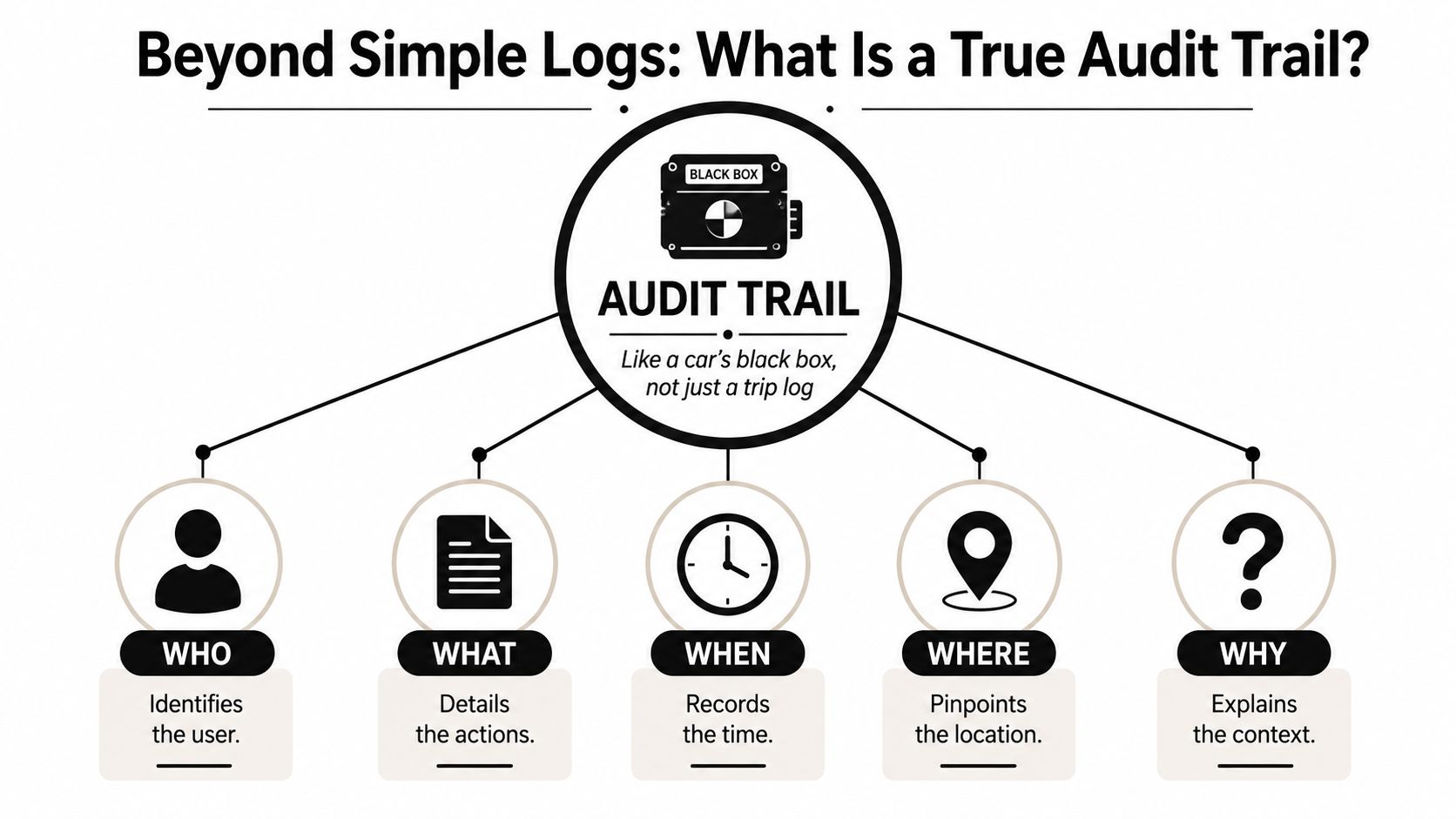
A simple log tells you that someone drove the car. A true audit trail is closer to the car's black box. It captures the sequence of events in a way that lets you reconstruct what happened and defend the record later.
That distinction matters in tax work. A version history may show that a return changed at 4:12 p.m. and identify the user who made the edit. Useful, yes. Sufficient, no. A true audit trail ties the action to the source, the workflow, and the reason.
The difference between activity history and evidence
In a tax firm, a real audit trail should answer five questions in one place:
- Who: Which preparer, reviewer, or partner took the action.
- What: What was changed, approved, rejected, annotated, or imported.
- When: The exact date and time the action occurred.
- Where: The record, workpaper, binder page, or return field involved.
- Why: The business justification behind the action.
Most systems can handle the first few. The last one is where many firms still fall short.
A reviewer doesn't just need to know that Line X changed after a document upload. The reviewer needs to know whether the update came from a corrected client document, a follow-up clarification, a classification judgment, or a correction of an extraction error. That context turns a log into evidence.
Why context changes everything
The missing piece in many audit trail setups is the why. That gap is bigger than it sounds. Censinet's discussion of audit trails and regulatory compliance notes the importance of capturing the business justification for changes to validated records, and the same source states that 40% of compliance penalties stem from missing contextual justification. In tax practice, that's the difference between a file that can be defended quickly and one that requires reconstruction.
Consider a revised 1040 entry tied to a corrected W-2. If the system records only that a change happened, the reviewer still has to infer intent. If the system records that the change was made because a corrected W-2 replaced the original source, the file is far stronger.
A clean timestamp helps you trace activity. A documented reason helps you defend judgment.
That's why I don't treat audit trail software as glorified version control. Version control helps you see movement. A true audit trail preserves the rationale behind that movement. For a busy tax team, that's what keeps review efficient and the record examiner-ready.
Key Features to Demand in Audit Trail Software
A vendor demo can make almost any platform look organized. The true test is whether the software removes the questions that slow tax review down. If a feature doesn't help a preparer document support, a reviewer verify support, or a partner sign off with confidence, it's noise.
Features that solve review bottlenecks
Start with the features that affect day-to-day review work most directly.
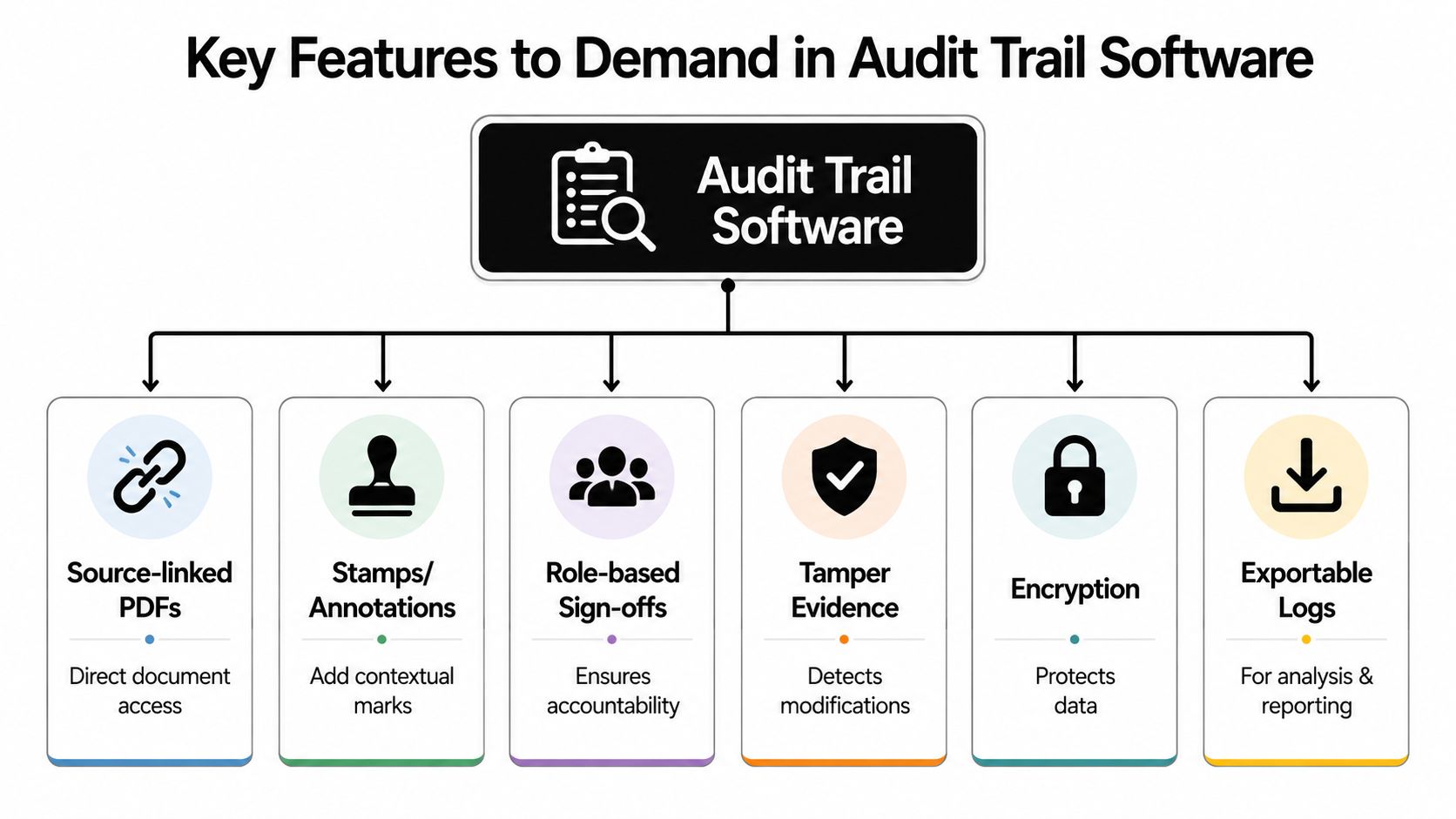
Source-linked PDFs: This matters because reviewers constantly ask where a figure came from. When a return field ties directly to the exact source page, that question disappears. The review becomes verification instead of scavenger hunt.
Stamps and annotations: These aren't cosmetic. They let the team mark what was reviewed, what needs follow-up, and why a judgment call was made. Good annotation tools reduce side conversations in email and keep the explanation attached to the workpaper.
Role-based sign-offs: Tax work moves through stages. Preparer, reviewer, and partner shouldn't all have the same responsibilities or authority. Role-based sign-offs create accountability at each handoff and make it obvious who cleared which item and when.
Some firms overlook how much these features improve internal consistency. They standardize review behavior without forcing the team into a rigid process that doesn't fit real engagements.
Security controls that preserve trust
The second group of features matters because an audit trail has no value if people can undetectably alter it.
Tamper evidence: The system should make changes to the record visible and difficult to hide. If a log can be edited without detection, it's not reliable evidence.
Encryption and access controls: Tax files contain sensitive client data. Encryption protects the data itself, while access controls determine who can view, change, approve, or export information. Those are separate controls, and both matter.
Exportable logs: When a managing partner, internal quality reviewer, or examiner asks for the file history, you need a clean export. If the only way to review the trail is inside the application interface, the process gets harder than it should be.
Here's what tends not to work in practice:
| Weak approach | Why it fails |
|---|---|
| Screenshots stored in folders | They don't create a continuous record and are hard to search |
| Email approvals | They separate approval from the actual return and source support |
| Shared spreadsheet trackers | They depend on manual updates and fall out of sync |
| Generic version history | It shows edits but often misses justification and workflow context |
The best audit trail software removes the sentence “I think this is what happened.”
When evaluating features, ask a blunt question. If a partner reviews a return six months from now, will the file still explain itself without needing the original preparer on the phone? If the answer is no, keep looking.
Compliance Security and Proactive Fraud Detection
Most firms still think of audit trails as records you pull after a problem shows up. That mindset is too narrow. A strong audit trail can help you identify the problem while it's happening, or at least before it spreads across a batch of returns.

Static logs are not enough
A static log is useful for reconstruction. It's weak for prevention. If someone makes unauthorized bulk edits, accesses returns at unusual times, or repeatedly overrides review controls, a firm shouldn't have to wait for a postmortem to spot it.
That gap is not theoretical. Hyperproof's audit trail resource cites a 2025 National CPA Association study stating that 35% of tax fraud cases involved unauthorized bulk edits to client returns, undetected because firms relied on static logs instead of automated pattern analysis. That's the operational difference between having a history and having a defense.
What active monitoring looks like in practice
For a tax firm, proactive monitoring usually means watching for patterns that don't fit normal work behavior, such as:
- Bulk changes across multiple client returns
- After-hours access to sensitive files
- Repeated overrides of the same review control
- Unexpected export activity
- Approval actions by the wrong role
Those alerts don't replace judgment. They focus it. Instead of reviewing everything with equal suspicion, the firm can investigate exceptions that look unusual.
A short explainer is helpful here:
A compliance-minded team should also think beyond fraud. Audit trail software supports cleaner internal reviews, clearer accountability, and faster response when someone asks how a change moved through the workflow.
If your system only helps after damage is done, it's a recordkeeper, not a control.
For firms handling high volumes of 1040 work, that distinction matters. The bigger the file flow, the less realistic it becomes to rely on memory, informal oversight, or static reports.
How to Choose the Right Software A Checklist for Tax Firms
Buying audit trail software for a tax firm shouldn't start with a feature comparison grid. It should start with workflow pressure points. Where do returns stall, where do reviewers lose confidence, and where does the firm rely too heavily on verbal explanation?
Questions to ask before you buy
Use a checklist that forces the vendor to show how the system performs inside real tax review work, not just generic compliance scenarios.
| Criteria | Key Question | Why It Matters |
|---|---|---|
| Workflow integration | Does it fit the way preparers, reviewers, and partners already hand off work? | If it fights the workflow, the team will bypass it |
| Source traceability | Can a reviewer move from a return item to the supporting document quickly? | This cuts the “where did this come from?” delay |
| Context capture | Does the system preserve the reason for a change or approval? | Without context, the file is harder to defend |
| Sign-off structure | Are role-based approvals built in? | Clear accountability matters in tax review |
| Tamper evidence | Can the audit trail be altered without detection? | If yes, the record won't hold up under scrutiny |
| Exportability | Can you export logs and approval history cleanly? | Internal review and examinations require portable evidence |
| User experience | Can busy staff use it without heavy training? | A clumsy system creates workarounds |
| Access control | Can you restrict who sees, edits, approves, and exports? | Tax data needs strict handling |
| Scalability | Will it still work during peak filing season? | Seasonal volume exposes weak systems fast |
| Support and implementation | Will the vendor help map your review workflow before rollout? | Poor setup ruins otherwise strong software |
A few questions are especially revealing in demos:
- Show me a changed number and the reason it changed.
- Show me the full sign-off path on one return.
- Show me how a reviewer sees exceptions without rereading the whole file.
- Show me what can and cannot be deleted or overwritten.
Those questions move the conversation away from marketing language and toward control design.
A tax firm doesn't need the broadest platform. It needs the clearest record.
The best choice often isn't the system with the longest feature list. It's the one that makes review easier, preserves context automatically, and fits the firm's actual filing workflow. If the vendor can't demonstrate that with a real sample return, the sales process is ahead of the product.
Implementation ROI and Real-World Use Cases
Implementation usually succeeds when firms keep it narrow at first. Start with one return type, one review team, and one defined sign-off path. Don't begin by trying to redesign every control in the practice at once.
That approach lets the firm answer practical questions early. Who adds annotations? At what point does preparer sign-off lock? What does a partner need to see before final approval? Those decisions matter more than broad policy language.
What rollout looks like inside a tax firm
A sensible rollout usually includes a few concrete steps:
- Define the review path first. Decide the handoff order before you configure the software.
- Pilot with complex returns. Simple returns won't expose workflow gaps as clearly.
- Standardize justification prompts. If the firm wants the “why” captured, staff need clear expectations for when and how to record it.
- Test exports early. Make sure the firm can produce a clean record without special vendor assistance.
Here's the practical truth. Firms usually feel value first in partner review and exception handling, not in abstract compliance reporting.
Where the return shows up first
The early return on implementation tends to show up in areas like these:
- Faster review conversations: Reviewers spend less time asking preparers to explain changes offline.
- Cleaner handoffs: Staff know what has been checked, what remains open, and who owns the next step.
- Stronger file defensibility: The reason behind a change stays attached to the work, rather than buried in memory or email.
- Less rework: When source links, annotations, and sign-offs are all in one place, the team doesn't duplicate effort.
This kind of workflow is easiest to understand when you can see it in context:

I'd also stress one trade-off. More logging isn't automatically better. If the system creates a flood of low-value activity data but doesn't surface the source support, sign-off path, and justification behind meaningful changes, the firm may end up with more noise than clarity. Good implementation keeps the record detailed enough to defend, but structured enough to review efficiently.
Frequently Asked Questions About Audit Trail Software
Is this just version history with a better label
No. Version history shows that something changed. Audit trail software should also preserve who made the change, when it happened, where it occurred in the file, and why it happened. For tax review, that last piece is the one that usually separates a usable record from an incomplete one.
Is audit trail software overkill for a small firm
Not if the firm handles sensitive client data, multiple handoffs, or partner review. Smaller firms may not need a large enterprise platform, but they still need a defensible record. The risk doesn't disappear just because the team is lean. In some cases, it increases because more knowledge sits in a few people's heads.
How long should we keep audit trail records
Retention depends on the firm's policies, client obligations, examination risk, and the systems involved. The practical answer is to set a written retention standard that aligns with your broader document retention policy and make sure the software can support that policy consistently. What matters most is consistency, accessibility, and confidence that the record hasn't been altered.
Audit trail software works best when it's treated as part of the review process, not as an add-on after the review is over. In tax practice, the strongest record is the one built while the work is happening.
If your firm wants a cleaner sign-off trail, source-linked workpapers, and a review-by-exception workflow built for 1040 preparation, WP TieOut is worth a close look. It's designed for tax teams that need validated source support, role-based handoffs, exportable audit history, and a defensible record without forcing reviewers back into manual tick-and-tie.