
If you're responsible for payroll, HR operations, or tax oversight, you probably know the pattern. Payroll closes are tight, employee moves happen late, and state or local tax changes rarely wait for a convenient week. Your team can automate calculations, but significant stress often starts after the patch goes in. You still need confidence that the results flowing into payroll, reports, or drafted returns make sense.
That's why BSI Tax Factory matters. In many enterprise environments, it sits underneath the payroll process like a dedicated calculation engine, doing work that would be burdensome to do by hand. It can remove a huge operational burden. But it also creates a practical question that leadership teams often discover too late. Automation can calculate taxes. It doesn't automatically explain every downstream effect in a way a reviewer can verify quickly.
For firms and internal teams that care about auditability, this distinction matters. Calculation and validation aren't the same job. If your process still depends on people manually checking changed outcomes line by line, the bottleneck hasn't disappeared. It has just moved.
Table of Contents
- The Hidden Engine of Payroll Tax Compliance
- What Is BSI Tax Factory Fundamentally
- Core Features and Workflow Automation
- Integration and Data Intake Architecture
- Weighing the Pros and Cons of BSI Tax Factory
- An Evaluation Checklist for Modern Tax Firms
- Implementation and Migration Considerations
The Hidden Engine of Payroll Tax Compliance
A large payroll environment rarely fails because people don't care. It fails because tax rules are fragmented, employee data changes constantly, and timing is unforgiving. One employee moves across town and picks up a different local tax profile. Another works in a location that doesn't match the home address on file. A remote worker changes states. Payroll still has to run on time.
In that setting, BSI Tax Factory acts like the part of the machine most executives never see. It isn't the portal employees log into, and it isn't the payroll brand leadership usually talks about in steering meetings. It's the engine underneath the process that determines what tax should be withheld when payroll data reaches the calculation stage.
That hidden role is exactly why it's easy to underestimate. Teams often assume their ERP or payroll platform "does the taxes." In many enterprise setups, the payroll platform is orchestrating the process while BSI Tax Factory performs the specialized tax logic in the background.
Practical rule: If your payroll process spans many jurisdictions, the real risk usually isn't payroll math. It's tax logic tied to changing locations, withholding rules, and jurisdiction mapping.
The appeal is obvious. A dedicated tax engine can standardize calculations, reduce manual setup, and keep payroll teams from maintaining tax rules by hand. It can also support a more disciplined compliance posture than spreadsheets, local workarounds, or custom code ever could.
But a leadership team shouldn't stop at "the engine works." The harder question is what happens after updates or rule changes flow through the engine. Who verifies that the changed output aligns with what the organization expected? Who can explain the difference to an auditor, reviewer, or tax manager without a manual chase?
That's where modern control conversations begin. Tax calculation software and audit trail software for tax review workflows solve different problems. If you combine them in your mental model, you'll overestimate how much end-to-end review risk has been removed.
What Is BSI Tax Factory Fundamentally
BSI Tax Factory is best understood as a dedicated payroll tax calculation engine. It isn't a full payroll provider, and it isn't a broad HRIS. Its job is narrower and more specialized. It takes wage, employee, and location data from another system, applies tax rules, and returns tax results for payroll processing.
A tax engine, not a payroll suite
The simplest analogy is a navigation system inside a car. Your ERP or payroll system is the car. It holds the driver, controls the trip, and gets you from payroll input to payroll output. BSI Tax Factory is the tax GPS. It doesn't replace the car. It calculates the best route through a changing map of tax rules.
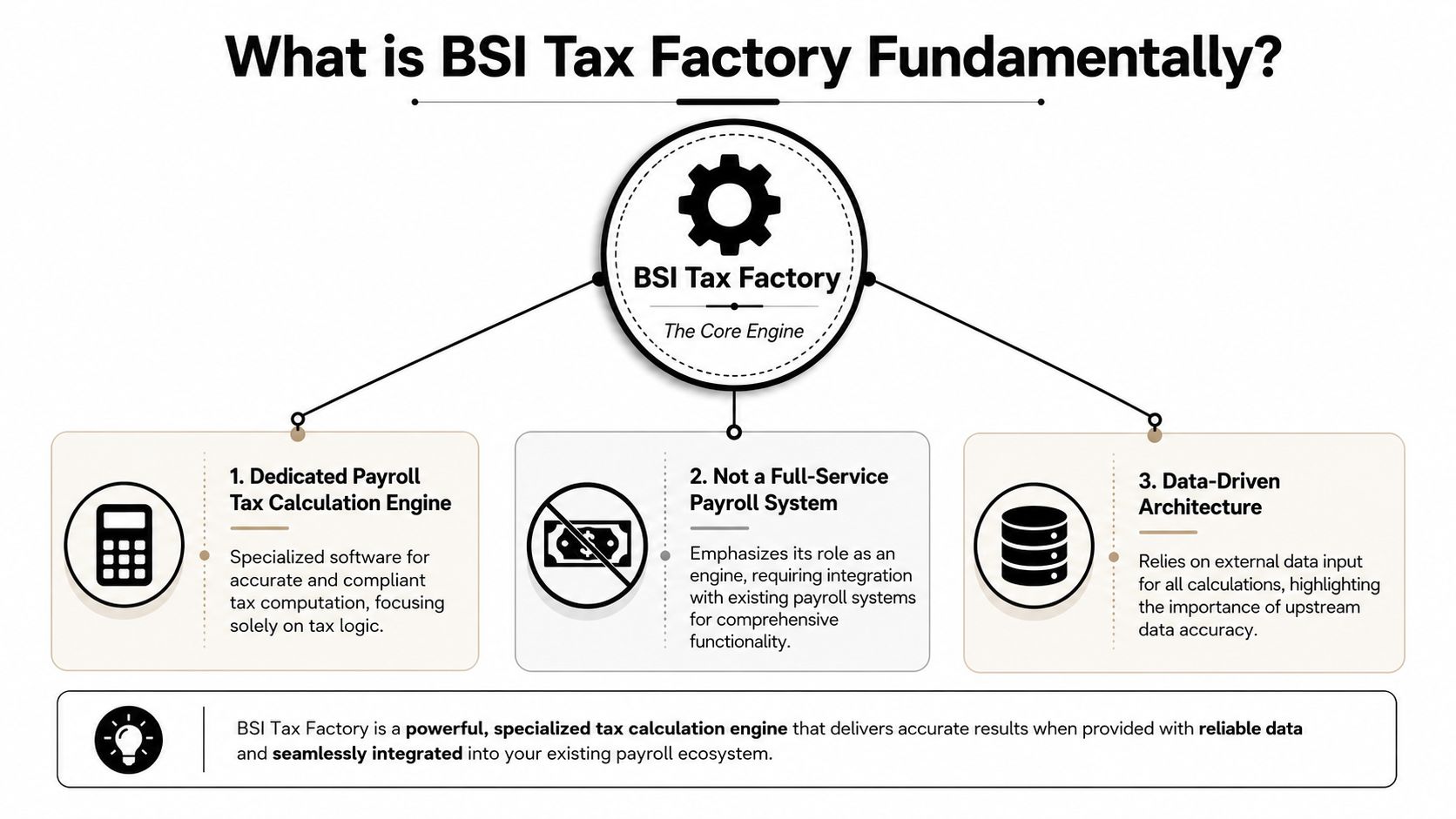
That distinction matters because it shapes implementation decisions. If a buyer expects BSI Tax Factory to manage employee lifecycle events, run workforce administration, or replace a payroll platform entirely, the project will start with the wrong assumptions. BSI Tax Factory is there to do tax logic well, not to become the whole payroll estate.
Where it sits in the payroll process
BSI Tax Factory has been serving as the integrated payroll tax calculation engine since 1979, marking over 47 years of continuous compliance support for major enterprise payroll systems, and SAP states that it is the mandatory tax calculation engine used by SAP US Payroll for federal, state, and local withholding in standard architecture, as described in SAP Help for BSI TaxFactory integration.
That long-standing role explains why many enterprise teams treat it as infrastructure. It supports payroll tax calculation across U.S. federal, state, local, and territory levels for employee and employer obligations. It is also used in Canada through TaxFactory Canada, which covers federal, provincial, Quebec, and territorial taxes.
A useful way to frame its scope is to ask two questions:
- What does it decide well: It determines tax withholding based on the data it receives and the tax content maintained in the engine.
- What doesn't it decide: It doesn't fix bad upstream employee data, settle internal policy disagreements, or create a human-friendly explanation for every changed result.
BSI Tax Factory is powerful because it's specialized. That same specialization is why you still need strong controls around the data going in and the review happening after results come back.
Core Features and Workflow Automation
The practical value of BSI Tax Factory shows up in workflow, not marketing language. Its strongest contribution is that it automates recurring tax determination tasks that payroll teams would otherwise have to maintain manually. That matters most when employee addresses, work locations, and withholding situations change often.
A good visual helps make that flow concrete.

How TaxLocator reduces manual setup
One of the best-known pieces of the BSI ecosystem is TaxLocator. BSI's TaxLocator feature automatically identifies correct federal, state, state unemployment, and local taxes, and it triggers updates when an employee record is added, an address or work location is changed, or a time record reflects a different work location, as summarized in this overview of BSI Tax Factory and TaxLocator.
That may sound technical, but the business value is straightforward. Payroll teams don't have to manually create and maintain as many U.S. tax deduction codes when employee circumstances shift. The engine re-evaluates tax treatment when key data changes.
Common trigger situations include:
- A new U.S. employee is added: TaxLocator evaluates the employee's setup at the start instead of waiting for a later correction cycle.
- An address changes: Home location can affect withholding and related tax determination, so the engine reassesses the tax setup.
- A work location changes: This is critical for employees whose payroll taxes depend on where work is performed.
- A time record points to a different location: Even when the employee master record hasn't changed, a time entry can trigger a new tax determination event.
The underlying message is simple. BSI Tax Factory doesn't just calculate once. It reacts when relevant inputs move.
Later in the workflow, teams often want to see the product in action. This walkthrough is useful for that purpose.
What automation handles well
BSI Tax Factory is particularly effective when the organization needs consistency across many employee scenarios. Instead of relying on tribal knowledge inside payroll, the tax engine centralizes the logic.
That helps in several ways:
- Operational discipline: New hires, transfers, and location updates can trigger the right recalculation path.
- Reduced manual maintenance: Teams spend less time updating tax codes by hand.
- Better scale: The same engine can support broad jurisdictional needs without requiring local workarounds in each payroll group.
A related part of the ecosystem is ComplianceFactory, which is positioned to simplify tax management and support filing and payment processes in higher-volume environments. For leadership teams, that matters because tax calculation and tax remittance are connected operationally even when they are not the same module.
The important caveat is this. Automation is strongest when the source data is clean and the organization has clear ownership over employee and location records. If those inputs are weak, BSI Tax Factory will still process what it receives. The engine can automate tax logic, but it can't correct governance problems upstream.
Integration and Data Intake Architecture
The architecture question usually comes up once leadership understands the functional value. Where does BSI Tax Factory live, and how does data move through it?
At a high level, BSI Tax Factory works as a modular component inside the broader payroll stack. TaxFactory US is described as a Software-as-a-Service product module hosted by BSI that interacts with HRM Payroll modules for gross-to-net tax withholding calculations, with tax release updates performed automatically by the provider, according to Surety Systems' description of TaxFactory US and ComplianceFactory.

Why the data flow matters
Think of the process as an exchange, not an isolated calculation. The payroll or HR system sends employee, wage, and location information into the tax engine. BSI Tax Factory applies tax rules and returns the calculated values for payroll to continue processing.
That design has two big implications.
First, it reduces some IT burden because the provider handles tax content updates. Internal teams don't have to patch every rule themselves. Second, it makes upstream data quality absolutely essential. If addresses, work locations, or wage elements are wrong before the handoff, the returned tax result can still be wrong in business terms even if the engine processed the request correctly.
The tradeoff of modular design
A modular design is usually better than forcing all tax logic into a monolithic payroll platform. You get specialist functionality and a cleaner division of responsibilities. But there is a tradeoff. Responsibility becomes distributed.
Payroll owns certain records. HR may own employee data changes. IT owns integrations. Tax may own exception review. Audit or controllership may own evidence requirements. If those owners don't agree on handoffs, the organization can end up with accurate calculations and poor explainability.
That's why many firms also focus on the gap between outputs and review evidence, especially when they are trying to move from scattered PDFs to one audit-ready binder. The integration story isn't complete until someone can show what changed, why it changed, and who approved the result.
Clean architecture isn't just about systems connecting. It's about making accountability visible after the systems have done their work.
Weighing the Pros and Cons of BSI Tax Factory
BSI Tax Factory has earned a strong position because it solves a real enterprise problem. But it isn't magic, and it isn't lightweight. Leaders evaluating it should be honest about both sides.
Where BSI Tax Factory is strong
The biggest advantage is specialization. BSI Tax Factory is built to handle payroll tax logic across complex jurisdictions. For large employers, that alone can justify the architecture. Internal payroll teams don't want to maintain tax rule changes manually, and they shouldn't have to.
It also fits well in enterprise environments where a dedicated calculation engine is preferable to custom tax logic buried inside payroll configuration. That separation can improve maintainability and reduce dependence on local workarounds.
Other strengths are more practical than flashy:
- Broad jurisdiction handling: Useful when employees span many tax authorities.
- Structured automation: Changes in employee or location data can trigger re-evaluation without relying on someone to remember every consequence.
- Enterprise familiarity: Many large payroll and HR teams already understand how to operate around a specialized tax engine.
Where leaders get surprised
The first surprise is complexity. BSI Tax Factory is not usually a plug-and-play tool for a smaller business with simple payroll. It makes more sense when tax complexity is already a serious operational issue.
The second surprise is dependency. Once a payroll process is built around a specialized engine, process design, support models, and internal knowledge tend to align around it. That isn't a problem in itself, but leadership should recognize it.
The third surprise is the black box problem. A tax engine can return a correct result without giving a reviewer an easy narrative for why the result changed after an update or data change. The machine knows the rule path. The reviewer still may not have a quick, human-readable explanation.
That matters in environments where review quality is just as important as calculation quality. Finance, payroll, and tax leaders often discover that they have automated the front half of the problem but left the back half mostly manual.
A strong tax engine reduces compliance burden. It doesn't automatically create review evidence that a manager, partner, or auditor can consume without extra work.
This is the limitation many teams don't discuss early enough. If your staff still has to compare outputs manually after updates, your compliance workflow remains exposed to fatigue, bottlenecks, and missed exceptions.
An Evaluation Checklist for Modern Tax Firms
Tax teams often evaluate BSI Tax Factory on the obvious criteria first. Does it calculate correctly? Does it handle the jurisdictions we need? Does it integrate with our stack? Those are necessary questions. They aren't sufficient.
The more difficult issue is validation after automation. One source focused on the unresolved problem facing CPA teams puts it plainly: "How do we validate that a BSI TaxFactory update didn't break our 1040 drafts without eyeballing every line?" The same source notes that this gap is a production risk and that miss rates can cost mid-sized firms over $15,000 annually in corrected returns, as discussed in SAPinsider's analysis of the BSI TaxFactory validation gap.
That question changes the evaluation standard. A tax engine can be excellent at applying current rules and still leave the review team with a painful manual burden.

The validation gap most demos skip
Leaders should test for the difference between these two capabilities:
- Calculation automation: The system determines withholding or tax outcomes based on current rules.
- Review automation: The system helps a human reviewer quickly identify what changed, why it changed, and whether the change should be accepted.
Those are not the same thing. A vendor may demonstrate flawless tax determination and still leave your firm with a manual line-by-line review process after updates, patches, or imported source changes.
Questions worth asking in a serious evaluation include:
- When tax content updates are applied, what evidence does the reviewer get?
- Can the team isolate only changed outcomes, or must staff recheck everything?
- How are exceptions documented for later sign-off or examination?
- If a draft return or payroll result changes, can a manager trace that change to source support without building a manual binder?
- Which part of the workflow is automated, and which part still depends on reviewer endurance?
The hidden cost in tax operations is often not calculation. It's the human review time required after the calculation changes.
BSI Tax Factory evaluation checklist
| Criteria | Question to Ask | Ideal Answer Signal |
|---|---|---|
| Regulatory Accuracy | How quickly and reliably are tax rule updates applied across the jurisdictions we use? | Clear ownership of tax content updates and a defined update process |
| System Integration | How does the engine receive employee, wage, and location data from our current systems? | A well-documented handoff model with stable integration points |
| Scalability for Growth | Will this architecture still work if our workforce footprint becomes more complex? | The platform supports more jurisdictions and organizational complexity without custom sprawl |
| Performance and Speed | How does the process behave during heavy payroll or filing periods? | The vendor can explain expected operating behavior and exception handling |
| Reporting and Auditability | What can a reviewer see when a tax result changes after an update or data correction? | Human-readable output, change visibility, and usable review evidence |
| Support and Resources | Who helps when tax logic, integration data, or update timing creates a discrepancy? | Clear support boundaries across vendor, payroll, HR, and internal IT |
The strongest evaluation teams don't ask only whether BSI Tax Factory can compute taxes. They ask whether the full workflow, including review, is fit for a modern control environment.
Implementation and Migration Considerations
A BSI Tax Factory rollout usually succeeds or fails long before go-live. The project goes better when leadership treats it as a cross-functional operating change, not just a technical install.
Workstreams to plan early
Data mapping comes first. Employee records, location structures, wage types, and payroll inputs have to line up cleanly before tax results will be trustworthy. If the source data is inconsistent, the implementation team should resolve that early instead of hoping the engine will smooth it out later.
Ownership also needs to be explicit. Payroll, HR, tax, IT, and compliance teams all touch part of the process. If nobody owns exception handling, update testing, or post-change review, the system may go live with unresolved operational gaps.
A realistic implementation plan usually includes:
- Data cleanup: Standardize addresses, locations, and relevant payroll inputs.
- Integration design: Define exactly what goes in, what comes back, and who monitors failures.
- Role clarity: Assign owners for tax setup, testing, approvals, and issue escalation.
Testing that leadership should insist on
Parallel testing matters because teams need to compare outcomes against the current process before trusting the new one in production. The point isn't just proving that taxes calculate. It's proving that your organization can understand and support the changed workflow.
Training should focus on operational exceptions, not just screens. Staff need to know what happens when an employee changes address, when a work location is corrected after the fact, or when a result looks right numerically but still needs explanation for review.
That is where many firms discover the remaining manual burden in tax season. If your team is still relying on manual tax season review workflows and trying to fix them, implementation planning should include how exceptions will be validated and documented after BSI Tax Factory does its part.
WP TieOut helps CPA firms close the validation gap that calculation tools leave open. It ingests source documents, validates the extracted data, compares that workpaper to the drafted return, and surfaces true discrepancies so reviewers can work by exception instead of eyeballing every line. If your firm wants faster 1040 review, source-linked audit trails, and a cleaner sign-off history, see how WP TieOut fits into a modern tax review workflow.