
You know the file. The client uploads a completed organizer, then separately emails two W-2s, forgets one 1099-DIV, types an outdated bank account on the questionnaire, and answers “no” to digital assets because they think a transfer between wallets doesn't count. By the time the draft return is ready, the senior has a reconciliation mess instead of a clean prep file.
That's why a client tax organizer matters far beyond intake. In a well-run 1040 practice, it sets the structure of the engagement, tells the client what the firm needs, and gives the preparer a disciplined starting point. But the organizer by itself isn't enough. The firms getting better turnaround, cleaner reviews, and fewer late-stage surprises are using the organizer as the first layer in a broader validation workflow.
Table of Contents
- What Is a Client Tax Organizer and Why Is It Critical
- Anatomy of an Effective Tax Organizer
- Digital vs Paper Organizers A Modern Approach
- Security and Compliance in Organizer Workflows
- The Gap Between Organizer and Source Documents
- Closing the Gap with AI-Powered Validation
- The Future of Tax Prep Starts with a Smarter Organizer
What Is a Client Tax Organizer and Why Is It Critical
A client drops off a folder with W-2s, a few brokerage statements, two charitable receipts, and a note that says, “Same as last year except I sold some stock.” That file looks workable until the preparer realizes no one confirmed estimated payments, dependent status, marketplace coverage, or whether the stock sale belongs to a taxable account or an inherited position. The organizer exists to prevent that kind of drift at the front end.
A client tax organizer is the firm's standardized intake document for an individual return. It captures what changed during the year, frames the document request, and gives the preparer a consistent starting point before data entry begins. In practice, it sits between last year's return and this year's source documents. It tells the client what the firm needs, and it tells the staff what questions must be answered before the file is ready for prep.
That matters because tax prep problems usually start as intake problems. If the organizer is incomplete, the return file becomes a series of assumptions, follow-up emails, and late-stage corrections. If the organizer is specific, the preparer can work from defined facts instead of guessing what the client meant or what they forgot to mention.
The organizer sets the rules of engagement
A well-built organizer does three things early in the process:
- Defines scope by asking about filing status, dependents, income streams, deductions, credits, entity activity, and major life changes before anyone starts the return.
- Standardizes intake so preparers, reviewers, and admin staff are all working from the same fact pattern and the same request list.
- Supports exception-based review by separating routine items from answers that need verification, clarification, or source-document tie-out.
That third point is where firms can improve the process. A traditional organizer collects answers. A stronger organizer collects answers in a format that can be checked against prior-year data and current-year documents, so the reviewer spends time on exceptions instead of rereading every line of intake from scratch.
Practical rule: If a client can answer a question three different ways, staff will interpret it three different ways. Good organizers reduce that ambiguity before the return reaches prep.
It improves quality before the return reaches software
The organizer is the first control point in the file. It should confirm identity details, household changes, income categories, deduction eligibility, and document expectations before anyone keys numbers into the tax system.
That distinction matters for newer staff. Source documents do not replace intake. A 1099 tells you what was issued. The organizer tells you whether the client had related activity, missing documents, changes from last year, or facts that affect treatment. Both are necessary, but they answer different questions.
This is also where the gap between old organizer workflows and modern ones starts to show. In a paper process, the organizer often acts as a checklist and little more. In a stronger digital process, the client's answers can trigger targeted follow-up, missing-document requests, and validation steps before the file reaches a reviewer. That reduces avoidable review notes and shortens the cleanup cycle that usually shows up near deadline.
Firms that want tighter control over 1040 work usually start here. If you are refining the broader individual tax preparation process, the organizer should be treated as a front-end control, not an administrative attachment.
Anatomy of an Effective Tax Organizer
A weak organizer asks broad questions and leaves too much room for interpretation. An effective one is structured, specific, and built to match the logic of the tax software and the review process.

Modern organizers can do much more than reproduce a paper checklist. Technical guidance on current organizer workflows notes that sections such as Personal Information, Dependents, Income, and Deductions can use conditional logic to show or hide questions based on prior answers. That setup can reduce manual data entry by up to 60% and accelerate return preparation by 45 minutes per file in mid-sized CPA firms. The same guidance also emphasizes a required document checklist and a signed client declaration, creating an audit-ready trail aligned with IRS recordkeeping expectations under 26 CFR § 1.6001-1, as described in this modern organizer workflow discussion.
The core sections every organizer needs
At minimum, the organizer should include these categories:
| Section | Purpose | What belongs there |
|---|---|---|
| Personal information | Establish identity and filing facts | Legal names, SSNs, addresses, filing status changes |
| Dependents | Confirm eligibility and support facts | Residency, relationship, birth date, education status |
| Income | Capture all reportable inflows | W-2, interest, dividends, brokerage activity, K-1s, self-employment income |
| Deductions and adjustments | Surface common tax positions | Mortgage interest, charitable giving, medical expenses, retirement contributions |
| Credits and special situations | Identify items clients don't volunteer | Education, child care, energy credits, foreign account questions, digital asset activity |
The organizer should also include a document request list. If the questionnaire asks about dividends, the file request should ask for every relevant 1099. If it asks about self-employment, it should ask for income statements and expense support where applicable.
Questions that surface what clients forget
Generic prompts produce generic answers. Better prompts are narrow enough that clients recognize the issue.
Examples that work in practice:
- For personal and dependent data: “Did anyone in the household change address, marital status, or custody arrangements during the year?”
- For bank and brokerage income: “Did you close any financial accounts, transfer assets, or receive a tax document from a bank or broker you no longer use?”
- For self-employment and side activity: “Did you receive income outside payroll from contract work, platforms, hobby activity, or informal services?”
- For foreign and digital activity: “Did you have authority over a foreign account, hold assets outside the U.S., or sell, exchange, or otherwise dispose of digital assets?”
- For deductions: “Do you have charitable gifts, mortgage interest, medical expenses, or other itemized deductions that require third-party statements or receipts?”
The best organizer questions don't ask what the client thinks is taxable. They ask what happened.
A signed declaration belongs at the end. That signature doesn't make the data correct, but it does force a moment of client confirmation and strengthens the documentation trail. In a review setting, that matters.
Digital vs Paper Organizers A Modern Approach
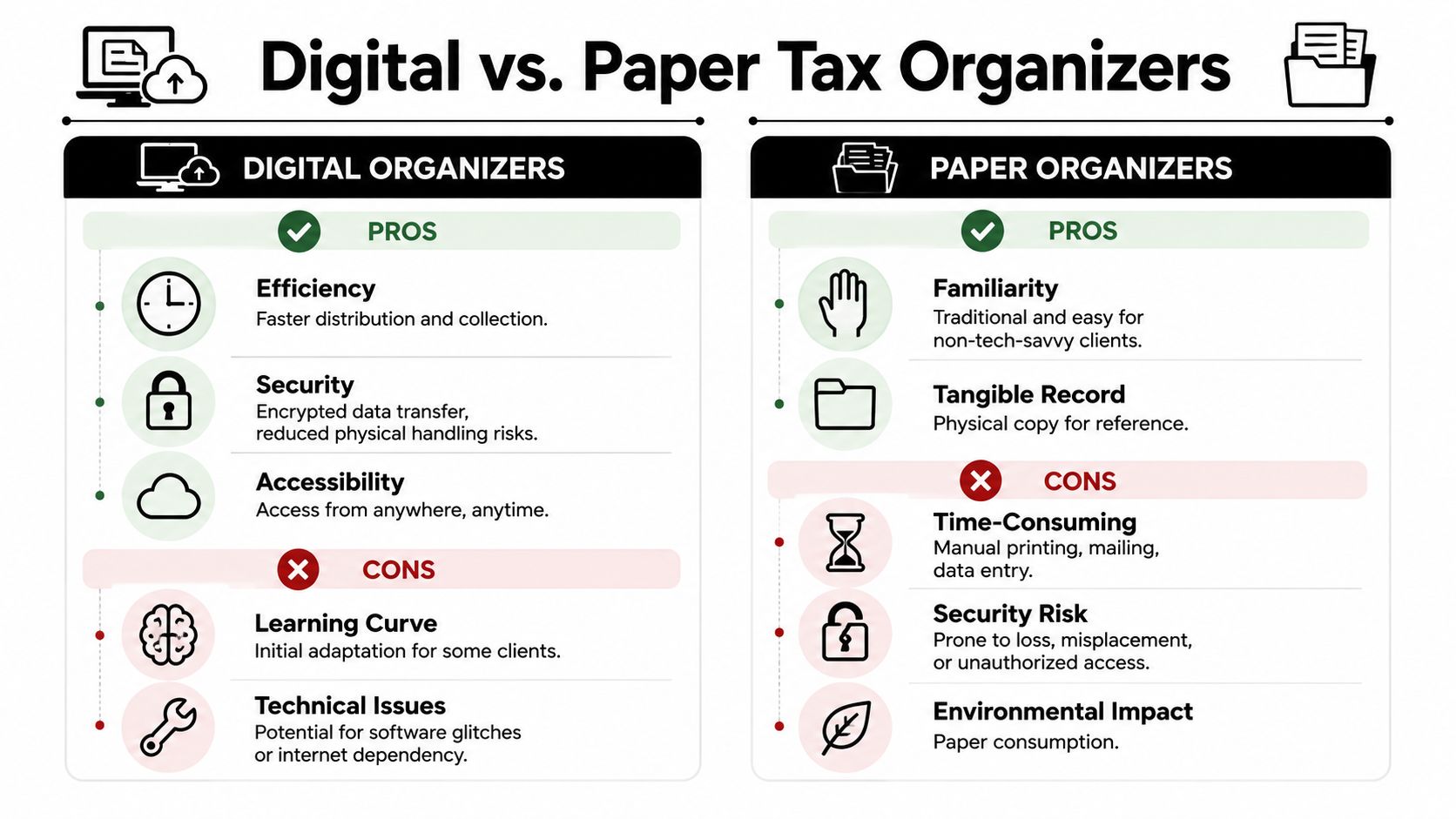
The question isn't whether digital is fashionable. The question is which format helps your firm collect complete information with the least friction and the fewest handling errors.
Where paper still works
Paper organizers still have a place in some practices. Certain long-time clients are more comfortable writing notes in margins, attaching sticky notes, and mailing back a packet with source documents. For those clients, paper may improve completion because it fits their habits.
Paper is often best for:
- Traditional client bases that resist portals or multi-step logins
- Simple annual returns where the same facts recur and the client's situation rarely changes
- Relationship-driven practices where staff already know the household and can translate handwritten responses efficiently
The downside is operational. Paper creates scanning work, manual status tracking, and another opportunity for misfiling or incomplete follow-up.
Where digital pulls ahead
Digital organizers do more than eliminate printing. They let firms control the sequence of questions, prevent blanks on required fields, and route collection through a client portal rather than unsecured channels. They also fit better with tax software ecosystems such as UltraTax CS and TaxSlayer Pro because data can be structured consistently from the start.
A simple comparison helps:
| Format | Pros | Cons | Best for |
|---|---|---|---|
| Digital organizer | Better routing, easier completion tracking, cleaner document collection, stronger workflow integration | Some clients need help with login or navigation | Firms prioritizing scale, standardization, and review efficiency |
| Paper organizer | Familiar and tangible, easier for some clients to annotate | Slower handling, harder to track, more manual entry | Smaller books of business with a high percentage of paper-oriented clients |
A hybrid model often works best. Standardize on digital, but keep paper available by exception rather than by default.
That exception matters. Firms lose efficiency when they design the entire process around the least tech-comfortable client. They also lose goodwill when they force every client into a system that doesn't fit. The right answer is usually a default digital workflow with a controlled paper alternative.
Security and Compliance in Organizer Workflows
Most firms focus on the organizer as an intake tool. They should also treat it as a security and compliance control. The organizer collects names, Social Security numbers, birth dates, dependent information, and financial account details. Once you request that data, your process becomes part of the firm's risk profile.

The organizer is a security event
If staff send organizers through ordinary email, ask clients to reply with attachments, and then save those files to ad hoc folders, the firm has already created avoidable exposure. The issue isn't convenience. The issue is that the intake path often becomes the weakest part of the tax workflow.
A secure organizer workflow should include:
- Controlled delivery through a portal or other managed channel
- Role-based access so only the right preparers and reviewers can see client data
- Consistent document storage tied to the engagement, not to an employee's inbox
- Clear status handling so the team knows whether the organizer is sent, started, completed, reviewed, or awaiting support
These aren't technical luxuries. They are basic operational controls.
Compliance starts before the return is drafted
Recordkeeping obligations don't begin at filing. They begin when the firm starts collecting and relying on client-provided information. That's why the organizer should be versioned, retained, and tied to supporting documents.
Use these controls as a minimum standard:
- Require a signed affirmation that the client has reviewed the organizer responses.
- Match requests to support so every major income and deduction category has a corresponding document expectation.
- Document exceptions clearly when a client cannot provide support or gives an explanation that affects treatment.
- Preserve the intake trail so a reviewer can see what was asked, what was answered, and what was later corrected.
If a reviewer can't reconstruct how the preparer moved from client intake to final reporting, the file isn't defensible enough.
Many firms underestimate the organizer. They see it as an administrative form, when in reality it is part of the substantiation record.
The Gap Between Organizer and Source Documents
A completed organizer is not a verified organizer. That distinction drives a large share of 1040 cleanup work.
A 2025 industry discussion reports that 100% of CPA firms require organizers, yet clients still complain about the burden and accountants spend “costly time” identifying discrepancies between organizer responses and actual records. The same discussion highlights self-reported errors involving items such as closed accounts and hobby income, and points to an emerging 2025 to 2026 shift toward AI-driven validation tools that compare organizer entries against uploaded W-2s, 1099s, and brokerage statements before draft filing, as noted in this industry discussion on organizer burden and validation gaps.
Why completed does not mean correct
Clients usually aren't trying to mislead anyone. They're forgetting, simplifying, or answering based on how they interpret the question.
Common failure points include:
- Closed or dormant accounts that still produced a final tax form
- Brokerage activity summarized casually on the organizer even though the actual 1099-B detail tells a different story
- Hobby or side income that the client doesn't think belongs in the return discussion
- Crypto transactions omitted because the client treats them as transfers rather than taxable events
- Foreign account authority left unanswered because the client doesn't realize authority can matter even without ownership
These aren't edge cases in a practical sense. They are routine sources of mismatch.
Where reconciliation work actually starts
The true prep burden begins after the organizer comes back. The preparer has to compare what the client checked, wrote, or omitted against the source documents in the file. If the organizer says one bank account was closed, but a 1099-INT appears from that institution, somebody has to resolve the inconsistency. If the organizer says there was no side income, but a 1099-NEC arrives later, the return changes and the review path changes with it.
That's why manual review so often turns into “eyeballing” two incomplete versions of the truth. The organizer gives you a narrative. The documents give you evidence. The mismatch between those two creates the expensive part of the workflow.
The organizer should start the conversation, not end the fact-finding.
The client perspective matters here too. Many ask why the firm needs the statements if they already filled in the questionnaire. The answer is that tax reporting is tied to source support and matching obligations, not just client recollection. If the organizer and the documents disagree, the documents drive the next step.
Closing the Gap with AI-Powered Validation
A client checks "no brokerage activity" on the organizer. Two days later, the file includes a 1099-B with multiple sales, wash sales, and basis adjustments. That is the point where a standard organizer process stops helping and the actual review work begins.
The stronger firms close that gap by treating the organizer as the starting structure, then validating the return against source documents before review is complete. The organizer still captures facts, prompts disclosures, and gives the preparer a roadmap. AI-assisted validation changes what happens next. It compares what the client reported, what the documents support, and what made it into the draft return.

That distinction matters in practice. A well-built organizer improves intake quality because it asks for information in a format that lines up with the return. But no organizer, however well designed, should be treated as final support. Clients answer from memory, from labels they do not fully understand, or from incomplete records. Source documents remain the control point.
From intake to validated review
In a manual process, staff compare organizer answers, PDFs, and return fields line by line. That is slow, inconsistent, and heavily dependent on who prepared the file. In a validation-driven process, the system extracts data from W-2s, 1099s, K-1s, brokerage statements, and similar records, then tests that data against the drafted return and identifies exceptions for human review.
The workflow changes in three practical ways:
- The organizer sets expectations. It tells the preparer and reviewer which income streams, deductions, entities, and disclosures should appear in the file.
- Documents verify the facts. Review turns on what the source records show, not just on what the client intended to report.
- Staff review differences, not everything. Time goes to mismatches, missing items, and classification questions that require judgment.
That is a meaningful shift for a tax practice. Senior accountants spend less time rechecking obvious agreement and more time resolving issues that affect accuracy, documentation, and sign-off quality.
A side-by-side tax return comparison workflow is a useful way to evaluate whether your current process is built around full-file reinspection or exception handling.
What AI-powered validation changes for reviewers
The benefit is not just speed. It is file quality.
When a system ties a return amount back to the underlying support, records the discrepancy, and preserves the resolution history, review becomes easier to supervise. The preparer can show why an amount changed. The reviewer can see whether the issue was cleared or overridden. The partner can trace the final position without reconstructing the file from notes, emails, and memory.
That also creates a better client experience, even if clients never see the validation layer. Follow-up requests become narrower and more specific. Instead of asking broad questions again, the firm can ask for the missing brokerage supplement, the corrected K-1, or clarification on a dependent mismatch. Clients usually respond better to a targeted request than to another general organizer reminder.
A brief demo helps make that workflow concrete:
AI does not replace tax judgment. It changes where that judgment is applied. The organizer still starts the process, but the review standard shifts from "did the client answer the questionnaire" to "does the return tie to the support, and are the exceptions resolved." That is the gap modern validation closes.
The Future of Tax Prep Starts with a Smarter Organizer
The client tax organizer is still the front door to a good 1040 process. That hasn't changed. What has changed is what firms should expect from it.
A static questionnaire is no longer enough for a practice that wants fewer surprises, tighter reviews, and stronger documentation. The smarter model is straightforward. Use the organizer to capture facts in a structured way, require support for the categories that matter, and move review away from manual reconciliation toward exception handling grounded in source documents.
That approach respects both sides of the engagement. Clients get clearer requests and fewer repetitive follow-ups. Preparers get a more consistent file. Reviewers get a cleaner path to sign-off.
Firms that still treat the organizer as a seasonal form are leaving efficiency and risk control on the table. In 2026, the stronger practice is the one that treats intake, validation, and review as one connected workflow.
If your firm wants that kind of review-by-exception workflow, WP TieOut is built for it. The platform validates source documents, compares them to drafted 1040 returns, and produces a source-linked, audit-ready binder with clear sign-off history so preparers, reviewers, and partners can move faster with better support.