

Remote access security controls are layered technical and administrative safeguards that govern how, when, and to what users connect to firm systems from outside the office. They're now an exam-survival issue for CPA practices, not just an IT hygiene issue, especially when 81% of CIOs and CTOs in one recent report said they'd suffered a remote access security incident in the last two years, and 75% of organizations with internet-exposed RDP reported an incident.
A tax firm doesn't have one remote worker and one remote system. It has preparers reviewing returns from home Wi-Fi, reviewers moving between offices, partners approving engagement letters from hotels, seasonal staff accessing client portals, and vendors supporting tax applications. Every one of those connections creates a decision point.
The weak approach is to buy a VPN, turn on an MFA prompt, and declare the problem solved. The defensible approach controls the identity, device, connection, application, session, and evidence trail together.
Table of Contents
- What Remote Access Security Controls Mean for CPA Firms
- Why Remote Access Is Now the Main Attack Surface
- The Five Core Controls Every Tax Practice Needs
- How These Controls Show Up in a 1040 Review Workflow
- VPN Versus Modern Zero Trust Approaches
- Compliance Obligations Driving These Controls
- A 30 Day Rollout Plan and Action Checklist
What Remote Access Security Controls Mean for CPA Firms
Remote access security controls determine who may connect, what they may reach, when access is allowed, and what the firm can prove afterward. For a CPA practice, that means governing the preparer pulling a client return from a home office, the reviewer tying out workpapers from a satellite location, and the partner approving a deliverable from a hotel network.
The control system starts before the login screen. The firm must know which remote gateways exist, where those gateways sit, who administers them, and whether they're patched. NIST guidance on enterprise telework and remote access treats remote access servers as controlled entry points that should generally sit at the network perimeter, enforce policy before traffic reaches internal systems, and remain manageable only from trusted hosts by authorized administrators.
That distinction matters during tax season. A preparer shouldn't connect directly to a file share because a shortcut happens to work. A reviewer shouldn't inherit the preparer's broad access because both employees use the same VPN group. A partner shouldn't approve a return through an unmanaged personal device just because the password is correct.
The control system has several moving parts
A mature program combines:
- Secure connectivity: The connection uses an encrypted tunnel or application-specific broker rather than exposing tax systems directly to the internet.
- Strong identity: The firm verifies each remote user before access, with phishing-resistant MFA preferred for sensitive and privileged accounts.
- Authorization: The user receives only the applications and engagement files required for the assigned role.
- Device and session safeguards: The firm checks device posture, limits idle sessions, and responds to risky context changes.
- Evidence and oversight: Logs show who connected, what they accessed, and which administrative actions occurred.
NIST's Cybersecurity Framework also treats remote access as something the organization must manage through usage restrictions, configuration requirements, connection requirements, prior authorization, and approved access control points. A useful CPA access-control compliance reference should therefore support written policies, role assignments, approval records, and periodic reviews, not just a screenshot of a security console.
For CPA firms, the practical standard is simple: every remote path to a 1040, workpaper, client portal, or tax application must have an owner, a defined purpose, an approval rule, and an audit trail.
Why Remote Access Is Now the Main Attack Surface
Remote access concentrates trust. One compromised account, gateway, remote desktop service, or administrative tool can put a large volume of taxpayer information within reach.
Verizon's 2025 breach data identifies credential abuse in 22% of breaches and vulnerability exploitation in 20%. Among vulnerability-exploitation breaches, exploitation of network edge devices and VPNs represented 22%, up from 3% in the prior period. Those figures make the operational point clearly: attackers don't need to defeat every application if they can compromise the path that reaches many applications. Verizon's remote access risk data as summarized in the 2026 industry analysis also reports that organizations with internet-exposed RDP face an especially serious exposure.
A CPA firm adds workflow complexity to that risk. Seasonal preparers may need access for a limited period. Reviewers need different permissions from preparers. Partners may need approval rights without needing unrestricted access to every engagement. Tax software integrations may create access paths outside the firm's primary VPN, and remote management tools may give administrators powerful control over endpoints.
Why one strong tool still fails
A VPN protects transport, but it doesn't decide whether a preparer should open a particular client folder. MFA verifies an identity factor, but it doesn't establish that the device is patched or that the user should access a partner-only workpaper. Logging records activity, but it doesn't prevent an over-permissioned account from downloading sensitive files.
The most concerning industry finding is the control gradient. The same 2026 report says organizations using only 1 to 5 basic defenses reported a 53% incident rate, while organizations using 6 or more layers reported 0 incidents in that dataset. That isn't a guarantee that additional controls make a firm invulnerable. It is strong evidence that layered defense changes the outcome.
Advisor's rule: A remote access program is only as strong as the least governed path to a client file.
| Attack Vector | Why CPA Firms Are Exposed | Layered Control That Reduces Risk |
|---|---|---|
| Stolen credentials | Tax staff work across multiple applications and may receive convincing phishing messages during deadline pressure. | Phishing-resistant MFA, conditional access, and prompt reauthentication for risky sessions. |
| Vulnerable VPN or edge device | A single gateway can provide a route toward many internal resources. | Prompt patching, restricted administration, vulnerability monitoring, and a documented emergency change process. |
| Exposed RDP | Remote desktop can provide powerful interactive access when exposed or weakly configured. | Remove public exposure, place access behind an approved broker, require MFA, and restrict administrator permissions. |
| Unmanaged home device | A personal or shared endpoint may not meet the firm's encryption, patching, or malware-protection requirements. | Device posture checks, managed endpoints, session restrictions, and application-specific access. |
| Remote management abuse | Administrative tools can bypass the normal user workflow and create invisible entry paths. | Approved-tool inventory, administrator MFA, enrollment approval, session recording, and centralized telemetry. |
A separate survey reported that 47% of IT teams experienced a remote access incident in the past two years, with vulnerability exploitation at 42%, security breaches at 38%, and misconfiguration at 35%. The message for managing partners is direct: don't measure success by whether the VPN is online. Measure whether the firm can identify and contain every route to the tax environment.
The Five Core Controls Every Tax Practice Needs
A CPA firm should organize its program around five operating controls. Device security belongs inside the connection and session decisions, because an encrypted tunnel from an untrusted endpoint is still a risky session.

Secure connectivity
Use an always-on VPN, posture-checked tunnel, or ZTNA broker. The objective is to prevent preparers from reaching tax applications over open networks or from connecting through an unapproved route.
A weak implementation uses split tunneling without understanding the traffic path, leaves an old VPN client installed, or permits staff to bypass the approved gateway for convenience. That can expose the firm to unmonitored traffic and make the access record incomplete.
For a tax engagement, secure connectivity prevents a home network or hotel connection from becoming the effective perimeter. Patch the gateway and client software, restrict gateway administration to trusted hosts, and maintain an inventory of every remote entry point.
Strong identity
Require MFA on every remote gateway, email account, tax application, and administrator account. NIST's access-control guidance for remote systems emphasizes authenticating each remote user before access, then applying authorization so the user reaches only necessary resources.
Phishing-resistant factors are preferable to SMS for privileged users and high-value systems. A weak implementation enables MFA for the VPN but not the tax platform, allows shared accounts, or exempts partners because they're senior. The failure is predictable: a stolen password still opens the application that matters.
Least-privilege access
Assign permissions by role and engagement. A preparer needs access to assigned client files. A reviewer needs the workpapers and return needed for tie-out. A partner needs approval and sign-off rights. None of those roles should automatically receive unrestricted access to every client, ledger, export folder, or administrative function.
The weak pattern is a single “tax staff” group with broad access because it's easier to administer. That turns a compromised junior account into a discovery tool for the attacker. Remove standing administrative rights and use time-bounded elevation for exceptional tasks.
Centralized logging
Collect authentication, file-access, application, administrative, and gateway logs in one reviewable location. A log should help answer who connected, from which device or context, to which system, and what administrative or file action followed.
Logging fails when each product keeps isolated records, retention is unclear, or no human reviews alerts. During an engagement, centralized records let the firm reconstruct whether an unfamiliar account opened a return, whether a reviewer accessed the correct workpaper, and whether an administrator changed a permission.
Session monitoring
Monitor concurrent sessions, idle timeouts, unusual locations, high-volume downloads, and access outside expected working patterns. A session should be capable of being challenged, restricted, or terminated when its risk changes.
A weak setup logs only the initial login. It won't show that a user remained connected overnight, opened multiple high-value returns, or transferred a large set of files after the normal review window. Session-level controls reduce the blast radius between authentication and logout.
How These Controls Show Up in a 1040 Review Workflow
Consider a normal remote 1040 engagement. The point isn't to create a dramatic breach story. It's to show where each safeguard earns its place during work that firms perform every day.
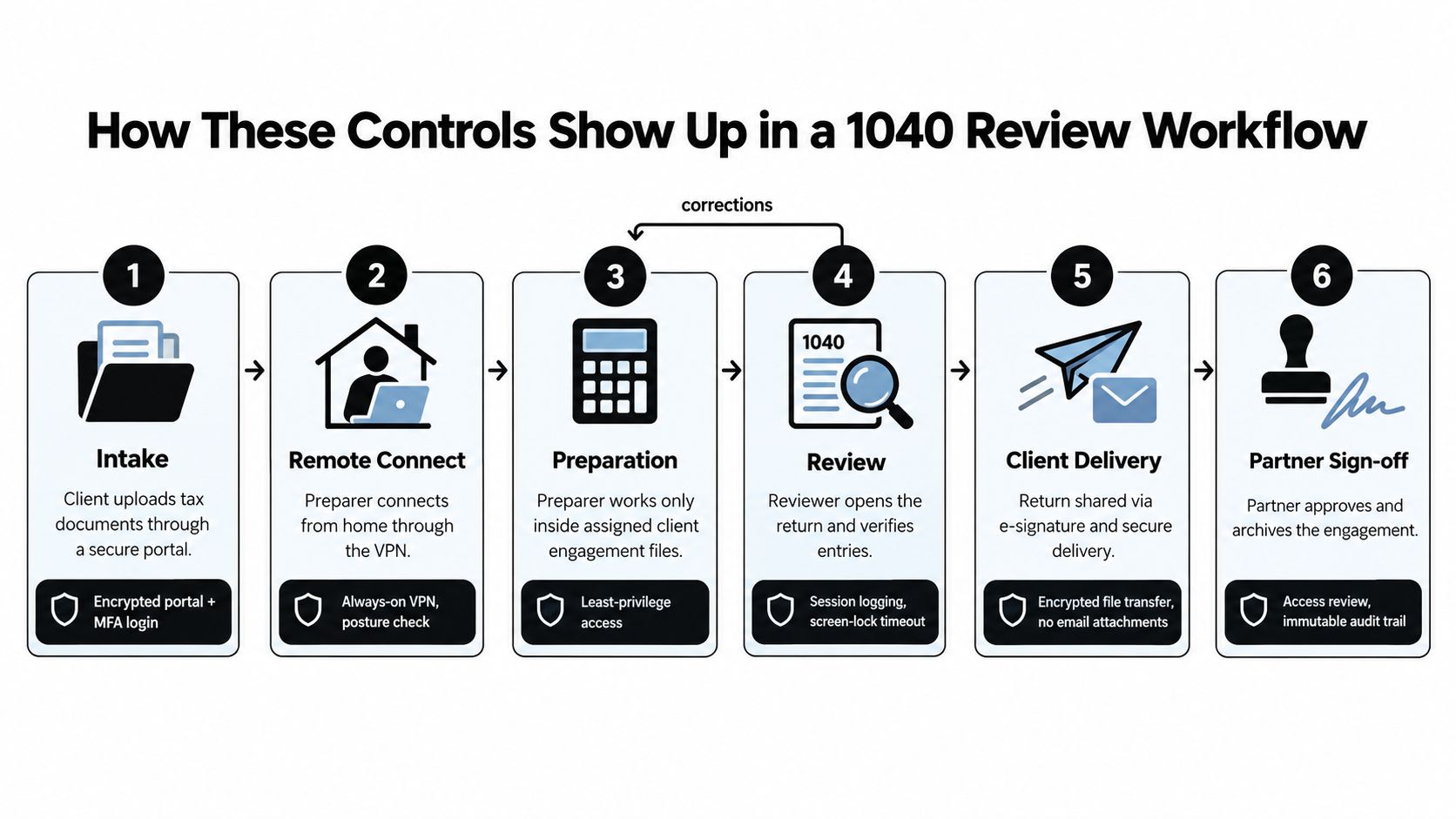
The client uploads source documents through a secure portal. The preparer signs in with MFA, and the firm records the identity used for intake. Before the preparer opens the tax application from home, an always-on VPN or ZTNA policy checks the connection and the device posture.
The preparer can work only inside the assigned engagement. Least-privilege permissions prevent access to unrelated client folders and prior-year materials that aren't needed for the current assignment. If the preparer's laptop falls out of compliance, the policy denies or limits the session instead of relying on the user to notice the problem.
The review and handoff
The reviewer opens the draft return and supporting workpapers. Session logging records the reviewer's account and the activity associated with the tie-out. If the reviewer sends the file back for correction, the preparer receives the appropriate engagement access without gaining the reviewer's broader permissions.
The partner receives a time-stamped handoff for approval. Session monitoring can flag an after-hours access attempt involving a high-net-worth return, or require reauthentication when the session context changes. If an unfamiliar connection appears during the review, the firm can challenge the session rather than allowing the original login to continue indefinitely.
Each control catches a different failure:
- MFA helps stop a stolen password from becoming a valid remote login.
- Device checks keep an untrusted or unpatched endpoint from opening the application.
- Least privilege limits what the account can see after login.
- Logging preserves the sequence of access and handoffs.
- Session monitoring identifies suspicious behavior after authentication.
That's why “the user had MFA” isn't an adequate incident analysis. The relevant question is whether the firm controlled the entire path from intake to partner sign-off.
VPN Versus Modern Zero Trust Approaches
A VPN isn't automatically obsolete. It's often the practical bridge for a mid-sized CPA firm with on-premises file shares, legacy tax applications, and staff who need a familiar workflow. The problem is granting broad network access when the user needs one application or one engagement.
A traditional VPN creates an encrypted tunnel into a network segment. That model is understandable and often easier to support, but a compromised laptop may be able to reach file shares, tax applications, print services, and other internal resources that the user never needed.
ZTNA-style access takes a narrower approach. It evaluates identity, device context, and application authorization, then provides access to a specific application rather than placing the user on a broadly reachable network. Research on securing remote access for distributed environments describes this distinction between network access and application-specific access.
| Control Area | Traditional VPN | ZTNA + Phishing-Resistant MFA |
|---|---|---|
| Access scope | Often grants access to a network segment or subnet. | Grants access to named applications or services. |
| Trust decision | Commonly concentrates verification at login. | Can evaluate identity and context throughout the session. |
| Legacy systems | Usually practical for on-premises applications and file shares. | May require connectors, brokers, or integration work for legacy systems. |
| User experience | Familiar for staff, but may route traffic inefficiently. | More targeted, but can require change management and training. |
| Failure mode | A compromised endpoint may move laterally across reachable resources. | Poorly governed policies or overlapping tools can create blind spots. |
| Best CPA use | Legacy on-premises systems with tight segmentation. | Cloud tax platforms and application-specific engagement access. |
For most mid-sized firms, the right answer is hybrid. Keep a tightly governed VPN for systems that require network-level access, and use ZTNA-style controls for cloud applications and sensitive workflows. Don't buy three overlapping products to demonstrate architectural ambition. Current survey data says 58% of IT professionals prioritize zero trust while only 28% have implemented it, and 57% prioritize consolidating remote access tools. The SANS analysis of remote access risk and tool sprawl supports the practical conclusion: visibility and consolidation often matter more than the label on the architecture.
A security access-control review for CPA firms should begin with the actual access map, not a vendor category. Identify every gateway, application, vendor tool, and administrative path, then decide which access model reduces reachability without making staff bypass the controls.
Compliance Obligations Driving These Controls
Compliance work becomes manageable when the firm maps each obligation to an owner, a technical setting, and a retained record. The firm shouldn't treat remote access as a standalone IT topic. It should connect remote identity verification, access permissions, monitoring, and review evidence to the firm's written security program and taxpayer-data safeguards.
Build the evidence trail
For IRS-facing safeguards, document how the firm verifies remote users, protects taxpayer information in transit, restricts access to assigned work, and reviews access when responsibilities change. Keep approval records for new accounts, evidence of MFA enforcement, records of terminated access, and logs that show activity involving sensitive returns.
For the FTC Safeguards Rule, use the same control evidence to support the firm's broader information-security program. Access control, encryption, device protection, monitoring, incident response, and service-provider oversight should appear in written procedures, not only in product settings. The firm should also track regulatory changes and update its written program when notification or operational expectations change.
State board reviews, peer review processes, and professional liability applications may approach the issue differently, but they all make undocumented controls difficult to defend. A firm that says “we review access periodically” should be able to show the date, reviewer, population checked, exceptions found, and corrective actions completed.

Documentation standard: If a control matters during an examination, assign someone to perform it and preserve evidence that the person performed it.
A security control effectiveness review should test more than whether a setting is enabled. It should confirm that the control applies to every remote path, that exceptions have approval, and that the firm can retrieve the evidence without reconstructing it under deadline pressure.
A 30 Day Rollout Plan and Action Checklist
Don't attempt a complete architecture replacement during filing season. Close the most dangerous identity and visibility gaps first, then tighten permissions and session oversight.
Week 1 closes identity gaps
Enforce MFA on every remote gateway, email account, tax application, and administrator account. Disable SMS and voice factors where phishing-resistant options exist, remove shared accounts, and inventory every remote entry point, including vendor and remote-management tools.
The managing partner should sponsor the requirement. The IT owner should produce the exception list, and the compliance owner should approve any documented exception.
Week 2 hardens connectivity
Move remote access away from uncontrolled split-tunnel configurations where the firm can't account for the path. Require an always-on VPN or approved ZTNA approach, patch VPN concentrators and clients, restrict gateway administration to trusted hosts, and verify that exposed RDP is removed or placed behind a controlled broker.
The IT lead signs off on the technical changes. The security or compliance lead validates that the approved access map matches reality.
Week 3 reworks entitlements
Inventory preparer, reviewer, partner, contractor, and administrator roles. Remove standing administrative rights, eliminate generic logins, and apply engagement-level permissions. Use time-bounded elevation for handoffs or exceptional support instead of leaving privileged access permanently enabled.
The tax operations leader should validate role design. Each department owner should approve the access list for their engagements.
Week 4 turns on visibility
Centralize VPN, firewall, identity, file, and application logs. Configure alerts for unfamiliar logins, concurrent sessions, unusual downloads, and access outside approved patterns. Assign a named person to review alerts every business day, then run a mock access review and document the results.
The managing partner signs the final risk acceptance. The compliance owner updates the WISP and retains the rollout evidence. The IT owner schedules the next review rather than treating completion as a permanent state.
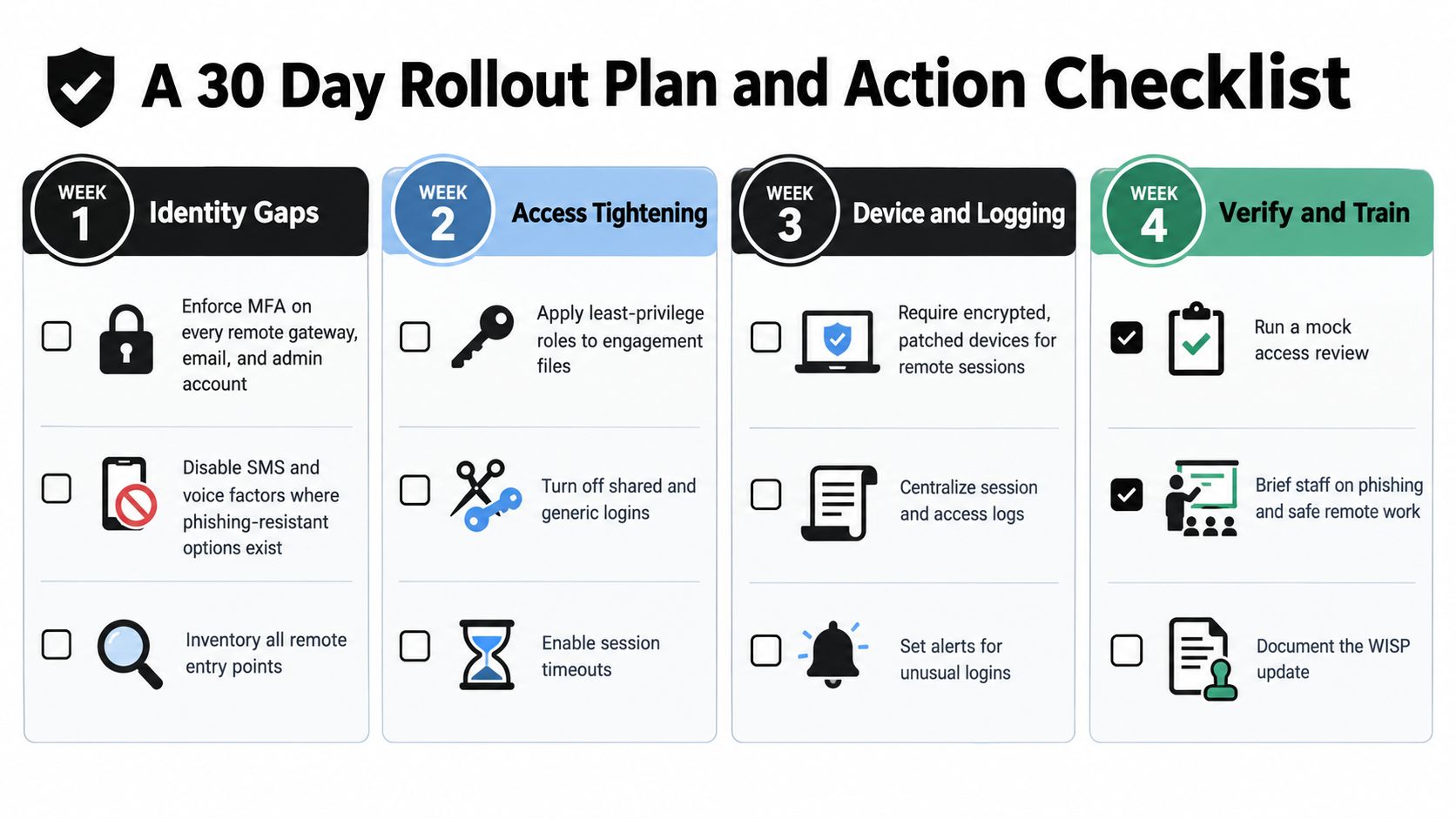
The checklist that survives April has names beside it. Managing partners should ask who owns each gateway, who approves each role, who reviews alerts, who removes departing staff, and who can produce the access history for a disputed return. If nobody can answer, the firm doesn't yet have a remote access control program. It has tools.
WP TieOut gives CPA firms a controlled workflow for source-document intake, 1040 discrepancy review, preparer and reviewer handoffs, partner sign-off, and an exportable audit history. Visit WP TieOut to evaluate how that workflow can support clearer access ownership and stronger evidence across the tax engagement.