

The return is due, the reviewer is waiting, and a temporary preparer needs access to one client file before the partner signs off. In many CPA firms, that request still travels through a patchwork of shared folders, application settings, email approvals, and permissions assigned years ago. During peak season, one hurried change can give an assistant more access than intended, while another employee can't open the workpaper needed to finish a legitimate review.
Passwords and multifactor authentication remain important, but they don't answer the central operational question: what should each person be allowed to do in the tax workflow? Role based access control, or RBAC, answers that question by tying permissions to job responsibilities. For tax practices, the model is most useful when it mirrors the actual handoff from preparer to reviewer to partner, rather than treating access as a collection of unrelated user settings.
Table of Contents
- Why Tax Firms Need Role-Based Access Control
- Understanding Role Based Access Control Fundamentals
- Security and Compliance Benefits for CPA Practices
- Comparing RBAC to Traditional Access Models
- Designing Effective Roles for Tax Teams
- Implementation Checklist for Tax Firms
- How RBAC Works in Modern Tax Review Platforms
- Building a Security-First Culture with RBAC
Why Tax Firms Need Role-Based Access Control
A weak access model creates two problems at the same time. It can expose client information to someone who doesn't need it, and it can prevent the right person from completing a review when a deadline is approaching. Both problems become more likely when firms add seasonal personnel, shift work between offices, or move returns through several applications.
Consider a common peak-season sequence. A preparer drafts an individual return and uploads supporting documents. A reviewer needs to inspect the workpapers, annotate discrepancies, and confirm that the return is ready for approval. A partner needs visibility into the engagement and authority to approve, release, or reopen the work. If administrators assign permissions individually, each handoff becomes a separate access decision. The firm may unintentionally grant editing rights to a reviewer or leave a former preparer connected to a client folder after responsibilities change.

The workflow matters more than the org chart
RBAC gives the firm a repeatable way to express those responsibilities. A preparer role can support drafting and controlled edits. A reviewer role can provide broader read access, annotations, and review actions without unrestricted authority to finalize a return. A partner role can provide oversight and approval capabilities.
That structure supports separation of duties, but only if the roles reflect real work. A generic “tax team” role is usually too broad. It may give every person access to client records, review functions, and administrative controls that only a small group needs.
Practical rule: Design access around the decisions a person must make, not simply the department they belong to.
The value appears during change. When a temporary preparer joins, the firm assigns the appropriate role instead of rebuilding permissions from memory. When an employee becomes a reviewer, the firm changes the role assignment and can remove drafting or administrative access that no longer fits. When someone leaves, revoking the role becomes a defined offboarding action rather than an attempt to remember every folder and application touched over time.
RBAC doesn't eliminate judgment. Partners and administrators still need to define roles carefully, approve exceptions, and review access. It does replace improvised permission management with a model that matches the tax practice's workflow.
Understanding Role Based Access Control Fundamentals
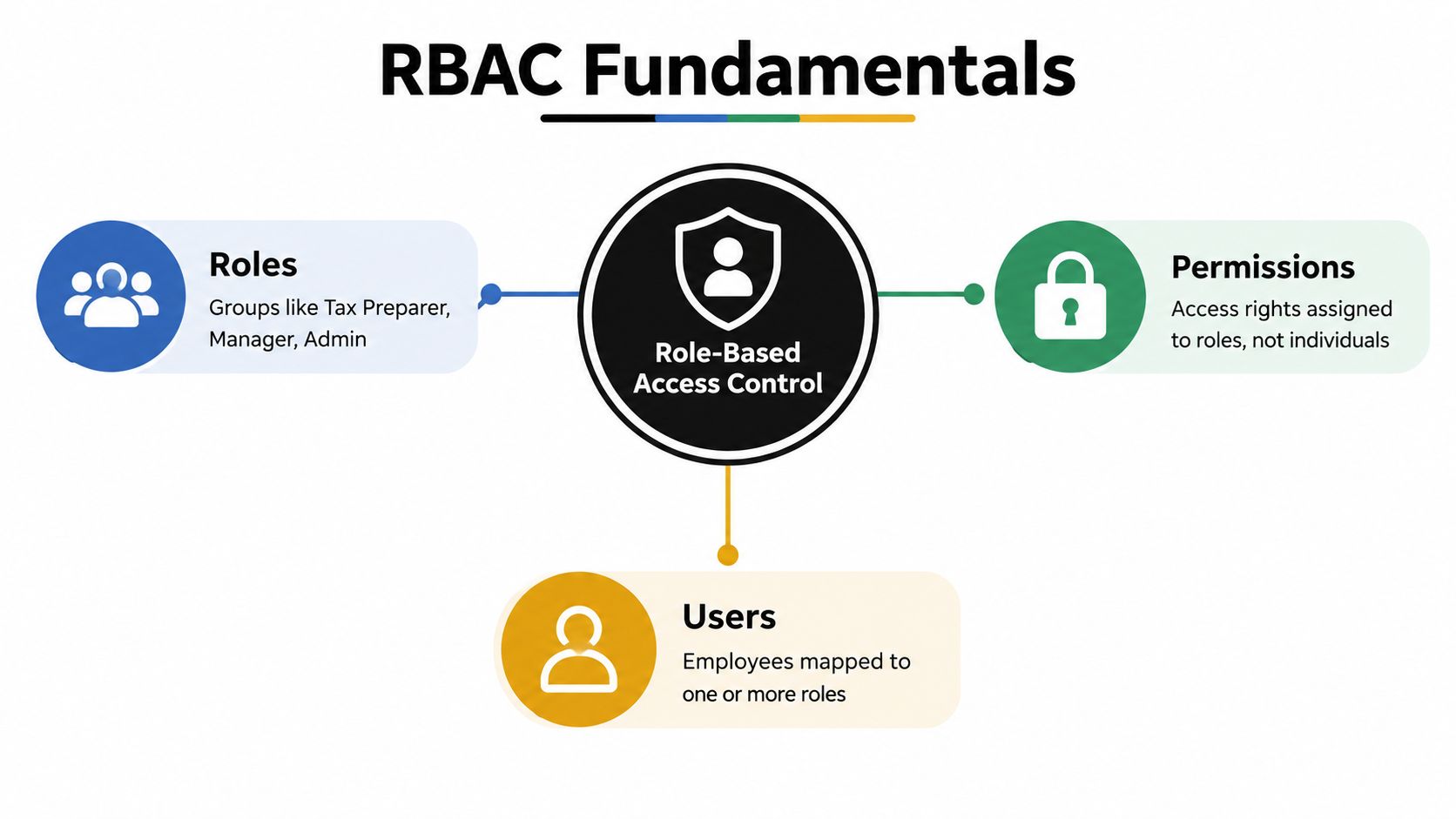
Role based access control assigns permissions to roles, then assigns users to those roles. The role represents a job function. The permission represents an allowed action, such as viewing a document, editing a workpaper, annotating a review item, approving a return, or managing users.
For a tax firm, the relationship might look like this:
- Role: Tax preparer. Permissions: Open assigned engagements, enter or edit draft data, upload source documents, and respond to review notes.
- Role: Tax reviewer. Permissions: Read the complete workpaper, compare source information, add annotations, flag exceptions, and record review activity.
- Role: Partner. Permissions: Oversee engagements, approve or reopen work, review sign-off history, and access firm-level reporting where appropriate.
- User: An employee or contractor mapped to one or more roles according to current responsibilities.
Why the model became established
The formal history matters because it shows that RBAC is more than a convenient folder structure. David Ferraiolo and Rick Kuhn formally defined RBAC in 1992, NIST unified that work with a broader model in 2000, and the resulting standard was adopted as ANSI/INCITS 359-2004 on February 11, 2004, according to NIST's RBAC timeline.
NIST also notes that rudimentary role-based controls appeared in commercial systems as early as the 1970s. Vendors including IBM, Sybase, Secure Computing, and Siemens were developing RBAC-based products by 1994, as described in NIST's overview of RBAC adoption. The model's staying power comes from its fit with how organizations already operate. People hold jobs, jobs require permissions, and changes in responsibility should change access.
For large enterprises, NIST reported that by 2010, more than 50% of IT users at organizations with more than 500 employees had at least some permissions managed by RBAC. The same economic appraisal reported $6.1 billion in net economic benefits to industry, measured in 2009 dollars, including $1.1 billion attributable to NIST's research contributions. Those figures come from the NIST FAQ linked above.
In a CPA practice, the practical lesson is straightforward: manage the permission set once at the role level, then use assignments and controlled exceptions for people whose responsibilities differ. Don't turn every small variation into a new role. That approach preserves the clarity that makes RBAC useful.
Security and Compliance Benefits for CPA Practices
Tax firms hold information that combines identity data, income details, financial accounts, and supporting records. A sound access model should therefore do more than block outsiders. It should limit unnecessary internal access, preserve accountability, and make it possible to explain why a person could perform a particular action.
The first benefit is least privilege. A preparer who drafts a return usually needs access to the assigned engagement and its source documents. That doesn't automatically mean the preparer should change firm-wide settings, approve the final return, or view every client in the practice. RBAC lets the firm define those boundaries in a way administrators can apply consistently.
The second benefit is separation of duties. A reviewer should be able to examine work without converting the review into an unchecked final approval. A partner may need authority to approve or reopen a return, but that authority shouldn't be inherited by every person who performs preparation or routine review.
Access during seasonal staffing changes
Peak season often brings contractors, interns, cross-office support, and temporary reassignment of work. RBAC makes those changes easier to control because access can follow a documented role instead of a hurried list of individual grants. When the assignment ends, the firm can remove the role and investigate any approved exceptions separately.
That structure also helps with auditability. A reviewer examining a return should be able to identify the user, the action, the relevant role, and the point in the workflow at which the action occurred. A role-based history doesn't prove that every permission is correct, but it gives the firm a defensible way to investigate access and demonstrate control design.
Firms evaluating their broader program can also use this access control compliance guidance to connect permissions with documented policies, approval procedures, and review evidence. The important point is operational: compliance evidence should come from the way the firm works, not from a role matrix that nobody enforces.
RBAC reduces risk when the firm keeps roles narrow, reviews role membership, removes stale assignments, and routes high-privilege access through approval. It won't compensate for shared accounts, unmonitored exceptions, or permissions that were copied from one employee to another without a business reason.
Comparing RBAC to Traditional Access Models
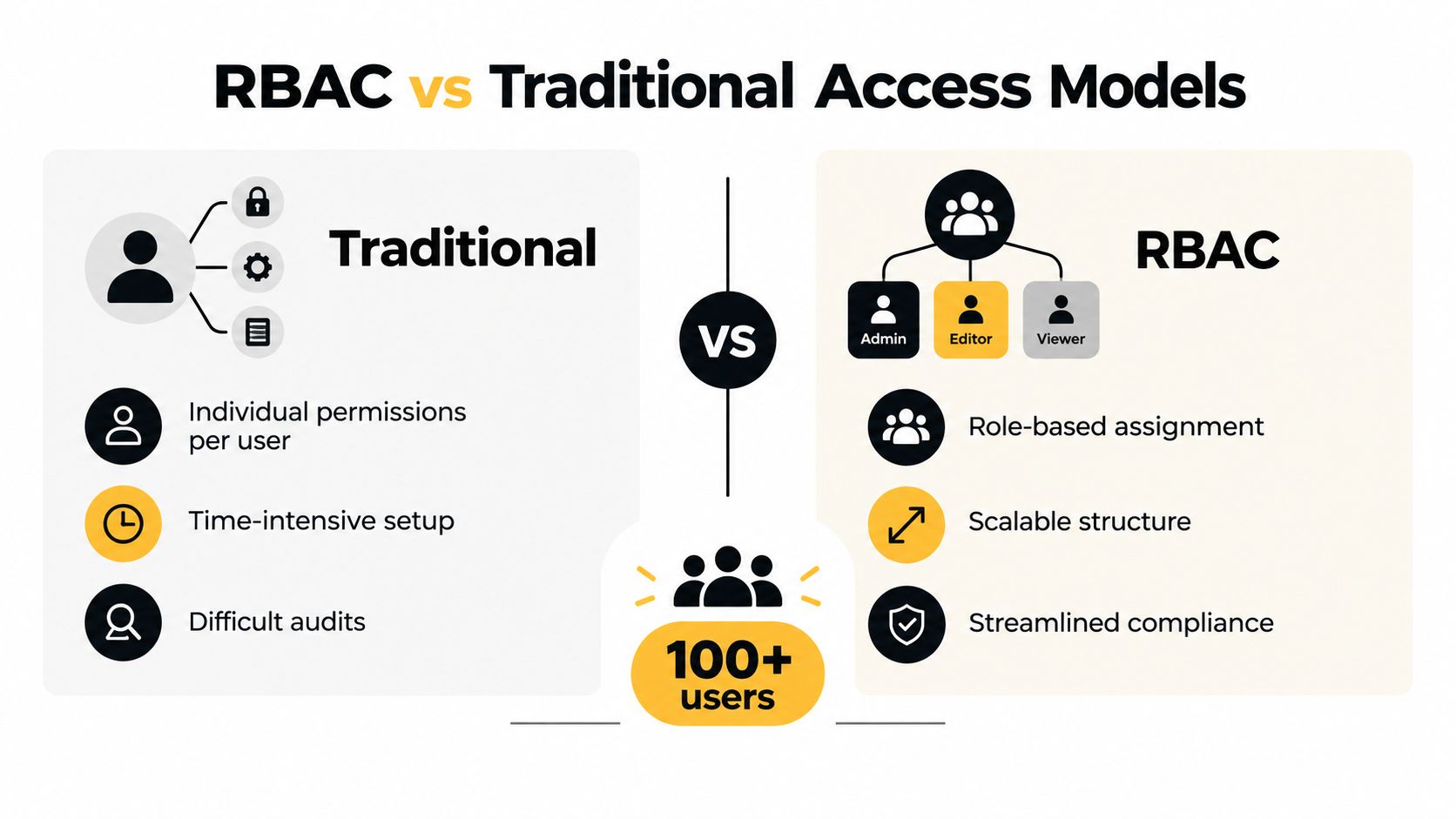
Traditional user-based access usually starts innocently. An administrator creates an account, checks the applications the employee needs, adds a few folder permissions, and handles special requests as they arrive. The problem appears later, when the firm has to determine why two people with similar responsibilities have different access or whether a departing employee still holds a permission granted years earlier.
RBAC uses a different unit of administration. Instead of asking, “What should this individual account be allowed to do?” the firm asks, “What does this role require, and which role or roles does this person currently hold?”
| Tax practice scenario | Individual permissions | Role based access control |
|---|---|---|
| New preparer joins | Administrator rebuilds access from a checklist or prior employee | Administrator assigns the preparer role and validates the result |
| Preparer becomes reviewer | Permissions are added and removed manually across systems | The reviewer role replaces or supplements the previous assignment |
| Temporary support begins | Staff may copy an existing employee's access for speed | Firm assigns a defined temporary role and documents any exception |
| Employee leaves | Administrator searches for every direct grant | Firm revokes role assignments and investigates remaining exceptions |
| Audit request arrives | Evidence is scattered across account and folder histories | Firm can organize evidence around roles, assignments, and actions |
Where the older model fails
Individual grants make exceptions easy and governance difficult. A partner may approve an urgent access request during the filing rush, but the firm still needs a reliable way to expire or reassess that access. Without that discipline, the exception becomes part of the employee's permanent profile.
RBAC also makes permission changes more predictable. If the reviewer role needs a new annotation capability, the administrator updates the role rather than editing every reviewer account. That change must still be tested, especially when it affects sensitive client records, but the firm has one defined control point instead of many disconnected ones.
A firm can document the distinction in its security access control procedures. The document should identify who approves role changes, how the firm handles emergency access, and how administrators confirm that direct permissions haven't bypassed the model.
RBAC isn't automatically superior in every situation. A very small practice with limited systems may manage individual permissions responsibly. Once staff, clients, applications, and seasonal assignments multiply, however, the individual model becomes hard to review. RBAC offers a clearer baseline, provided the firm doesn't allow uncontrolled direct grants to grow around it.
Designing Effective Roles for Tax Teams
Role design determines whether RBAC helps the tax practice or only gives old access problems new names. Start with the workflow, not with software labels. List the actions each person must perform, the information needed for those actions, and the decisions that must remain with someone else.
The preparer role
A preparer typically needs to work with assigned engagements, source documents, draft calculations, and review responses. The role should support editing within that scope without automatically granting access to every client or the ability to approve a completed return.
Useful permissions may include:
- Workpaper editing: Enter and correct draft information.
- Document handling: Upload and organize W-2s, 1099s, brokerage statements, and related records.
- Review response: Address assigned questions and provide supporting explanations.
- Status visibility: See whether a return is awaiting review or requires additional work.
Avoid giving the preparer role broad release, partner approval, user administration, or unrestricted access to unrelated engagements. Those capabilities create risk without helping the person complete the preparation assignment.
The reviewer role
Reviewers need a wider view than preparers because they assess the relationship between source documents, workpapers, and the drafted return. They may need to annotate, flag discrepancies, confirm resolved items, and preserve evidence of what they checked.
The reviewer role should distinguish between review activity and final approval. If the platform supports it, reviewers should be able to record findings without altering the underlying preparer work in a way that obscures the original state. A reviewer who can make final changes undetected weakens the separation of duties the firm intended to establish.
The partner role
Partners need oversight, not necessarily every operational permission. A partner role may include access to engagement status, review history, unresolved exceptions, approval actions, and controlled reopening of work. It should also make clear whether the partner can change permissions, create users, or alter firm-wide settings. Those administrative rights belong in a separate role unless the partner genuinely performs that function.
Avoiding role sprawl
Keep the first design focused on stable job functions. Regional, client-specific, or project-specific differences may be better handled through engagement assignment, data scope, approval rules, or time-limited exceptions than through a new role for every variation.
Design test: If two roles differ only because of one temporary client assignment, you probably need a scope rule or exception, not another permanent role.
Document the business owner for each role and the person authorized to change its permissions. A role that nobody owns will drift, and a role that nobody can explain will eventually attract workarounds.
Implementation Checklist for Tax Firms
A controlled rollout starts with evidence. Don't begin by copying the permission structure from another firm or accepting the vendor's default roles without review. Begin with the work your preparers, reviewers, partners, administrators, and seasonal staff perform.
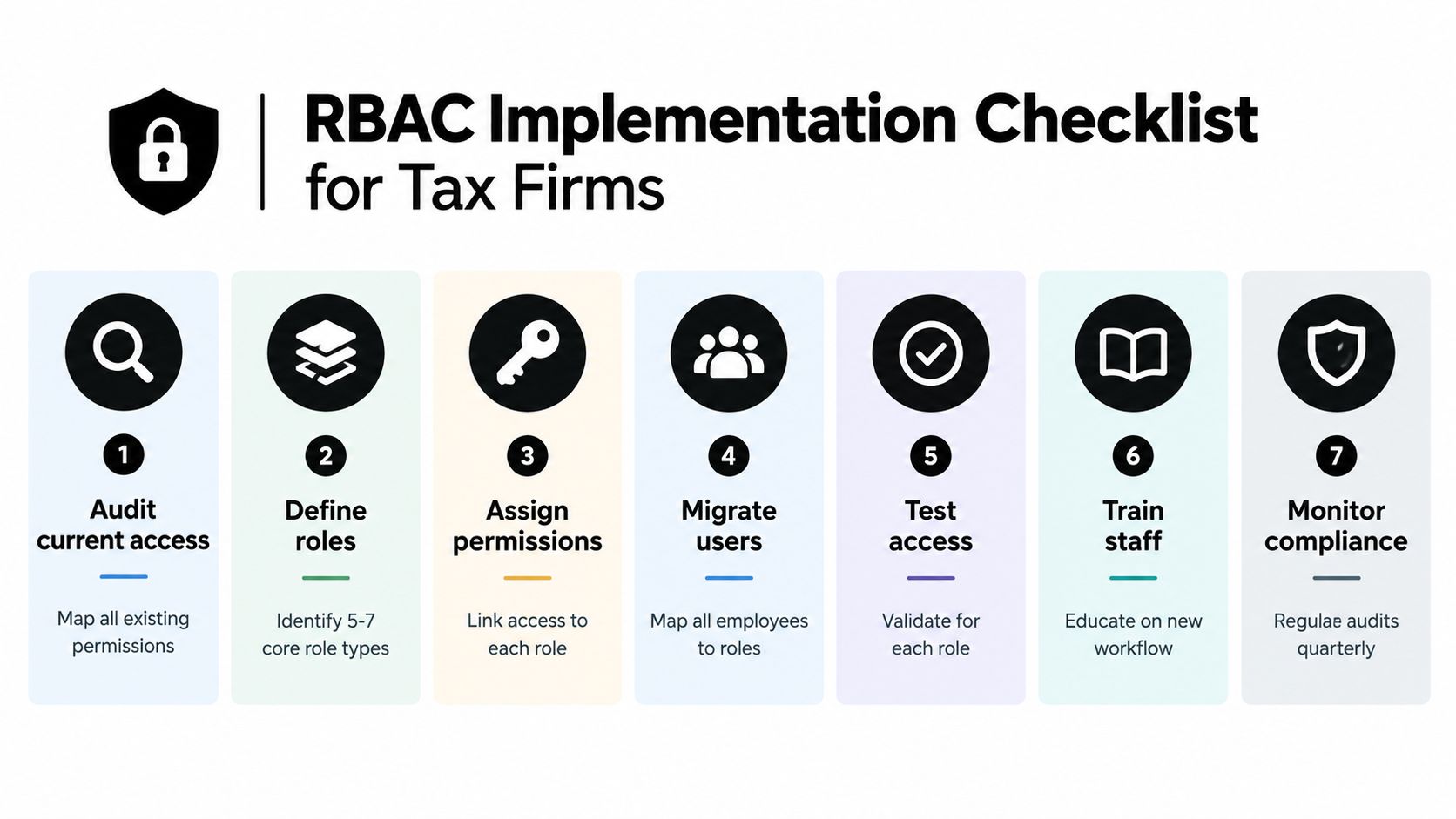
1. Audit current access
Export or document current users, applications, client workspaces, direct grants, shared accounts, and elevated permissions. Look for mismatches such as preparers with approval rights, former staff with active access, or reviewers who can modify settings unrelated to their duties.
2. Define the core roles
Write a short purpose statement for each role. A role should answer three questions: what work does this person perform, what information must they see, and what actions must remain restricted?
3. Map permissions
Connect each role to concrete capabilities, not vague labels. “Tax review access” is too imprecise. Specify whether that means read, annotate, edit, approve, release, reopen, export, or administer.
4. Migrate users carefully
Assign employees to roles based on current responsibilities, then record exceptions separately. Do not hide exceptions inside a broad role just to make the migration look complete.
5. Test realistic workflows
Use test accounts for a preparer, reviewer, partner, administrator, and temporary worker. Confirm both positive and negative cases. The preparer should complete expected tasks, while restricted users should be unable to approve, release, or access unrelated client work.
6. Train the people who request access
Staff should know how to request a permission change, explain the business need, and report an access problem. Training should also make clear that sharing credentials or bypassing workflow controls isn't an acceptable workaround.
7. Monitor and review
Assign an owner to inspect role membership, direct permissions, emergency grants, and role changes. Review the roles themselves as well as the people inside them. A role can become excessive even when every current assignment is technically accurate.
During implementation, protect service continuity. Roll out a sensitive workflow first, compare expected access with observed access, and keep a documented rollback path. A successful RBAC project is not the one with the most elaborate matrix. It's the one that staff can use during the busiest week of the season without reverting to shared folders and informal approvals.
How RBAC Works in Modern Tax Review Platforms
A tax review platform can make RBAC visible in the workflow instead of leaving it as an administrative setting. The key is to connect each permission to a stage of work and to preserve the handoff history.
A practical sequence begins when a preparer receives an engagement. The preparer can access the assigned source documents, build or update the workpaper, and respond to review questions. The platform should not treat that assignment as permission to approve the return or browse unrelated client records.
After preparation, the reviewer receives the access needed to examine the complete file. The reviewer can compare the workpaper with the drafted return, add annotations, flag a discrepancy, and record the review action. The preparer's original work should remain attributable, so the firm can distinguish a correction from a reviewer note and identify who performed each action.
Approval needs a separate control
The partner's role begins where oversight and approval become important. The partner can inspect unresolved items, review sign-off history, approve the return, or reopen it when additional work is necessary. That authority should be explicit rather than inherited automatically by everyone who can view the file.
This model supports a clean chain of responsibility:
- Preparation: The preparer creates and updates the draft.
- Review: The reviewer examines evidence and records findings.
- Resolution: The responsible preparer addresses assigned items.
- Approval: The partner confirms readiness or reopens the work.
- History: The system preserves the users, actions, and timing associated with the handoff.
In practice, WP TieOut is one example of a tax review platform that provides built-in preparer, reviewer, and partner roles, source-linked workpapers, discrepancy review, and sign-off history. The product is relevant when a firm wants the access model to follow the review process rather than treating security as a separate folder-management exercise.
The platform still needs careful configuration. Firms should validate who can release or reopen a return, whether a reviewer can edit source-linked evidence, how access is scoped to engagements, and what happens when a staff member changes roles. RBAC works best when the application enforces those decisions consistently and gives administrators an exportable history for internal review.
Building a Security-First Culture with RBAC
A role matrix won't protect a firm if employees work around it whenever a deadline tightens. The culture must make the secure path the practical path. That means staff can request legitimate access quickly, managers understand what they're approving, and administrators can remove temporary access without hunting through disconnected systems.
Start by assigning ownership. A partner or operations leader should own the business meaning of the roles, while a security or technology administrator should own configuration and enforcement. Those responsibilities are related but not identical. A technology administrator shouldn't decide alone whether a reviewer needs approval rights, and a partner shouldn't assume that a documented policy is enforced merely because it exists.
Make changes deliberate and reversible
Require a reason for elevated access and define an end point for temporary requests. A reviewer who needs a special permission for one engagement should receive a controlled exception, not a permanent expansion of the reviewer role. The firm should be able to identify the request, approver, scope, and removal action.
Review access after meaningful events such as promotions, transfers, changes in engagement assignment, and departures. During peak season, also pay attention to temporary workers and cross-team support. Stale access often reflects a change in responsibility, not a dramatic security incident.
Measure control effectiveness through evidence
Useful evidence includes role definitions, approval records, access review results, exception logs, and sign-off history. Firms can use security control effectiveness guidance to connect those records with the question partners and examiners ultimately care about: did the control operate as designed when people handled sensitive client work?
Modern environments also expose RBAC's limits. OWASP warns that large numbers of roles can make role checks easier to miss or perform incorrectly, and that RBAC can accumulate too many roles. A 2025 identity-governance survey found that 73.9% of enterprise leaders agreed their organizations had access people didn't need, while 56.8% said cloud-based user access control such as RBAC would most improve IGA ROI, according to the survey data provided through the OWASP authorization guidance. For a tax firm, the lesson is to watch for role sprawl and permission drift rather than assuming role assignment equals least privilege.
RBAC also isn't always sufficient by itself. A 2025 authorization survey found that 94.7% of engineers had used RBAC, 86.6% said it was their platform's current model, and 62.2% had built custom in-house authorization systems, according to Permit's State of Authorization 2025 report. Tax practices may need RBAC as the baseline, with attribute or policy checks for client scope, engagement assignment, device context, temporary access, and sensitive actions.
The practical standard is simple: every person should have a defensible reason for access, every role should have an owner, and every exception should be visible. That discipline protects client confidentiality while keeping preparer-reviewer-partner handoffs workable when the workload is highest.
WP TieOut gives CPA firms a tax review workflow with defined preparer, reviewer, and partner handoffs, source-linked workpapers, discrepancy review, and an audit-ready sign-off history. Visit WP TieOut to evaluate how its role-based workflow can support controlled access and clearer accountability during tax season.