
You're probably looking at the same bottlenecks many firms hit every filing season. Clients send PDFs in the wrong order, someone keys numbers into the return, a reviewer flips between source documents and tax software, and the final check turns into a line-by-line hunt for missed W-2 wages, omitted 1099 interest, or brokerage details buried deep in a statement. The work gets done, but it depends too much on heroic effort, institutional memory, and late nights.
That model breaks down as volume rises and returns get more document-heavy. It also creates the kind of risk firms hate most. Not obvious technical failures, but quiet review misses, weak sign-off records, and workpapers that are hard to defend months later. A modern Tax Preparer App matters because it changes the operating model. The strongest platforms no longer stop at data entry and e-filing. They push upstream into intake and downstream into review, reconciliation, and audit-ready documentation.
Table of Contents
- The End of Tax Season Chaos
- Defining the Modern Tax Preparer App
- The Core Workflow from Intake to Audit Trail
- The AI Revolution in Tax Review
- How to Evaluate and Choose the Right App
- Your Implementation Roadmap to Success
The End of Tax Season Chaos
Tax season chaos usually isn't caused by a lack of effort. It comes from a workflow that asks smart people to do repetitive control work by hand. A preparer enters data. A reviewer rechecks the same data in a different window. A partner asks where a number came from, and someone starts opening PDFs to rebuild the trail.
That old pattern is losing ground quickly. The U.S. tax preparation software market was valued at USD 6.4 billion in 2024 and is projected to reach USD 12.9 billion by 2032, growing at a CAGR of 9.3%, according to PS Market Research's analysis of the U.S. tax preparation software market. What matters more than the market size is the operational shift behind it. Firms are moving away from traditional review methods and toward automated, exception-based workflows.
The practical implication is simple. A Tax Preparer App is no longer just filing software. It's part of a control system.
Practical rule: If your reviewers spend most of their time proving that obvious numbers are correct, your process is using expensive labor for low-value validation.
For firms that handle complex 1040 work, the pressure points are familiar:
- Document sprawl: W-2s, 1099s, consolidated brokerage statements, organizer responses, and client emails live in different places.
- Review fatigue: Senior staff burn time confirming routine items instead of focusing on judgment calls.
- Weak traceability: The final file may be complete, but not organized in a way that supports fast internal review or examination response.
- Inconsistent sign-off: Different reviewers document their work differently, which makes quality uneven across teams.
A better workflow doesn't eliminate human review. It changes where humans spend their attention. Instead of scanning every line, they investigate exceptions, resolve mismatches, and sign off on a documented trail.
If your firm is already reassessing how it builds an audit-ready tax support package, that's usually the right starting point. The best software decisions come from fixing the review layer, not just replacing one data entry screen with another.
Defining the Modern Tax Preparer App
A modern Tax Preparer App isn't just a digital version of a paper return. It's a workflow hub that carries a return from intake through review to final sign-off, while keeping the supporting record intact.
Older tax tools were narrower. One system handled organizer collection. Another stored PDFs. The tax software itself handled preparation and e-file. Review happened in email, on printed copies, or inside spreadsheets built by the firm. That stack can function, but it creates fragmented accountability. No single system owns the return lifecycle.
What separates modern platforms from older tools
The difference isn't branding. It's scope.
A basic filing app helps you complete and submit a return. A modern platform coordinates multiple jobs at once:
- Document intake and organization
- Data extraction and normalization
- Validation against source records
- Reviewer collaboration
- Workpaper retention and sign-off history
That matters because returns don't fail at the filing step very often. They fail earlier, when the source data is incomplete, or later, when the workpaper file doesn't clearly show how the team verified the result.
One of the easiest ways to spot an outdated system is to ask a simple question: where does review happen? If the answer is "mostly outside the platform," then the platform isn't running the process. Your staff is.
The app should function like an operating layer
The strongest products act as an operating layer around the tax return. They don't just host data. They control movement, permissions, and checkpoints.
A useful way to evaluate this is to map the lifecycle:
| Workflow stage | What weak tools do | What strong tools do |
|---|---|---|
| Intake | Collect files in folders or email | Standardize collection and document status |
| Preparation | Push data into the return | Tie prepared values back to source material |
| Review | Depend on manual reviewer habits | Assign tasks, exceptions, and sign-offs |
| Final file | Save a PDF set | Preserve a defensible audit trail |
When firms upgrade, they often focus first on speed. That's understandable, but incomplete. Speed helps. Control helps more.
A short product walkthrough is often enough to expose the difference in philosophy:
If the software demo spends all its time on forms and none on reconciliation, reviewer workflow, or final documentation, it's probably solving the wrong problem for a firm that wants fewer misses and cleaner files.
The Core Workflow from Intake to Audit Trail
Think of a strong Tax Preparer App as an automated assembly line. The return moves through defined stations. Each station has a purpose, a responsible party, and a record of what happened there. That's different from the older model, where the return bounces between inboxes, desktop folders, and reviewer notes.

Client intake and data extraction
The first station is intake. Here, many firms still lose efficiency before any tax work begins. Clients upload partial records, resend the same files, or use inconsistent naming. Staff then spend time renaming documents, combining PDFs, and deciding what's missing.
A good platform imposes order early. It gathers documents through a structured process, groups them by type, and makes it easy to see what has arrived and what hasn't. That reduces one of the most expensive forms of waste in tax operations. Reviewer time spent solving admin problems.
Once documents are in, extraction matters. But extraction alone isn't the finish line. Pulling data from a W-2 or 1099 is useful only if the system also preserves the connection between the value and the source page it came from.
The firms that review cleanly aren't the ones with the fastest input. They're the ones that can trace a return value back to the exact source record without friction.
Reconciliation and validation
Modern systems differentiate themselves from entry-focused software through reconciliation. Reconciliation asks a harder question than "what did the document say?" It asks "does the drafted return reflect the validated source information?"
That distinction matters in practice. A preparer may have the right source document but post the value to the wrong line, omit one brokerage page from a consolidated package, or carry a prior-year assumption into a current-year return. A proper validation layer catches those workflow defects.
Firms should expect the platform to support checks such as:
- Source completeness: Did the team ingest all expected supporting documents for the taxpayer?
- Field agreement: Do extracted values agree with the drafted return?
- Exception visibility: Are mismatches grouped in a way that a reviewer can resolve quickly?
- Workpaper continuity: Can the reviewer see the document context without leaving the workflow?
Weak systems create noise here. They flag too much, force the reviewer to interpret everything manually, and turn automation into another inbox. Strong systems reduce the volume of low-value review work and make discrepancies easy to investigate.
Collaborative review
Tax review is rarely a single-person act. Preparers, senior reviewers, and partners each interact with the file differently. The app needs to reflect that.
Preparers need a clear list of unresolved items. Reviewers need visibility into what was checked, what changed, and what still requires judgment. Partners need confidence that the control process happened.
That usually requires role-based workflow rather than generic comments. A system works better when it can show ownership, status, and timestamped action history tied to specific items.
Here's what tends to work in real firms:
- Preparer resolves data issues first. Don't send raw intake problems upstream.
- Reviewer focuses on exceptions and judgment areas. Routine agreement should already be documented.
- Partner signs off on the file, not on a verbal assurance. The record should show who checked what and when.
Finalization and audit trail
The last station is where many firms still rely on manual assembly. Someone bookmarks PDFs, saves versions with inconsistent names, and tries to preserve enough context for the next reviewer, the partner, or a future exam.
That process is fragile. It depends on discipline under deadline.
A modern Tax Preparer App should produce a final file that's readable and defensible. In practice, that means a source-linked binder, a clear record of annotations or stamps, and a sign-off history that doesn't require detective work later.
Value shows up after filing season. Months later, when a client asks a question or a return is examined, the firm shouldn't have to reconstruct how it got comfortable with the numbers. The file should already tell that story.
The AI Revolution in Tax Review
The most important change in tax software isn't that systems can read documents faster. It's that some systems can now participate in the review process itself.
That shift matters because review has always been the expensive bottleneck. Data entry can be delegated and standardized. Quality control can't. A senior reviewer has to decide whether the drafted return reflects the source file accurately, and historically that meant scrolling line by line through the return while cross-checking PDFs.

Why line-by-line review doesn't scale
Line-by-line review feels safe because it appears thorough. In practice, it often produces the opposite. Reviewers spend long stretches confirming items that were never likely to be wrong, then miss the few items that deserved attention.
The problem isn't effort. It's signal quality.
A reviewer looking at a dense 1040 package needs help identifying where the file deserves scrutiny. That might be a mismatch between a validated 1099 and the drafted return, an inconsistency across source documents, or a value that appears in one place but not another. Traditional software rarely does that well because it was designed to prepare returns, not interrogate them.
What review by exception changes
Review by exception changes the unit of work. Instead of asking the reviewer to inspect everything, it asks the system to compare validated source data against the drafted return and surface the exceptions that matter.
That changes three things at once:
- Attention goes to discrepancies. The reviewer starts with what doesn't agree.
- Context stays attached. The issue can be inspected alongside the source material.
- The work becomes documentable. Resolution and sign-off happen inside the control record.
This is the category where AI is most valuable in tax operations. Not as a novelty. Not as a chatbot bolted onto a workflow. As a comparison engine that helps firms replace broad manual inspection with targeted review.
For firms evaluating this layer of the stack, it's worth studying how AI tax software for reconciliation and review workflows handles source validation, discrepancy surfacing, and final workpaper output. Those details tell you whether the product is helping a reviewer think, or just moving documents around.
What works: AI that narrows the review field and preserves evidence.
What doesn't: AI that extracts data but leaves humans to build the comparison logic and audit trail manually.
The best outcome of AI in tax review isn't abstract efficiency. It's a file that supports confidence. The reviewer sees why an item was flagged, resolves it with the source in view, and the platform preserves a binder that is bookmarked, source-linked, and ready for internal or external scrutiny.
That's the evolution of the Tax Preparer App. It no longer stops at preparing the return. It helps prove that the return was reviewed properly.
How to Evaluate and Choose the Right App
Most buying mistakes happen because firms compare feature lists instead of operating risk. A product can look polished in a demo and still fail where it counts. Handoffs, review discipline, peak-season performance, and documentation quality.
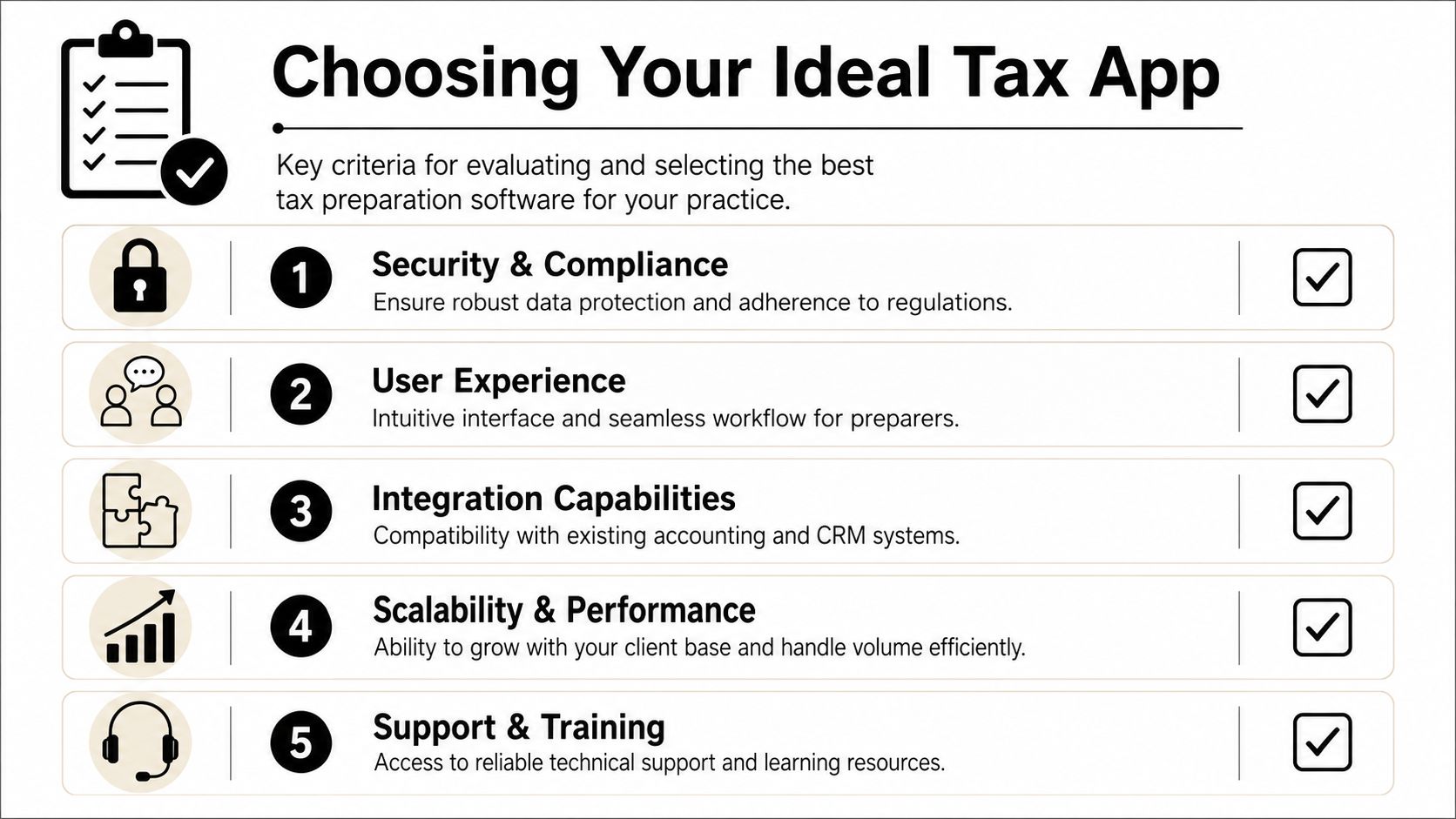
The right way to choose a Tax Preparer App is to test whether it strengthens your process under load, not whether it looks modern on screen.
Security and compliance
Start with the basics. Tax data is sensitive, and your software vendor should treat that as foundational, not as a late-stage procurement checkbox.
Ask how access is controlled by role. Ask how documents and workpapers are protected. Ask whether the audit history is preserved in a way that supervisors can use. A system that can't tell you who checked an item and when is already weaker than the process most firms are trying to replace.
Integration with your existing stack
A new app shouldn't force your staff to duplicate work across multiple systems. It needs to fit the stack you already rely on, especially your tax software, document workflow, and client-facing intake process.
This doesn't mean every firm needs deep technical integration on day one. It does mean the handoffs have to be deliberate. If the app creates one version of the truth while the return lives in another system with no clean comparison path, users will fall back to manual side processes.
A practical evaluation often starts with a side-by-side view of professional tax preparer software comparison criteria. The point isn't to chase the longest feature matrix. It's to identify where a platform reduces operational friction versus where it adds another layer.
Scalability and performance
Peak filing periods expose architectural weaknesses fast. Systems that work well for a light document load can become sluggish once teams are processing dense returns with multiple supporting files.
According to the LinkedIn article on system architecture for tax administration information systems, a strong architecture should prioritize high transactions per second and scalability, and a design using independent components, decentralized data storage, and memory caching can reduce latency by up to 50% during peak filing periods. You don't need to audit a vendor's codebase, but you do need to ask how the system handles volume, failures, and recovery.
Buyer warning: If a vendor can't explain how the product behaves under filing-season load, assume your team will discover the answer at the worst possible time.
User experience and adoption
Even strong control software fails if reviewers won't live in it. User experience matters most at the points where people are under time pressure. Resolving exceptions, moving work between roles, and assembling final files.
Don't evaluate usability by asking whether the dashboard looks clean. Watch how many steps it takes to answer real questions:
- Can a preparer find unresolved items quickly?
- Can a reviewer jump from discrepancy to source page without hunting?
- Can a partner verify sign-off status without asking staff for an update?
If those workflows feel clumsy in a demo, they'll feel worse in March.
Key questions to ask vendors
Bring pointed questions into the sales process. Generic demos hide weak spots.
- How does the platform document reviewer actions? Ask what the sign-off history looks like in an exported file.
- How are discrepancies surfaced? Ask whether the product supports true exception-based review or just document display.
- What happens when a component fails? You want to hear about recovery and isolation, not vague assurances.
- How does the system handle role-based workflow? Preparers, reviewers, and partners shouldn't all see the same task view.
- How does the final binder get produced? If binder assembly is still largely manual, the control story is incomplete.
Good software reduces risk because it narrows variation in how work gets done. That's the standard to use when you choose.
Your Implementation Roadmap to Success
A new Tax Preparer App doesn't fail because the software is bad. It usually fails because the firm tries to install it into an undefined process. If ownership is fuzzy, exceptions aren't standardized, and reviewers keep using old habits, even a strong platform will underperform.
Start with one return type and one workflow owner
Begin with a narrow lane. For most firms, that means a defined segment of 1040 work rather than every return in the office. Pick one workflow owner who is responsible for intake rules, reviewer steps, and final file standards.
That owner shouldn't be the most senior partner unless they also control daily operations. In practice, a tax operations lead, manager, or review lead often drives implementation better because they can see where work stalls.
Clean up handoffs before migration
Don't migrate confusion into new software. Decide who owns each transition.
A simple rollout plan should answer these questions:
- Who confirms source documents are complete?
- Who resolves extraction or classification issues?
- When does the file move from preparer to reviewer?
- What has to be true before partner sign-off?
If those answers vary by team, the app will become a mirror of inconsistency instead of a tool that fixes it.
A clean implementation starts with workflow discipline, not vendor configuration.
Train reviewers differently from preparers
Many firms run one generic training session for everyone. That's a mistake. Preparers and reviewers use the system for different reasons and need different habits.
Preparers need to know how to clear document issues, validate data, and package a file properly before it moves upstream. Reviewers need to learn how to trust the workflow without reverting to full manual re-performance. That often requires the bigger mindset shift.
A reviewer who still checks every line out of habit will erase much of the gain from a review-by-exception model. Training should focus on what the system proves, what still requires judgment, and how to document resolution inside the platform.
Roll out in phases and inspect the process
Use a phased launch. Start with a pilot group, inspect the output, then expand. Look closely at exception handling, sign-off consistency, and final binder quality.
What you're looking for isn't perfection on day one. You're looking for whether the new process produces cleaner files with less reviewer friction and fewer off-system workarounds. If staff are still tracking issues in side spreadsheets or rebuilding binders manually, stop and fix that before broader rollout.
The firms that get the most value from implementation do one thing especially well. They treat the app as part of operations, not as a piece of software dropped onto the team. Once the process is stable, the benefits compound in practical ways. Faster review cycles, clearer accountability, stronger workpapers, and less dependence on memory or heroics.
If your firm wants a practical way to move from manual line-by-line review to AI-driven reconciliation, WP TieOut is built for that exact problem. It helps CPA firms validate source documents, compare them to drafted 1040 returns, surface real discrepancies, and produce a source-linked, audit-ready binder with clean sign-off history. The interactive demo is a smart next step if you're evaluating how to modernize review without weakening control.