

Most advice on tax preparer software comparison still starts in the wrong place. It asks which package has the broadest forms library, the lowest sticker price, or the easiest e-file path. Those things matter, but they don't usually create the most expensive failures inside a CPA firm.
The true cost shows up later. It shows up when a senior reviewer has to chase a missing number back to a brokerage statement, when a partner can't tell who cleared an issue, or when a drafted return looks complete but no one has reconciled it to source documents. That's where bad software choices become workflow debt. Staff spend hours proving that a return is right after the system has already "prepared" it.
A useful tax preparer software comparison should measure the whole operating model, from intake through partner sign-off. If the platform is fast for data entry but weak at review, you'll feel that weakness every busy season.
Table of Contents
- Why Most Tax Software Comparisons Miss the Mark
- Core Evaluation Criteria for Professional Tax Software
- The Top Tax Preparer Software Contenders in 2026
- Detailed Tax Software Feature and Workflow Matrix
- Analyzing the Pros and Cons of Each Major Vendor
- Our Recommended Software by Firm Size and Specialty
- Your Go-Forward Checklist for Software Trials and Demos
Why Most Tax Software Comparisons Miss the Mark
The standard buying checklist is too narrow. Firms compare form coverage, portals, cloud access, and e-filing. Then they assume review will take care of itself because every vendor claims diagnostics, completeness checks, and workflow tools.
That assumption is where firms get burned.
Wolters Kluwer makes a point that more buyers should take seriously: a “best tax software” ranking can miss the highest-cost failure mode for many CPA firms, not whether the return can be prepared, but whether reviewers can efficiently catch discrepancies across source documents, workpapers, and the final return, as discussed in its guide on choosing the right solution for preparers.
Workflow debt is real
A weak review process creates hidden labor. Preparers finish the return. Then reviewers reopen source PDFs, compare numbers line by line, leave side notes in email or a practice management system, and hope the final version reflects every fix. None of that shows up in the vendor's feature grid.
The problem isn't only time. It's uncertainty. If your software doesn't make reconciliation easy, your firm relies on memory, reviewer habits, and heroics from senior staff.
Practical rule: If a vendor demo ends at “return complete” instead of “review complete,” you haven't seen the part of the workflow that actually protects the firm.
Return prep is only one stage
Modern tax work starts earlier and ends later than older comparison articles admit. Intake is more document-heavy. Drafting often includes imported data. Review requires tracing amounts back to source support. Partner sign-off needs a reliable record of what was checked, by whom, and when.
A platform can look strong in production and still fail in quality control. That's why a serious tax preparer software comparison has to ask harder questions:
- Can reviewers trace entries back to source support quickly?
- Can managers see open issues without hunting through notes?
- Can the firm preserve a clean audit trail of review decisions?
- Can handoffs between preparer, reviewer, and partner happen without rework?
Most firms don't switch software because a return can't be produced. They switch because the surrounding process has become clumsy, opaque, or risky.
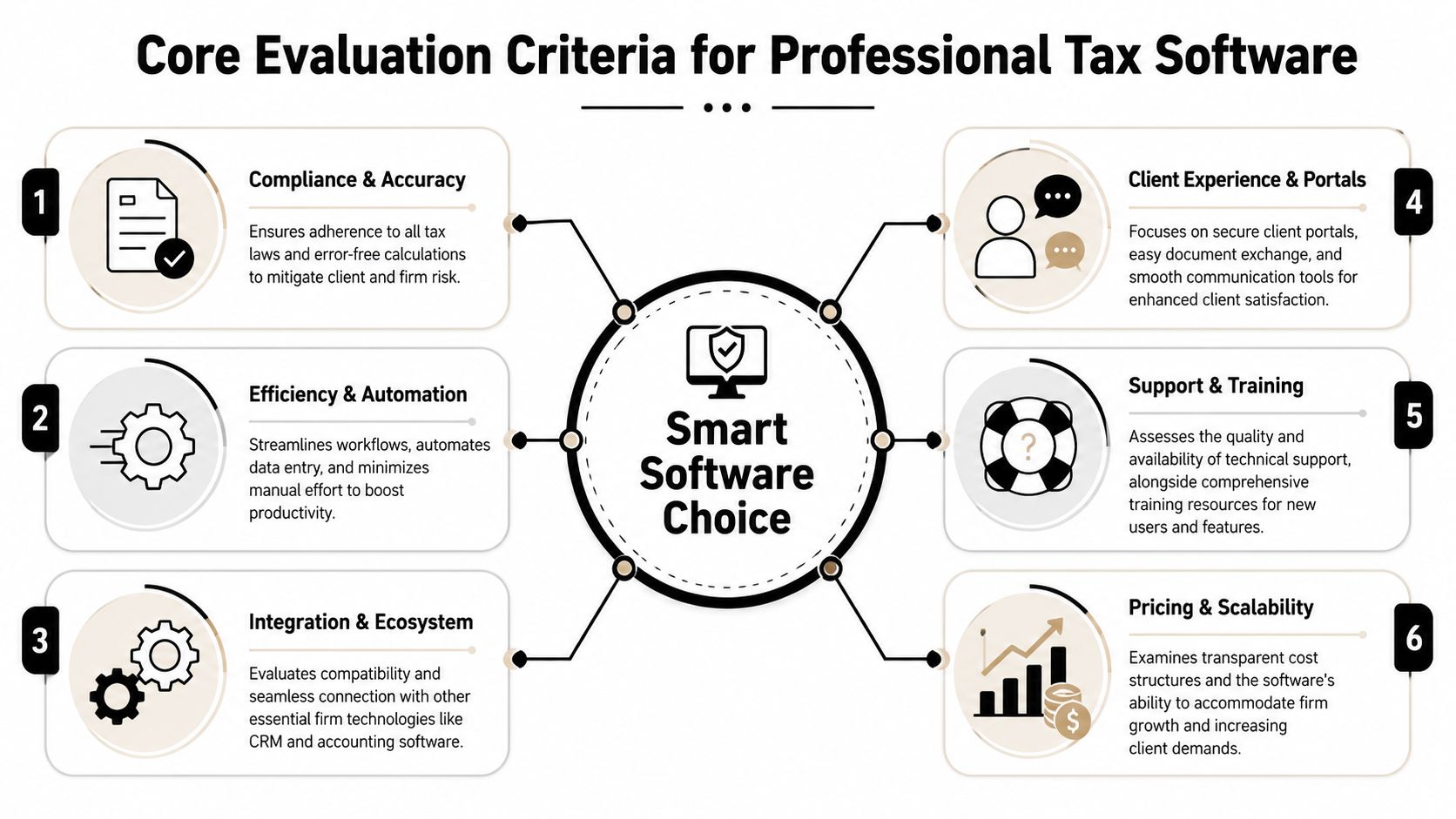
Core Evaluation Criteria for Professional Tax Software
A good buying decision starts with a scorecard, not a vendor demo. The scorecard should reflect how your firm processes a return from raw documents to signed filing copy.
Early in the process, it helps to keep the framework visible:
Start with workflow fit
The first question isn't whether the software is impressive. It's whether it matches the way your firm works. A solo preparer can tolerate more manual steps than a multi-reviewer office. A firm with heavy 1040 volume needs a very different setup from a practice built around complex entity and individual coordination.
Look at the full sequence:
- Intake and organization. Can the system handle document-heavy files without turning every return into a scavenger hunt?
- Preparation flow. Does the input model suit your staff, whether they prefer data-entry speed or form-based review?
- Internal handoffs. Can a preparer pass work to a reviewer cleanly, with issues visible and status obvious?
- Final approval. Can a partner sign off without reconstructing the file history?
If the answer is "we'd handle that outside the software," that's not neutral. That's extra process your firm now has to build and police.
Diagnostics matter, but so does accountability
Diagnostics get a lot of attention, and for good reason. They catch technical issues before filing. But diagnostics alone don't create a controllable workflow.
Strong systems usually separate three things well:
- Error detection through diagnostics and alerts
- Issue routing so the right person resolves the right item
- Audit trail so the firm can prove what happened
A product can have decent diagnostics and still be weak operationally if review notes live in too many places or if edits aren't easy to trace. The practical question is simple: when a reviewer finds a discrepancy, what happens next? If the answer depends on side conversations, spreadsheets, or inbox follow-up, the software isn't carrying enough of the process.
Review strength isn't just about finding a problem. It's about moving that problem back to the preparer, resolving it, and preserving the record without friction.
Pricing tells you how the vendor thinks about control
Pricing isn't just cost. It reveals the vendor's workflow philosophy.
One independent comparison of professional tax software shows a wide spread from $299 for a Beginner plan to $2,499 for an Expert plan, with review and filing rights changing by tier. The Beginner plan includes a 60/40 split and mandatory pre-submission review, Intermediate is $499 with a 70/30 split, Pro is $799 with an 80/20 split, and Expert is $2,499 with a 90/10 split and direct IRS filing through the preparer's own EFIN, according to this independent tax software comparison.
That matters because it shows how much of the market now sells software as a workflow and review-control system, not just a filing utility.
When you compare pricing models, evaluate more than the invoice:
- Included permissions. Who can review, approve, and file?
- Limits on collaboration. Are workflow controls reserved for higher tiers?
- Hidden add-ons. Do you need separate modules for portals, document handling, or firm management?
- Scalability pressure. Will your current bargain become awkward once you add staff or more review layers?
Cheap software becomes expensive when senior people spend busy season compensating for workflow gaps.
The Top Tax Preparer Software Contenders in 2026
The professional market has a familiar set of names, but they don't all solve the same problem. Some products are favored because they move high volumes efficiently. Others are chosen because they fit a broader suite, support deeper review, or give larger firms more structure around accountability.
The core market view
Usage scale matters because firms aren't only buying features. They're buying operational stability, support maturity, and a platform that can survive tax season volume.
TaxAct Professional states that it has a 25-year history and has processed over 110 million e-files on its TaxAct Professional platform page. In the same verified market snapshot, UltimateTax says more than 50,000 tax preparers use its platform annually, and G2's June 2026 professional tax category reported a large body of verified user reviews. That combination tells you something important: buyers in this category tend to favor products with a visible installed base and a long enough operating history to make support and reliability credible.
What the leading names generally represent
Drake Tax is often associated with speed, direct data-entry workflow, and broad appeal for firms that value throughput. It tends to stay in the conversation when firms want a practical, production-oriented system.
UltraTax CS is usually evaluated by firms that already think in terms of an integrated suite and structured review. It's often seen as a workflow-centric option for practices that want strong cross-tool continuity.
CCH ProSystem fx and CCH Axcess Tax tend to attract firms that care about deeper control, more formal processes, and enterprise-style tax operations. These products usually enter the shortlist when the buying committee includes not just preparers, but review managers and firm leadership.
Intuit ProSeries and Lacerte appeal to different segments inside the Intuit ecosystem. ProSeries is often associated with accessibility and familiarity. Lacerte is frequently considered for more complex work and firms that need broader technical depth.
TaxAct Professional and UltimateTax also belong on many comparison lists because scale, longevity, and recurring annual use suggest they aren't fringe options. They may not fit every firm's workflow, but they deserve review when the firm wants alternatives to the biggest suite-based vendors.
The right shortlist depends less on market popularity than on what your firm needs the software to do after the return has already been prepared.
Detailed Tax Software Feature and Workflow Matrix
A comparison table is useful only if it helps you make operational decisions. The matrix below doesn't pretend every product can be reduced to a single score. It gives you a disciplined way to compare likely fit.
Professional Tax Software Comparison Matrix 2026
| Software | Ideal Firm Size | Pricing Model | Diagnostic Strength (1-5) | Review Workflow Support (1-5) | Key Integrations |
|---|---|---|---|---|---|
| Drake Tax | Solo to mid-sized, high-volume practices | Vendor pricing varies by package and usage approach | 4 | 3 | Commonly evaluated alongside portals and firm workflow tools |
| UltraTax CS | Small to large firms, especially suite-oriented practices | Vendor-specific and suite-oriented | 5 | 5 | CS ecosystem and review-oriented workflow connections |
| CCH ProSystem fx | Mid-sized to larger firms | Vendor-specific, often suite-based | 5 | 5 | Broader CCH environment for tax and firm operations |
| CCH Axcess Tax | Mid-sized to larger firms, especially distributed teams | Vendor-specific, platform-based | 5 | 5 | Axcess platform integrations and centralized workflow controls |
| Intuit ProSeries | Solo to small and mid-sized firms | Vendor pricing varies by edition and add-ons | 4 | 3 | Intuit-oriented workflows and related tools |
| Intuit Lacerte | Small to larger firms handling more technical returns | Vendor pricing varies by package | 4 | 4 | Intuit ecosystem and adjacent practice tools |
| TaxAct Professional | Solo to mid-sized firms seeking established scale | Vendor pricing varies | 3 | 3 | Evaluated for fit with existing firm process rather than a dominant suite |
| UltimateTax | Solo to small firms and independent preparers | Vendor pricing varies | 3 | 3 | Often considered where simplicity and annual volume fit matter |
How to read the matrix correctly
The scores above are directional, not laboratory measurements. They reflect how these products are commonly judged in practice, with one major exception: where survey or marketplace data gives a clear signal, that evidence should carry more weight than general reputation.
In The Tax Adviser's 2025 survey, 82.8% of respondents said their software's error-checking was sufficient, but CCH ProSystem fx at 91% and UltraTax CS at 90.4% stood above that benchmark in the 2025 tax software survey. That matters if your firm runs a review-heavy process or handles returns where diagnostic depth is a real risk-control issue, not just a convenience feature.
Those results support a practical reading of the market:
- CCH and UltraTax belong on the shortlist when review quality and diagnostics carry more weight than raw prep speed.
- Drake and ProSeries stay attractive when efficiency, accessibility, and day-to-day usability matter more than the most structured review environment.
- Lacerte often lands in the middle. It can support more demanding work than entry-level systems while remaining familiar to firms already comfortable with Intuit products.
- TaxAct Professional and UltimateTax deserve consideration when firms want established platforms outside the biggest suite ecosystems, but they still need to be tested carefully against the firm's own review process.
A mature tax preparer software comparison also needs to separate two kinds of "good." One product can be good at moving a return to draft. Another can be good at helping a reviewer prove the draft is right. Those aren't the same thing.
The wrong buying question is “Which software prepares the return?” The better one is “Which software reduces the amount of human proving after preparation is done?”
Use the matrix to narrow the list. Then test your busiest return type through each platform's real workflow, especially post-prep review, corrections, and final sign-off.
Analyzing the Pros and Cons of Each Major Vendor
The matrix helps with screening. The harder part is imagining what each choice feels like inside the firm during deadline weeks.
Drake Tax
Drake Tax often appeals to firms that value production pace and a practical, no-nonsense workflow. For firms with standardized 1040 work and experienced preparers, that can be a real advantage. People who like keyboard-driven entry and direct movement through returns often adapt quickly.
The trade-off usually appears in the layers around the return. If your firm relies on formal review routing, highly structured reconciliation, or detailed sign-off accountability, you need to test whether Drake's surrounding workflow is enough for your process rather than assuming speed at prep solves everything.
Where it tends to work well
- High-volume recurring work
- Lean firms that don't want heavy process overhead
- Preparers who prefer fast input over extensive navigation
Where caution is warranted
- Partner-led review environments with many handoffs
- Firms trying to standardize issue tracking across reviewers
- Practices that need stronger source-to-return proofing
CCH ProSystem fx and CCH Axcess Tax
CCH products are usually strongest when the firm needs control. Review managers often appreciate systems that support structure, accountability, and a more formal operating model.
That strength can come with more setup, more discipline, and sometimes more complexity than a small firm wants. But if the firm already feels pain in review, that added structure is often a feature, not a burden.
UltraTax CS
UltraTax CS stands out when integration and review traceability are central buying criteria. On G2's June 2026 professional tax listings, UltraTax CS is positioned around an integrated workflow with LookBack and LinkBack capabilities that trace calculated results back to their sources, while ProSeries users report saving an average of 32 minutes per complex return and 16 minutes per simple return, according to the G2 professional tax category.
That comparison captures a real trade-off. ProSeries may appeal to firms focused on prep-time efficiency. UltraTax CS may appeal more to firms that are willing to trade some speed for stronger review depth and source traceability.
If your bottleneck is preparer time, you'll weight the ProSeries side of that trade-off more heavily. If your bottleneck is reviewer time, UltraTax CS becomes much more interesting.
Intuit ProSeries and Lacerte
ProSeries often fits firms that want a familiar interface and solid day-to-day usability. The reported time savings on returns make it attractive where throughput matters and the return mix doesn't require the most rigorous review structure.
Lacerte tends to attract firms with more technical return profiles and a need for broader depth. The benefit is capability. The cost can be a steeper internal learning curve and a workflow that smaller teams may find heavier than necessary.
In practice, the Intuit choice often comes down to this:
- Choose ProSeries if the firm values speed, familiarity, and efficient handling of a broad volume of routine work.
- Choose Lacerte if the client base is more complex and the firm is willing to accept a more demanding system in exchange for depth.
No vendor wins every category. The right answer depends on whether your biggest pain point is input speed, diagnostic confidence, review traceability, or firm-wide process control.
Our Recommended Software by Firm Size and Specialty
Recommendations should reflect how the firm earns money and manages risk. The best system for a sole practitioner can be the wrong system for a partner group with layered review.
This summary visual works as a quick shortlist aid:

Solo and new firms
For a solo preparer or a newly launched firm, the priority is usually clean production, manageable cost, and a workflow that doesn't require a full operations manual. In that setting, Drake Tax, ProSeries, TaxAct Professional, and UltimateTax usually make the most sense to evaluate first.
The deciding factor should be ease of use under real deadline conditions. A smaller practice can compensate for some missing workflow structure with owner oversight. It usually can't absorb a system that is cumbersome to learn or awkward to operate every day.
Small boutique CPA firms
For a small firm with a few preparers and at least one active reviewer, UltraTax CS and Lacerte often deserve serious attention. They usually provide a better balance between production capability and review discipline than entry-level options.
This is the firm size where poor workflow fit starts to hurt noticeably. Once returns move between people, the software needs to support handoffs, issue resolution, and final review with less reliance on memory and hallway conversations.
Before the video below, one practical point. If the firm is debating between speed and review depth, watch demos with an actual reviewer in the room, not just a preparer.
Mid-sized and larger firms
For firms with layered review, multiple offices, or tighter accountability requirements, CCH ProSystem fx, CCH Axcess Tax, and UltraTax CS are usually the strongest starting points. These firms need more than return completion. They need consistency, visibility, and a sign-off process that stands up under scrutiny.
A larger firm should almost never optimize solely for preparer speed. Once several people touch the same file, weak tracking becomes expensive very quickly.
Specialty-driven selections
A few practical defaults help narrow the field:
- High-volume individual returns. Lean toward Drake Tax or ProSeries if the work is standardized and turnaround matters.
- Review-heavy or quality-control-sensitive practices. Lean toward CCH or UltraTax CS.
- Complex individual work. Put Lacerte on the shortlist.
- Firms already invested in a broader vendor ecosystem. Favor the product that reduces fragmentation across the rest of the stack.
The smartest recommendation isn't the "best" software in the abstract. It's the one that removes the most friction from your firm's actual bottleneck.
Your Go-Forward Checklist for Software Trials and Demos
Most demos are choreographed around preparation. Don't let the vendor stop there. Push the conversation into review, correction, and sign-off, because that's where the software will either support your firm or introduce hidden labor.
Keep this checklist visible during every evaluation:

What to make the vendor show you live
Ask the vendor to demonstrate these actions on screen, not describe them verbally:
- Reviewer handoff. Show exactly how a reviewer flags an issue and routes it back to the preparer.
- Audit trail. Show where the platform records who changed what and when.
- Source tracing. Show how a reviewer ties a return entry back to the originating document or calculation.
- Correction loop. Show how a resolved issue is marked complete and how the reviewer verifies the fix.
- Partner approval. Show the final approval path and what documentation remains in the file.
A demo that avoids live issue handling is telling you something. The vendor may be strong at preparation and weak at controlled review.
What to test after the demo ends
During a trial, run one real return type through the platform from intake to sign-off. Then ask your team what slowed them down.
Use this simple checklist:
- Import reality. Did prior-year data and source documents come in cleanly enough for real use?
- Reviewer experience. Could the reviewer work by exception, or did they still have to inspect everything manually?
- Communication clarity. Were open items obvious, or did staff revert to email and side notes?
- Manager visibility. Could someone supervising the job see file status without asking around?
- Exit risk. Can your firm export what it needs if the relationship doesn't work out?
A sound tax preparer software comparison ends with evidence from your own process, not with a polished sales presentation.
If your firm has already learned that the hardest part of tax work isn't drafting the return but proving it's right, WP TieOut is worth a look. It focuses on post-prep review and reconciliation for 1040 workflows, comparing validated source data against the drafted return, surfacing true discrepancies, and preserving a clean sign-off trail for preparers, reviewers, and partners.