
It's 9:40 p.m. and the return still isn't out the door.
A senior reviewer has the draft 1040 open on one screen, scanned source documents on another, and a PDF workpaper file that keeps growing with sticky notes, highlights, and half-finished sign-off marks. Mortgage interest has to match. Brokerage income has to match. A depreciation deduction needs support. Someone has to prove that every deduction belongs on the return, and that proof usually comes from manual tick-and-tie work that gets slower as the file gets messier.
That's where the phrase Tax Shield Software gets confusing. Most content on this topic points toward enterprise tax shield valuation in corporate finance, not the practical verification workflow CPA firms need for 1040 review. IESE Business School's discussion of tax shields centers on corporate finance concepts, including the idea that perpetual debt tax shields equal “tax rate × debt,” which highlights how far most “tax shield” discussions are from the day-to-day work of validating individual deductions on personal returns for audit support and quality control IESE Business School on penetrating tax shields.
For firms that prepare individual returns, Tax Shield Software means something much more concrete. It means software that ingests source documents, compares them against the drafted return, isolates discrepancies, and leaves behind an audit-ready record of what was checked, by whom, and when.
Table of Contents
- The End of Manual Tick and Tie Review
- Defining Tax Shield Software for 1040 Preparation
- Key Features of Modern Tax Review Platforms
- The Business Case for Your CPA Firm
- How AI-Powered Software Streamlines 1040 QC
- An Evaluation Checklist for Tax Shield Software
- Beyond Purchase Implementing and Measuring Success
The End of Manual Tick and Tie Review
Manual 1040 review has a familiar pattern. The preparer finishes the return, the reviewer opens every source document, and the same basic question gets asked over and over: does this number on the return trace cleanly back to support?
That process works, but it doesn't scale well. It depends on concentration, consistency, and stamina. Late in busy season, those are exactly the things firms have the least of.
Where the real bottleneck sits
The bottleneck usually isn't tax knowledge. It's verification labor.
Reviewers spend too much time on low-judgment work:
- Matching inputs: Comparing W-2 wages, withholding, and state data against the draft return
- Tracing deductions: Confirming mortgage interest, taxes, charitable giving, and similar items to source support
- Checking carryovers: Making sure prior-year information flowed correctly
- Building evidence: Leaving behind workpapers that someone else can follow later
None of that is intellectually difficult for an experienced reviewer. It's just tedious, repetitive, and easy to mishandle when the file is large or the documentation is inconsistent.
Practical rule: If a reviewer is spending most of their time proving that data was entered correctly, the firm is using expert labor for clerical control work.
Why the term creates confusion
The phrase Tax Shield Software should describe software that helps prove a deduction's support and its treatment on the return. Instead, many search results drift into corporate finance. That's useful in its own context, but it doesn't help a CPA firm verify a mortgage interest deduction, trace depreciation support, or produce a clean binder for a 1040 review file.
The gap matters because firms don't need another abstract definition. They need software that answers operational questions. What came in from source documents? What made it onto the return? What failed to match? What has been signed off?
The firms moving faster today aren't skipping review. They're changing the shape of review. Instead of line-by-line eyeballing, they're shifting toward exception-driven validation and documented sign-off. That's the practical meaning of Tax Shield Software in a 1040 environment.
Defining Tax Shield Software for 1040 Preparation
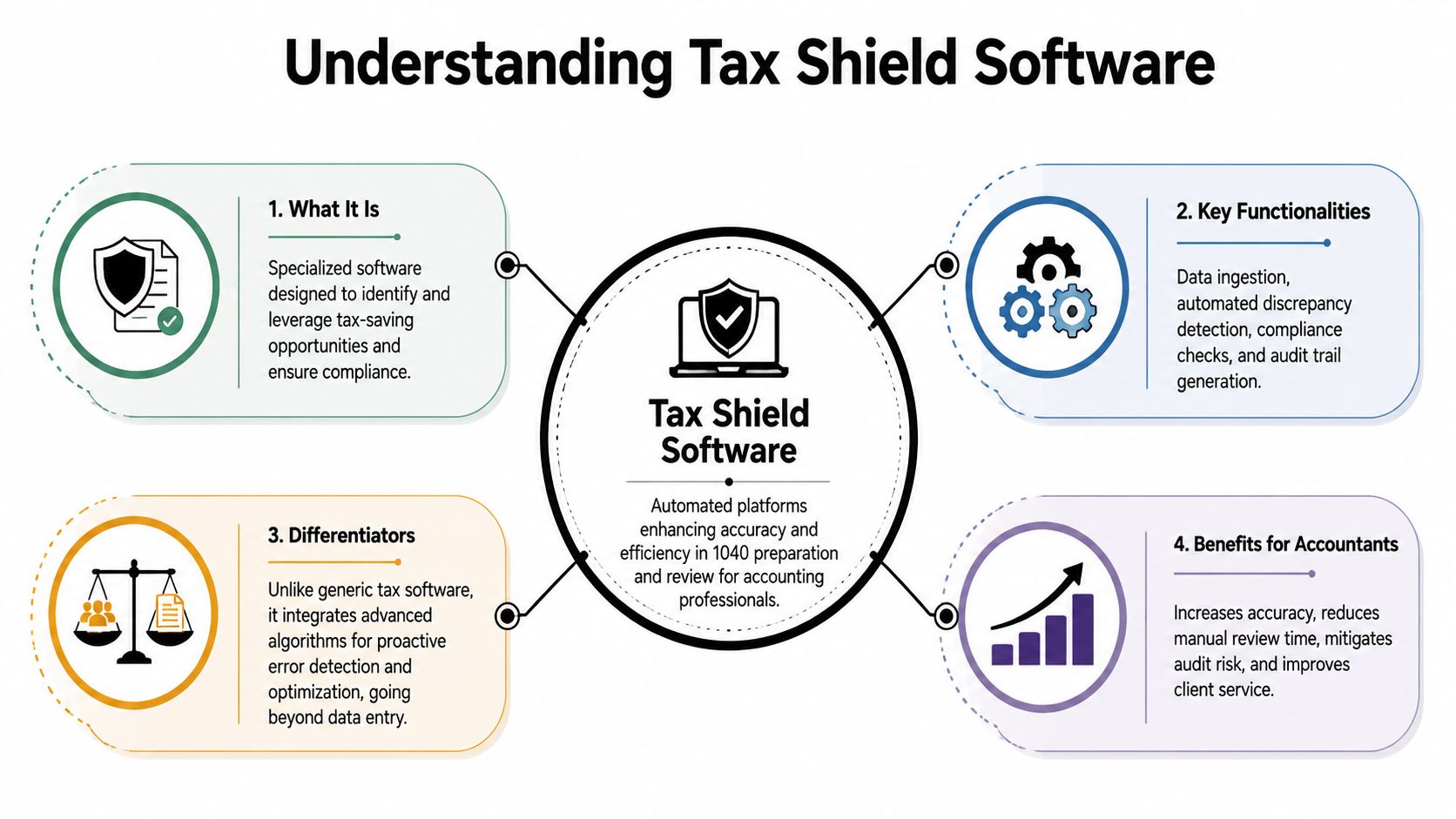
For a CPA firm, Tax Shield Software is specialized review technology that helps verify whether deductions, income items, and return inputs are supported by source documents and reflected correctly on the drafted 1040.
It's best understood as a digital review layer, not as a replacement for tax software.
What it is not
It isn't consumer filing software like TurboTax. It isn't a core professional prep suite like ProSeries, UltraTax CS, Lacerte, or Drake. Those systems are where the return gets prepared.
It also isn't a corporate valuation tool built around debt structuring, entity modeling, or finance theory. In firm practice, the relevant use case is much narrower and much more practical. The software sits around the drafted return and tests whether the file is supportable.
It operates like a very disciplined junior accountant who never gets tired of ticking and tying. The difference is that a strong platform can ingest a large document set, extract relevant tax data, compare that data to the return, and route the reviewer to the exceptions instead of forcing them to inspect every line manually.
What it does inside the workflow
A good platform usually operates in four stages:
Ingest source files
It pulls data from documents such as W-2s, 1099s, brokerage packets, and supporting statements.Validate extracted information
It checks whether the data captured from the documents is reliable enough to use for review.Compare against the draft return
It reconciles source data to the completed or near-completed 1040 and related schedules.Produce reviewable output
It highlights mismatches, preserves support, and creates a clean review record.
That workflow matters because traditional tax software is built to prepare and calculate. Review platforms are built to verify and document.
A strong review tool doesn't just help staff move faster. It changes what managers spend their attention on.
When firms evaluate Tax Shield Software, the practical test is simple. Does it reduce manual tie-out work without weakening documentation? If the answer is yes, it belongs in the workflow. If it only adds another screen without eliminating review friction, it won't survive busy season.
Key Features of Modern Tax Review Platforms
The strongest tax review platforms follow the same basic logic. They move source data into a controlled review process, reconcile it to the return, and leave behind a file someone else can defend.

Document ingestion and extraction
Everything starts with intake. If the system can't handle real client files, the rest doesn't matter.
In practice, that means reading messy PDFs, scanned forms, consolidated brokerage statements, and mixed document packages without forcing staff to pre-sort everything perfectly. A workable platform identifies tax-relevant fields, captures them in structured form, and ties those fields back to the original page.
The best systems don't treat ingestion as a black box. Reviewers need to see where a value came from and whether the extracted data is trustworthy enough to compare against the return.
Look for these signs of maturity:
- Broad document support: The platform should handle common individual tax documents, not just ideal samples
- Page-level traceability: Staff should be able to jump from an extracted value back to the source page
- Validation controls: The system should separate likely-good extraction from items that need human confirmation
Validation and reconciliation logic
Extraction alone doesn't solve the review problem. The useful part is the comparison engine.
A modern platform maps source amounts to the relevant return fields and tests whether they align. If wages, withholding, interest, dividends, retirement distributions, mortgage interest, or other reportable items don't match, the system should flag the discrepancy clearly. If they do match, the reviewer shouldn't need to spend time proving it again manually.
Weak tools frequently fall short. Some products only summarize documents or provide basic OCR output. That creates another administrative layer without eliminating the reviewer's real burden.
What works better is reconciliation logic that reflects how returns are reviewed in a firm setting:
| Review need | What the platform should do | Why it matters |
|---|---|---|
| Source-to-return match | Compare validated source data to drafted return fields | Reduces manual line tracing |
| Missing item detection | Surface expected values that don't appear on the return | Helps catch omissions before filing |
| Mismatch handling | Present differences in a reviewer-friendly queue | Keeps attention on items that need judgment |
Exception-based review and audit trail output
The operational payoff is review by exception. Instead of opening every source form and checking every field, the reviewer starts with the mismatch queue. That shifts the job from data confirmation to professional judgment.
That distinction is bigger than it sounds. A reviewer should spend time resolving why something is off, not proving that already-correct inputs are still correct.
Later in the process, documentation becomes just as important as detection. The platform should preserve original support, annotate what was checked, show sign-off status, and generate a binder or workpaper set that another reviewer, partner, or examiner can follow.
Clean audit support isn't a byproduct. It's part of the product.
Security also belongs on the feature list, not in the footnotes. These systems handle sensitive taxpayer information, so access controls, encryption, and role-based permissions aren't optional. Firms should expect review software to fit into the same control environment as the rest of the tax stack.
The Business Case for Your CPA Firm
Partners don't buy review technology because it's interesting. They buy it if it improves capacity, lowers risk, and strengthens the file.
More capacity during peak season
Busy season pressure usually shows up first in review queues. Preparers can finish returns, but experienced reviewers become the choke point because too much of their day is spent on repetitive checking.
Tax Shield Software changes that by cutting down the amount of manual inspection needed before a return reaches final sign-off. The immediate effect is operational. Managers can move through more files without turning every review into a late-night tie-out exercise.
That doesn't mean quality drops. In many firms, quality improves because the process becomes more consistent.
Fewer avoidable review misses
Manual review always carries the same risk. People skip, transpose, overlook, or assume. Most firms know this from experience. The issue isn't that reviewers lack skill. It's that the process asks them to perform a huge amount of low-value comparison work under deadline pressure.
A platform that validates source data and flags discrepancies creates a stronger control environment. It won't replace tax judgment, and it shouldn't. What it does is reduce the chance that routine mismatches get buried inside dense files.
Common areas where automation helps include:
- Income reconciliation: Brokerage packets, multiple 1099s, and state withholding details are easier to miss when handled manually
- Deduction support: Mortgage interest, charitable support, and depreciation-related items often require cross-referencing several documents
- Sign-off discipline: Structured workflows make it harder for unresolved items to drift to filing
A defensible file when questions come later
The value of a review system often becomes most obvious after filing. A partner asks why a deduction was taken. A client questions a number. An internal inspection looks at workpaper quality. An examiner requests support.
If the file depends on scattered notes, partial highlights, and reviewer memory, the firm has a documentation problem. If the file contains source-linked support, visible sign-offs, and a clean binder, the conversation is very different.
Firms rarely regret having too much support for a position. They regret not being able to reconstruct what happened.
That's why the business case isn't only about efficiency. It's about reducing chaos in the final mile of preparation and improving the firm's ability to stand behind the return long after it's filed.
How AI-Powered Software Streamlines 1040 QC
A typical AI-assisted QC workflow starts before the reviewer ever opens the file. The preparer uploads the source documents and the drafted return into the review platform, then the system begins sorting, extracting, and organizing the information into a usable workpaper set.

From upload to validated workpaper
Start with a common file. The client has a W-2, several 1099s, a consolidated brokerage statement, Form 1098 for mortgage interest, and depreciation support tied to a rental activity. In a manual environment, staff would name files, sort pages, open each document, and key or verify values across multiple screens.
An AI-powered platform compresses that setup work. It identifies the documents, extracts tax-relevant fields, and assembles them into a validated workpaper environment where the source remains attached to the data. The preparer can then review extraction issues before handing the file forward.
That handoff matters. Review is smoother when the reviewer inherits a structured discrepancy list instead of a pile of PDFs and a note saying “please review.”
How the reviewer works differently
Once the return and support are reconciled, the reviewer no longer needs to inspect every line. They open the mismatch list and work the exceptions.
That list might show missing withholding, an amount on a 1099 that doesn't agree to the draft return, or a deduction with support that doesn't tie cleanly to the schedule. The reviewer can click into the item, see the source page, evaluate whether the draft return is wrong or the source classification needs interpretation, and clear or escalate the issue.
This is the moment where AI helps without replacing judgment. The platform handles the clerical burden. The reviewer handles the tax reasoning.
A short product walkthrough helps make that operational shift concrete:
Final sign-off and binder creation
After exceptions are cleared, the partner's review becomes more focused. Instead of reopening raw documents to reconstruct the staff's work, the partner can inspect the sign-off trail, review remaining judgment calls, and approve the final file with confidence.
The last step is often where firms feel the biggest relief. The platform compiles a bookmarked, source-linked PDF binder with annotations, original pages, and a record of who checked each item and when. That output is useful internally and later if anyone needs support for the filed return.
In a manual process, binder creation is usually one more task someone dreads. In an automated process, it's part of the workflow from the beginning.
An Evaluation Checklist for Tax Shield Software
Most demos look polished. However, the question is whether the platform fits your firm's workflow when busy season hits, documents are messy, and reviewers don't have time to babysit the software.
Use a structured checklist instead of buying on presentation quality alone.
| Criteria | Key Questions to Ask | Why It Matters |
|---|---|---|
| Integration fit | Does it work alongside your current tax prep, document management, and review process? | A tool that sits outside the real workflow often creates more admin work than it removes |
| Source document coverage | Which individual tax documents can it ingest and reconcile reliably? | The broader the document support, the less manual fallback your staff will need |
| Extraction transparency | Can reviewers trace values back to the original page and confirm questionable fields? | Black-box output creates review risk |
| Exception workflow | How are mismatches presented, assigned, resolved, and signed off? | The review queue is where the practical value shows up |
| Binder output | Does it generate a source-linked, organized workpaper file suitable for internal QC and external support? | Documentation quality matters after filing, not just before it |
| Security controls | What access controls, encryption standards, and user permissions are built in? | Tax data requires tight handling and limited access |
| User roles | Are there distinct workflows for preparers, reviewers, and partners? | Good handoffs reduce confusion and duplicated effort |
| Onboarding model | Who trains the team, helps configure the process, and supports early adoption? | Software fails when firms underestimate change management |
| Pricing clarity | Is pricing tied to users, returns, volume, or implementation scope? | Hidden cost structure makes budgeting and scaling difficult |
Ask vendors to show a real exception-resolution workflow, not just an intake screen.
If a product can't demonstrate how a reviewer clears discrepancies and how the file is documented afterward, it probably isn't solving the hardest part of the job.
Beyond Purchase Implementing and Measuring Success
Implementation usually succeeds when firms start small. Pick a pilot group, choose returns with enough complexity to test the workflow, and assign one reviewer who will give blunt feedback. That's better than rolling the tool out to everyone at once and hoping adoption takes care of itself.
Internal messaging matters too. Staff will resist if they think the software is there to monitor them or replace them. Adoption is stronger when leadership frames it correctly. The point is to remove mechanical verification work so professionals can spend more time on issues that require judgment.
Measure success with operating metrics your team already cares about:
- Review cycle time: Are files moving through review faster?
- Reviewer note volume: Are fewer basic tie-out issues being kicked back?
- Post-filing cleanup: Are there fewer avoidable support problems later?
- Binder quality: Can another person follow the file without asking for context?
The biggest mistake is buying software without defining what “better” looks like. The second biggest is undertraining the people who have to use it in February and March. Firms that handle both pieces well usually discover the same thing. The technology doesn't replace tax expertise. It protects it from being wasted on repetitive checking.
If your firm wants to see how AI-driven review by exception can tighten 1040 QC and produce audit-ready binders without the usual manual tick-and-tie burden, take a look at WP TieOut. It's built for preparers, reviewers, and partners who need a cleaner handoff from source documents to final sign-off.