
By 9:15 on a March Monday, a mid-sized CPA firm can already be behind. Partners are opening returns with stacks of source documents, seniors are matching transactions manually, and a first-year is retyping amounts from scanned W-2s while the review queue grows. The work is familiar, expensive, and difficult to scale.
AI accounting software is changing that operating model, but not by removing professional judgment. The better use case is narrower and more valuable: let software handle document intake, comparison, pattern recognition, and evidence assembly, then keep preparers, reviewers, and partners responsible for decisions. The category is expanding rapidly. The global AI-in-accounting market benchmark estimates a value of USD 4,872.7 million in 2024, with a projection of USD 96,686.1 million by 2033 and a projected 39.6% CAGR from 2025 to 2033.
For a CPA firm preparing individual returns, the practical question isn't whether AI sounds impressive. It's whether the system can create a defensible review-by-exception workflow for Form 1040 preparation, preserve source-document provenance, and give the partner a clear path to sign-off.
Table of Contents
- Why AI Accounting Software Is Reshaping CPA Firms
- Core AI Capabilities Inside Modern Accounting Platforms
- How AI Transforms 1040 Preparation and Review
- Benefits and Real Risks Firms Must Weigh
- Evaluation Criteria for Choosing the Right Tool
- Implementation Tips for a Smooth Rollout
- The Road Ahead for AI in Tax and Accounting
Why AI Accounting Software Is Reshaping CPA Firms
The March bottleneck starts with low-judgment work. Someone has to open every attachment, identify every tax form, read values from imperfect scans, enter those values into the tax system, and chase documents that appear to be missing. A preparer may spend hours proving that ordinary items are ordinary, while the judgment-heavy issues receive the same amount of attention as routine lines.
That model is breaking under three pressures. Clients expect faster answers, tax teams continue to face staffing constraints, and firms that automate intake and review can process work differently from firms still relying on manual handoffs. The shift isn't just about buying a new application. It changes who touches the return, when they touch it, and what evidence they leave behind.
The adoption trend supports that conclusion. A 2026 summary of the Wolters Kluwer Future Ready Accountant Report reports that AI adoption in accounting rose from 9% to 41% in a single year, based on 2,768 respondents across 14 countries. The same summary cites separate findings that 94% of U.S. accounting teams are adopting AI-enabled tools and that 53% of accountants use AI in accounting software and other work tools.
The workflow, not the feature list, creates the value
A firm doesn't gain much from a chatbot that answers accounting questions if staff still download documents, rekey values, compare drafts manually, and assemble review binders by hand. The value appears when AI connects those steps into a controlled sequence.
For 1040 work, that sequence looks like this:
- Intake: Source documents are classified and read.
- Validation: Extracted values are checked against the original pages.
- Preparation: Validated information moves into the return or workpaper.
- Review: Exceptions are prioritized by risk and confidence.
- Sign-off: The reviewer and partner can see what was checked, changed, and approved.
That is why firms should evaluate AI through the lens of audit and review operations. Guidance on AI use in audit workflows is useful here because it reinforces a basic principle: automation should strengthen the control environment, not make the control environment invisible.
Operating principle: AI should reduce the number of items a reviewer must inspect manually, never reduce the reviewer's accountability for the final return.
The strongest implementation absorbs repetitive work while preserving a human decision point for exceptions. That design can reduce seasonal friction without weakening the training path for junior staff, provided the firm makes the reasoning visible instead of treating the model as an authority.
Core AI Capabilities Inside Modern Accounting Platforms
Modern AI accounting software earns its place by doing more than applying fixed rules. A legacy rule might always map a vendor to one account. An AI-enabled platform can interpret a document, compare it with prior patterns, assign a confidence level, and route an uncertain item to a person.
Four capabilities matter most for a 1040-focused CPA workflow.
Optical character recognition and document extraction
OCR converts unstructured documents into structured fields. A scanned W-2, 1099, K-1, or brokerage 1099-B can become usable data instead of a page someone must manually transcribe. The important control isn't extraction alone. The platform should retain the original page, identify the field location, and allow the preparer to verify the value.
For example, if a client uploads several brokerage statements, the system can identify payer information, proceeds, basis, and withholding fields before the preparer begins entering the return. A person then reviews unclear fields rather than retyping every line.
Research on AI document extraction for financial records reports extraction accuracy of about 92.5% to 93.7% for unstructured inputs, alongside reported reductions in manual review time and error rates. Those figures should inform testing, not replace firm-specific validation.
Anomaly detection
Anomaly detection looks for patterns that deserve attention. In a 1040 workflow, it might compare current-year income with prior-year information, identify a deduction that differs sharply from the established pattern, or flag income that doesn't reconcile with the source documents.
Suppose a taxpayer's charitable contribution changes materially while the supporting documents appear incomplete. The software shouldn't decide that the deduction is wrong. It should show the preparer the discrepancy, identify the relevant documents, and explain why the item was flagged.
Reconciliation matching
AI matching suggests relationships between records. It can pair a bank transaction with an invoice, connect a brokerage statement to a workpaper line, or match a document value to a drafted-return value. Confidence scores help staff confirm strong matches quickly and investigate weak matches deliberately.
The difference is operational. Staff stop hunting through folders for a possible match and start reviewing a ranked list of proposed matches. That frees attention for exceptions involving basis, classification, ownership, or incomplete evidence.
Predictive analytics
Predictive analytics uses current and historical information to surface likely outcomes. Depending on the platform, that may include an estimated tax balance, a refund range, or a cash flow forecast. These outputs are useful for client conversations, but they're not substitutes for a completed return or professional analysis.
A preparer might use a projected balance to identify a client who needs an estimated-payment discussion before the return is finalized. The partner still decides how the result should be communicated and whether additional facts are needed.
Read more about AI document extraction for tax workflows when assessing whether a vendor can preserve the link between an extracted value and its source page.
The following video offers another practical view of how AI can fit into preparation and review workflows.
How AI Transforms 1040 Preparation and Review
The most important change happens after extraction. Review by exception replaces the assumption that a reviewer must give every line identical attention. The reviewer focuses on low-confidence fields, unusual changes, missing evidence, and values that don't tie between the source documents, workpapers, and drafted return.
Intake becomes a controlled evidence process
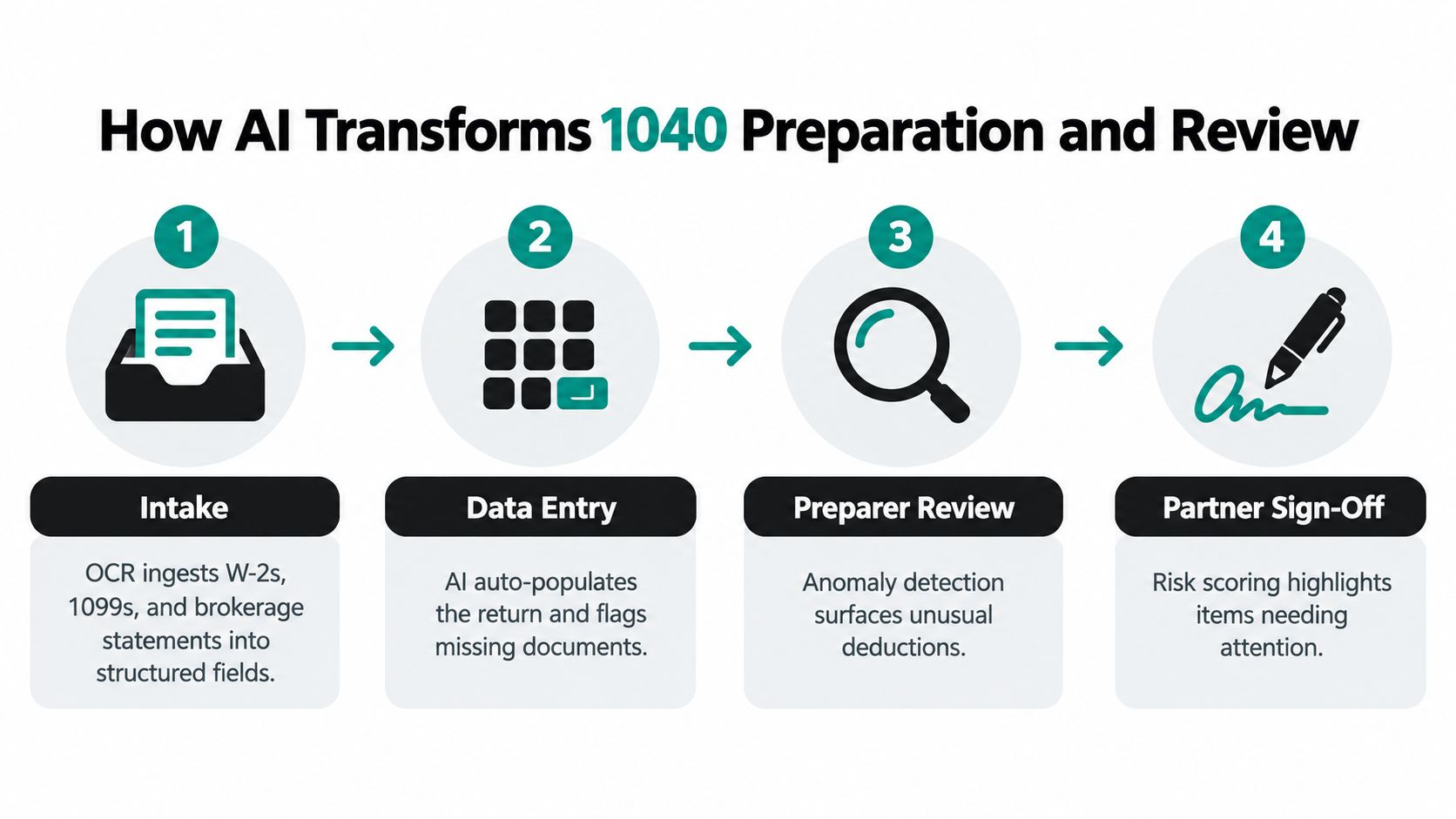
At intake, the platform classifies incoming documents and extracts relevant fields. W-2s, 1099s, and brokerage statements move into a structured workpaper, while the original files remain available for verification. Missing-document logic can then compare expected information with what the client supplied.
That sequence matters because a return can be numerically neat and still incomplete. A system that only reads what it receives may miss a form that was never provided. A stronger workflow records the expected item, identifies the gap, and routes the question back to the preparer or client-service team.
Preparation becomes exception-aware
During preparation, AI compares extracted information with the draft return and relevant prior-year patterns. It can surface an amount that doesn't tie out, a deduction that lacks support, or a form whose values were entered inconsistently.
The preparer remains responsible for resolving the issue. They may confirm that the change is legitimate, request another document, correct the draft, or document why the flag doesn't apply. The software's role is to make the issue visible and attach the relevant evidence.
Partner review becomes risk-directed
A partner shouldn't have to rediscover every preparer's work from scratch. The partner should see which exceptions were raised, how the preparer resolved them, what the reviewer approved, and which items remain open.
That requires more than a red flag. Each flag should include an explanation, source linkage, status, responsible person, and timestamp. The firm should configure thresholds for confidence and risk, define when an override requires written reasoning, and require partner sign-off for unresolved or judgment-heavy matters.
A useful control design includes:
- Confidence routing: High-confidence matches move quickly, while uncertain fields require review.
- Override logic: Staff can reject a suggestion, but the system records the reason and supporting evidence.
- Escalation rules: Sensitive or material exceptions move to a reviewer or partner.
- Audit history: The platform preserves who checked each item and when.
The AI document review workflow should be judged against this standard. The goal isn't merely faster preparation. It's a traceable chain from source document to drafted return to final approval.
Review-by-exception works only when the exception is explainable. A mysterious score creates another review problem instead of solving the first one.
Benefits and Real Risks Firms Must Weigh
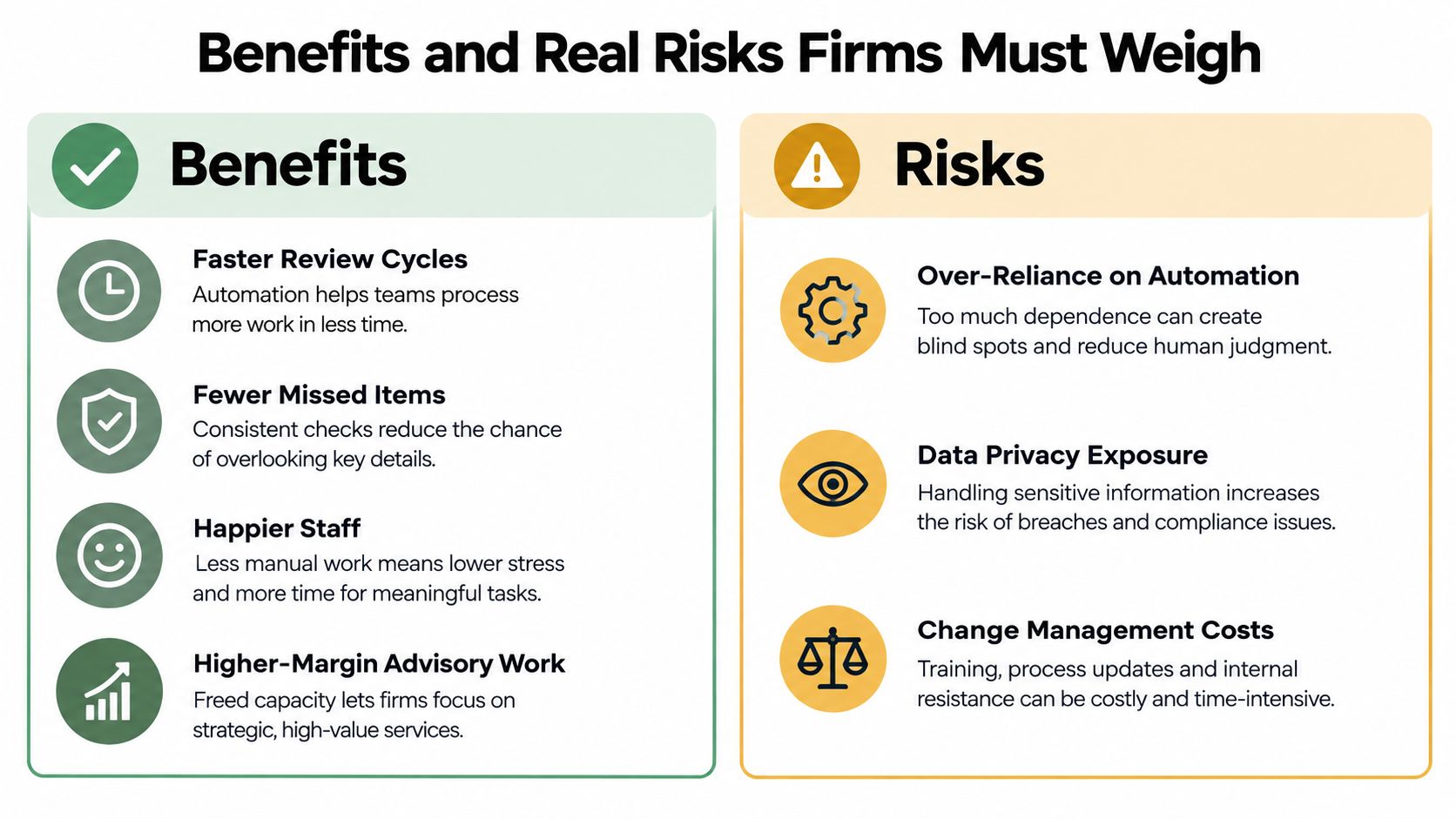
The business case is straightforward. AI can shorten the path from document receipt to review, reduce repetitive entry, and help staff concentrate on unusual facts. Research cited in the financial document processing study reports manual review-time reductions of roughly 76.5% and a decline in reported error rates from 7.5% in manual processes to about 1.5% in AI-driven systems.
Those results don't guarantee a similar outcome for every firm. They do show why document-heavy work is a sensible place to test AI. If the tool handles routine evidence reliably, the firm can redirect human effort toward judgment, client communication, and advisory work.
The upside is operational, not magical
A well-designed system can produce:
- Faster review cycles: Reviewers spend less time locating ordinary support.
- Fewer missed items: Cross-document comparisons can expose inconsistencies that manual review overlooks.
- Better staff experience: Junior employees spend less time on transcription and more time learning how to resolve exceptions.
- Higher-value capacity: Senior staff can devote more time to planning and client advice.
The risks are equally concrete. A model can misread a K-1, classify a capital transaction incorrectly, or accept incomplete evidence with too much confidence. A missed loss or unsupported deduction can become a client problem and a firm liability.
Governance must be designed before rollout
Security isn't a procurement footnote. Client tax data includes sensitive personal and financial information, so firms should demand clear answers about encryption in transit and at rest, access controls, retention, subprocessors, model training use, incident response, and independent security reporting.
Trust is a central adoption barrier. A 2026 accounting and bookkeeping report identifies accuracy, trust in outputs, data security, and client confidentiality among the leading reasons firms resist adoption. It also reports that 87% of firms already using AI had no formal written AI policy, while cost ranked last among the cited barriers at 3%. A separate finding in the same evidence set says 61% of accountants consider document exchanges insufficiently secure.
Set guardrails before live use:
- Human approval: Every material AI flag receives human disposition.
- Sampling: Reviewers test accepted low-risk items instead of trusting the model blindly.
- Training: Junior staff learn why a flag exists and when an override is defensible.
- Policy: The firm documents permitted tools, data handling, retention, and escalation.
The quietest risk is over-reliance. If staff stop developing judgment because the system appears to catch everything, the firm builds a fragile bench. AI should increase the quality of supervision, not eliminate it.
Evaluation Criteria for Choosing the Right Tool
Don't start with a feature checklist. Start with filters that expose whether the product can operate inside your firm's actual 1040 process. Every vendor demo looks smooth when it uses clean sample documents and ignores the handoffs that cause production delays.
Filter one is workflow fit
Ask whether the platform can sit alongside your current tax software and document system. A tool that requires a full replacement may create more risk than it removes. Test the complete path, from client upload through preparer correction, reviewer disposition, and partner approval.
Filter two is security and data control
Request current security documentation, including SOC 2 Type II reporting where applicable. Ask where processing occurs, what happens to uploaded tax documents, how long data remains available, and which subprocessors can access it. The vendor should explain how it handles Form 1040 information without vague assurances.
Filter three is transparency
A useful platform can explain a flag. If it identifies a $9,200 charitable deduction as suspect in a demonstration, ask it to show the exact source, comparison, confidence issue, and recommended review action. A score without reasoning won't support a defensible partner conversation.
Filter four is integration depth
Test connections with the systems your firm uses, such as ProConnect, Lacerte, UltraTax, or Drake, along with document management and workpaper tools. Don't accept a promise that an integration exists. Confirm what moves automatically, what requires export, and how corrections flow back.
Filter five is commercial predictability
Clarify whether pricing changes with users, returns, documents, storage, or seasonal volume. Tax-season surges are exactly when a firm needs predictable access, so ask about throttling, support response, and usage limits.
Filter six is vendor viability
Review ownership, support capacity, implementation resources, and the product roadmap. A technically strong tool can still fail if the vendor doesn't understand tax review or can't support your peak workflow.
Score finalists using the same evidence, not presentation quality.
| Evaluation Criterion | Weight | Vendor A Score | Vendor B Score |
|---|---|---|---|
| Workflow fit | Assign internally | Record test result | Record test result |
| Security and data control | Assign internally | Record evidence | Record evidence |
| Model transparency | Assign internally | Record explanation quality | Record explanation quality |
| Tax and document integrations | Assign internally | Record integration test | Record integration test |
| Pricing predictability | Assign internally | Record contract terms | Record contract terms |
| Vendor viability | Assign internally | Record diligence result | Record diligence result |
Have two or three finalists process representative, de-identified returns. Partners should score the review experience, preparers should score the correction workflow, and operations leaders should score handoffs and reporting.
Implementation Tips for a Smooth Rollout
Buying AI accounting software is easy compared with changing daily behavior. Firms should protect quality by limiting the first release, measuring the work that matters, and teaching staff to interpret exceptions rather than click through a dashboard.
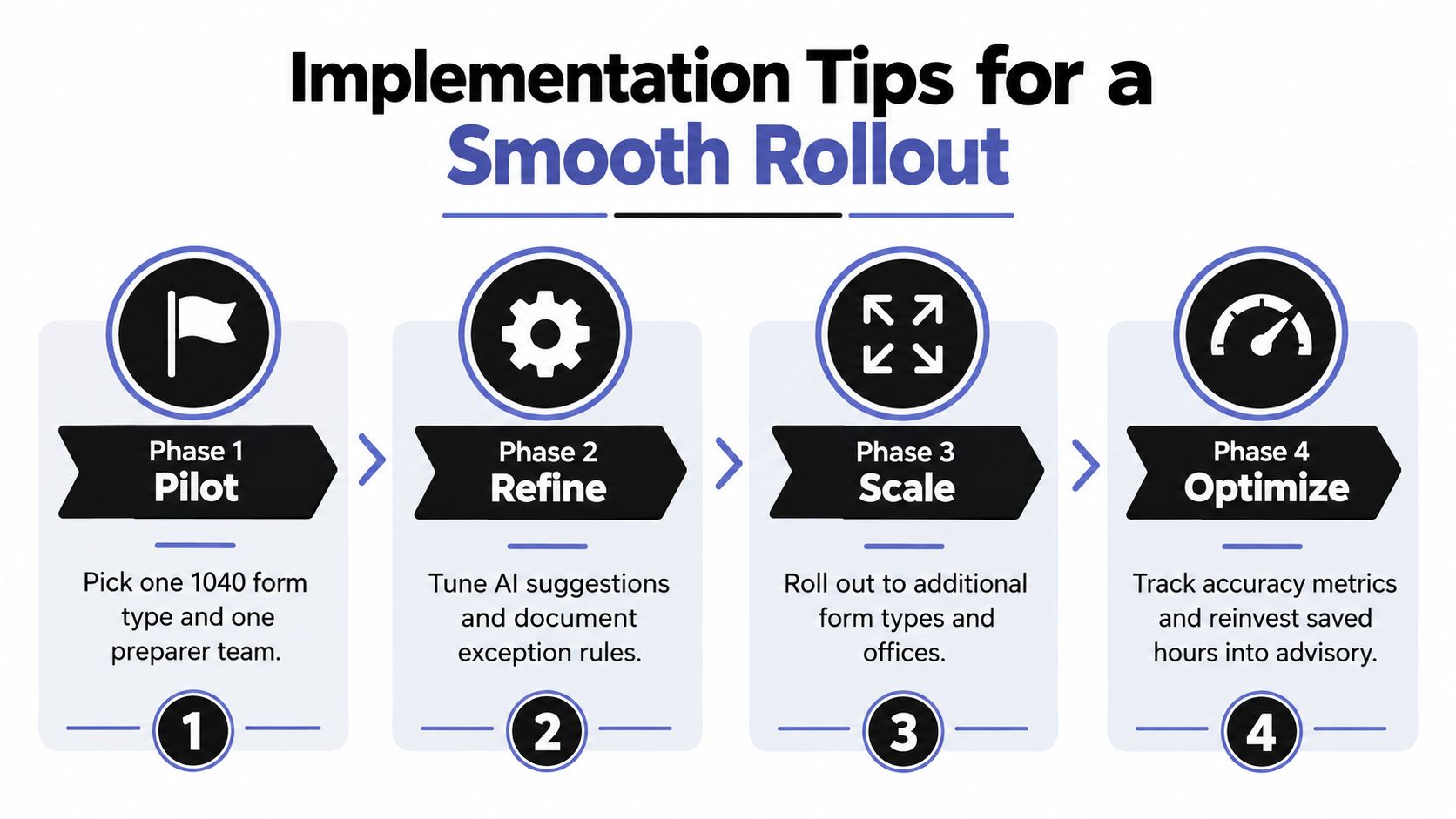
Phase one is a narrow pilot
Choose one 1040 form type and one preparer team. Use representative source documents, including the messy scans and incomplete submissions that expose workflow weaknesses. Define an exit measure such as review hours per return, exception-resolution quality, or the percentage of source values that require correction.
Don't pilot across every office at once. A contained test gives the firm enough evidence to change thresholds, update instructions, and identify integration gaps before the process reaches the full review queue.
Phase two connects the workflow
Integrate the platform with document intake, workpapers, and the tax application before enabling live client data. Confirm that source pages remain linked after export, that corrections are preserved, and that reviewer comments travel with the workpaper.
A disconnected AI tool creates another inbox. That matters because recent accounting workflow coverage reports that 61% of accountants are slowed by switching between too many tools, while 65% report insufficient automation for routine tasks. The lesson is clear: adding an AI feature without closing the handoff problem won't produce a complete workflow.
Phase three trains judgment
Training should use actual exception types. Show staff how the system identified an unusual deduction, what evidence supports the flag, when a correction is appropriate, and how to document an override. Staff should understand that accepting a suggestion is a professional action, not a harmless click.
Phase four establishes governance
Set sampling rates, escalation paths, partner sign-off rules, and a feedback loop for firm-specific patterns. Define who can change thresholds and how the firm reviews changes. Record false positives and false negatives so the vendor conversation is based on production evidence.
A practical rollout cadence is:
- First 30 days: Validate extraction, integrations, exception categories, and training.
- Next 60 days: Expand only after the pilot team meets the firm's quality criteria.
- By 90 days: Review outcomes with partners, revise policy, and decide whether to add teams or form types.
Implementation rule: Scale the control process before scaling the user count.
The Road Ahead for AI in Tax and Accounting
Over the next three to five years, firms should expect AI accounting software to move from isolated task assistance toward broader workflow coordination. Today's extraction, anomaly detection, and predictive features point toward systems that can draft more of a return, monitor regulatory changes, and support near-real-time client advice.
That progression won't eliminate the need for CPAs. It will raise the value of professionals who can interpret incomplete facts, challenge an automated conclusion, explain consequences to clients, and approve work under a documented control framework. The review-by-exception model is an early version of that future: machines prioritize evidence and risk, while people resolve ambiguity and accept responsibility.
Firms should prepare now by tracking vendor roadmaps, building AI literacy into staff development, and participating in professional discussions about acceptable use, documentation, privacy, and oversight. They should also treat integration quality as a strategic capability. High adoption can coexist with weak operational maturity, especially when teams still clean data manually and move information between disconnected systems. The Capterra accounting workflow analysis reports that 44% of U.S. accounting teams would conduct more thorough needs assessments and security reviews in a future implementation, a useful warning against buying first and governing later.
The next step is practical. Run a 30-day controlled pilot on one 1040 engagement type, with de-identified documents, defined review thresholds, and partner oversight. Measure whether the system improves exception handling and evidence traceability, not merely whether it produces an impressive demo.
WP TieOut helps CPA firms validate source documents against drafted 1040 returns, surface discrepancies for review, and compile source-linked workpapers with sign-off history. Visit WP TieOut to explore whether its review-by-exception workflow fits your firm's next controlled pilot.