

Monday morning starts with a familiar 1040 review problem. A senior reviewer opens three engagement folders and finds W-2s in one mailbox, K-1s forwarded by a preparer, and brokerage 1099s split between scans of different quality. One 1099-DIV appears to be a correction, but nobody can confirm whether it supersedes the earlier copy.
The tie-out stalls. The reviewer manually compares PDFs, searches email threads, and asks the preparer which document is current. The bigger fear isn't that a file is hard to find. It's that the firm will sign off on an incomplete return because the intake record, document history, and review status can't be trusted.
CPA document management software should solve that operational problem. Storage, sharing, and version control matter, but they aren't enough. The system must improve the quality of source-document intake, surface exceptions before approval, and preserve an audit-ready record of who checked what and when.
Table of Contents
- The Moment Every 1040 Reviewer Knows Too Well
- What CPA Document Management Software Actually Is
- Core Features That Matter in a CPA-Ready System
- How a 1040 Review Workflow Changes With the Right Tools
- Security and Compliance Considerations CPA Firms Cannot Skip
- The Intake Quality Problem Most Buyer Guides Ignore
- A Vendor Evaluation Checklist for Shortlisting Platforms
- Choosing and Implementing the Right System for Your Firm
The Moment Every 1040 Reviewer Knows Too Well
The reviewer opens the first client folder and sees a clean-looking PDF. The second folder contains a phone photo of a W-2, rotated sideways and missing part of the employer information. The third has two brokerage statements with similar filenames, different page counts, and no indication which one came from the client and which one came from the preparer.
That uncertainty creates work before anyone reaches a judgment call. The reviewer must identify the authoritative file, compare totals across pages, locate supporting schedules, and determine whether the preparer already considered a corrected statement. A shared drive can store every version, but it won't reliably tell the reviewer which version governs the return or whether a missing document was ever requested.
Storage doesn't establish trust
A generic folder structure treats a 1099-DIV, a reviewer note, and a final approved workpaper as files sitting beside one another. A CPA-ready system treats them as related events in a controlled engagement record. It should connect the source page to the extracted value, the extracted value to the draft return, and the reviewer decision to a named person and timestamp.
That distinction matters most during 1040 review, when staff handle multiple document types and make rapid handoffs. The firm needs a controlled lifecycle, not a larger filing cabinet. Intake, preparation, review, correction, approval, and filing should leave a coherent history.
Practical rule: If a reviewer has to ask which PDF is current, the document process has already failed.
The buying question, then, isn't “Where can we put our files?” It's “Can our reviewers trust the record in front of them?” The right CPA document management software reduces ambiguity at the point where documents enter the firm and keeps that context intact through partner sign-off.
What CPA Document Management Software Actually Is
Think of a general-purpose file share as a warehouse. It has shelves, labels, and locks, but staff still need to remember where each box belongs and whether someone replaced its contents. CPA document management software is closer to a controlled vault that understands clients, engagements, tax years, document types, preparer ownership, review stages, and approval history.
The broader document management software market relied on by CPA firms was valued at USD 7.35 billion in 2025 and is projected to reach USD 19.04 billion by 2034, with a projected 11.2% compound annual growth rate, according to Strategic Market Research's accounting practice management analysis. The same source reports that cloud deployment held 58.3% of total revenue, a useful signal for firms deciding whether a modern system should be cloud-first.
The operating model
A CPA-focused platform should handle five connected jobs:
- Structured intake: It accepts uploads and scans into client and engagement contexts instead of leaving staff to rename and relocate every file.
- Source-linked storage: It keeps tax documents, workpapers, annotations, and return information connected.
- Controlled handoffs: It routes work between preparers, reviewers, and partners without relying on status emails.
- Review evidence: It records comments, exceptions, approvals, and changes as part of the engagement history.
- Tax application connectivity: It moves information or documents into the firm's tax-preparation workflow without repeated manual indexing.
A platform such as SharePoint or Box may provide strong general document controls, but configuration alone doesn't make a system tax-aware. Generic tools typically require the firm to build its own conventions for client requests, tax-year folders, preparer attribution, review checkpoints, and sign-off evidence. That can work for a disciplined technology team, but it leaves the firm responsible for designing and maintaining the workflow.
The category is also expanding inside accounting practice systems. One market dataset estimates the document management application segment at USD 2.9 billion in 2025, while another estimates document management solutions at USD 1.5 billion with a 6.8% CAGR. The same dataset places CPA firms at a USD 4.0 billion segment in 2025 and reports cloud deployment at 62.3%, as described in Strategic Revenue Insights' market overview.

A useful system makes each transition visible. Intake creates a reliable record, review focuses staff on unresolved issues, approval captures an intentional decision, and filing occurs only after the necessary controls are complete.
Core Features That Matter in a CPA-Ready System
A long feature list won't tell you whether a platform can survive a difficult 1040 review. The following capabilities matter because they change what a preparer or reviewer can prove inside the engagement record.
Version history with context
Versioning should do more than preserve old filenames. When a broker issues a corrected statement, the reviewer needs to see the earlier document, the replacement, the related notes, and the decision made about the difference. The system should make it difficult to mistake an old draft for the controlling source.
Permissions that reflect responsibility
A preparer, reviewer, and partner shouldn't have identical powers. Role-based permissions should limit access appropriately, separate preparation from approval, and allow the firm to revoke access promptly when staff change roles or leave. A permission model that exists only at the top-level folder is too blunt for sensitive tax work.
An audit trail that records action
The audit log should capture uploads, edits, downloads, annotations, approvals, and sharing events, with the relevant user and timestamp. Technical guidance for accounting document systems describes centralized documents, role-based permissions, timestamped activity logs, version history, automated retention, and stage-gated approvals as controls that support compliance and accountability, as outlined by Folderit in its accounting document management guidance.
OCR and meaningful indexing
OCR earns its place when it does more than make a PDF searchable. It should identify pages, bookmark documents, and apply metadata such as client, engagement, document type, and tax year. Wolters Kluwer's accounting document management information describes scan software that can read, identify, and bookmark client documents. That capability helps a reviewer move directly to a relevant page instead of opening every page in a large source package.
Integrations that remove duplicate handling
A platform should fit the firm's existing tax stack. Whether the firm uses Drake, ProConnect, UltraTax, or another application, the demo should show how a document moves from intake into the tax-preparation workflow and how the resulting workpaper returns to the engagement record. Manual export, renaming, downloading, and re-indexing are not harmless inconveniences. They create more opportunities for the wrong file to enter review.
Exception dashboards and search
Search should locate a K-1 by client, job, staff member, metadata, or content without requiring perfect folder navigation. A reviewer dashboard should surface missing W-2s, unmatched 1099 totals, unsupported estimates, and unresolved preparer questions. A document comparison tool such as WP TieOut's document matching software belongs in this broader evaluation because review efficiency depends on identifying exceptions, not merely opening files.
| Feature | What It Solves | Review Impact |
|---|---|---|
| Version history | Conflicting or obsolete statements | Prevents reviewers from relying on an outdated source |
| Role-based access | Unclear responsibility and excessive access | Separates preparation, review, and approval |
| Audit trail | Unprovable review activity | Creates evidence of who acted and when |
| OCR and indexing | Slow retrieval and manual filing | Makes source pages searchable and usable |
| Tax integrations | Repeated file handling | Reduces duplicate movement between systems |
| Exception dashboards | Line-by-line inspection of routine items | Directs attention to judgment-worthy discrepancies |
Rank these features by operational value, not by how polished they look in a sales presentation. Intake, exception handling, source-linked review, and sign-off evidence usually move the 1040 cycle more than cosmetic portal customization.
How a 1040 Review Workflow Changes With the Right Tools
The improved workflow starts before the preparer opens the tax application. The client uploads documents through a structured request, or staff scan them into the correct engagement. The system associates each file with the client, tax year, document type, and relevant workflow stage.
Intake and assembly
A preparer should see an organized source set rather than a collection of attachments. W-2s, 1099s, brokerage statements, and supporting PDFs should remain connected to the workpapers they support. If the platform extracts data, it should also preserve a path back to the original page so a reviewer can verify the value rather than trust an untraceable field.
The preparer then assembles the return with source documents available in context. A corrected brokerage statement can be marked as controlling, while the older version remains available for history. That approach replaces informal explanations in email with an engagement record that another staff member can understand.
Review by exception
The reviewer shouldn't spend the entire day confirming that routine values match. The system should flag missing forms, mismatched totals, unsupported estimates, and source values that fail validation. The reviewer spends time on exceptions and judgment, while the platform preserves the underlying evidence.
Tax-grade automation requires more than OCR. Guidance on tax AI validation and traceability from K1x emphasizes deterministic validation, confidence thresholds, and traceability to source documents. Those controls matter because a fast extraction that cannot show its source page merely moves risk from filing cabinets into software.
Approval and filing
Once exceptions are resolved, the partner should receive a clear approval view. A sign-off action should identify the approver, lock or preserve the approved record, and retain the supporting history. It shouldn't be a checkbox disconnected from the documents the partner reviewed.
WP TieOut is one example of a tax review platform that ingests source documents, validates extracted data against a drafted return, surfaces discrepancies, and compiles a bookmarked source-linked PDF binder with sign-off history. The important design principle is broader than any single product: the checkpoints belong inside the review workflow, not in a spreadsheet maintained after the fact.
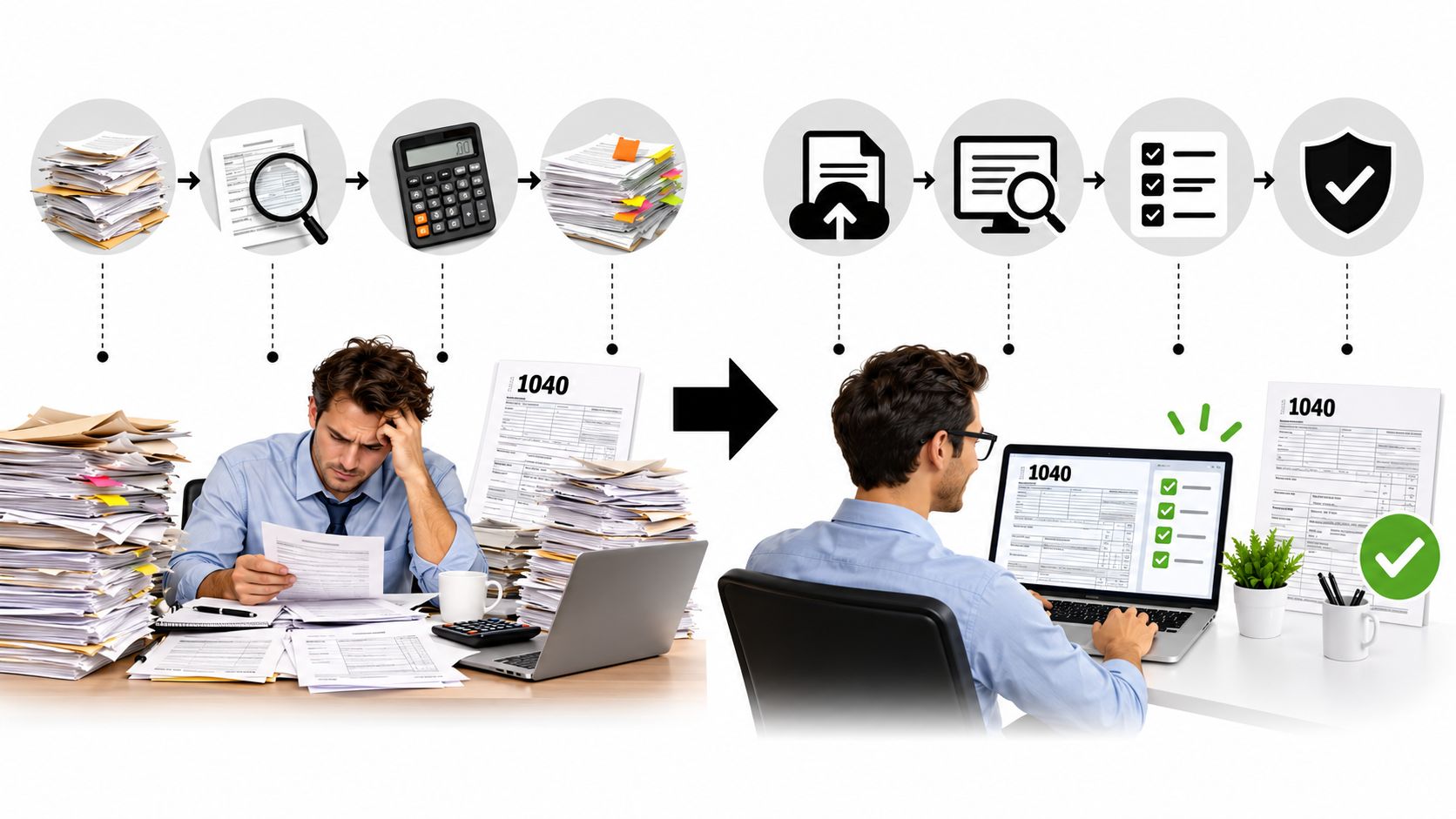
The result is fewer redundant touches, fewer status messages, and a reviewer who sees the items requiring professional judgment instead of reconstructing the entire file from scattered PDFs.
Security and Compliance Considerations CPA Firms Cannot Skip
A login screen doesn't make a document system secure enough for client tax data. The firm must assess how the vendor protects information, governs access, detects activity, and supports the firm's own written security procedures.
Ask for evidence, not assurances
A vendor should distinguish an independent SOC 2 Type II report from a self-attested questionnaire. Ask how data is encrypted at rest and in transit, how multifactor authentication works, how administrators review access, and how quickly the firm can revoke a departing preparer's permissions.
Role design deserves equal attention. A system that gives every employee broad access may be convenient during onboarding, but it creates unnecessary exposure. The platform should support least-privilege access, engagement-level permissions where appropriate, and clear ownership of administrative actions.
Treat every download as an event
Consumer-grade shared folders create quiet risks. A link may remain active after a project ends. A former employee may retain access through an orphaned account. The firm may have no reliable record of who viewed or downloaded a document. Those gaps become difficult to explain during an internal review or external examination.
A serious platform should log activity at the document level and make that history exportable. It should also support retention rules, secure sharing, and controlled deletion rather than leaving those decisions to individual staff members. Use WP TieOut's security control effectiveness resource as a prompt for the type of control evidence and review discipline your firm should request from any vendor.
A low subscription price is irrelevant if the firm still has to build separate controls to prove who accessed a client file.
Security also includes implementation. The firm needs documented procedures for client uploads, staff access, incident escalation, retention, and account termination. A DMS can enforce those procedures, but it can't replace the firm's responsibility to define them and train staff to follow them.
The Intake Quality Problem Most Buyer Guides Ignore
Most firms don't receive a neat document package. A client may send a phone photo of a W-2, screenshots from a brokerage portal, and a multi-page statement split across several emails. If the firm drops those files into a generic DMS, the reviewer still has to rotate pages, identify document types, remove duplicates, and determine whether the source set is complete.
That is why intake deserves more weight in a buying decision. A system can have excellent storage and still produce poor review outcomes if bad metadata and incomplete source files enter the workflow.
Fragmentation remains a buying signal
A recent industry summary describes tax-source scanning and autoflowing as fragmented across tools. It reports that 38% of respondents use CCH Scan and 30% use Thomson Reuters SurePrep, as presented in WorldMetrics' accounting document management overview. The figures point to an operational issue, not a simple market preference. Firms continue to use different capture paths, which makes consistent indexing and handoff harder.
An intake-first platform should capture, de-skew, classify, and index pages as they arrive. It should flag an unreadable scan, identify a likely duplicate, and prompt staff when a required document appears absent. That doesn't eliminate human judgment. It moves cleanup to the earliest point, where a correction is cheaper and less likely to contaminate downstream review.
| Step | Generic DMS | Intake-First Platform |
|---|---|---|
| Upload | Stores the file where a user places it | Associates the file with a client and engagement |
| Image quality | Leaves staff to spot poor scans | Flags or routes questionable pages |
| Classification | Depends on filenames and folders | Uses document type and metadata rules |
| Completeness | Requires manual checklist work | Can surface missing or unexpected source items |
| Review handoff | Sends a folder or email notification | Sends a structured record with status and context |
Intake is workflow, not upload. The hour spent correcting a source package affects assembly, review, approval, and filing. That makes reliable capture more valuable than another low-use feature on a comparison matrix.
A Vendor Evaluation Checklist for Shortlisting Platforms
Run vendor demos with the same test package. Give each finalist a messy 1040 source set containing a corrected statement, an unclear scan, duplicate pages, and a document that requires reviewer judgment. A polished demo using perfect files tells you almost nothing.
Score the five buying buckets
Use a simple one-to-five score for each bucket. The score itself is a decision aid, not a market statistic. Require the vendor to demonstrate each claim inside the product.
| Evaluation Bucket | What to Score 1-5 | Proof Point to Request | Red Flag |
|---|---|---|---|
| Intake and source capture | Upload routing, OCR, classification, quality checks | Process a mixed source package live | Vendor asks staff to clean every file first |
| Version control and tie-out | Replacement handling, comparison, source links | Show a corrected 1099 and its review history | Old and current files look interchangeable |
| Audit trail granularity | User, action, timestamp, approval state | Export activity for one engagement | Log shows only broad folder activity |
| Tax and workflow integrations | Direct movement into the firm's stack | Complete an end-to-end handoff | Integration depends on manual downloads |
| Security posture | Access, encryption, authentication, retention | Review current control documentation | Vendor gives only sales-level assurances |
Questions that expose weak products
Ask the intake specialist to upload a skewed scan and explain what the platform does next. Ask the reviewer to locate every version of a brokerage statement and identify the controlling copy. Ask the partner to approve the file, then ask an administrator to export the sign-off history.
The system should answer these questions without a workaround:
- Can a reviewer trace a value to its source page?
- Can the firm separate preparer, reviewer, and partner permissions?
- Can the vendor show exactly what changed between document versions?
- Can the platform identify unresolved exceptions before approval?
- Can the firm retrieve a complete activity record without vendor assistance?
- Can a departing user's access be revoked without disturbing the engagement record?
Don't award a finalist position because the portal looks modern. Award it because the platform handles an untidy source package, preserves context, and produces evidence that a partner can defend.
Choosing and Implementing the Right System for Your Firm
A shortlist becomes credible only after three tests. First, speak with firms that resemble yours in client mix, staffing model, and 1040 review process. Second, run a paid pilot with one team and real source documents. Third, demand a documented migration plan for prior-year files, including permissions, naming conventions, duplicates, and retention decisions.
Pilot the complete cycle
The pilot should include intake, preparer assembly, review exceptions, corrections, partner approval, and export of the final history. Don't accept a pilot that ends after the upload demonstration. The system has to prove that it can preserve source context when the file changes hands.
Use the firm's own roles during testing. Have a preparer upload documents, a reviewer resolve exceptions, and a partner approve the return. Record where people hesitate, where they create workarounds, and where the system fails to make status clear. The best practices for document management from WP TieOut can help shape the operating rules around that evaluation.
Configure before cutover
Before launch, configure intake templates, client requests, metadata rules, role permissions, approval routing, and escalation paths. Involve at least one partner, review manager, preparer, administrative user, and technology owner. Each role sees different failure points, and a system designed only by administrators usually misses reviewer friction.
Protect the active season with a controlled cutover. Start with a defined group of engagements, keep the old repository read-only where practical, and verify migrated files before staff rely on them. Measure progress at 30, 60, and 90 days using qualitative checks such as intake completeness, unresolved exception patterns, duplicate handling, reviewer confidence, and sign-off consistency.
Don't sign a multi-year agreement until the pilot has processed at least one full 1040 cycle from intake through partner approval.
The right system is the one your team can use consistently under deadline pressure. If it improves intake, exposes exceptions, and preserves approval evidence without creating parallel spreadsheets, it earns serious consideration. If it only gives the firm a cleaner folder tree, keep evaluating.
WP TieOut helps CPA firms validate W-2s, 1099s, brokerage statements, and supporting documents against drafted 1040 returns, then preserves source-linked workpapers and sign-off history. Visit WP TieOut to explore the end-to-end intake, exception review, and partner approval workflow.