

Monday morning, a senior reviewer at a mid-sized CPA firm is staring at W-2s, 1099s, brokerage summaries, and K-1s while three preparers wait for sign-off. The drafted 1040 already exists in the tax application. The question isn't whether someone entered numbers into the return. It's whether every source document supports the numbers that will be filed.
That distinction is where document matching software earns its place. In a 1040 workflow, the software must classify documents, extract fields, resolve taxpayers and payors, validate values, compare source data with the drafted return, and route uncertain results to a human. It also has to preserve the reasoning behind each decision.
Manual review hasn't disappeared because tax professionals stopped caring about accuracy. It stopped scaling because source-document volume has grown more complicated while reviewer capacity has stayed constrained. Brokerage 1099-B supplements, multiple 1099-Rs, gig-economy income, corrected forms, and partnership statements create more opportunities for both missed discrepancies and unnecessary follow-up.
Table of Contents
- Why CPA Firms Are Rethinking 1040 Review
- How Document Matching Software Actually Works
- Where OCR Breaks Down in Real Tax Workflows
- Tie-Out Against the Drafted 1040 Return
- The Hidden Cost of False Matches in Review
- Audit Trails, Roles, and Security Expectations
- What to Ask Before Buying Document Matching Software
- What This Changes Inside a CPA Firm
Why CPA Firms Are Rethinking 1040 Review
The reviewer's bottleneck usually isn't a single difficult form. It's the accumulation of ordinary forms that must be compared across different layouts, taxpayers, tax years, and return schedules. A W-2 may be straightforward, while a brokerage composite contains several pages of transactions and summaries that must ultimately support entries elsewhere in the return.

The common response is to add more manual checkpoints. That can help temporarily, but it also creates a queue. Preparers wait for reviewers, reviewers spend time confirming clean fields, and exceptions compete for attention with routine tie-outs.
Practical observation: A reviewer shouldn't have to treat every return as if every source field is equally suspicious.
The business case for automation is therefore narrower than “replace tax review.” A useful platform should remove repetitive comparison work while leaving judgment-heavy decisions with the preparer, reviewer, or partner. It should identify whether a value ties, falls within an approved tolerance, or needs investigation, then show the source page and the drafted-return field together.
The category itself grew out of earlier document-processing technologies. Current intelligent document processing combines OCR, machine learning, classification, workflow automation, and digitization, moving firms away from rule-only capture and manual line-by-line comparison toward exception-based validation, as described in industry coverage of intelligent document processing. A separate forecast places finance and accounting at 45.57% of the IDP market, large enterprises at 61.54%, and cloud deployments at 65.18%, illustrating how the technology has moved into enterprise controls rather than remaining a niche back-office utility (Strategic Market Research).
A serious evaluation has to answer four practical questions:
- How does the platform extract and validate data?
- Where does OCR fail on real tax documents?
- How does it resolve source entities against the drafted 1040?
- How does it control false positives, overrides, access, and evidence?
Those questions matter more than a polished match-rate demonstration.
How Document Matching Software Actually Works
A 1040 review job generally passes through four connected stages. The names vary by vendor, but the responsibilities should remain clear.

Ingestion and classification
Documents enter through a secure upload, an email parser, or a scanner. The platform first determines what it received, such as a W-2, 1099-INT, 1099-R, brokerage statement, or K-1. Classification matters because the same visual pattern can mean different things on different forms. A field locator designed for a W-2 shouldn't interpret a K-1 as though it were a wage statement.
The system should also preserve the original file and page sequence. A reviewer needs to know whether the extracted value came from the first page, a supplemental schedule, or a corrected statement attached later.
OCR and AI extraction
OCR converts the page image into machine-readable characters. An AI extraction model then identifies meaning and location, such as wages, federal withholding, taxable interest, or a Box 12 code. Each extracted value should carry a confidence signal, although confidence alone isn't proof that the value is correct.
A grocery receipt offers a useful analogy. OCR reads the printed words, classification identifies that an item is produce or a beverage, and validation checks whether the quantity and price make sense together. Tax-document processing follows the same general pattern, but the consequences of a bad interpretation are much more serious.
Validation before matching
Validation applies format checks, arithmetic relationships, and business rules. The platform might compare withholding components with a stated total, inspect taxpayer identification formats, or test whether related extracted fields are internally consistent. It may also compare against prior-year information, but that comparison should create a review signal, not an automatic conclusion.
A strong workflow separates “the system read this value” from “the system has enough evidence to accept this value.” That distinction prevents a legible OCR result from bypassing a contradiction elsewhere on the document.
Reconciliation to the return
Finally, validated fields are mapped to the drafted 1040 and its schedules. The output shouldn't be one generic similarity score. Reviewers need separate outcomes for exact ties, acceptable variances, unresolved entity matches, and genuine discrepancies.
The technical foundation is record linkage, not merely string comparison. Research on OCRed documents shows that matching improves when systems exploit redundancy and cross-document consistency, helping reduce false mismatches caused by OCR errors, abbreviations, and formatting variation (Scitepress technical paper).
The key design question is simple: can the reviewer see why the system connected a source document to this taxpayer and this return line?
Where OCR Breaks Down in Real Tax Workflows
OCR failure in tax work isn't limited to a number being read incorrectly. The more dangerous problem is a value that looks plausible but lands in the wrong field or attaches to the wrong document context.
A dense 1099-DIV can place adjacent boxes close enough that a system reads the characters correctly but assigns a dividend amount to the wrong category. A multi-page brokerage statement can separate a heading from the transactions it describes. A corrected form can be processed as the original if the workflow doesn't interpret the correction indicator and document sequence.
The benchmark matters because it measures layout sensitivity rather than presenting a single universal accuracy claim. It reported 97% to 99% accuracy on clean typed English, but only 64% on scanned bank statements with multi-page tables, 58% on phone-photographed receipts, and 61% on handwritten forms (OCR accuracy benchmark). Tax source documents often contain the same difficult characteristics, including tables, faint scans, skewed pages, handwriting, and supplemental schedules.
| Document Type | Typical Field-Level Accuracy | Most Common Failure | Reviewer Action Required |
|---|---|---|---|
| Clean typed document | 97% to 99% | Isolated character or field error | Confirm confidence and validate against related fields |
| Dense multi-page statement | 64% in the benchmark's scanned bank-statement test | Table structure and column assignment | Inspect page context and reconcile totals |
| Phone-photographed receipt | 58% in the benchmark | Image noise and field extraction | Review the original image and re-key material values |
| Handwritten form | 61% in the benchmark | Character segmentation and interpretation | Require human confirmation before acceptance |
The practical response is not buying a better scanner. Firms need confidence scoring, field-level validation, document-status recognition, and an exception queue that makes uncertainty visible. A platform that promotes low-confidence fields into the drafted return creates more risk than a platform that asks for help.
For a deeper look at how extraction fits into tax review, see AI document extraction for tax workflows. The evaluation standard should be the firm's own difficult documents, not a vendor's clean sample packet.
Tie-Out Against the Drafted 1040 Return
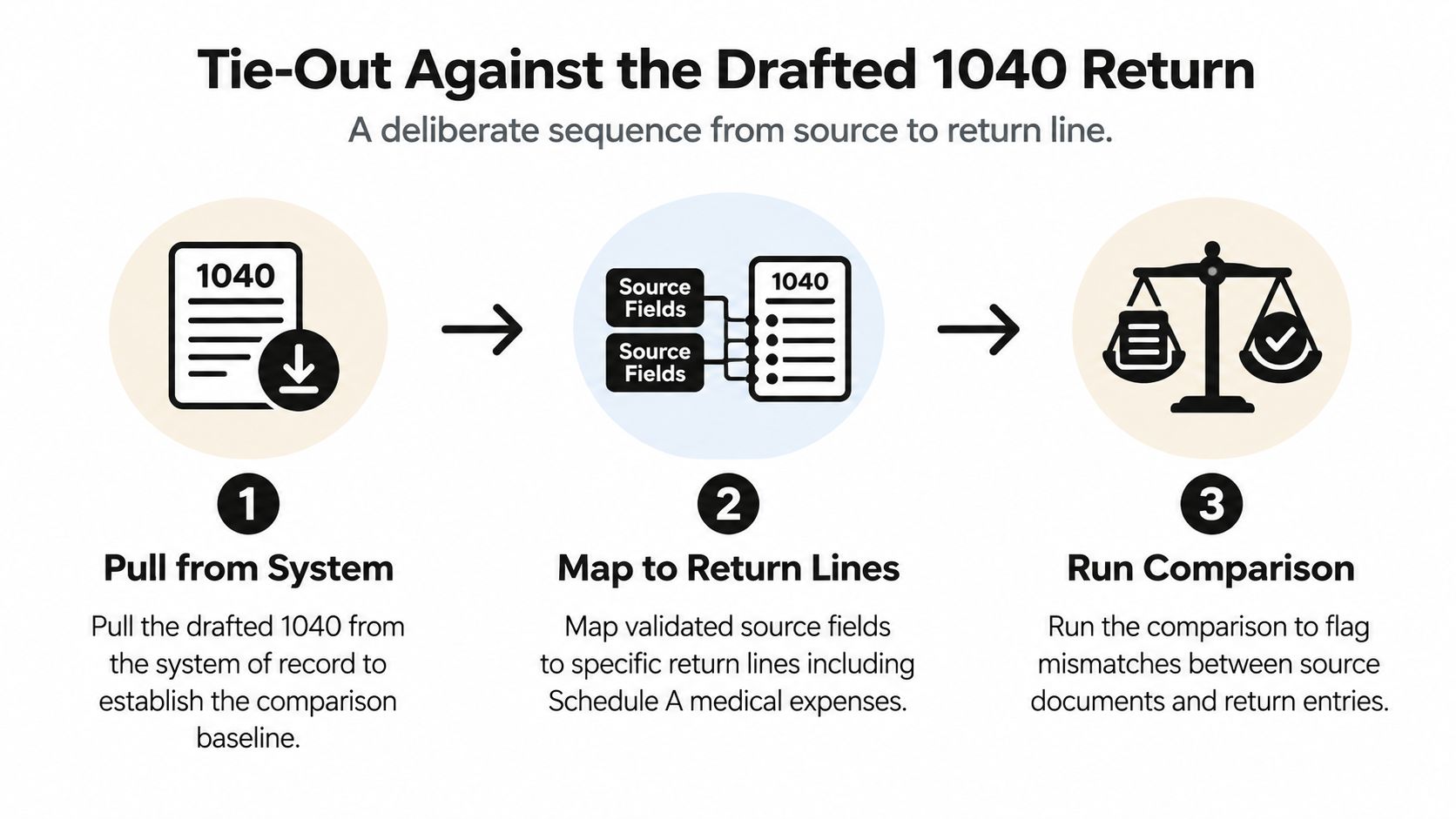
The drafted return is the system of record for comparison. Source documents provide evidence, but the review objective is to determine whether the return reflects that evidence correctly.
Establish the comparison baseline
The platform first retrieves the drafted 1040 and relevant schedules from the tax application or connected system. It should capture the taxpayer identity, tax year, filing context, and return version so that the comparison doesn't accidentally use an outdated draft.
Next, validated source fields are mapped to return locations. A medical-expense total may map to Schedule A, interest documents may support Schedule B, and business revenue documents may feed Schedule C. The mapping needs to be explicit. “This source resembles that return” isn't enough for a defensible review.
Separate ties from exceptions
A useful result set distinguishes at least three outcomes:
- Numeric tie: The validated source total and return entry agree.
- Within tolerance: The values differ, but the variance falls inside a firm-approved rule.
- Flagged exception: The difference exceeds the rule, the entity is uncertain, or the source evidence is incomplete.
Consider Schedule A medical expenses. If the source workpaper total agrees with the drafted line, the item can be marked reconciled with a source reference. If the workpaper and return differ because the return applies an intentional adjustment, the reviewer should see the variance and its explanation rather than receive a generic failure.
Schedule B interest requires aggregation discipline. Several 1099-INT documents may support one return presentation, so the software must compare the relevant source set with the return total, not force a one-document-to-one-line assumption. Schedule C gross receipts creates a similar issue when source records are grouped or when a preparer applies a documented classification decision.
Make tolerances policy-driven
Tolerance bands should be defined by line item and engagement policy. A small rounding variance may not deserve the same treatment as an unexplained difference in a material income category. The reviewer needs to know which rule accepted a soft variance and who can change that rule.
Review-by-exception only works when the exception has a reason, an owner, and a next action.
The payoff is focused attention. Reviewers can open returns with failed reconciliations, uncertain entity mappings, or low-confidence fields instead of rechecking every clean field in every batch. A practical overview of this approach is available in tax return comparison workflows.
The Hidden Cost of False Matches in Review
A high match rate can be a misleading purchasing metric. A false positive occurs when the system marks a source value and return entry as reconciled even though the connection or comparison is wrong. That result is more dangerous than a visible false negative because it can remove the item from reviewer attention.
Tax reviewers understand the asymmetry. A missed charitable carryover or misapplied basis isn't merely an extra task in the queue. It can affect the filed return, the firm's workpapers, and the defensibility of the engagement. The exact risk depends on the facts, but the operational principle is consistent: a quiet wrong match deserves more scrutiny than a loud unresolved match.
Microsoft's guidance on document fingerprinting and classifiers identifies practical controls for reducing false positives, including raising match thresholds, adjusting confidence levels, and tuning instance counts (Microsoft Purview guidance). Those controls aren't cosmetic settings. They determine how many items reach a reviewer and which items the system is willing to accept automatically.
Buyers should demand configurable policy at several levels:
- Thresholds: Set confidence requirements by document type or field.
- Escalation: Route uncertain matches to the appropriate reviewer instead of treating them as failures or approvals.
- Materiality: Apply different tolerance bands to different return lines.
- Overrides: Require a reason when a reviewer accepts or rejects a flagged result.
- Monitoring: Track whether one rule creates excessive noise or suppresses important exceptions.
A firm may intentionally allow more visible false negatives in low-risk areas if that choice keeps high-risk false positives from disappearing. The best workflow isn't the one that claims to match everything. It's the one that makes the remaining uncertainty proportionate, visible, and manageable.
Audit Trails, Roles, and Security Expectations
Security questionnaires often start with generic infrastructure language. CPA firms need to go further and ask whether the platform can reconstruct a tax review as a professional workpaper process.
For every source document, the audit trail should identify who ingested it, when it entered the system, and which extraction model version processed it. For every field, it should show whether the value was auto-validated, flagged, corrected, or accepted. For every exception, it should preserve the reviewer's action, the reason for the action, and the timestamp.
That record matters when a partner asks why a value passed review months after the engagement closed. It also matters during peer review or a state board inquiry, when the firm may need to demonstrate not only the final number but the path used to validate it.
Access should follow responsibility
Preparer, reviewer, and partner roles should have distinct permissions. Intake staff may upload and classify documents without approving exceptions. Preparers may resolve assigned issues. Reviewers may override selected results with documented reasons, while partners retain final sign-off authority.
Separation of duties is especially important when one person can influence ingestion, data correction, and approval without an independent checkpoint. The system should make those handoffs visible rather than relying on informal email or shared folders.
Ask where the evidence lives
Firms handling multi-state clients should ask about data residency, subprocessors, retention windows, encryption, and deletion procedures. They should also confirm whether original pages remain available after extraction and whether all annotations, source links, and sign-off records can be exported.
The practical test is demanding but appropriate: can the firm produce a complete reconstruction of a reviewed 1040 within 24 hours for a state board inquiry? Guidance on building a defensible review record is available in audit trail best practices for tax workflows. If the answer depends on searching inboxes and asking former engagement staff what happened, the control environment isn't mature enough.
What to Ask Before Buying Document Matching Software
A vendor demo should be a working session, not a slide presentation. Bring a real, appropriately redacted 1040 packet and make the sales engineer process the documents that cause trouble in your firm.
Start with the intake path. Upload a W-2 and ask the system to show wages, withholding, and source-page references. Then test a 1099-R, including distribution and taxable-amount mapping. Don't accept a summary score. Watch the individual fields and the exception queue populate.

Use difficult samples deliberately:
- Faded scans: Test whether the platform lowers confidence and requests review instead of inventing certainty.
- Brokerage composites: Check how it handles dense tables, supplemental pages, and truncated identifiers.
- Corrected forms: Confirm that the system recognizes corrected status and doesn't combine original and corrected values improperly.
- K-1 mismatches: Use a partnership name with an abbreviation or typographic error and ask how the system resolves it against Schedule E.
- Non-tied returns: Put a source document into a return where the expected line does not reconcile, then inspect the explanation shown to the reviewer.
Entity resolution deserves its own demonstration. A document rarely belongs to the correct record because two strings look similar. The platform should use taxpayer identifiers, payor or entity context, return relationships, and cross-document evidence, while escalating uncertain joins to a person.
Ask how thresholds can be tuned by preparer, partner, engagement type, document type, and return line. Then ask what happens when a model changes. Can the firm identify which fields were processed under the earlier model and rerun or re-review them?
Finally, get direct answers about data residency, SOC 2 Type II scope, retention, export rights, and termination procedures. Request a reference firm with a comparable return mix and speak with that firm without the vendor present. WP TieOut, for example, is an option that ingests tax source documents, validates extracted fields, compares them with drafted 1040 returns, and preserves source-linked review and sign-off records.
What This Changes Inside a CPA Firm
Document matching software doesn't replace reviewers. It concentrates reviewer attention on returns and fields that warrant judgment, while routine ties can move through a controlled review-by-exception process.
That changes the work. Reviewers spend less time on mechanical box-by-box comparison and more time on basis adjustments, at-risk limitations, state-specific add-backs, and cases where the numbers require professional interpretation. The firm also gains a consistent record of extracted fields, threshold decisions, manual overrides, and approvals.
Accuracy, governance, and audit posture become properties of the same workflow. A signed return is easier to defend when the firm can show the original source, the comparison performed, the exception decision, and the person responsible for each action.
If your firm is evaluating a safer way to reconcile source documents with drafted 1040 returns, review the end-to-end workflow available from WP TieOut. Use the interactive demo to test intake, exception handling, source-linked workpapers, role-based sign-off, and audit-ready export against the documents your reviewers see.