
If you're staring at a pile of drafted 1040s, source docs spread across your desk, and a partner asking which returns are ready, you already know the problem. The bottleneck isn't filing, it's review. That's where CPA review software matters for firms like yours, not as an exam-prep buzzword, but as a way to reconcile drafted returns against source documents faster and with fewer misses.
The market around CPA review software has clearly outgrown the old “study course” definition. On the exam-prep side, the category is now broad, subscription-driven, and crowded, with 9 providers tracked in 2026 and pricing ranging from $0 to $4,999 at Atlas CPA Index. On the firm side, the same keyword now points to a very different workflow, one built around document comparison, exception review, and sign-off history, not flashcards and multiple-choice questions.
For a 1040 firm, the key question is simple. Can this software reduce the time your reviewers spend hunting through W-2s, 1099s, and brokerage statements, while making the work cleaner to sign off and easier to defend later? If the answer is no, the interface doesn't matter.
Table of Contents
- The Review Bottleneck Every 1040 Firm Feels
- What CPA Review Software Actually Means
- The Six Core Features That Actually Matter
- How to Evaluate Vendors Without Getting Sold To
- Implementing Review Software Without Disrupting the Firm
- Measuring ROI and the Pitfalls That Quietly Erase It
- Your Next Step and Why a Demo Beats a Datasheet
The Review Bottleneck Every 1040 Firm Feels
Monday morning starts the same way in too many firms. A review manager opens a queue of drafted returns, sees a stack of W-2s, 1099s, and brokerage statements, and realizes the team has only a few hours before partner sign-off. The work is not complicated in theory, but it's painfully manual in practice.
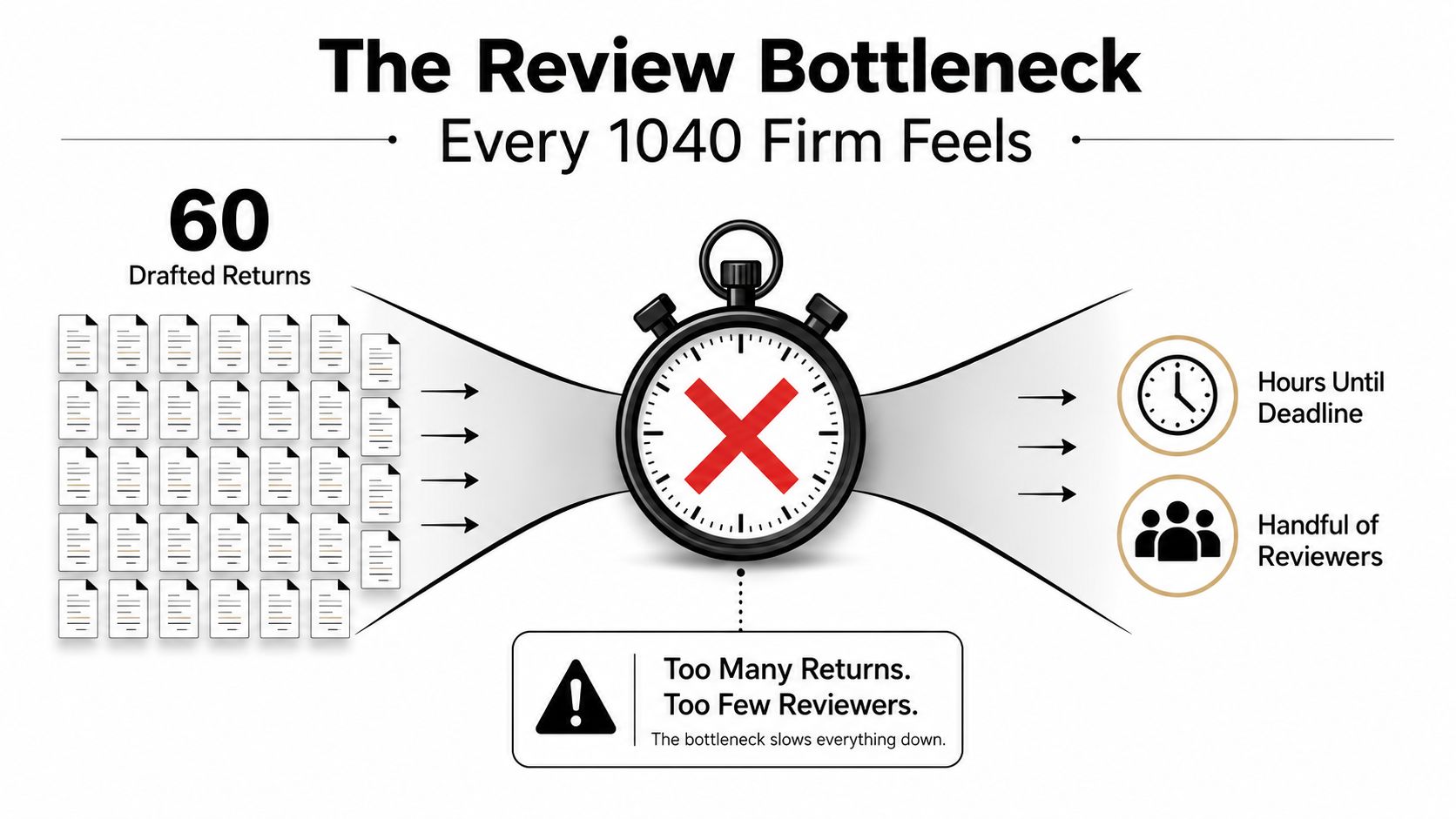
The old process is still common because it feels safe. Someone compares the draft line by line, flips between source docs and the return, and hopes nothing slips through. That workflow burns senior time on repetitive checking, and it scales badly when the queue gets long.
Why the bottleneck keeps showing up
The problem is not that reviewers don't care. It's that line-by-line reconciliation asks experienced people to spend their attention on obvious matching work before they can focus on judgment calls. That's where review software changes the equation, because it can surface the mismatch instead of making the reviewer rediscover it manually.
Practical rule: if a reviewer is spending most of the morning proving that a draft matches source documents, the firm is paying senior rates for clerical work.
That's why the category matters now. For 1040 firms, CPA review software is no longer just a phrase borrowed from exam prep marketing. It's a workflow tool built to compress reconciliation, expose true differences, and leave a cleaner record for sign-off.
If your firm is still treating review as an inbox problem, you're making the reviewer solve the same issue return after return. That's the wrong use of talent. The right use is exception handling, not endless eyeballing. For a broader look at how firms are applying automation to review work, see WP TieOut's discussion of AI in audit workflows.
What CPA Review Software Actually Means
The keyword CPA review software gets used for two different products, and that confusion causes bad buying decisions. One category is exam-prep software for candidates studying for the CPA exam. The other is firm-side review software for reconciling drafted returns against source documents. Those are not interchangeable, and a firm should not buy one expecting the other.
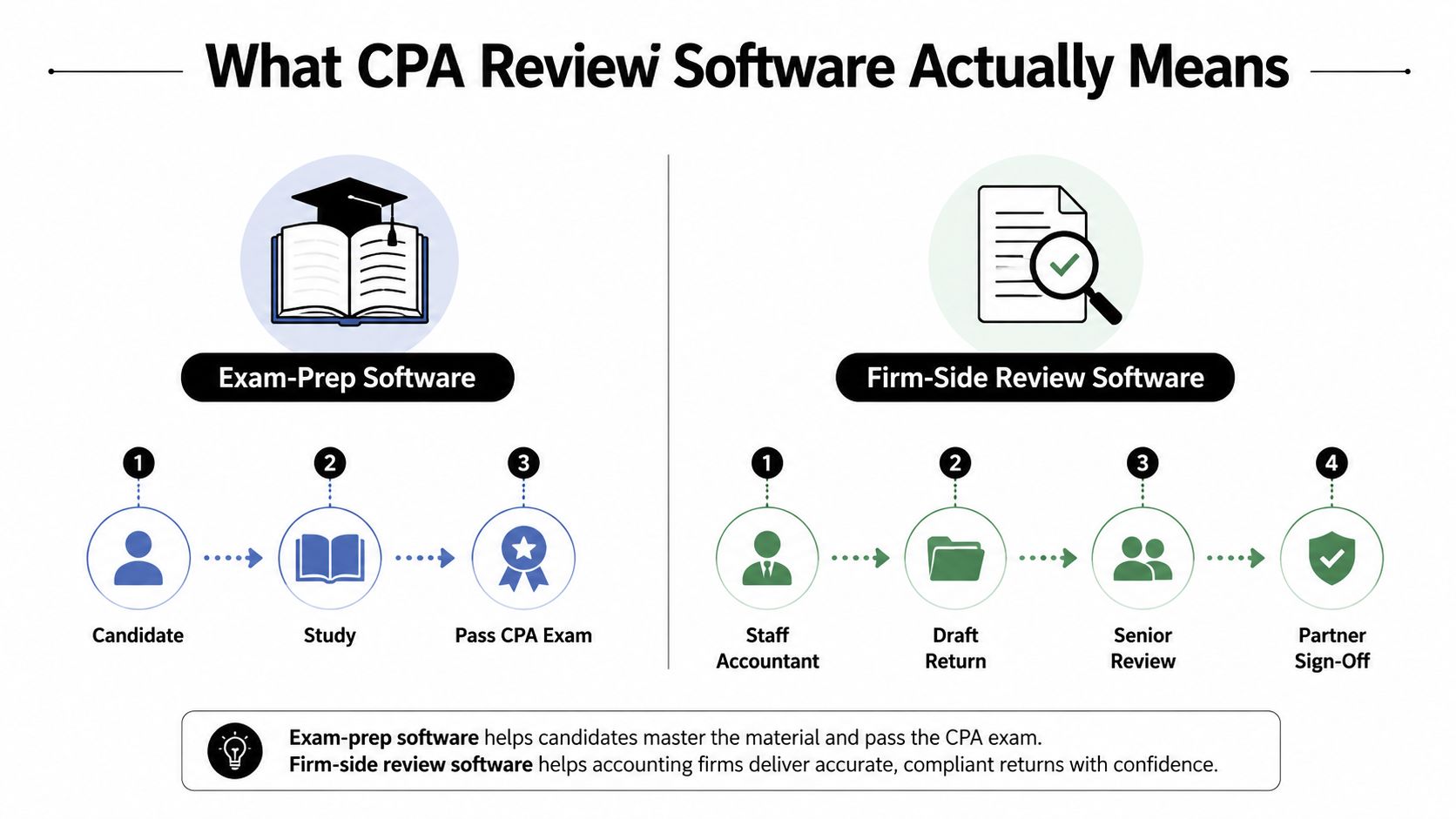
Exam-prep software versus firm-side review software
Exam-prep platforms are built for candidates. They use digital study guides, practice questions, simulations, and performance analytics so a user can study weak areas and prepare for the exam. That market is substantial, with independent research putting the category in the billions, including one estimate of $15.28 billion by 2025 and a 7.33% CAGR projected for 2025 to 2033 per the market data in Atlas CPA Index. Another study valued the category at USD 285 million in 2024, projected USD 470 million by 2032, and noted 100,000+ CPA candidates sat for the exam globally in 2023 at the same source.
Firm-side software has a different job. It ingests source documents, validates extracted data, compares the validated workpaper against the drafted return, and flags the discrepancies that matter. That's the product class this article is about.
Why the broader CPA technology market matters
The wider CPA tech stack has long been shaped by a small set of established platforms. In a 2025 survey, seven tax products accounted for most usage, led by UltraTax CS (22.9%), Drake Tax (16.3%), and Lacerte (15.8%) in The Tax Adviser's survey coverage. That concentration matters because it trains buyers to expect depth, reliability, and familiar workflows.
It also explains why new review tools can't just be “nice interfaces.” They have to fit into the existing tax prep stack and solve a very specific reconciliation problem. UWorld's review framing makes that clear too, describing the category as structured around thousands of MCQs, task-based simulations, and performance analytics on the exam-prep side in its CPA review materials. On the firm side, the equivalent expectation is not study content, it's operational control.
A good working definition is blunt. CPA review software for firms is post-preparation reconciliation software that helps staff compare source data to a drafted return, isolate true mismatches, and preserve an auditable sign-off trail. If a vendor can't do that, it's not solving the right problem.
The Six Core Features That Actually Matter
A lot of vendors sell “automation” and leave buyers to guess what that means. For 1040 review, the useful features are narrower and more practical. They either reduce manual comparison work or they don't.
Ingestion and validation come first
The first test is document intake. Can the platform handle W-2s, 1099s, brokerage statements, and messy scans without turning the reviewer into a cleanup crew? If extraction is sloppy, the rest of the workflow falls apart because bad data gets passed downstream.
Validation is the second layer. The software should catch obvious OCR mistakes before they show up in review, because a reviewer shouldn't have to decipher whether a number was mistyped or reported by the client. The tool stops being a file viewer and starts acting like a control point.
Review by exception is the real payoff
The best systems don't force a human to stare at every line. They compare the validated workpaper to the drafted return and show the differences that need attention. That review-by-exception model is the whole point, because it cuts through the noise and directs reviewer time to genuine mismatches.
A review tool that still makes your senior staff eyeball every line is just a more expensive way to do the same old work.
Audit trails, workflow roles, and security
A firm also needs traceability. For review work, the CPA guidance on preparation, compilation, and review stresses workflow review, efficiency, quality, and documented controls in the CPA.com technology guide. Software that records who checked what and when directly supports that expectation.
Roles matter too. Preparer, reviewer, and partner handoffs should be explicit, not improvised through email and comments. And security can't be a side note. If a vendor is going to hold client source data, the firm needs clear access controls, encryption, and enough documentation to satisfy internal risk review before onboarding.
For firms evaluating workflow tools more broadly, WP TieOut's take on tax workpaper automation is a useful reference point because it reflects the same operational logic, structured intake, validated comparison, and sign-off discipline.
How to Evaluate Vendors Without Getting Sold To
Most demos are designed to impress, not to answer hard questions. The buyer's job is to ignore the polish and focus on whether the software can survive real 1040 work. A slick dashboard doesn't matter if the validation logic is opaque or the audit trail falls apart during export.
Ask these questions in every demo
| Evaluation Criterion | Buyer Question to Ask | What a Strong Answer Sounds Like |
|---|---|---|
| Fit for 1040 work | Can it handle our common W-2, 1099, and brokerage cases without manual rework? | The system handles your actual file mix and shows exceptions cleanly. |
| Integration with tax prep | How does it fit our existing tax prep stack and file naming conventions? | It connects to your current process without forcing a rebuild. |
| Validation transparency | What exactly triggers a discrepancy, and can we see why it was flagged? | The logic is clear enough for reviewers to trust and explain. |
| Audit trail export | Can we export a clean record of review, comments, and sign-off history? | The export is usable without cleanup. |
| Roles and permissions | Can we separate preparer, reviewer, and partner access cleanly? | Permissions are role-based and easy to control. |
| Security and compliance posture | What documentation can you share before we commit? | The vendor shares it early and answers access-control questions directly. |
What to listen for
A strong vendor doesn't hide behind “AI” language. It explains how exceptions are detected, how workflow states move, and what the reviewer sees before sign-off. If the answer keeps drifting back to interface design instead of reconciliation depth, keep moving.
This is also where teams should pressure-test the administration side. Ask how permissions are managed, how exports are handled, and whether the platform can support firm policy without workarounds. WP TieOut's firm management context is relevant here because review software never lives alone. It has to sit inside a broader operating model.
The simple filter is this. If the vendor can't show the software working on your own messy files, the demo is theater. Do not buy from a slide deck.
Implementing Review Software Without Disrupting the Firm
Implementation fails when firms treat it like an install instead of a behavior change. The software can be fine and the rollout still collapses because reviewers keep using the old habits. That's especially true in tax season, when nobody wants another process that slows the queue.
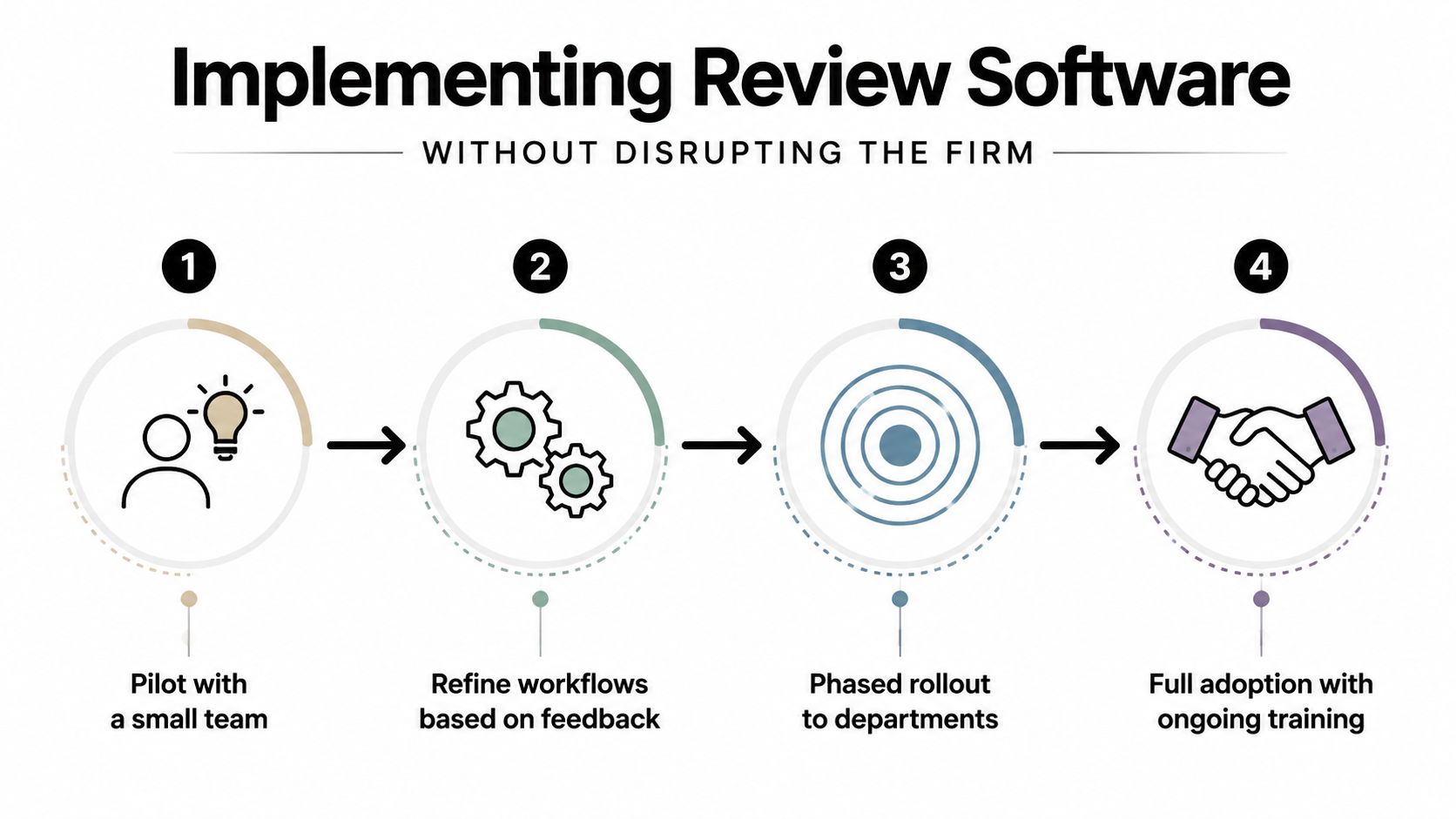
Start with a controlled pilot
Use a small cohort of real returns. Pick the dull, representative files first, not the hardest cases in the office. The point is to let a small group prove the workflow before the whole team has to trust it.
The reviewer and preparer should agree on handoff rules before the pilot starts. Decide what counts as a completed draft, what gets flagged as an exception, and what has to be resolved before partner review. That removes ambiguity when the first returns move through the tool.
Expect friction, then plan for it
Senior reviewers often built their reputation on catching little errors manually. A tool that automates part of that work can feel threatening if leadership frames it badly. That's not a software problem, it's a management problem.
Don't ask the reviewers to “just trust it.” Ask them to test it on real work and show where it misses.
The first month should include dual running, meaning the team compares the new workflow against the old one while confidence builds. That creates a safety net and exposes where settings are too loose or too strict. A named internal champion helps too, because someone has to absorb the small operational annoyances that come with any new system.
Use the rollout to standardize, not improvise
The best implementations make the firm more disciplined. They reduce the habit of every reviewer doing things differently and replace it with a shared review path. That matters because the point of software is not just speed, it's repeatability.
For teams considering automation across the broader workflow, an embedded walkthrough helps.
The firms that get this right treat implementation as training plus process design. The firms that get it wrong treat it like software procurement and wonder why adoption stalls.
Measuring ROI and the Pitfalls That Quietly Erase It
ROI only shows up if the firm changes its behavior. Buy the platform, then keep reviewing the old way, and you'll burn money without changing outcomes. Partners should measure the value in operational terms, not marketing claims.

What to measure
Start with minutes saved per return. That is the cleanest baseline because it shows whether the software is reducing manual comparison time or just changing where the work happens. Then look at reviewer capacity, meaning how many returns each reviewer can move through without the quality dropping.
A third measure is reduction in adjustments after sign-off. If the tool is doing its job, fewer problems should make it through review. Audit-readiness is harder to quantify, but partners know it when they see it. A clean, exportable history of who checked what and when makes internal review and external examination easier to defend.
The common ways firms erase the gain
The first mistake is under-tracking. If nobody records the time saved, the firm can't tell whether the process got faster or just felt better. The second is using inconsistent review checklists, which makes each reviewer a special case and destroys standardization.
The third mistake is tuning exception logic too loosely. When that happens, the software floods reviewers with noise and the promised time savings vanish in triage. The fourth is buying a platform that improves visibility but doesn't change behavior, so the firm gets prettier workflow charts and the same sign-off pain.
The lesson is straightforward. ROI comes from configuration and discipline, not from the logo on the contract. If leadership doesn't enforce the new workflow, the software will settle into the old one.
Your Next Step and Why a Demo Beats a Datasheet
Do not buy CPA review software from a datasheet. A datasheet can tell you what a vendor wants to promise, but it won't show how the system behaves on a ragged brokerage statement or a return with multiple source documents and messy scans. That's the difference between a pitch and a fit check.
Bring a handful of recent 1040 files to a live demo. Make sure they include the kind of work your firm handles most often, especially W-2, 1099, and brokerage cases. Then watch how the software handles extraction, how it presents exceptions, and how the audit trail exports at the end.
If a platform can't show that end-to-end on real files, it's not ready for your firm. The fastest buying mistake is assuming that a good presentation means a usable workflow.
WP TieOut is built for exactly this kind of post-preparation 1040 review, with source-document validation, review-by-exception, and an auditable sign-off trail. If you want to see how that looks on your own return mix, visit WP TieOut and run a guided demo before you commit to onboarding.