

At many firms, the tax return is technically “done” before the review is manageable. The preparer has a draft. The source documents are somewhere in a portal, a shared drive, Outlook, or a PDF binder someone assembled at midnight. The reviewer opens the file and starts the familiar hunt: Which 1099 drove this amount, why doesn't Schedule B agree, and who confirmed that the state withholding on the W-2 made it into the return?
That paper chase is still one of the least efficient parts of a 1040 workflow. It's also one of the easiest places to underestimate lost margin, because the time disappears in fragments. A few minutes downloading files. A few more renaming them. Another stretch tying numbers back to source documents that should have been linked from the start.
This is why tax workpaper automation has moved from a nice-to-have to a mainstream operational decision. The market for automated tax software reached $18.65 billion in 2024 and is projected to grow to $33.88 billion by 2031, while 84% of businesses plan to use AI heavily for tax functions in 2025 compared to 47% in 2024, according to automated tax software market data from Swell. That doesn't mean every product is mature or every rollout succeeds. It means firms are no longer debating whether automation belongs in tax. They're deciding where it belongs, and under what controls.
Table of Contents
- The End of the Endless Paper Chase
- What Is Tax Workpaper Automation Really
- The Four Pillars of Core Functionality
- Quantifying the Business Impact and ROI
- Your Practical Implementation Roadmap
- Putting It All Together A WP TieOut Example
The End of the Endless Paper Chase
A senior reviewer usually doesn't lose time on the obvious parts of the return. The time goes into the seams. Missing source links. Unclear file names. Tick marks that live in someone's memory instead of the workpaper. Follow-up messages asking whether an item was reviewed, imported, or assumed.
This is the burden tax workpaper automation addresses. It doesn't just move paper into a digital folder. It standardizes how source documents, extracted data, review notes, and sign-offs come together so the reviewer can work from a structured file instead of reconstructing the engagement from scratch.
Why the old workflow keeps breaking down
Manual workpaper processes create two kinds of drag.
First, they slow down review. A reviewer can't make a fast judgment if they have to inspect every line and hunt for every source document. Second, they create inconsistency. One preparer bookmarks everything. Another drops raw PDFs into a folder. A third names files correctly but doesn't connect them cleanly to the return.
Practical rule: If a reviewer has to ask where a number came from, the workpaper package wasn't finished.
The firms getting traction with automation usually start by fixing that package, not by chasing the flashiest AI feature. Good automation makes the return reviewable earlier and with fewer interruptions.
That matters even if you already have a portal and document storage. Intake and storage aren't the same as review readiness. A stack of uploaded PDFs is still a stack of PDFs.
For firms trying to clean up the intake side before automating review, strong tax document management software often becomes part of the foundation. It won't replace reconciliation logic, but it does reduce the disorder that makes review automation harder than it should be.
What peers are realizing now
The market data says the shift is well underway, but the practical reason is simpler. Firms can't keep absorbing review friction as if it's fixed overhead. During busy season, every avoidable touch compounds. Every manual tie-out steals time from judgment work, partner review, and client communication.
Tax workpaper automation works best when you treat it as an operating model change. The software matters. The workflow matters more.
What Is Tax Workpaper Automation Really
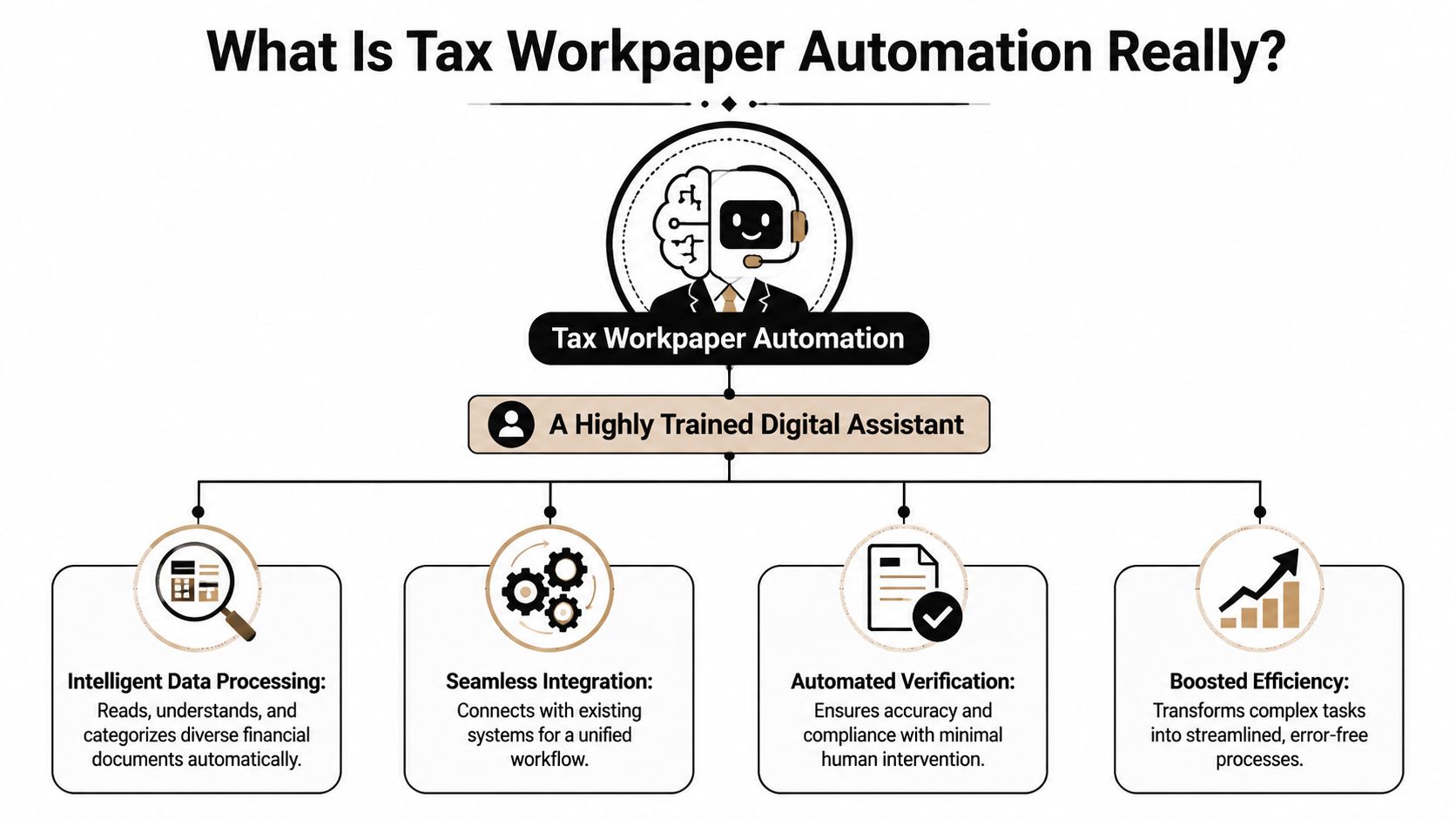
The easiest way to explain tax workpaper automation is this: think of it as a highly trained digital assistant assigned to the return file. It reads the source documents, pulls out the relevant tax data, organizes the workpaper, and then checks whether the drafted return agrees with what the documents say.
That's different from older tools that scanned a PDF and dumped text into fields. Basic OCR can capture characters. Modern tax workpaper automation is closer to a reconciliation engine. Its value isn't just extraction. Its value is validation.
What the system is actually doing
In a practical 1040 setting, the platform takes in W-2s, 1099s, brokerage statements, and similar source documents. It identifies the fields that matter, places them into a structured workpaper, and compares those values against the draft return.
If the figures align, the reviewer doesn't need to spend time proving the obvious. If they don't align, the system surfaces the discrepancy so a human can decide whether it's an extraction issue, a return issue, a missing document, or a legitimate exception.
That changes the reviewer's role from line checker to issue resolver.
What it is not
It isn't a magic button. It won't rescue a return built on missing source documents, inconsistent client records, or unstable upstream formatting. It also doesn't eliminate professional judgment. A machine can show that a number differs. It can't decide whether the taxpayer's situation justifies a treatment, whether a document belongs to the current year, or whether a disclosure issue exists outside the extracted field set.
Automation should remove repetitive verification work. It should not replace responsibility for the return.
The best systems also don't force the firm to abandon review discipline. They make that discipline more visible. A proper workflow still shows who prepared, who reviewed, what changed, and when each step was completed. The difference is that those facts live in the system rather than in email threads, sticky notes, or memory.
The core promise
The primary promise of tax workpaper automation is review by exception. Instead of proving every correct line by hand, the reviewer focuses on the items that failed validation or need judgment.
That sounds small on paper. In practice, it's a different review posture. The reviewer stops spending energy on mechanical tie-out work and spends more of it on the issues that merit senior time.
The Four Pillars of Core Functionality
Tax workpaper automation earns its keep when four functions work together. If one is weak, the firm usually feels it right away. Data gets imported but not trusted. Exceptions get flagged but not explained. Workpapers get generated but the audit trail is thin.
The strong platforms handle the full chain from source document to reviewer sign-off.

Intelligent data ingestion
The work commences. The system has to read messy, inconsistent tax documents and convert them into usable structured data.
The meaningful difference today is that strong platforms don't stop at optical character recognition. According to Thomson Reuters on tax return automation, AI-powered tax workpaper automation reduces manual data entry time by 60–75% through intelligent OCR that achieves >98% extraction accuracy by cross-referencing line items and flagging discrepancies via exception-based review rather than line-by-line inspection.
That matters because extraction without context creates more cleanup than value. A useful engine recognizes document types, identifies the right fields, and places them where the preparer or reviewer expects to see them.
For firms dealing with high document volume, income verification software often overlaps with this first pillar because income documents are where many 1040 workpapers either become structured quickly or turn into a manual cleanup project.
Automated validation and tie-out
Once the data is ingested, the platform has to compare source-derived values to the drafted return. During this comparison, many firms first determine whether the tool is operational or cosmetic.
In a manual workflow, a reviewer may move line by line through interest income, dividends, withholding, or proceeds, checking each amount against supporting documents. In an automated workflow, the system performs that matching first and highlights only the mismatches.
A practical before-and-after looks like this:
- Before automation: Staff read each form, key amounts into workpapers, and then recheck those amounts against the return.
- After automation: The system validates extracted values against the draft and presents a short list of variances for review.
The gain isn't only speed. It's consistency. Machines don't get tired on the fifteenth brokerage packet.
Review by exception workflow
This is the feature that changes reviewer behavior the most. The reviewer no longer starts with a blank mental map of the file. They start with a queue of exceptions.
That queue might include a dividend amount that doesn't agree to Schedule B, withholding that appears on the source document but not the return, or a document that was ingested but not matched cleanly. Each item asks a focused question. Is the return wrong, is the source incomplete, or is the discrepancy explainable?
Review by exception works when the exception list is short, credible, and tied directly to source support.
If the platform throws too many false positives, reviewers stop trusting it. If it hides too much, reviewers won't rely on it. The best systems get the balance right. They narrow attention without pretending to replace judgment.
The audit trail that actually holds up
The final pillar is the least glamorous and one of the most important. Workpaper automation should leave behind a defensible record.
That means the file shows the original source pages, the extracted data, the validation status, the annotations, and the sign-off path. It should be clear who touched what and when. If a partner, internal quality reviewer, or examiner opens the binder later, they should be able to follow the trail without interviewing the team.
A weak audit trail forces firms back into reconstruction mode. A strong one preserves the review history as the work happens.
Quantifying the Business Impact and ROI
Most firms don't buy tax workpaper automation because it sounds modern. They buy it because the review bottleneck is expensive, senior time is scarce, and manual tie-out work doesn't scale well during filing season.
The strongest business case usually starts with review cycle time. According to USTech Automations on automating workpaper review, tax workpaper automation can reduce average review cycle times by 35–40%. The same source notes that a firm processing 200 engagements annually typically recoups its first-year automation costs within 2–3 months, which can translate to approximately $100,000 in average annual savings.
Where the return shows up first
The first return isn't always dramatic in isolation. The cumulative effect is.
The recovered time usually appears in places that firms already feel acutely:
- Senior review capacity: Less time spent chasing support and reconciling clean items.
- Fewer manual follow-ups: The file itself shows what's missing or unresolved.
- Cleaner handoffs: Preparers, reviewers, and partners spend less time re-explaining the status of a return.
- Shorter turnaround: Returns move faster because review starts from organized exceptions, not from document assembly.
There's also a staffing angle. Many firms try to solve review delays by adding people during peak periods. Automation doesn't remove the need for experienced staff, but it does reduce the amount of senior attention consumed by mechanical checking.
Manual review vs automated workflow
| Metric | Manual Process | Automated Process |
|---|---|---|
| Review cycle | Reviewer checks line by line and hunts for support | Reviewer works from surfaced discrepancies and linked support |
| Senior time | Heavy time spent on mechanical tie-out | More time available for judgment and final review |
| File consistency | Varies by preparer and binder quality | Standardized structure across returns |
| Issue visibility | Status often lives in email, notes, or memory | Exceptions and sign-offs live in the workflow |
| Cost recovery | Savings are hard to capture because work is fragmented | Savings become visible through reduced cycle time and recovered senior capacity |
Firms usually underestimate the ROI because they count labor savings and miss the value of faster review, cleaner turnaround, and fewer preventable misses.
The key point is that ROI doesn't come from “AI” as a label. It comes from redesigning review so experienced staff stop doing clerical reconciliation work.
Your Practical Implementation Roadmap
Most failed rollouts aren't software failures. They're selection failures or sequencing failures. Firms automate the wrong work first, assume all source data is stable, and then conclude the product underperformed when the actual issue was upstream chaos.
That's why the implementation roadmap should begin with a sorting exercise, not a vendor demo.
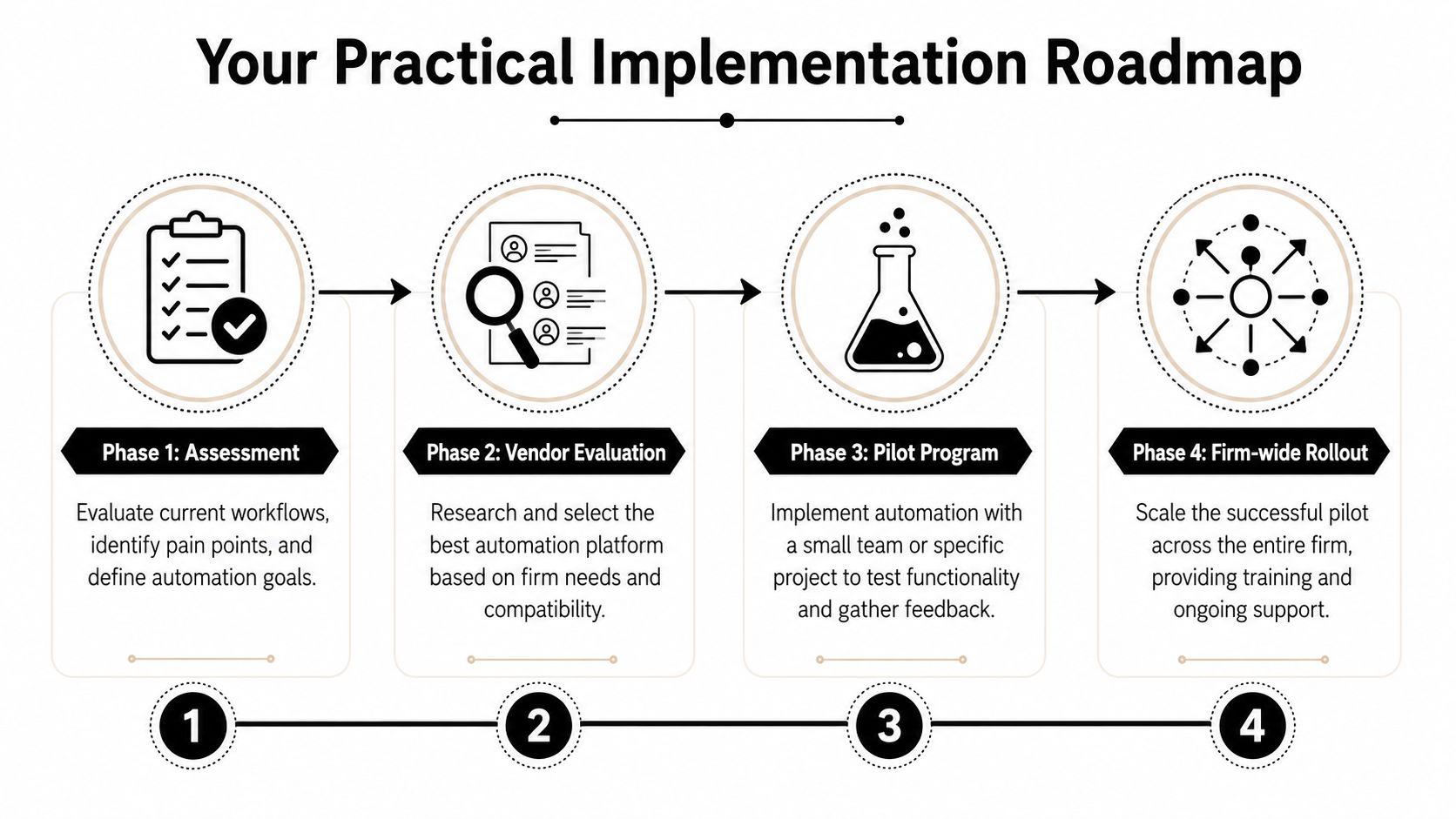
Phase one starts before vendor demos
The first question isn't “Which platform has the most features?” It's “Which workpapers in our firm are stable enough to automate well?”
That distinction matters because a critical implementation insight is that 60–70% of failed tax workpaper automation initiatives stem from unstable upstream data structures, not poor AI models, according to TaxTime on why not every tax workpaper should be automated. The same source argues that successful implementation requires categorizing workpapers into automatable zones based on data stability before full rollout.
A practical internal assessment usually sorts work into three buckets:
- Strong candidates: Standard documents, repeatable layouts, and clear mapping to return fields.
- Conditional candidates: Mostly structured inputs, but occasional inconsistency or document variation.
- Manual holdouts: Volatile, incomplete, or highly unstructured source data that still needs human control.
To avoid a disappointing pilot, many firms benefit from understanding automation suitability. Stable W-2 and 1099-heavy 1040 work often automates well. Highly irregular statements or inconsistent client-provided schedules may not.
Pilot the stable work first
Once the firm knows what belongs in the first wave, pilot a narrow slice of work with a small group of preparers and reviewers. Don't measure success by whether every return goes straight through untouched. Measure it by whether the system improves review readiness, flags meaningful exceptions, and reduces back-and-forth.
The best pilot teams also define what the software should not do. If a category of workpaper still requires manual review discipline, say so upfront. Firms get into trouble when they oversell the pilot internally and create the expectation that all review friction will vanish.
Start where the data is boring. Boring data produces the fastest wins.
Change management is where firms win or stall
Technology adoption inside a CPA firm is rarely blocked by the interface. It's blocked by role confusion.
When tax workpaper automation is introduced, some staff worry the system is replacing preparation work. In practice, it shifts the work. Less time goes to rekeying and document chasing. More time goes to resolving exceptions, validating source completeness, and exercising judgment earlier.
A useful rollout plan usually includes:
- Clear ownership: Decide who validates source completeness, who clears exceptions, and who gives final sign-off.
- Training on edge cases: Staff need examples of where automation is trusted and where manual escalation is required.
- Revised review standards: Reviewers should work from the exception workflow, not recreate the old line-by-line method out of habit.
- Feedback loops: Capture where false positives, weak mappings, or unstable document types create friction.
Firms that treat implementation as a workflow redesign tend to get much more value than firms that treat it as software installation.
Putting It All Together A WP TieOut Example
A practical example makes this easier to visualize. Take a fairly standard 1040 engagement with a W-2, several 1099s, and a brokerage packet. The preparer uploads the source documents, the system reads them, and the return draft is brought into the review environment.

A realistic 1040 workflow
The first useful result isn't just extracted data. It's a structured workpaper tied to the actual source pages. W-2 wages, withholding, payer details, 1099 interest, dividends, and related values are organized so the preparer and reviewer are looking at the same evidence set.
The next step is the one that changes review behavior. The system compares validated source data to the drafted return and surfaces mismatches. If Schedule B doesn't agree to imported 1099 data, that item gets flagged. If withholding appears on a source document but not the return, that exception is visible immediately. The reviewer isn't scanning every line to discover these issues manually.
If you want to see what a reconciled file can look like in practice, this tax reconciliation example shows the kind of source-linked review structure firms are aiming for.
Where the handoffs improve
The handoff from preparer to reviewer is where many firms still leak time. A preparer may understand the file perfectly, but that understanding often isn't embedded in the workpaper. In a structured review platform, the status of each item is visible. The reviewer can see what was validated, what failed tie-out, and what still needs explanation.
That clarity also helps at the partner level. Instead of opening a final binder and wondering what was reviewed, the partner sees a sign-off path tied to specific actions. The finished file can then be compiled into a source-linked, bookmarked PDF binder with the review history preserved.
A short product walkthrough makes this easier to picture in motion:
The point isn't that every return becomes touchless. It won't. The point is that the human touches happen in the right places. Staff spend less time assembling and proving clean data, and more time resolving the few items that warrant attention.
If your firm is trying to cut review friction without sacrificing control, WP TieOut is built for exactly that use case. It helps tax teams validate source documents, reconcile drafted 1040 returns through review by exception, and produce audit-ready binders with a clean sign-off trail.