

At many firms, the tax season bottleneck still happens in the same place. A preparer finishes the return, a reviewer opens the draft, then starts the slow tie-out against W-2s, 1099s, brokerage statements, K-1s, organizer notes, and whatever else landed in the client folder. Hours later, the review file is full of sticky notes, highlights, and unanswered questions. The problem isn't only time. It's that the whole control process depends on whether tired humans catch the right mismatch on the right page.
That model breaks first in complex 1040 work. One imported number lands in the correct field but came from the wrong document context. A supplemental statement gets read correctly but categorized incorrectly. A reviewer signs off that the math ties, yet no one can later show who validated the classification decision or when. Those misses aren't usually dramatic. They're subtle, expensive, and avoidable.
Firms are responding by changing the process, not just speeding up the old one. The market reflects that shift. The global tax compliance software market reached approximately USD 18.5 billion in 2024 and is projected to reach USD 42.8 billion by 2033, with 8.7% CAGR from 2025 to 2033, according to DataHorizzon Research's tax compliance software market analysis. The reason is straightforward: regulatory complexity keeps rising, and manual review doesn't scale cleanly.
For firms still relying on bookmarked PDFs and late-night manual tie-outs, even specialized tools like PDF bookmarking software for tax workpapers solve only part of the problem. Better organization helps. It doesn't answer the harder question of whether the data was validated correctly before it reached the return.
Table of Contents
- The End of Late Night Eyeballing
- What Tax Compliance Software Really Is
- Core Capabilities That Drive Real Value
- Benefits Beyond Simple Time Savings
- How to Choose the Right Software for Your Firm
- Planning Your Implementation and ROI
- Your Next Steps Toward Automated Compliance
The End of Late Night Eyeballing
A reviewer gets to the last return of the night. The numbers mostly tie. The brokerage packet is long, the 1099 composite is messy, and one line on the draft looks plausible enough that it almost escapes attention. That is how quality control fails in many firms. Not through a dramatic system error, but through an exhausted human making a reasonable judgment under time pressure.
The old review method asks strong people to do weak work. It turns skilled tax professionals into manual comparison engines. They scroll through PDFs, cross-reference fields, mark pages, and re-check entries that were already touched by preparers upstream. The work is repetitive, but the risk isn't. A return can be mathematically accurate and still wrong because the wrong source value was used, the right value was used in the wrong context, or a reviewer assumed someone else had already validated the issue.
What the manual process gets wrong
The biggest problem with line-by-line eyeballing isn't speed. It's inconsistency.
Two senior reviewers can inspect the same return and focus on different issues. One is strong on wage and withholding tie-outs. Another catches basis and classification problems. Both are competent. Neither gives the firm a repeatable control standard.
Practical rule: If your review process depends on reviewer memory, reviewer stamina, or reviewer style, it isn't a durable control process.
That is why tax compliance software matters. Properly implemented, it doesn't just automate calculations. It changes the review model from checking everything manually to isolating exceptions that deserve judgment.
The shift firms actually need
The firms getting value from automation aren't looking for a flashy AI overlay. They're trying to solve three operational problems:
- Too much low-value review work that keeps senior people in document comparison instead of issue resolution
- Too many hidden classification risks where extracted data appears correct but has been interpreted incorrectly
- Too little defensible review history when a partner asks who reviewed a discrepancy and how it was cleared
Good tax compliance software creates a system where routine matching is automated, exceptions are surfaced, and human review happens where it adds value. That is a very different operating model from "upload documents and hope the OCR got it right."
What Tax Compliance Software Really Is
Most firms first evaluate tax compliance software as if they were shopping for a better calculator. That's the wrong frame. A strong platform functions more like an automated control layer sitting between source documents, workpapers, and the drafted return.

From calculator thinking to control thinking
A calculator answers the question, "What is the result?"
Tax compliance software should answer harder questions:
- What data entered the workflow
- How the platform interpreted that data
- Which rule set applied
- What failed validation
- Who reviewed the exception
- Whether the return and source support the same conclusion
That difference matters. A tax team doesn't lose sleep because addition is hard. It loses sleep because source data is messy, returns are drafted under deadline, and review documentation often isn't strong enough to reconstruct decisions later.
Modern platforms rely on a Tax Rule Engine, an AI-Powered Tax Calculation Engine, and a Data Integration & ETL Pipeline to ingest transaction data, classify it for taxability, determine jurisdictional treatment, and automate return generation, as described in Wolters Kluwer's overview of tax compliance technology. For a CPA firm, the practical takeaway is simple: the system should move data through a structured validation path, not just transfer values from one place to another.
Why firms are adopting it now
Mandates and workflow pressure are pushing firms forward at the same time. Digital filing mandates influence over 78% of enterprises globally to adopt tax software for compliance accuracy, and over 35% of users have already adopted AI-driven automation for real-time error detection, according to Industry Research's tax software market report.
That doesn't mean every firm needs the same stack. A practice centered on high-volume, straightforward returns has different needs from a firm handling document-heavy 1040s with brokerage activity, multiple income streams, and partner review layers.
What does carry across firm types is this: the software has to support review by exception. If it still leaves staff manually proving every obvious item, it may automate intake, but it hasn't improved the control model.
Tax automation works when it removes repetitive verification and leaves judgment calls to people. It fails when it just creates a faster pile of unchecked data.
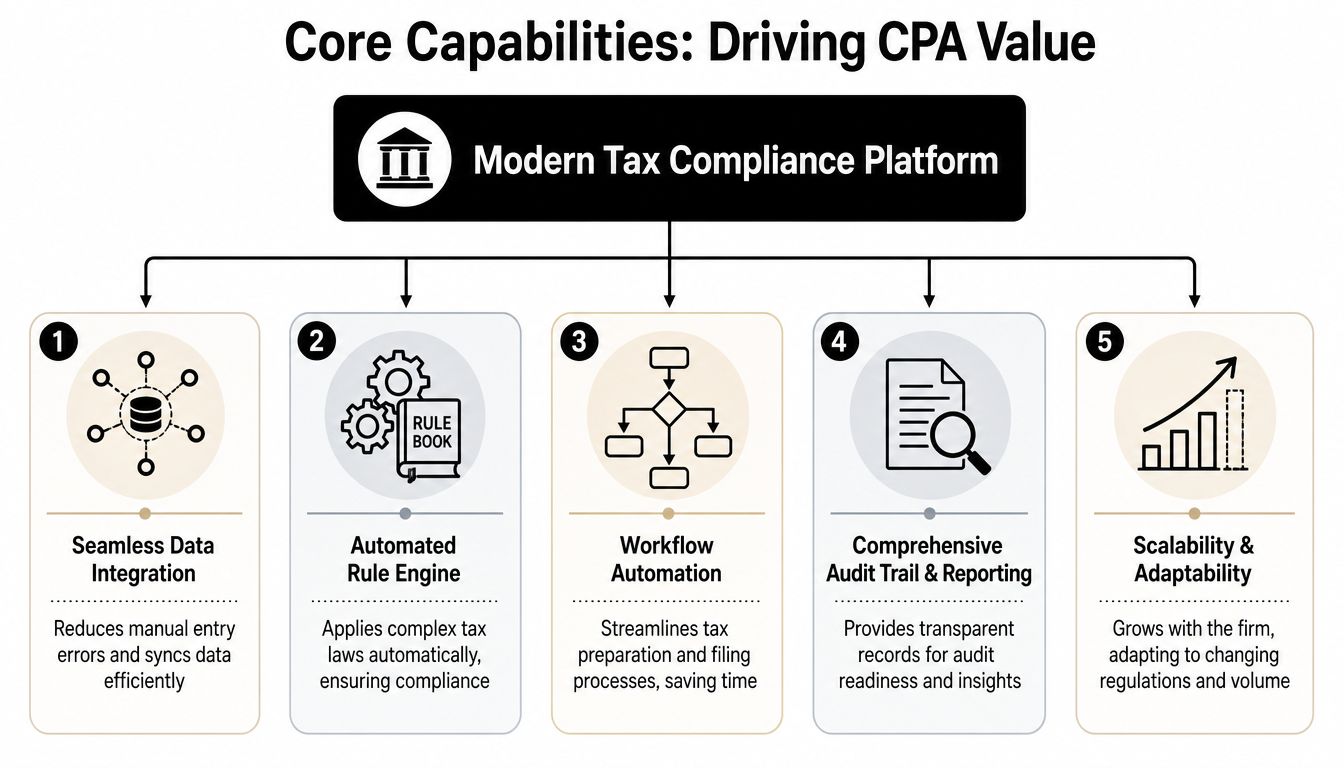
Core Capabilities That Drive Real Value
The difference between a useful platform and a disappointing one usually shows up after implementation. In demos, most systems look polished. In production, the winners are the ones that reduce review noise without hiding risk.
The engine under the hood
A serious tax compliance platform needs a few core capabilities working together.
| Capability | What it should do in practice | Why it matters |
|---|---|---|
| Data ingestion | Pull data from source documents and connected systems | Reduces manual rekeying and the errors that come with it |
| Rule application | Apply current tax rules consistently | Keeps treatment standardized across preparers and reviewers |
| Reconciliation | Compare validated source data to drafted return fields | Surfaces meaningful mismatches instead of forcing full manual tie-out |
| Workflow control | Route work across preparer, reviewer, and partner roles | Prevents unclear handoffs and skipped review points |
| History and reporting | Preserve an audit-ready record of activity | Supports internal QC and external examination readiness |
The category of audit trail software for tax workflows is relevant. But a firm shouldn't stop at "does it log actions." That standard is too low.
Where basic automation falls short
Many products handle OCR or document capture adequately on standard forms. The true problem begins when the platform extracts the number correctly but assigns the wrong meaning to it.
That is the overlooked human-in-the-loop validation gap.
If a system reads a figure from a 1099-K, but downstream logic or mapping causes it to be treated like wage income, the extraction itself may look successful. A reviewer who trusts the automation too early can miss the contextual error because the number appears where a number should be. That is why firms need software that doesn't only ingest data. It must support validation against document context and let humans review exceptions where the AI's interpretation is uncertain.
Three signs a platform is too shallow:
- It celebrates extraction accuracy but says little about contextual validation
- It produces lots of flags without ranking true risk
- It assumes staff will catch interpretation errors during normal review
A platform that only digitizes source documents may reduce clerical work. It won't necessarily reduce costly misses.
Why sign-off trails matter more than generic logs
Vendors often say "audit trail" as if the term settles the matter. It doesn't. A generic audit trail usually shows that something happened in the system. It may record edits, uploads, timestamps, or status changes. That's useful, but it is not enough for internal quality control.
A sign-off trail answers more pointed questions:
- Who reviewed this discrepancy?
- What exactly did they approve or annotate?
- In what role did they act?
- When did the handoff occur?
- Can the firm export that history cleanly for internal review or examination?
That distinction matters most in CPA firm workflows with preparer, reviewer, and partner checkpoints. If the software can't tie annotations and approvals to named users and roles, the firm still relies on informal memory and email chains to prove review happened.
A generic system log helps IT. A sign-off trail helps a partner defend the review process.
This is one of the least understood buying criteria in the market. Firms ask whether a platform has an audit trail. They should ask whether the software can produce a defensible, user-linked sign-off history that reflects the way tax work moves through the firm.
Benefits Beyond Simple Time Savings
The easiest way to undersell tax compliance software is to describe it as a time saver. Time savings matter, but partners usually approve budgets for stronger reasons: lower review risk, better control consistency, and the ability to grow without pushing senior people deeper into manual checking.
Better reviews, not just faster reviews
A review-by-exception workflow changes the quality of the review itself. Instead of spending energy proving obvious matches, reviewers can concentrate on unresolved items, strange classifications, and gaps between source support and drafted treatment.
That has a practical effect on reviewer behavior. People slow down where they should slow down. They stop wasting attention on straightforward fields solely due to process requirements.
Consider the contrast:
Manual review environment
Reviewers inspect broad sections line by line, often with uneven depth depending on time pressure and document complexity.Exception-based environment
The system handles routine comparison first, then pushes unresolved issues into a focused queue for human judgment.
That isn't just efficiency. It's better deployment of expertise.
A stronger control environment
Good firms already care about penalties, notices, and rework. The larger issue is reputation inside the client relationship. Clients rarely see the hours spent reviewing, but they do notice amended returns, avoidable follow-up questions, and confidence gaps during delivery.
A solid tax compliance workflow strengthens the firm in three ways:
It standardizes how returns are reviewed.
The firm gets more consistency across staff levels and offices.It documents how decisions were cleared.
Internal QC no longer depends on chasing emails or deciphering markup on static PDFs.It keeps the file ready for scrutiny.
When a partner or examiner wants support, the workpaper package is already structured around source linkage and reviewer action history.
There is also a scaling benefit. As return volume grows, firms usually have two bad options: hire aggressively into repetitive review work or ask current staff to absorb more complexity. Better software creates a third option. It lets the firm grow review capacity by redesigning the process.
The strongest return on automation often comes from fewer preventable misses and cleaner review evidence, not from shaving minutes off data entry.
How to Choose the Right Software for Your Firm
Buying tax compliance software gets easier when you stop asking which vendor is "best" and start asking which control problem your firm needs to solve first. The answer is rarely the same across firms.

Start with return type, not vendor branding
A firm focused on individual returns has different pain points from a tax department managing broad entity compliance. If your core work involves 1040s with many source documents, your evaluation should emphasize document handling, return tie-out, reviewer workflow, and sign-off evidence. If your work is more jurisdiction-driven, your attention may shift toward rule maintenance, integration depth, and filing support.
That is why broad vendor claims can be misleading. "AI-powered" can mean anything from document OCR to a real validation layer. "Audit-ready" can mean anything from downloadable reports to a role-based record of every review action. Firms should compare products against their live review process, not against marketing language from a homepage.
For firms exploring newer providers in the market, directories of AI automation companies serving tax and accounting workflows can help build an initial list, but the shortlist should be based on process fit.
A short demo is useful. A sample-file test is better.
A practical evaluation checklist
Use a working checklist with your actual return types and review steps.
Document support
Can the system handle the source documents your staff sees every day, including brokerage statements, consolidated 1099s, and irregular supplemental pages?Contextual validation
Does the software only extract data, or does it help validate whether the extracted amount belongs in the drafted field where it appears?Exception quality
Are reviewers getting a short list of meaningful discrepancies, or a noisy flood of low-value alerts?Sign-off depth
Can the platform show who reviewed a specific item, what was annotated, and when each approval happened?Workflow fit
Does it mirror your preparer, reviewer, and partner handoff model, or force your team into a generic task sequence?Export quality
Can you produce a clean binder or review file that preserves original source context and review evidence?
Bring your security team or operations lead into the process early. Enterprise platforms should include Security, Encryption & Access Control along with Audit & Compliance Monitoring to preserve audit-ready history and reduce error risk through continuous updates, as described in this enterprise tax platform development overview on LinkedIn.
The vendor's video may help you see how the workflow is presented.
Questions that expose weak products fast
Ask direct questions during evaluation. Soft questions get polished answers.
Show me a case where the amount was extracted correctly but categorized incorrectly.
Then ask how the system flags and routes that issue.Show me the sign-off history for one discrepancy from preparer through final approval.
If the vendor can't do this cleanly, the workflow control is probably thin.Show me what the reviewer sees when the system isn't confident.
Confidence handling tells you more than success cases do.Show me the export package.
A product can have good on-screen workflow and still produce poor downstream documentation.
The best buying process is not feature counting. It is pressure testing the software against the exact points where your current review process breaks.
Planning Your Implementation and ROI
Most first-time automation projects fail for one of two reasons. The firm buys a system without a clear use case, or it tries to roll out everything at once. Both are fixable.
Roll out in a pilot, not a firm-wide blast
Start with one return type, one office or team, and a handful of preparers and reviewers who are comfortable giving candid feedback. Document the current review process before the pilot starts. If you don't know how work moves today, you won't know whether the software improved it.
Use the pilot to answer practical questions:
- Where does data validation still require human review?
- Which exception types matter most?
- What support do reviewers need to trust the workflow?
- What export record satisfies partner review standards?
A simple visual walkthrough can help teams react to something concrete during pilot discussions.

Don't judge the pilot only by speed in the first week. Early friction is normal. What matters is whether the team ends up with cleaner exception handling, less redundant review, and stronger review evidence.
How to think about ROI without fake precision
For a first investment, ROI should be framed around a few observable outcomes:
- Reviewer hours moved away from manual tie-out
- Reduction in avoidable rework
- Fewer missed discrepancies reaching partner review
- Stronger internal QC documentation
- Easier onboarding for newer staff into a repeatable process
A practical formula is:
ROI = labor savings + avoided rework + control value – software cost – implementation effort
Not every component needs a hard number on day one. Some firms can quantify labor movement cleanly. Others get partner approval because the control environment improves in ways that matter operationally, even if the value isn't reduced to a tidy spreadsheet.
Ask vendors pointed implementation questions early. How long does onboarding usually take for your return type? What data security controls are in place for access, encryption, and user permissions? What internal systems integrate now, and which require manual workarounds? What training is provided for preparers versus reviewers?
Those answers usually tell you more about fit than another feature slide ever will.
Your Next Steps Toward Automated Compliance
The firms that benefit most from tax compliance software don't treat it as a gadget. They treat it as a redesign of review and quality control. That means the right question isn't whether automation can help. It is where your current process is leaking time, consistency, or review evidence.
Start with four actions.
First, audit your current review workflow. Identify where staff still do line-by-line comparison, where classification mistakes are most likely, and where partner sign-off depends on informal notes instead of system evidence.
Second, shortlist vendors based on your actual return profile. A 1040-heavy practice should prioritize document validation, review-by-exception workflow, and role-based sign-off history over generic enterprise messaging.
Third, schedule a live demo using one of your own messy files. Clean demo data hides weak validation logic. Real returns expose it.
Fourth, propose a controlled pilot. Give a small team a defined use case, a short evaluation window, and clear success criteria tied to review quality, not just speed.
A firm doesn't need to automate every tax process at once. It does need a review model that can hold up under volume, complexity, and scrutiny. That's where modern tax compliance software earns its place.
If your firm wants to see how review by exception, source-linked binders, and role-based sign-off trails work in practice, take a look at WP TieOut. It's built for CPA firms reviewing drafted 1040 returns against source documents, with a workflow that validates extracted data, surfaces real discrepancies, and preserves a defensible review history from preparer through partner approval.