

A senior reviewer at a mid-size CPA firm is finalizing a batch of client returns when a staff accountant clicks a link that appears to lead to the firm's document portal. The page is a convincing copy. Within minutes, the attacker has the accountant's username and password, and the review team is still working as if nothing has happened.
What happens next depends less on whether the firm owns a particular security product and more on whether its security controls work together. Can multi-factor authentication stop the stolen login? Can role-based access prevent the account from opening every client folder? Will logging show which records were accessed? Can the firm revoke the session, investigate the event, and produce reliable evidence for its insurer, clients, or an examiner?
Security controls are the preventive, detective, and corrective safeguards that protect the confidentiality, integrity, and availability of information. They govern who can access tax data, what users and systems can do with it, how suspicious activity is identified, and how the organization responds when a safeguard fails. The sections below translate the question “what are the security controls” into practical decisions for CPA firms and operations teams.
Table of Contents
- Why Security Controls Matter More Than Ever
- The Three Core Categories of Security Controls
- Foundational Technical Controls You Cannot Skip
- Administrative and Physical Controls That Close the Rest
- Security Controls Inside a CPA Tax Review Workflow
- The Gap Between Controls on Paper and Controls in Practice
- Building a Control Stack That Holds Up
Why Security Controls Matter More Than Ever
Tax workflows concentrate valuable information in a small number of systems. A single engagement may involve Social Security numbers, wage statements, brokerage records, bank information, signed forms, workpapers, and communications between the preparer, reviewer, and partner. If an attacker gains access, the issue isn't limited to one stolen password. The attacker may be able to read records, alter workpapers, impersonate employees, or use the account to reach other systems.
That exposure has a financial dimension. The global average cost of a data breach reached $4.88 million in 2024, a 10% year-over-year increase, according to the industry data on access-control exposure. The same source reports that 38% of breaches involved stolen credentials, compared with 31% over the prior decade, and that credential-based attacks take an average of 292 days to detect. Those figures explain why a login page clone is not merely an employee-training problem. It tests identity controls, monitoring, response procedures, and the firm's ability to prove what happened.
Controls protect more than confidentiality
Confidentiality means the right people can see client information while unauthorized people can't. Integrity means a reviewer can trust that a workpaper, tie-out, or draft return hasn't been changed without detection. Availability means the team can access the records and applications needed to complete the engagement, even after an outage or security event.
A good control addresses a defined failure mode:
- Phishing-resistant access controls reduce the chance that a stolen password becomes an active session.
- Least-privilege permissions limit the records an affected account can reach.
- Audit logging creates evidence about sign-ins, permission changes, and file activity.
- Incident response procedures give named people a way to contain the event and preserve evidence.
- Backups and recovery measures help the firm continue operating when systems are unavailable.
These safeguards aren't separate decorations around a software platform. They form a coordinated operating process. A firm with encryption but broad permissions may protect a stolen laptop while leaving active accounts overexposed. A firm with detailed policies but no access reviews may have a strong description of a control and weak enforcement of it.
The NIST SP 800-53 Rev. 5 control catalog, published in 2020, treats access control as a core family with 25 distinct requirements covering account management, least privilege, separation of duties, and related safeguards. That structure matters to tax and finance teams because it turns a vague goal, “keep client data secure,” into questions that can be tested and evidenced: who has access, why do they have it, what can they do, and who reviews the result?
Practical rule: A security control is useful only when someone owns it, the system enforces it, and the firm can produce evidence that it operated.
The Three Core Categories of Security Controls
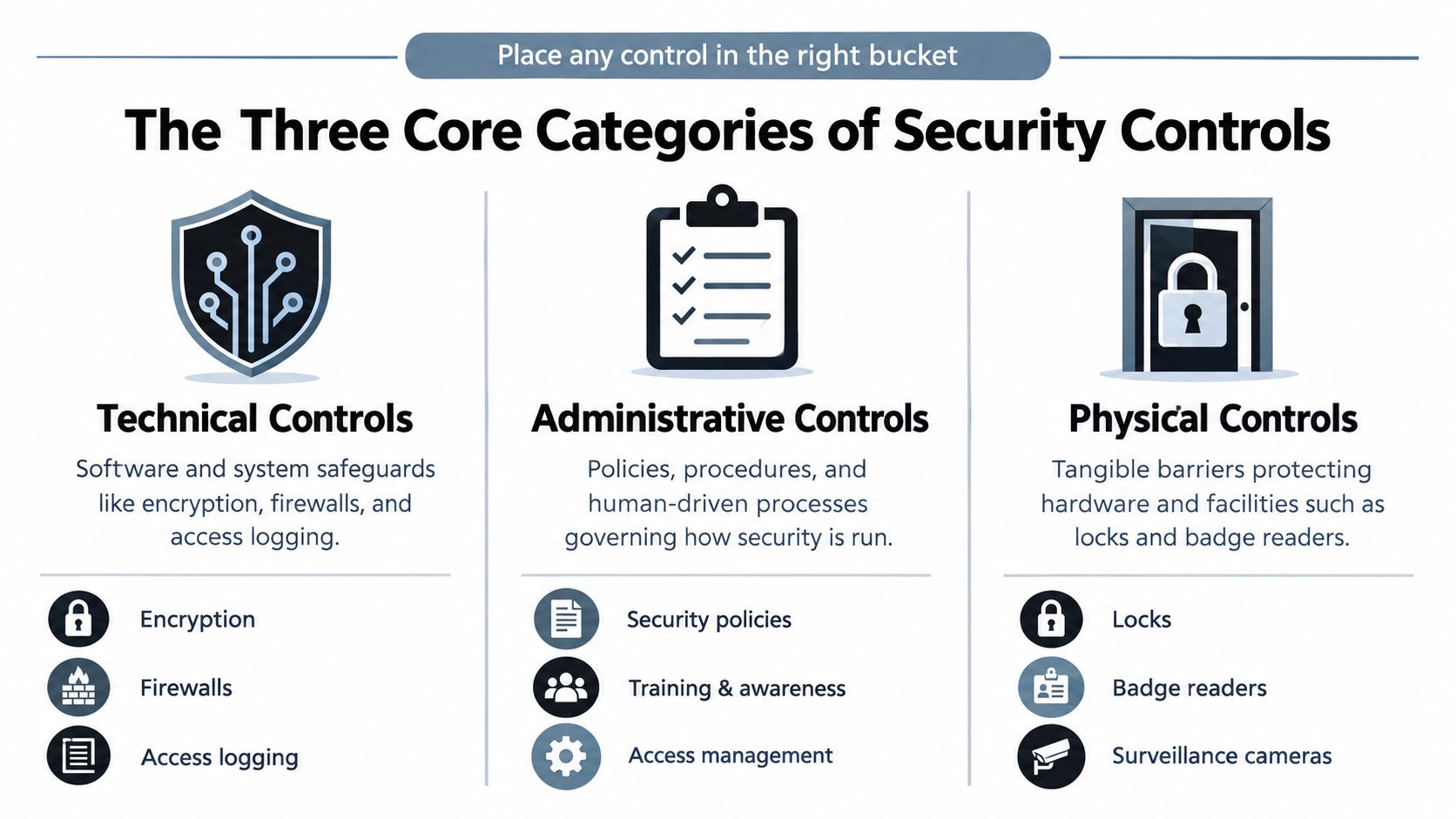
The three traditional categories give managers a quick way to classify any safeguard. Technical controls operate through software, systems, and configuration. Administrative controls govern people, decisions, and procedures. Physical controls protect facilities, devices, and paper records. A control can support more than one category, but the classification helps identify what kind of failure it is meant to prevent.
Technical controls
Technical controls enforce rules inside systems. Encryption protects a file while it's moving through a portal or stored on a device. Multi-factor authentication challenges a user beyond a password. Firewalls and network segmentation restrict which systems can communicate. Endpoint protection identifies suspicious activity, while audit logs record important events for later investigation.
The failure mode is usually direct: an unauthorized user attempts to sign in, a malicious program runs, a system exposes a service, or an account tries to access information outside its role. Technical safeguards can prevent the action, detect it, or contain its effect.
Administrative controls
Administrative controls tell people how security should operate. They include access-review procedures, onboarding and offboarding checklists, security awareness training, vendor due diligence, retention schedules, and incident response plans. These controls address decisions that software can't make on its own.
For example, an identity system may support rapid account deactivation, but an administrative procedure must tell the firm's operations lead when an employee leaves, who approves the change, and how the firm verifies completion. Training may reduce the chance of a phishing click, while a response plan determines what happens after someone reports one.
Physical controls
Physical controls protect the places and objects where information exists. Badge readers, locked server rooms, visitor logs, privacy screens, locked filing cabinets, and secure destruction services all belong here. Device encryption also supports physical protection because it reduces the value of a laptop if someone steals it.
The categories overlap. A badge reader is physical, its access records are technical, and the visitor-management procedure is administrative. Strong programs manage them as one system. If a reviewer can enter an office after hours, find printed client records on an unattended desk, and use a workstation that is open, a well-configured cloud portal won't close the entire exposure.
Foundational Technical Controls You Cannot Skip
Technical controls should be selected by the failure they prevent, not by the appeal of a feature list. In a tax environment, the central questions are practical: can an attacker use a stolen identity, can a user reach records outside the engagement, can the firm reconstruct activity, and can an exploitable weakness remain open?
Role-based access control and least privilege are especially important. The NIST guidance on logical access controls describes the need to restrict which users and processes can access systems and perform actions. In a CPA firm, a preparer may need to upload source documents and update assigned workpapers, while a reviewer may need review and approval rights. Neither role should automatically receive unrestricted access to every client file.
| Technical control | Failure mode it prevents | Example in a tax or audit workflow |
|---|---|---|
| Encryption in transit and at rest | An intercepted transmission, stolen laptop, or exposed storage device becomes immediately readable | A client's K-1 remains protected while it moves to the portal and while the portal stores it |
| Multi-factor authentication | A reused or phished password is enough to take over an account | A reviewer must approve a second authentication factor before entering the engagement system |
| Role-based access and least privilege | One compromised account can reach or change every client record | A staff accountant can work only on assigned engagements and can't approve the final sign-off |
| Audit logging | The firm can't determine who signed in, changed permissions, or opened sensitive records | A workpaper sign-off records the user, event, and time for later review |
| Network segmentation and firewalls | An attacker moves from one compromised system into unrelated systems | The document environment is separated from payroll, finance, and administrative networks |
| Vulnerability management and patching | An attacker exploits a known weakness before the firm closes it | The operations team tracks updates for workstations, browsers, servers, and tax applications |
Encryption needs careful interpretation. In cloud environments, the provided industry data reports that only 45% of data is encrypted on average, and just 14% of surveyed organizations said they controlled all encryption keys for their encrypted cloud data, as reported in the access-control and key-governance analysis. Encryption without appropriate key governance may leave an organization unable to control who can decrypt information or prove how keys are managed.
Logs turn activity into evidence
Logging should capture more than successful sign-ins. The NIST audit guidance identifies authentication events, privilege changes, and access attempts as important events for detection and investigation. For a tax workflow, that means recording failed logins, changes to permissions, access to sensitive files, workpaper edits, and approval events.
Logs also need protection. If a user can alter the record of their own activity, the audit trail loses value. Retention, restricted administrative access, encryption where confidentiality matters, and tamper-evident mechanisms help preserve the record a reviewer or investigator may later need. Firms can compare these controls with their documented security access-control practices when assessing whether a platform supports the required separation of roles and review history.
Administrative and Physical Controls That Close the Rest
A technical configuration can't decide whether a departing employee's access should be removed today, whether a vendor may handle client records, or whether a printed return belongs in a locked disposal bin. Those decisions require documented ownership. Administrative controls convert security expectations into repeatable actions that people can perform, check, and improve.

Administrative safeguards create accountability
A small set of written procedures usually closes more risk than a large policy library that nobody follows. At minimum, define how the firm will:
- Approve access: Match permissions to a person's job function, engagement assignment, and system need.
- Review access: Have managers examine current access and document the decision to retain, change, or remove it.
- Train employees: Teach staff how to identify suspicious portal links, protect passwords, report incidents, and handle printed information.
- Manage vendors: Review how document portals, tax applications, storage providers, and other processors protect client information.
- Retain and dispose: Set rules for digital records, paper returns, exports, backups, and obsolete devices.
- Respond to incidents: Name the people who isolate accounts, notify leadership, preserve logs, communicate with clients, and coordinate outside support.
Onboarding and offboarding deserve special attention. An administrator should create access from an approved role, confirm that the employee completed required training, and remove access when employment or engagement responsibilities end. Without that sequence, stale credentials and shared accounts can survive long after the original business need has disappeared.
Physical exposure is easy to overlook
A binder of signed forms left on a desk can expose client information without a software exploit. So can an open conference-room laptop, a visitor who walks unescorted through an office, or a discarded hard drive that still contains downloaded returns.
Physical controls should match how the firm operates. Use badge access for restricted areas, maintain visitor records, lock paper files when staff leave their desks, use privacy screens for travel, and destroy paper and storage devices through a controlled process. The firm's document-storage compliance practices should align with these physical rules rather than treating digital storage as the only security boundary.
Operational test: Ask whether a new employee, a departing employee, a vendor, and a visitor would each encounter a clear, documented security process.
Administrative and physical controls also support audit readiness. A reviewer may need to see an approved access request, a completed offboarding record, evidence of training, a vendor assessment, or a destruction record. These artifacts show that the firm didn't merely publish a rule. It followed the rule and checked the result.
Security Controls Inside a CPA Tax Review Workflow
Consider a corporate return review from intake through partner sign-off. The client uploads source documents through a controlled portal. Encryption protects the transfer and stored records, while identity controls determine whether the person attempting to enter is an authorized preparer, reviewer, or partner.
The system then applies separation of duties. The preparer can enter or correct information within the assigned engagement. The reviewer can examine source documents, investigate variances, and approve review tasks. The partner can provide final approval. A user shouldn't receive broader permissions just because a previous engagement required them.
Evidence follows the work
Each significant action should create an evidence trail that another person can understand without relying on memory. A reviewer needs to know which source document supported a conclusion, who changed a value, who resolved a variance, and when the partner approved the final work.
For example, a review system can record:
- Source handling: The original document received, its location, and the user who validated it.
- Exception review: The discrepancy identified, the explanation entered, and the person who resolved it.
- Change history: The previous value, revised value, user identity, and timestamp.
- Approval: The reviewer's sign-off, partner approval, and the status of outstanding items.
- Export history: When the final workpaper binder was created and who accessed the export.
That evidence serves two purposes. It helps the firm detect inappropriate activity, and it lets a manager or external reviewer reconstruct the engagement without asking each participant to remember every decision. An audit trail is therefore part of quality control, not merely an incident-response feature.
| Review stage | Control applied | Evidence produced |
|---|---|---|
| Intake | Encrypted transfer, authenticated client access, restricted engagement assignment | Upload record, user identity, document receipt history |
| Preparation | Role-based permissions and validation workflow | Preparer activity, source-linked values, unresolved items |
| Review | Separation of duties, exception handling, controlled edits | Reviewer comments, variance resolutions, change history |
| Approval | Partner authorization and restricted finalization rights | Approval identity, timestamp, status of open issues |
| Retention | Controlled storage, retention rules, export restrictions | Final binder record, access history, disposal or archival record |
The same pattern applies to individual returns, partnership workpapers, and other engagements. A firm may align its procedures with expectations from frameworks and guidance such as SOC 2 or IRS Publication 4557, but the practical test remains the same: can the firm show that the right person handled the right information and that the final result was approved through a traceable process?
The Gap Between Controls on Paper and Controls in Practice
During a tax engagement, a firm may have a policy requiring endpoint protection, quarterly access reviews, and scheduled deletion. Those statements describe expectations. They do not show whether the tax preparer's laptop is protected, whether a manager completed the review, or whether the deletion job succeeded.
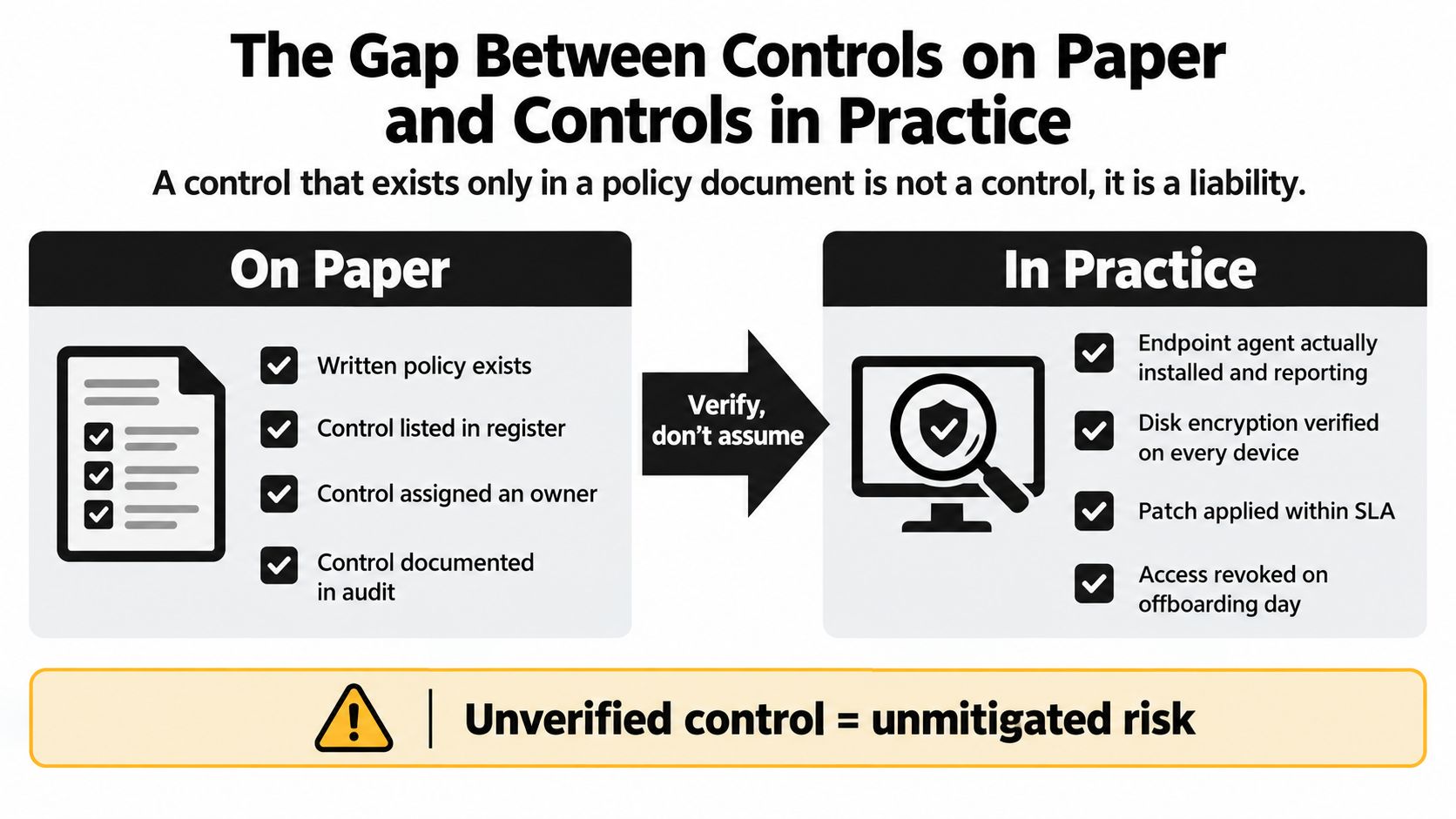
Recent telemetry-based coverage found that one in five enterprise endpoints is outside a protected and enforceable state on any given day, and that the average device spends about 76 days per year where controls aren't reliably enforceable, according to the reported endpoint-control coverage data. A control can appear active in a security console while remaining absent from the device handling a client's return or workpapers.
Test the control, not the description
A focused self-audit can show whether the documented safeguard prevents the failure it was designed to address:
- Sample access reviews: Pull completed reviews and check the approver's identity, the accounts in scope, decisions made, and follow-up actions.
- Check account removal: Compare departed employees with active accounts, tokens, group memberships, and shared credentials.
- Verify MFA enrollment: Confirm that privileged and remote-access users are enrolled, with approved exceptions recorded.
- Inspect endpoint health: Select devices from different teams and confirm that the security agent is installed, reporting, and configured as expected.
- Test retention jobs: Review execution records, failures, exceptions, and treatment of records under a legal or operational hold.
- Trace a sensitive action: Select a client file or workpaper and verify that the system can show who accessed, changed, and approved it.
These checks connect each control to a specific failure mode. Access sampling can expose unreviewed permissions. Account comparisons can reveal access that survived an employee's departure. Retention testing can show that a policy exists while deletion quietly fails.
Evidence is the deciding factor. If the firm can't produce it, it should treat the safeguard as unverified until an owner confirms the gap and fixes it, using this security control effectiveness checklist to guide verification.
A reliable review asks three separate questions: Is the control technically enforced? Is the process followed by people? Does the result produce an artifact? All three answers should be yes before an operations lead relies on the control during an examination or incident.
Building a Control Stack That Holds Up
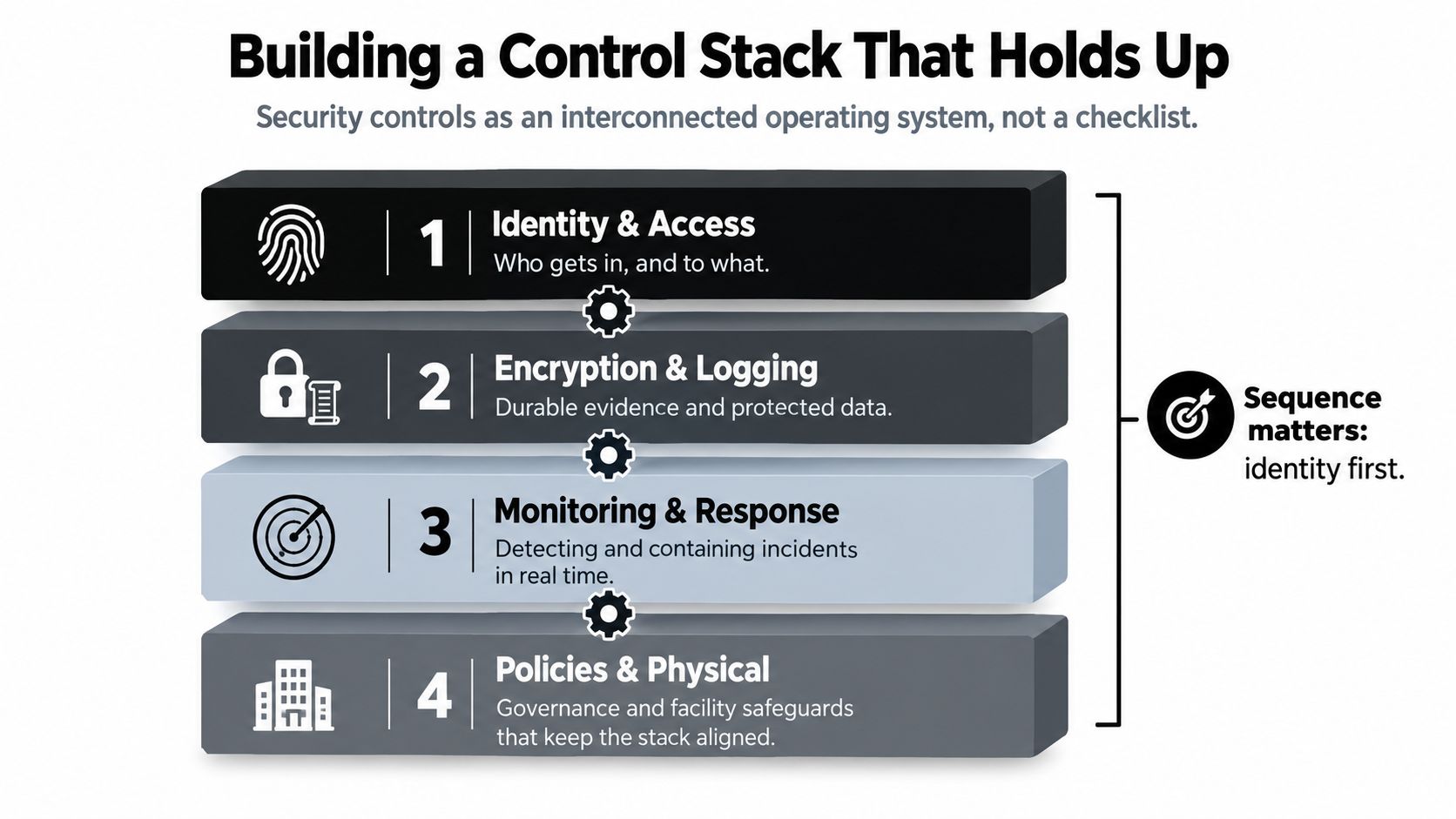
Security controls work best as an operating system of protection, not as a checklist of unrelated purchases. Identity determines who can enter. Encryption protects the information they handle. Logging creates durable evidence. Monitoring detects abnormal behavior. Policies and physical safeguards make sure the technical layers remain aligned with how people work.
Build in a deliberate sequence
Start with identity and access. Establish named accounts, single sign-on where appropriate, multi-factor authentication for privileged roles, role-based permissions, and a repeatable joiner-mover-leaver process. The objective is simple: the firm should know who can reach each class of client data and why.
Add encryption and logging. Protect data in transit and at rest, then create logs for authentication, privilege changes, sensitive access, edits, and approvals. Restrict log administration and preserve records for the period required by the firm's review and retention obligations.
Operationalize monitoring and response. Assign someone to review alerts, investigate unusual access, contain accounts, and preserve evidence. Vulnerability management should follow a fixed operating cadence, with a documented path for urgent remediation and exceptions.
Close residual gaps with governance and physical safeguards. Review vendors, train employees, control visitors, protect paper records, and verify that disposal procedures work. Critical vendor attestations, such as a current SOC 2 report when relevant to the service, should be evaluated against the provider's actual responsibilities rather than accepted as proof that the firm's own controls are complete.
A practical maturity ladder helps teams choose the next move:
- Reactive: The firm responds after an incident or failed review.
- Documented: Policies, owners, and procedures exist.
- Tested: The firm samples controls and corrects exceptions.
- Continuously evidenced: Systems and processes produce reliable evidence as work occurs.
Don't try to improve every layer at once. Pull your last three vendor security questionnaires, compare the answers with your identity, encryption, logging, monitoring, administrative, physical, and evidence practices, and select the one unresolved gap that creates the greatest exposure for client tax data.
WP TieOut supports this control model with encrypted tax-review workflows, role-based handoffs for preparers, reviewers, and partners, and source-linked workpapers with an exportable sign-off history. Visit WP TieOut to evaluate how its review-by-exception process can help your firm preserve clearer evidence from intake through final approval.