

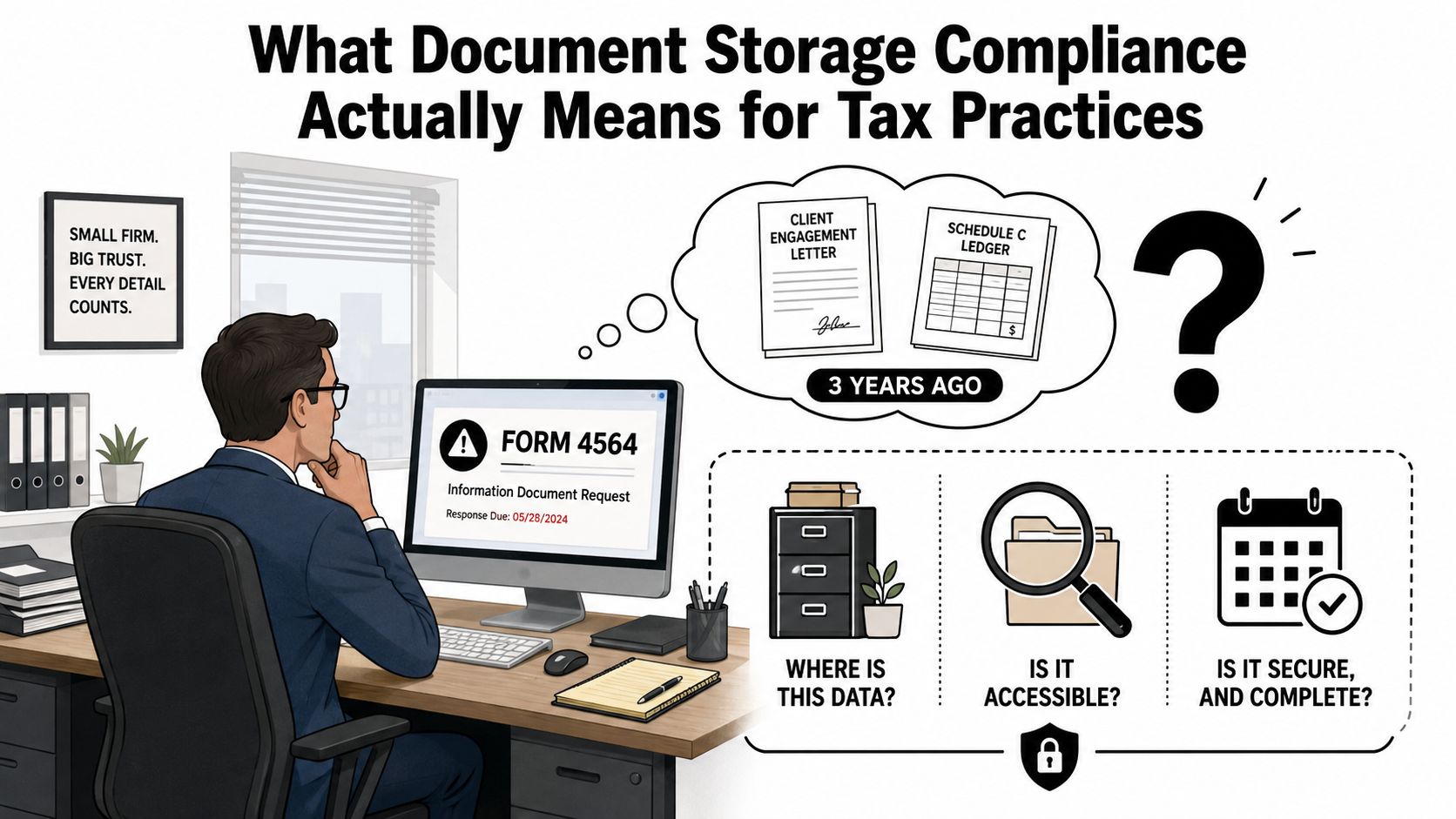
A partner gets an IRS Form 4564 asking for an engagement letter and a Schedule C ledger from three years ago. The partner who handled the return has left. The files sit across two cloud drives, a local NAS, and several inboxes, while the response deadline keeps moving closer. Nobody knows whether the records are complete, which version is final, or who last changed them.
That isn't a storage failure. It's a lifecycle governance failure. Document storage compliance for a tax practice means capturing records at intake, classifying them correctly, applying a defensible retention rule, controlling access, preserving an audit trail, and deleting records with evidence that the right person approved the decision. The folder structure matters far less than what your firm can prove under pressure.
Table of Contents
- What Document Storage Compliance Actually Means for Tax Practices
- Regulations and Retention Windows That Shape Your Storage Policy
- Core Controls Behind Defensible Document Storage
- A Practical Workflow From Intake to Partner Sign-Off
- The Hidden Compliance Gap Most Firms Overlook
- Implementation Checklist and Vendor Evaluation Criteria
- Validating Your Compliance Program Before an Examiner Does
What Document Storage Compliance Actually Means for Tax Practices
An examiner doesn't care that your firm uses a folder named “2021 Individual Returns.” The examiner cares whether you can produce an authentic, complete, usable record, show who handled it, and explain why anything is missing. Federal records guidance describes electronic recordkeeping as a governed lifecycle, with records retained as long as needed, permanent records preserved, and temporary records destroyed only when their approved retention period ends. It also states that electronic records follow the same retention period as paper records. Federal records-management guidance makes the central point clear: keeping a file is only one part of compliance.
The examiner sees the lifecycle
For a tax practice, the lifecycle begins before a preparer opens the return:
- Capture at intake: Receive W-2s, 1099s, K-1s, engagement letters, and client correspondence through a controlled channel.
- Classify by document type: Separate source documents, workpapers, filed returns, review notes, consent records, and administrative material.
- Protect the record: Use encryption, role-based permissions, multifactor authentication, and tested backups.
- Preserve context: Maintain timestamps, source identity, file format, version history, reviewer actions, and sign-off records.
- Apply the schedule: Tie each class of record to a documented retention rule and any legal hold.
- Dispose defensibly: Delete records only when the schedule permits, the hold has cleared, and the system records the decision.
This is why a firm can have secure cloud storage and still fail an examination. If the source document can't be connected to the adjustment on the filed return, or if a former employee still controls access, the storage platform hasn't solved the compliance problem.
Practical rule: If a new partner or examiner can't reconstruct the return without asking the original preparer, your process isn't governed well enough.
Tax firms also need operational resilience. A documented breach response, tested recovery process, and clear ownership model protect more than confidential data. They reduce the chance that staff turnover, a failed device, or a rushed handoff turns into a missing-record problem or a malpractice dispute. The IRS instructs examiners to preserve original and working copies on encrypted storage and document actions in a case history, a useful model for firms building their own traceable tax-record process.
Regulations and Retention Windows That Shape Your Storage Policy
A retention schedule is the firm's filing calendar, but it's more than a calendar. Think of it as a set of traffic lights for records. Some documents remain active, some are frozen because of an examination or dispute, and others can move toward destruction only after the applicable rule and hold status allow it.
The mistake managing partners make is choosing the shortest period they can find. IRS rules, professional obligations, state accountancy requirements, privacy duties, and insurance expectations can overlap. Your policy should use the longest defensible period that fits the firm's actual risk, not the most convenient number on a reference card.
Federal records guidance establishes the broader principle that electronic records must remain authentic, reliable, and usable throughout their required life, and that destruction must occur only at the end of the authorized retention period. For a tax practice, that means the schedule belongs in both policy and workflow software. A spreadsheet that no one consults won't control disposition.
Build the schedule by document class
The following table is a practical policy framework. It distinguishes the record itself from the rule that may affect it. The recommended floor is an operational recommendation, not a claim that one period applies to every engagement.
| Document class | IRS trigger | FTC Safeguards | State board (typical) | Recommended policy floor |
|---|---|---|---|---|
| Filed returns and accepted e-file records | Apply the applicable return and examination period | Protect taxpayer information throughout storage | Confirm the governing board rule | Use the longest applicable legal, professional, or contractual period |
| Source documents | Tie to the return, workpaper, and any open examination | Protect taxpayer information throughout storage | Confirm the governing board rule | Retain with the related engagement record unless a documented rule permits earlier disposition |
| Engagement letters and consent records | Tie to the engagement and advice provided | Protect taxpayer information throughout storage | Confirm the governing board rule | Retain with the engagement file and preserve execution evidence |
| Workpapers and review notes | Tie to the return position and examination support | Protect taxpayer information throughout storage | Confirm the governing board rule | Retain for the full defensible life of the engagement record |
| Audit logs and disposition evidence | Preserve activity and destruction history | Govern access and security evidence | Confirm contractual and professional expectations | Retain under the firm's documented log policy, with longer preservation for disputes or audits |
A retention reference for businesses notes that HIPAA-related compliance documents are commonly retained for 6 years, SEC and FINRA-linked records often fall within a 3-to-6-year range, and employee records may span 1 to 7 years, depending on record type. The same source emphasizes that retention involves capture, indexing, access, disposition, and legal defensibility, not storage alone. This records-retention guide is useful for seeing why one universal timer is a poor design.
For tax and accounting teams, the schedule should identify the trigger, owner, hold process, approval authority, and destruction evidence. Publish the policy alongside your tax record-keeping procedures, then configure the system so staff don't have to remember every rule manually.
Core Controls Behind Defensible Document Storage
An examiner will test whether your controls work in sequence. Start with protection, then test identity, lifecycle rules, evidence, resilience, and response. Buying a secure repository without connecting those controls creates a polished gap.
Protect the record and control the keys
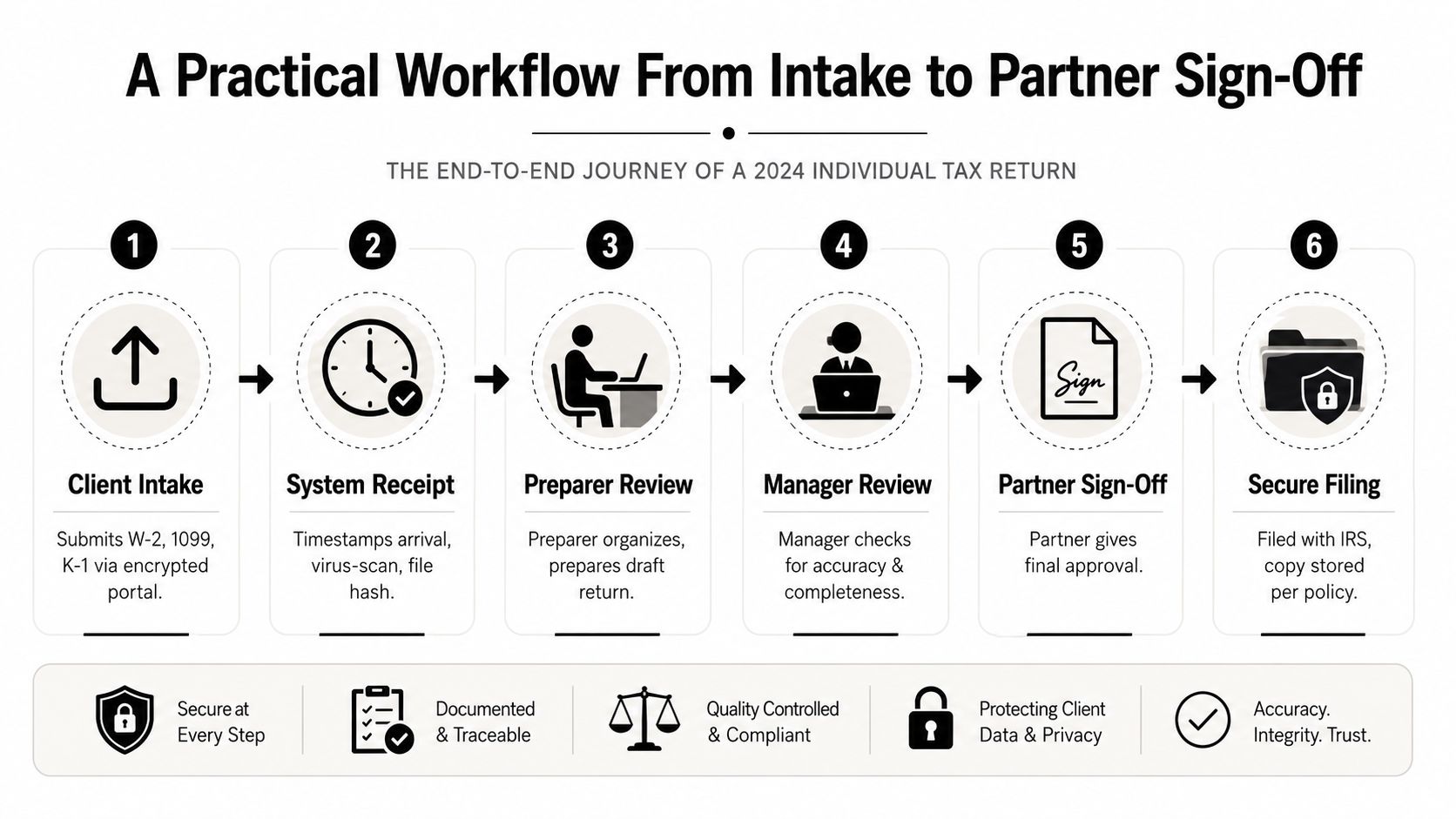
Encryption at rest should use a strong standard such as AES-256 for stored records. Encryption in transit should use TLS 1.2 or higher for uploads, downloads, integrations, and administrator activity. Where a governmental subpoena or compelled disclosure presents a serious concern, customer-managed keys give the firm more control over key custody and access decisions.
Ask the vendor, “Can you show me where the encryption policy is enforced, and who can change it?” A marketing page isn't evidence. Request configuration exports, contractual commitments, and an explanation of how backups and exports inherit protection.
Make access match the engagement
Role-based access should follow the engagement, not the employee's broad department membership. A preparer may need the assigned workpaper and its supporting source files. A manager may need review material. A partner may need sign-off authority. Administrative access should be limited and monitored.
Require MFA for every login, provision access only when needed, remove it immediately when employment ends, and review permissions on a recurring schedule. Access-control compliance guidance can support the policy discussion, but your firm still needs to test its own directory, role mapping, and termination workflow.
Turn retention into an active control
Retention timers should attach to document classes and engagement events. A signed partner approval can start the retention period for a completed engagement, while an IRS examination, state inquiry, malpractice notice, or legal dispute should place a hold on affected records.
Audit logs need to show who accessed, changed, exported, or deleted a record, when the action occurred, and what reason or workflow authorized it. A storage-audit-trail reference notes that multiple compliance frameworks commonly expect at least 12 months of audit-log retention and recommends enforcing that period through lifecycle or archival policies. Audit-log retention guidance supports treating logs as evidence rather than disposable system noise.
Prove recovery and response
Use redundant backups, document recovery objectives, and test restoration instead of assuming backups work. A restore exercise should confirm that records, metadata, permissions, and audit history return together.
Breach response is the control most firms under-test. Name the incident owner, privacy counsel, insurer contact, technical lead, and communications decision-maker. Then rehearse the sequence with a realistic client-data scenario. A plan sitting in a policy binder won't help if nobody knows who can isolate one engagement without shutting down the entire practice.
A Practical Workflow From Intake to Partner Sign-Off
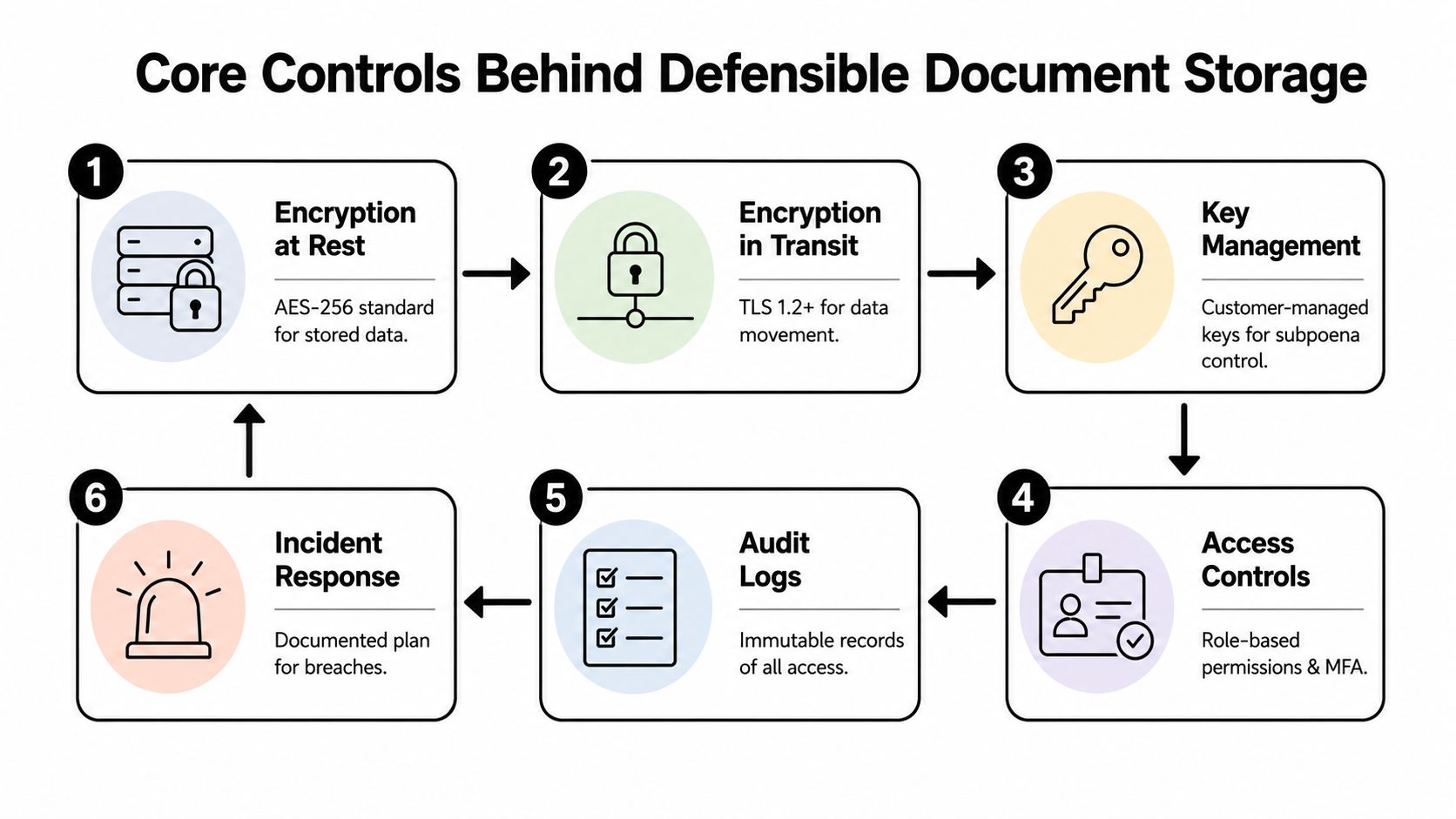
Take a 2024 individual return. The client uploads W-2s, 1099s, and K-1s through an encrypted portal. The system records receipt, scans the attachments for malware, and creates a file hash so the firm can later show that the stored file matches the received file.
The preparer routes each document to the appropriate 1040 workpaper. That routing decision matters because it creates the connection between the source record and the return position. A loose folder can preserve a document, but it won't necessarily preserve why the preparer used it or which line item it supported.
Make every handoff visible
The manager doesn't need unrestricted access to the client's entire history. The system should expose the supporting documents required for review and retain the access event. Review comments should attach to the relevant workpaper line or supporting item rather than disappear into a separate email thread.
A disciplined workflow looks like this:
- Client intake: The client submits documents through the approved portal.
- System receipt: The platform timestamps arrival, scans the files, and preserves the original.
- Preparer work: The preparer classifies documents, resolves missing items, and prepares the draft.
- Manager review: The manager checks completeness, accuracy, and support for the reported positions.
- Partner approval: The partner signs electronically and records the final decision.
- Secure filing: The accepted return and related evidence move into the governed archive.
The same structure supports due-diligence records, including documentation associated with Form 8867. The important feature isn't that the workflow has six labels. It's that each transition records a human action, timestamp, and resulting status.
A defensible file tells the story of the return without relying on memory.
Partner sign-off should trigger the retention schedule for the engagement folder. The archive should preserve the original source pages, workpaper references, review notes, and sign-off history as one connected record set. If an examiner later asks why a figure appeared on the return, the firm should be able to follow the chain from source document to adjustment to approval.
The Hidden Compliance Gap Most Firms Overlook
Most firms focus on encryption, permissions, and retention timers. Those controls matter, but they don't answer the questions that create the hardest disputes: What was deleted, when was it deleted, who approved it, and did copies remain elsewhere?
A visible file can disappear from a client folder while surviving in a synced drive, historical version, external share, email attachment, or backup. Recent coverage on automated PII deletion describes this problem as a retention blind spot, especially in fragmented repositories where manual classification and weak disposition controls make it difficult to prove that deletion happened everywhere it needed to happen. The discussion of SharePoint deletion blind spots is a useful warning for firms that treat the delete button as a complete disposition process.
Defensible deletion needs evidence
Your disposition record should identify the record class, retention trigger, scheduled destruction date, hold check, approving person, execution time, and repositories included in the deletion. If the system can't produce that evidence, the firm can't confidently explain why an old record no longer exists.
Source traceability creates the second gap. A W-2 image should remain connected to the extracted values, preparer adjustments, review comments, and final 1040. If a document is converted into text or markdown and the link to the original layout disappears, the evidentiary chain breaks at intake.
AI adds another layer of accountability
OCR, auto-categorization, and drafting assistants can improve workflow, but they also create new records. The firm should retain the original source, identify the tool and version used, preserve relevant model inputs and outputs, and assign a human reviewer to the final decision.
AI-era audit logs can also contain personal data. Independent commentary on document AI warns that logs may trigger residency concerns under regimes including GDPR, HIPAA, Korea's PIPA, and Singapore's PDPA. This analysis of audit trails and document AI makes the contrarian point clearly: more logging can create more exposure unless the firm governs log content, retention, access, and jurisdiction.
A locked folder is not a compliance program. An attributable, reviewable, expiring lifecycle is.
Implementation Checklist and Vendor Evaluation Criteria
Put the policy into two working documents. The first is a quarterly verification checklist for the operations lead. The second is a vendor scorecard that forces the firm to test evidence rather than accept feature descriptions.
Quarterly verification checklist
The operations lead should collect dated proof for each item:
- Encryption: Confirm AES-256 protection at rest and TLS 1.2 or higher in transit.
- Access: Reconcile role-based permissions with the firm directory, test MFA, and verify termination deprovisioning.
- Retention: Confirm timers are configured by document class and that legal holds override destruction.
- Audit evidence: Export immutable logs to a separate governed location and verify that access, changes, exports, and deletions are visible.
- Recovery: Test backup restoration, record the recovery objectives, and preserve the test result.
- Incident response: Run the breach-response scenario with named owners, counsel, insurer contacts, and client communications roles.
The person completing the checklist shouldn't be the only person approving it. A partner should sign the result, accept documented exceptions, and assign a remediation owner.
Vendor scorecard
Score each criterion from 1 to 5, then apply weights that reflect the firm's client base, jurisdictions, and engagement risk. Require a written remediation plan for any score below 3 before signing the contract.
| Criterion | Weight | Score (1-5) | Notes |
|---|---|---|---|
| Current SOC 2 Type II report | Review scope, exceptions, and report date | ||
| Alignment with IRS Publication 4557 | Map safeguards to actual configuration | ||
| Business associate agreement support | Confirm whether the firm's use requires one | ||
| Data-residency options | Identify storage and log locations | ||
| Per-engagement retention controls | Test timers, holds, and disposition | ||
| Exportable audit trails | Verify readable, complete exports | ||
| Customer-managed encryption keys | Confirm custody, rotation, and access model |
Ask for a live demonstration using a closed engagement. Create a hold, export the audit trail, restrict a reviewer to one engagement, and execute a controlled disposition test. A vendor that can't show the complete lifecycle shouldn't receive access to your client records.
For a broader comparison of workflow requirements, use this guide to tax document management software. Keep the evaluation centered on evidence, not the number of dashboard tiles.
Validating Your Compliance Program Before an Examiner Does
Annual policy review is too passive. Run the program as a live stress test, then preserve the results. The purpose isn't to prove that the firm never makes mistakes. It's to prove that the firm can detect a gap, assign ownership, and correct it before an examiner finds it.
Run three exercises
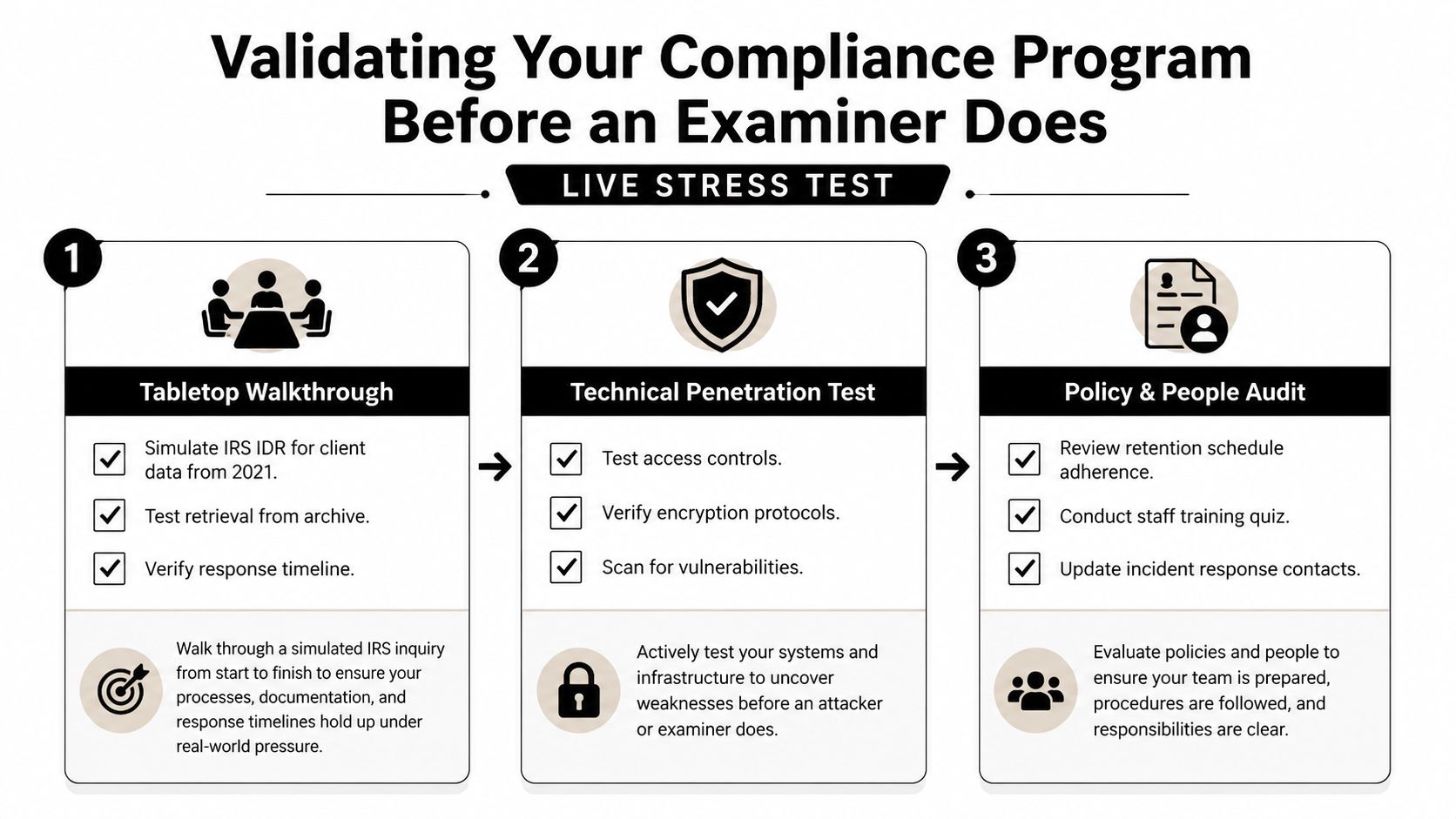
- Tabletop walkthrough: Simulate an IRS information-document request or state-board demand. Have the team retrieve a complete, time-stamped record set from the archive and explain every missing item.
- Internal engagement audit: Select closed files and compare the actual retention status, permissions, encryption evidence, audit history, and disposition record with the written policy.
- Technical review: Test MFA, role boundaries, encryption settings, backup restoration, and configuration drift across the storage stack.
Each exercise needs a date, evidence packet, finding, remediation owner, due date, and partner sign-off. The partner should also record whether the issue creates a legal hold, client notification concern, vendor escalation, or policy change.
Reissue the checklist and vendor scorecard every twelve months, or sooner after a material system, staffing, or regulatory change. The firm should be able to answer three questions without searching through inboxes: Can we retrieve the record, can we prove its history, and can we prove why it still exists or was deleted?
WP TieOut helps tax firms connect original source documents to workpapers and drafted returns, then compiles a source-linked PDF binder with bookmarked pages, annotations, roles, and an exportable sign-off history. Visit WP TieOut to evaluate whether its intake-to-partner-approval workflow fits your document storage compliance controls.