
Tax season exposes every weak link in a CPA firm's process. Draft returns stack up, reviewers get buried in line-by-line checks, and one missed tie-out can turn a routine filing into a cleanup project that eats partner time and client confidence.
That's why AI workflow automation is getting real attention in tax practices. The firms that benefit aren't chasing novelty, they're redesigning work so AI handles intake, validation, routing, and evidence capture while humans focus on exceptions, judgment, and sign-off.
Table of Contents
- The Tax Season Crisis That AI Workflow Automation Can Solve
- What AI Workflow Automation Actually Means for Tax Practices
- Benefits and Risks of AI Workflow Automation for Accounting Firms
- A Phased Roadmap to Implementing AI Workflow Automation
- Measuring Success with KPIs and Audit Trail Requirements
- Integration, Security, and Change Management Strategies
- How to Select or Pilot an AI Workflow Automation Solution
- Taking the Next Step in Your AI Workflow Automation Journey
The Tax Season Crisis That AI Workflow Automation Can Solve
Every firm knows this scene. The client file is ready enough to start, the return gets drafted, and then the review queue turns into the bottleneck. Staff are matching source documents to the workpaper line by line, managers are chasing missing support, and partners are asking whether anyone caught the one issue that could matter.
The problem is not just volume. Many firms still review tax work as a broad manual inspection of everything instead of a focused search for true exceptions. That approach drains experienced staff and still misses details once the workload piles up.
Why the old review model breaks
Tax work is full of repetitive comparisons, but not every comparison deserves the same level of human attention. The primary value usually comes from finding mismatches, missing signatures, odd numbers, unsupported assumptions, and items that require judgment. A reviewer staring at every line of every return is spending expert time on clerical work.
AI workflow automation makes sense here because it separates routine checks from judgment calls. In regulated work, the goal is to reduce the reviewer's burden, keep the reviewer in control, and direct scrutiny to the exceptions that matter.
The shift firms are making
The market is already moving in this direction. Mordor Intelligence estimates the workflow automation market at USD 23.77 billion in 2025, rising to USD 26.01 billion in 2026 and reaching USD 40.77 billion by 2031, with a 9.41% CAGR from 2026 to 2031, while cloud deployment captured 62.15% of market size in 2025 and North America contributed 34.22% of global revenue. That is not the profile of a side project. It is enterprise spending, and firms in regulated professional services should pay attention.
For CPA firms, the practical lesson is direct. If your process still depends on eyeballing every page, you will keep paying for that choice in overtime, burnout, and avoidable risk.
What AI Workflow Automation Actually Means for Tax Practices
Think of a good tax workflow like a relay race, not a pile of independent tasks. Each runner needs the baton passed cleanly, and the race only works if the handoff points are defined. AI workflow automation adds a smarter set of runners, but the gain comes from how the baton moves through the process.
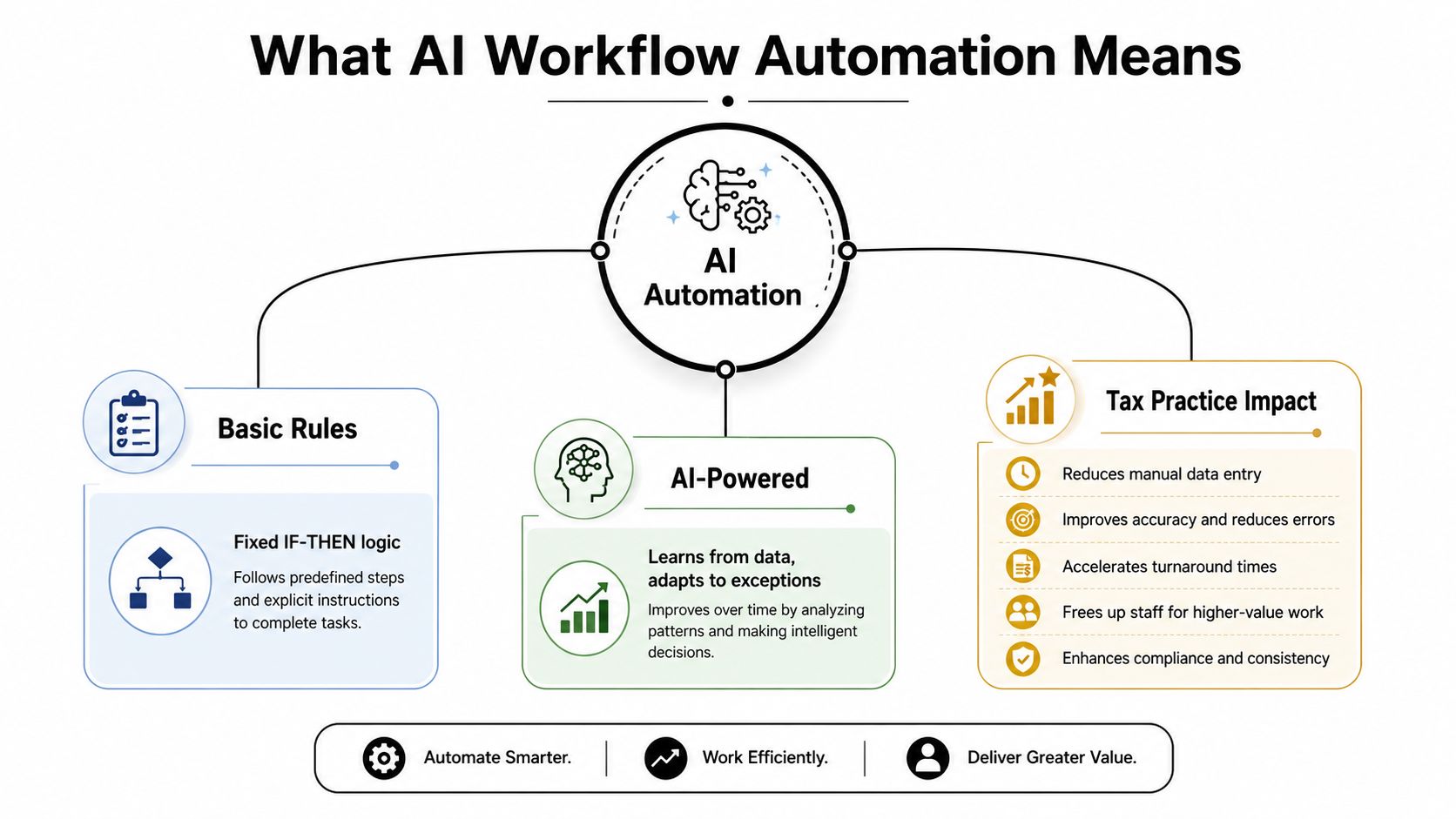
Basic rules versus AI-powered orchestration
Traditional automation follows fixed logic. If a document exists, route it here. If a field is blank, flag it. That still has value, but it breaks down when the source data is messy, incomplete, or inconsistent, which is exactly what tax teams deal with.
AI changes the middle of the workflow. It can ingest documents, classify them, extract fields, compare source support to a drafted return, and decide whether the item is clean enough to move forward or should be sent to a reviewer. The important shift is orchestration, not just task replacement. McKinsey's 2025 global AI survey, summarized by Hyperone, reports that 88% of organizations use AI regularly in at least one business function and that about one-third have begun scaling AI programs. Hyperone also cites that 23% are already scaling agentic AI somewhere in the enterprise and 39% are experimenting with it (Hyperone summary of the 2025 global AI survey).
For tax practices, that means the system should do the parsing, the comparison, and the routing, then stop where judgment is needed.
The parts that matter in a tax firm
A practical workflow usually includes document ingestion, validation rules, low-confidence handling, exception routing, and human approval. You want the system to surface the question, not bury the reviewer in noise. A form package with a missing brokerage statement should not look the same as a package with one unexplained mismatch in cost basis.
Practical rule: automate the comparison, not the decision. Let the system find the gap, then make a person own the judgment.
Expert-level workflow design starts earlier than many firms expect. The implementation should be specified as a contract that defines workflow steps, handoffs, safeguards, and governance up front. In practice, that means using a functional workflow diagram, a technical workflow diagram, a solution architecture diagram, data-element mappings, unique identifiers, expected data volumes, and authentication requirements so developers can build without guessing (Curiously Chase).
That's the definition of AI workflow automation in a tax office. It's a controlled process that makes review by exception possible.
Benefits and Risks of AI Workflow Automation for Accounting Firms
Anyone who has watched a review team grind through a stack of returns knows the appeal. AI workflow automation can cut the time spent on clean documents, speed up exception routing, and reduce handoffs that slow the file down. It can also create false confidence, sloppy review habits, and an audit trail that nobody wants to defend later.
The upside, measured in operational sanity
The market has already matured enough that firms are no longer betting on a fad. Tooling is better, vendor support is stronger, and adoption is rising across professional services, as noted earlier. That matters, but only if the workflow is built around control rather than convenience.
The core benefit in a CPA firm is focus. If AI sorts low-risk items, pre-validates data, and surfaces only the return sections that need attention, reviewers spend their time on tax judgment instead of clerical matching. That usually improves morale too, because staff would rather solve problems than scan pages line by line.
For regulated work, the strongest use case is not speed alone. It is a review process that leaves a clean trail. A good workflow shows what was checked, what was flagged, who reviewed it, and what changed before the item moved on, which is the same control mindset reflected in this audit-focused overview.
The risks that actually sink these projects
Trust is the first failure point. If users keep rechecking AI output because it shifts from one file to the next, they will route work around the system. Prompt fatigue and over-automation show up fast when a firm tries to automate too much before proving the workflow on a narrow use case.
Exception handling is the second failure point. Tax work is full of edge cases, and those edge cases need to stay visible. If the system hides uncertainty instead of flagging it, the firm has not reduced risk, it has moved risk from the reviewer's desk into the process itself.
Change management is the third. Teams do not reject automation because they dislike efficiency. They reject it when the new process makes their work less predictable or less defensible. That is why strong adoption guidance keeps returning to pilots, feedback loops, and training, while compliance-heavy workflow design keeps stressing traceability and human sign-off in sensitive files (Zapier, Keystone).
The practical rule is simple. Automate comparison, routing, and evidence capture, then stop where judgment belongs. A workflow that cannot show who touched the item, what changed, and why the system routed it is not ready for regulated work.
A Phased Roadmap to Implementing AI Workflow Automation
A serious rollout starts small and gets stricter over time. Firms that jump straight to full automation usually discover that their source data is inconsistent, their reviewers want different exceptions, and nobody agreed on what “done” means.
Phase 1 and 2, define the work before you automate it
Start with one narrow process, such as intake and document validation for a 1040 return. Map the current state exactly, including where staff rekey data, where review stalls, and where missing support causes rework. Then define the automation goal in operational terms, not slogans. You need to know what the system must catch, what it may ignore, and what always goes to a human.
That is where the implementation contract matters. It should define the workflow steps, the handoffs, the rules for escalation, and the governance model before anyone writes production logic. If the team can't describe the workflow clearly on paper, the software won't fix that.
Phase 3, pilot on real files
Run the solution against live but controlled files. Don't test with perfect documents only. Use the messy ones, the scanned copies, and the files that normally require reviewer judgment. The pilot should show whether the system can identify the obvious exceptions and preserve the evidence trail without creating extra cleanup work.
Phase 4 and 5, train, then optimize
Train preparers, reviewers, and partners separately. They don't use the workflow the same way, and they don't care about the same controls. Reviewers care about exception quality, partners care about defensibility, and preparers care about whether the process slows them down.
The final phase is continuous tuning. Exception rules, validation logic, and routing thresholds need regular review because tax work changes, staff habits change, and client documents change. If the firm treats the first rollout as finished, the system will drift.

Before you ask whether a platform is “smart enough,” ask whether the process is defined tightly enough to support it. That question saves more money than the software feature list ever will.
Measuring Success with KPIs and Audit Trail Requirements
If you can't measure the workflow, you're guessing. In a CPA firm, guessing is expensive because a process that looks efficient can still create more cleanup, more partner review, and more exposure later.
Track what matters in a regulated process
The right KPIs are boring, which is a good thing. You want to know how many items are routed as exceptions, how much time reviewers spend on true issues, how often sign-offs happen without rework, and whether the audit trail is complete enough to reconstruct the file later. Those are operational metrics, but they also tell you whether the process is defensible.
A strong audit trail needs more than a timestamp. Mature AI workflow automation should emit structured logs at every step with timestamps, step names, input and output hashes, model version, user or context metadata, workflow version, execution environment, and checksums for linked artifacts (Tech Daily Shot). That lets the firm rebuild the run history and explain how the system reached a result.
Why logs are a control, not a nice-to-have
For tax work, logging is not just for IT. It's what gives you a reviewable record when a partner asks why a file was routed to exception handling, or when an examiner wants to know how an item was validated. Structured logs also make debugging faster because the team can see exactly where the workflow broke instead of hunting through screenshots and email chains.
Bottom line: if the workflow can't be exported for internal review, it's not audit-ready.
If your process needs to preserve every handoff and sign-off, compare your controls against these audit trail requirements. That standard is stricter than a generic productivity workflow, and it should be.
The cleanest way to measure success is to separate speed from defensibility. Fast is nice. Repeatable, reviewable, and exportable is what keeps the firm out of trouble.
Integration, Security, and Change Management Strategies
Most automation projects don't fail because the technology is broken. They fail because the new workflow doesn't fit the existing stack, or the staff never trust the process enough to use it consistently.
Integration should be boring
The best workflow tools connect to the systems your team already uses without forcing a rebuild of the whole practice. In tax, that usually means the document intake layer, the return prep environment, the review queue, and the archival file all need to stay in sync. If the AI tool can't move validated data cleanly from one stage to the next, the firm just adds another island of work.
Security comes first in this environment. Source documents can include highly sensitive client data, so access controls, encryption, and role-based permissions need to be in place before rollout, not after the first pilot. Compliance teams should also decide who can see raw source files, who can see extracted data, and who can approve a final package.
People adoption is the real gating item
Partners often focus on features. Staff focus on whether the tool makes their day harder. Both views matter, but the deciding factor is usually trust. If preparers believe the workflow will create more rework, they'll resist. If reviewers think the exceptions are noisy, they'll ignore the queue. If partners can't see the trail, they won't sign off on scale.
The fix is training and communication that's specific to each role. Show preparers what gets extracted, show reviewers how the exception view works, and show partners exactly how the sign-off trail is preserved. One pilot with good user feedback is worth more than a polished vendor demo.
WP TieOut is one example in this category, it ingests source documents, validates extracted data, compares that workpaper against the drafted return, and records a source-linked, audit-ready history for review by exception.
You should also be realistic about change fatigue. If your team is already living through software churn, don't ask them to absorb a vague “transformation.” Ask them to validate one workflow, prove the handoff, and expand only after the process behaves.
How to Select or Pilot an AI Workflow Automation Solution
Pick the platform that fits the workflow, not the one with the loudest demo. In a compliance-heavy firm, a flashy interface is cheap. A system that preserves evidence, supports role separation, and integrates without manual cleanup is what matters.
Use a hard filter for vendor selection
Start with the basics. Can it connect to your tax systems without custom patchwork? Can it enforce role-based access? Can it show the source document, extracted field, and exception status in one view? If the answer to any of those is no, keep looking.
The source trail matters just as much as the extraction engine. A tool that produces a pretty summary but can't preserve the underlying support is a poor fit for regulated work. Support quality matters too, because your team will need help during pilot, rollout, and the first few close cycles.
Pilot on files that will expose weakness
Don't build your pilot around easy returns. Use returns with incomplete source packets, multiple document types, or items that regularly create review questions. You want to see whether the system flags uncertainty properly and whether your reviewers can work faster without losing confidence.
A practical evaluation scorecard should cover:
- Integration fit: confirm the tool works with your current prep and review stack.
- Security controls: verify access restrictions, encryption, and role separation.
- Audit trail depth: inspect whether every item is traceable from intake to sign-off.
- Exception handling: test whether low-confidence items are routed cleanly.
- Support model: ask who trains your team and how issues get resolved during rollout.
For firms comparing platforms and implementation partners, this directory of AI automation companies is a useful place to start the search. The right question isn't whether the vendor can automate something. It's whether they can automate it in a way your reviewers can defend six months from now.

Taking the Next Step in Your AI Workflow Automation Journey
CPA firms don't need more hype about AI. They need workflows that keep review disciplined, preserve evidence, and reduce the amount of time senior people spend checking obvious items. That's the promise of AI workflow automation in tax, less noise for the reviewer and a cleaner path to sign-off.
The firms that win won't be the ones that automate everything first. They'll be the ones that define the process tightly, route only true exceptions to humans, and build an audit trail that stands up when someone asks for the history. Start with one narrow file type, prove the control points, and expand only after the process is stable.
WP TieOut is built for CPA firms that want review by exception, source-linked validation, and an exportable audit trail in one workflow. If you're ready to see how that fits your tax process, visit WP TieOut and test it against the files your team reviews every day.