

Every firm reaches the same point eventually. The portal is in place, PDFs are arriving on time, and the staff can find last year's return in seconds. Yet review still drags because someone has to open the W-2, flip to the brokerage statement, compare figures to the draft, and decide whether the preparer missed something. The documents are organized, but the risk hasn't been removed.
That's the gap most discussions about tax document management software ignore. A digital filing cabinet solves storage. It doesn't solve validation. It doesn't tell you whether the 1099-R made it into the return correctly, whether a brokerage subtotal was miskeyed, or whether the reviewer can prove what source page was checked during sign-off.
That distinction matters more now because firms are buying into a category that is expanding quickly. The global tax management software market is projected to grow from USD 23.86 billion in 2025 to USD 44.42 billion by 2030, at a 13.2% CAGR, with North America holding 34.70% of the market in 2025 according to The Business Research Company's tax management software market report. The money is flowing toward systems that do more than store files. They automate extraction, support audit defense, and replace manual checking with smarter controls.
A firm that wants cleaner reviews should treat document management as a quality-control layer. That's the standard behind solid document management best practices for tax teams. Storage is table stakes. A critical question is whether the software helps the team trust the return before a partner signs it.
Table of Contents
- Introduction Beyond the Digital Filing Cabinet
- What Is Modern Tax Document Management Software
- Core Features That Drive Efficiency and Accuracy
- Optimizing Firm Workflows and Defining Roles
- How to Select the Right Software for Your CPA Firm
- Implementation and Driving Adoption in Your Firm
- Example in Action How WP TieOut Aligns with Best Practices
Introduction Beyond the Digital Filing Cabinet
Most firms don't suffer from a storage problem anymore. They suffer from a review problem.
The staff can upload files, rename them, and route them to the right client folder. But when the return reaches reviewer status, the same old work starts again. Someone still has to inspect source documents line by line, confirm the draft reflects them correctly, and piece together a sign-off record that can survive a partner question or an IRS examination.
Why storage alone falls short
Traditional document systems behave like orderly shelves. They improve retrieval and reduce paper clutter. That helps, but it doesn't answer the question that drives partner confidence: Was the return validated against the source?
That's where a lot of generic software advice misses the mark. Research summarizing the category notes that most content focuses on storage, retrieval speed, and ROI language, while overlooking the gap between organizing documents and validating extracted tax data against the drafted return. It also notes that common tools may automate filing but are not designed to reconcile W-2 or 1099 data to a final 1040 draft, leaving firms to rely on manual review by eyeballing line items, as outlined in this analysis of document management gaps in tax workflows.
Practical rule: If a platform can't help your reviewer identify discrepancies between the source and the draft return, it's not solving the hardest part of tax season.
What firms actually need
Modern tax document management software should sit between client intake and final approval. It should ingest documents, recognize what they are, extract usable data, and support a workflow where the reviewer focuses on exceptions rather than rechecking every field.
That shift changes the economics of review. The team spends less time proving obvious items and more time resolving actual issues. It also changes risk management. A return is easier to defend when the firm can show how the source document, the extracted data, and the reviewed return line connect.
The useful question isn't "Where do we store tax PDFs?" It's "How do we turn source documents into a traceable, reviewable, audit-ready workpaper process?"
What Is Modern Tax Document Management Software
A legacy document management system is a digital cabinet. A modern tax platform is a workflow engine.
That difference sounds subtle until you live with both. The first stores scans and PDFs. The second reads them, classifies them, and prepares them for review in a tax context. For a CPA firm handling 1040 work, that means the software's value isn't in holding a brokerage statement. It's in recognizing the statement, extracting relevant data, and making that data usable inside the review process.
The old model versus the current one
Older systems were built around retention and retrieval. They answered practical questions such as: Did the client upload the file? Can the staff find it? Is there a version history? Those functions still matter, and no serious firm should dismiss them.
Modern tax document management software goes further. It treats the document as a source of structured tax information rather than a flat image. The system should identify forms, organize them by taxpayer and year, and create a bridge from source intake to prepared return review.
A simple analogy helps. A filing cabinet holds records. A skilled paralegal reads the records, tags the relevant items, and flags what doesn't match the case file. Firms need the second model.
What the software should do in sequence
In practice, a strong platform should handle a chain of tasks:
- Collect source documents securely. Clients or staff upload W-2s, 1099s, brokerage statements, and supporting PDFs.
- Classify what arrived. The system recognizes form type, tax year, and client context.
- Extract relevant fields. Values become structured data rather than trapped text inside an image.
- Prepare the file for review. The platform organizes the extracted data so staff can compare it to the drafted return.
- Record the review path. Every check, exception, and approval should leave a trace.
The software earns its keep when it reduces what the reviewer has to look at, not when it simply gives the reviewer a nicer folder.
Where it sits in the tax workflow
For a junior partner evaluating tools, the right mental model is this: the platform belongs between document intake and partner sign-off.
It isn't just a repository, and it isn't just tax prep software either. It's the control layer that turns raw source documents into evidence-backed review work. That's why the best systems don't just talk about search speed. They talk about validation, exception handling, role-based review, and defensible history.
When a vendor describes only storage, upload, and retrieval, assume you'll still be paying your most expensive people to do manual tie-out work.
Core Features That Drive Efficiency and Accuracy
A partner does not care that a platform can store ten thousand PDFs if the reviewer still has to open each one to prove the return ties back to source support. The features that matter are the ones that reduce manual checking, surface real exceptions, and leave a defensible record behind.

Intake and organization that reduce friction
Tax season problems often start before anyone touches the return. Documents arrive in waves, clients upload duplicates, file names are inconsistent, and staff waste time sorting support into the right engagement.
Modern systems use OCR and metadata extraction to classify documents by client, tax year, and form type. Uncle Kam's overview of tax document management software notes that this can reduce manual indexing time by up to 40%. The practical benefit is simple. Staff spend less time renaming and routing files, and more time resolving missing items before the return reaches review.
The best intake setup mirrors the way the firm already organizes workpapers. If the software forces staff into a generic folder tree that ignores your 1040 or entity workflow, the firm just swaps one clerical problem for another.
Extraction that produces usable tax data
Reading a document is only the first step. The software has to pull the fields that matter and place them in a format the team can test, compare, and reconcile.
Swell's roundup of automated tax calculation statistics reports very high extraction accuracy in tax workflows, along with lower preparation costs for firms that automate more of the process. Those figures matter, but the workflow point matters more. Accurate extraction cuts rekeying, reduces carry errors, and gives the preparer a cleaner starting file.
That changes the review burden. Instead of checking whether someone typed every box correctly, the reviewer can focus on whether the extracted information agrees to the return and whether the source itself is complete.
Validation and review by exception
This is the feature set that separates document storage from an actual review platform.
A strong system does more than display a source document beside a tax return. It compares extracted values to the drafted return, flags mismatches, identifies missing support, and shows the reviewer exactly where the issue sits in the file. That is what review by exception looks like in practice. The reviewer spends time on breaks, omissions, and judgment calls, not on confirming that fifty obvious matches are still obvious.
The trade-off is straightforward. Better validation rules take work to configure, and firms need to decide how much standardization they want across return types. But once those rules are in place, the firm gets a faster review cycle and a tighter control process. More important, it reduces the chance that a missed discrepancy survives because nobody had time to reopen every statement page.
Review quality improves when the software narrows the reviewer's field of vision to the items that can actually change the return.
Audit trails that hold up under scrutiny
Audit trail claims are cheap. What matters is whether the file can prove who checked a number, what source page supported it, what changed, and when the change happened.
Many vendor descriptions stop at activity logs. That is not enough for tax review. A partner signing off on a return needs source-linked verification, exception history, version control, and an exportable file that does not require staff to rebuild the support package by hand. This review of tax document management software questions firms still struggle with highlights the same gap in the market.
For firms that want a defensible standard, the right benchmark is a documented, source-linked review history that supports partner sign-off and later examination. A disciplined audit trail process for tax review should make that standard visible in every file.
Security that supports real firm operations
Security controls should help the tax team work correctly, not just satisfy an IT policy. Role-based access, MFA or SSO, encryption, version history, and controlled client uploads all affect day-to-day execution.
The operational question is simple. Does the system let the right people see the right documents at the right stage without creating side channels like email attachments, desktop saves, or shared-drive workarounds? If the answer is no, the control structure will fail in practice no matter how good the vendor's checklist looks.
Good security design also improves turnaround. Secure portals, controlled permissions, and tracked document status make it easier to collect complete support earlier, keep client data contained, and prevent last-minute review delays caused by missing or misplaced files.
Optimizing Firm Workflows and Defining Roles
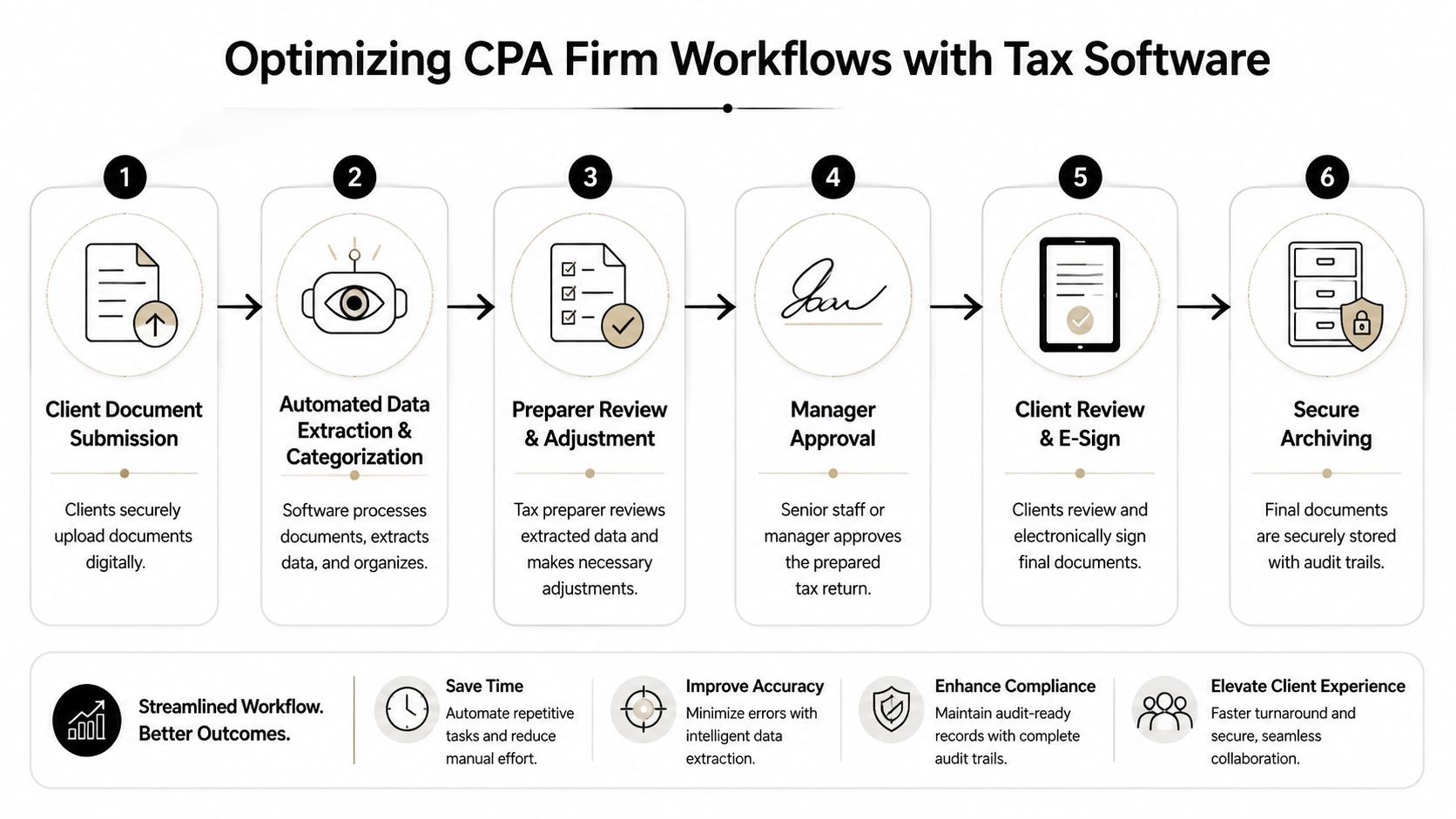
A platform succeeds when each role in the firm sees less confusion, not more. The easiest way to judge that is to follow one return through the workflow and see whether handoffs get cleaner.
Preparer workflow
The process starts with intake. The client uploads files through a secure portal, or staff imports them from the firm's document queue. The software classifies the source documents, assembles the workpaper file, and gives the preparer a single place to confirm what arrived and what still appears missing.
The preparer should not be acting as a file clerk. Their main job is to resolve missing items, review extracted data, and make targeted corrections where the system flags uncertainty. When the platform is set up well, the preparer hands off a validated package rather than a loose pile of PDFs.
Reviewer workflow
The reviewer should inherit a narrower task. Instead of reopening every document and reperforming the entire preparation process, the reviewer clears exceptions, inspects unresolved mismatches, and confirms that supporting pages link to the relevant workpaper items.
That's where a disciplined audit trail process for tax review becomes useful. It reduces ambiguity about what was reviewed and what remains open. Good software makes the queue visible. Weak software forces the reviewer to reconstruct the queue from email, notes, and memory.
The cleanest review workflow is one where the manager can tell, in minutes, whether the file is incomplete, inaccurate, or simply waiting for approval.
Partner sign-off
By the time the file reaches the partner, the work should be distilled. The partner doesn't want to inspect every source document again. The partner wants to see that the exceptions were cleared, the support is traceable, and the sign-off record is complete.
That change in role definition matters. When preparers prepare, reviewers review, and partners approve within a visible system, bottlenecks shrink. Accountability improves too, because every action is attached to a person and a timestamp. The software becomes a chain of custody for the return, not just a storage location for its attachments.
How to Select the Right Software for Your CPA Firm
A partner opens a return at 10:30 p.m. and sees 140 PDFs, a few review notes, and no clean way to trace whether the numbers in the draft match the source documents. That is not a storage problem. It is a review control problem.
Selection should start there. The firm is not buying software to create nicer folders. It is buying a system that shortens review time, exposes discrepancies early, and leaves behind a record the firm can defend.

Selection criteria that matter in practice
Start with the bottleneck. If the pain is intake and retention, a conventional document management system may be enough. If the pain is reviewer rework, partner sign-off time, or weak source-to-return support, the software has to do more than store files. It has to classify documents, extract usable tax data, flag mismatches, and preserve the review trail.
Integration still matters, but firms often overrate it in demos and underrate it in production. A tool can claim compatibility with your prep stack and still create manual work if staff have to export, rename, re-upload, or rekey information to keep the process moving. A clean handoff into UltraTax, ProConnect, or the firm's existing workflow matters because every manual touch creates another chance for omission, version confusion, or duplicated work.
The control questions are usually more revealing than the feature list:
- How does the system validate extracted data against the return or workpapers? If the answer stops at OCR or AI extraction, the team is still doing the tie-out by hand.
- Can reviewers see an exception queue instead of rechecking the whole file? That determines whether review time goes down or just shifts location.
- What does the sign-off record prove? The firm needs source-linked support, user-level history, timestamps, and a record that can be exported if a return is questioned later.
- Do permissions match firm roles? Preparers, reviewers, and partners should not all operate in the same unrestricted workspace.
- How does the system perform under peak filing volume? A polished demo with a few clean sample PDFs does not tell you what happens with mixed-quality scans and deadline pressure.
Firms should also evaluate the product in the context of the larger stack. If you are already reviewing options for tax compliance software that supports integrated tax workflows, judge document management the same way. Ask whether it contributes to a controlled preparation and review process, or whether it merely adds another repository.
To see how some firms frame the buying decision, this walkthrough offers a useful product-selection lens:
Traditional DMS vs AI-Powered Review Platforms
The clearest way to compare products is to separate storage functions from review functions. Many firms buy a DMS expecting review efficiency and only discover the gap during busy season.
| Functionality | Traditional Document Management System (DMS) | AI-Powered Review Platform |
|---|---|---|
| Primary role | Stores and organizes documents | Validates document data within the tax review workflow |
| Intake | Uploads and folders | Uploads, classification, and review-ready organization |
| OCR use | Often limited to searchable text | Extracts structured tax data for downstream use |
| Review process | Human compares source to draft manually | System surfaces exceptions for targeted review |
| Audit support | Basic activity logs and version history | Source-linked support and sign-off trail |
| Integration value | Repository adjacent to tax prep | Workflow layer connected to tax prep and review |
| Risk impact | Better organization | Better organization plus stronger discrepancy control |
A traditional DMS still has a place for retention, retrieval, and general file management. It usually falls short when the firm needs a source-linked reconciliation workflow that gives reviewers and partners confidence in what they are signing.
Red flags to watch for
Bad fits usually reveal themselves quickly if the firm asks operational questions instead of accepting marketing language.
- Vague AI claims: If the vendor cannot explain how the system identifies mismatches, clears exceptions, or learns what counts as a resolved item, treat it as storage with new branding.
- Security language without specifics: Ask for role-based access details, encryption standards, MFA or SSO support, and immutable activity history.
- No exportable review record: If the review evidence stays trapped inside the application, audit defense and internal quality review get harder.
- Closed architecture: If the product does not fit the firm's portal, prep software, and review process, staff will build side workflows in email and shared drives.
- A retrieval-heavy pitch: Fast search is useful. It does not reduce manual tie-out or reviewer rework.
The critical question is whether the software helps the team trust the return before a partner signs it. If it cannot show how source documents connect to extracted data, how discrepancies are resolved, and how approval is documented, the firm is still relying on memory, heroics, and late-night review labor.
Implementation and Driving Adoption in Your Firm
The software decision is only the first half. The harder part is getting preparers, reviewers, and partners to work differently when deadlines are already tight.
Start with one return type and one pilot team
Don't roll a new system across the whole firm at once. Start with a contained group, usually one return category and one set of users who can tolerate some process adjustment. For many firms, that means a 1040-heavy team with clear reviewer oversight.
A pilot works when the firm defines a narrow success condition. Faster handoffs. Fewer unclear review notes. Cleaner sign-off documentation. Keep the target operational, not theoretical.
Train by role, not by menu
Generic software training rarely sticks during tax season. Preparers need to know how to clear intake issues and validate extracted data. Reviewers need to know how to work exception queues and confirm support. Partners need a short path to approval evidence.
Use live files if possible. Staff learn faster when they can see how the tool changes the work they already do. A menu tour won't change behavior. A return moving from intake to sign-off will.
Manage adoption like an operations project
Expect resistance from strong reviewers who have personal methods that seem faster. Respect that instinct, but test it against consistency. A firm can't scale partner review through custom habits alone.
A practical rollout usually includes:
- A written review standard: Define what counts as cleared, escalated, and approved.
- A small set of operating metrics: Time to reviewer handoff, open exception count, and completeness of sign-off history are usually more useful than broad ROI talk.
- A feedback loop: Let the pilot team identify where the workflow is slowing down or overflagging items.
- Visible early wins: When one team closes files with less back-and-forth, show the rest of the firm what changed.
The firms that get value from tax document management software treat implementation as process design with technology support, not as an IT install.
Example in Action How WP TieOut Aligns with Best Practices
A useful way to judge any platform is to test it against the standards that matter in practice: source ingestion, extracted-data validation, exception-based review, and an audit-ready sign-off record.
WP TieOut fits that model closely. It ingests source documents such as W-2s, 1099s, and brokerage statements, validates the extracted data, and compares the resulting workpaper against the drafted 1040 so the reviewer sees true discrepancies instead of rechecking everything manually. That is the operational shift many firms are trying to create.

It also addresses the sign-off problem directly. The platform compiles a source-linked, bookmarked PDF binder that preserves original pages, supports annotations, and records who checked what and when. For firms that need a partner-ready file or an exportable history for examination support, that matters more than generic version tracking.
The built-in role structure is also practical. Preparer, reviewer, and partner handoffs are part of the system, which helps standardize responsibility across the return lifecycle. That makes the software useful not just as a storage layer, but as a review framework.
For firms moving past passive document storage, that's the right benchmark. The software should help the team validate, reconcile, and defend the work product.
If your firm wants to replace manual eyeballing with source-linked, exception-based tax review, WP TieOut is worth a close look. It's built for 1040 workflows, supports cleaner preparer-to-partner handoffs, and produces the kind of audit-ready review record that basic document systems usually can't.