

Two weeks before an audit notice lands, the file usually looks calmer than it is. The return is already filed, the reviewer sign-off is done, and the client says they “have everything somewhere.” Then someone asks for a W-2, a brokerage statement, or the charity log that supports a deduction, and the team starts hunting through forwarded PDFs, screenshots, email attachments, and one paper folder that never made it into the scan queue.
That's where tax record keeping stops being a storage habit and becomes a review discipline. A firm either has reconstructable evidence, or it has a pile of documents that only feels complete until an examiner asks a direct question. The difference shows up in the way the file was built, not in how many files the archive can hold.
Table of Contents
- Why Tax Record Keeping Breaks Down Right Before an Audit
- What Tax Record Keeping Actually Means for a CPA Firm
- Retention Rules Explained as Conditions, Not a Single Number
- A Sample Retention Schedule by Document Type
- The Source-Linked Digital Binder and Exception-Based Tie-Out
- Paper vs Scanned vs Born-Digital Workflows Compared
- A One-Page Checklist for an Audit-Ready 1040 File
- Common Tax Record Keeping Questions After Implementation
Why Tax Record Keeping Breaks Down Right Before an Audit
Two weeks before a Form 1040 audit notice arrives, the partner doesn't lose sleep over storage. The problem is whether the file can answer the examiner fast enough to keep the engagement controlled. If the W-2 came in by email, the 1099s were downloaded from three portals, and the charitable receipts were forwarded by the client from a phone, the team usually discovers too late that the evidence trail was never normalized.
That's why audit documentation requirements matter so much in practice. A file can contain every document and still fail the review because the firm can't tell which version was used, who validated it, or whether the final return line traces to a source document.
The failure point is intake, not archive
Most breakdowns happen before the return is finalized. Intake staff save what the client sends, reviewers check what they can find, and a partner signs off on a file that looks complete because nothing is obviously missing. The missing item usually isn't the last document received, it's the one that never got linked to the right line or never got stamped as reviewed.
Practical rule: If a document can't be traced from source to return line in one pass, it isn't really retained. It's just stored.
That matters because exam questions are rarely generous. An auditor doesn't want “we think that was in the folder.” They want a chain that shows the original record, the working paper, and the final treatment. When firms keep paper for the sake of paper, they often preserve clutter while losing the one thing that matters, the ability to reconstruct the decision.
The operational trade-off is simple. More storage doesn't fix a weak intake process. A source-linked file with clear exceptions and review history does.
What Tax Record Keeping Actually Means for a CPA Firm
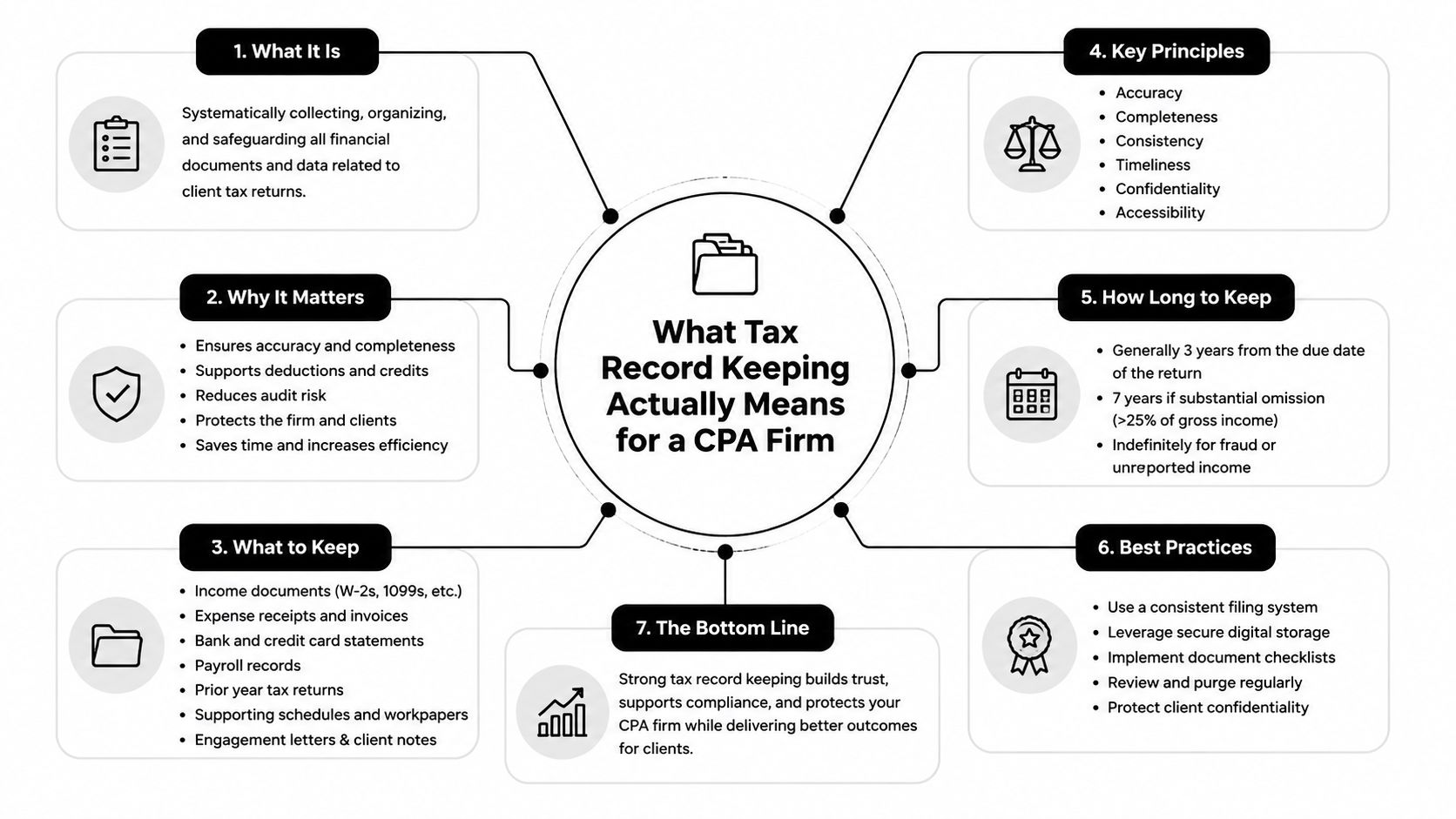
For a CPA firm, tax record keeping is not a pile of PDFs, and it's not a shoebox translated into cloud storage. It's a working system that connects source documents, validated workpapers, reviewer sign-off, and a retrievable approval trail. If one layer is missing, the file may still look organized, but it's not defensible in the way a reviewer or examiner needs.
Four layers that actually matter
The first layer is the source record, things like W-2s, 1099s, brokerage statements, payroll reports, invoices, and bank statements. These prove where the numbers came from. The second layer is the validated workpaper, where someone reconciled those numbers to the drafted return and documented what changed, what didn't, and why.
The third layer is the review trail. That means stamps, notes, initials, timestamps, or system records that show the preparer and reviewer both touched the item. The fourth layer is the retrieval path, which is the boring but critical part. If a file can't be found quickly during the retention window, the record might as well not exist when the question arrives.
A defensible digital record needs three things. Integrity, meaning the source hasn't been overwritten. Provenance, meaning the file stays linked to the original document. Retrievability, meaning someone can find it without guessing which folder a prior preparer used.
The goal isn't to keep everything forever. The goal is to keep the right evidence long enough, in a form you can actually use.
That's the standard to apply to any current file. If a record can't meet those three tests, it may be present, but it isn't operationally useful.
Retention Rules Explained as Conditions, Not a Single Number
The generic “keep it for 3 years” advice is exactly where firms get sloppy. The IRS treats retention as a conditional rule tied to the record, the event, and the exception. The general rule is 3 years after filing, but the window extends to 6 years if unreported income exceeds 25% of gross income, to 7 years for worthless securities or bad debt claims, and indefinitely for fraudulent or unfiled returns. Employment tax records need to be kept for at least 4 years after the tax becomes due or is paid, whichever is later, as stated in the IRS record retention guidance. (IRS record retention guidance)
Why the shortest answer is often wrong
A retention policy only works if it matches the document's risk profile. Routine expense support usually follows the general window, but asset records, amended positions, and payroll records can't be treated like everyday receipts. The IRS's own recordkeeping examples say asset files should preserve acquisition details, improvements, Section 179 deductions, and depreciation claims, which makes them materially different from a standard reimbursable expense.
That's why the right question is not “How long do I keep receipts?” The better question is “What event could make this record relevant again?” If the answer involves depreciation, basis, payroll, a possible amendment, or an extended assessment, the retention window changes.
What the conditional logic looks like
A workable policy reads like decision logic, not a slogan. Start with the record type, then ask whether the filing position creates a longer tail. If the answer is yes, document the reason in the file so disposal isn't based on memory or whoever happens to clean the archive that year.
The IRS's historical filing volumes also explain why this matters operationally. The early modern income tax years saw roughly 330,000 to 440,000 individual returns filed annually, but filings rose to more than 60 million by 1959, almost 94 million by 1980, more than 100 million by 1985, and more than 134 million by 2005. In Fiscal Year 2025, the IRS processed 271.4 million tax returns and other forms, collected $5.3 trillion in gross taxes, and issued $638.8 billion in refunds, according to IRS historical data. That growth turned record keeping into a large-scale verification system, not just a filing habit. (IRS historical data)
A Sample Retention Schedule by Document Type
A firm doesn't need a separate policy memo for every engagement. It needs a schedule that tells staff what to keep, the minimum window, and what can extend it. The table below turns the IRS logic into a working reference for a 1040 practice.
The IRS also expects records to support gross receipts, expenses, and asset purchases, and its guidance recognizes digital formats such as bank statements, invoices, and taxpayer-used ledgers. For a cleaner operating model, see document management best practices and build the schedule into your intake checklist, not your archive cleanup day.
| Document category | Minimum retention | Common extension trigger |
|---|---|---|
| Wage and withholding records, including W-2s | 3 years | Employment tax issues can require at least 4 years for payroll-related records |
| Brokerage and investment records, including 1099-B, 1099-DIV, 1099-INT | 3 years | 6 years for unreported income above 25% of gross income, or 7 years for worthless securities or bad debt claims |
| Self-employment records, including 1099-NEC, 1099-K, receipts, ledgers | 3 years | Keep longer if the expense supports basis, a carryforward, or an amended position |
| Property records, including basis, improvements, depreciation, Section 179 support | Until the asset is fully resolved under tax administration rules | Extend through the period the records may affect depreciation, gain, or loss |
| Engagement workpapers, intake files, client letters, review sign-off | At least through the return's retention window | Extend if the engagement includes amended work, unresolved exceptions, or a later inquiry |
The disposal trigger should be explicit. If the record category has a longer tail, tag the file at intake with the reason and the planned review date. That keeps cleanup from becoming guesswork.
The Source-Linked Digital Binder and Exception-Based Tie-Out
A review file falls apart fast when staff are still eyeballing every line and hoping the one changed item gets spotted. That approach wastes time once the file gets large, source data arrives in mixed formats, or the same support keeps getting checked twice because nobody has a clean trail of what was already confirmed. A better review workflow pushes routine validation forward, then leaves the reviewer with the items that need judgment.
How the binder is built
Start with the source. W-2s, 1099s, brokerage statements, payroll reports, organizer uploads, and scanned statements are brought into one repository tied to the return. The system validates extracted data against the drafted return, then bookmarks each accepted item back to the original page in a compiled PDF binder. That binder keeps the source as filed, carries stamps and annotations from the reviewer, and records who checked what and when.
The same workflow shows up in tax workpaper automation. A platform like WP TieOut follows the same practical logic, ingest source documents, validate extracted data, compare the workpaper to the drafted return, and surface discrepancies for review by exception. The label matters less than the process. Source stays linked, routine tie-outs are handled first, and the reviewer sees the breakpoints instead of rereading the whole file.
What gets handed off at each stage
The preparer gathers clean source. The preparer does not need to dress up the file or force every support item into a polished narrative. The reviewer resolves the exceptions that matter, and does not repeat every tie-out just to prove the software was right. The partner checks the sign-off trail and makes sure the file can be exported as a coherent record if someone asks later.
Practical rule: Reviewers should spend their time on mismatches, missing support, and judgment calls. They should not spend it proving that a standard wage line was read correctly.
That handoff matters because it leaves a review history that auditors can follow without asking the firm to rebuild the file after the fact. A good binder keeps the original document, the working note, and the final decision aligned in one place. It also gives the firm a clear record of who reviewed what, and when, without relying on staff memory months later.
Paper vs Scanned vs Born-Digital Workflows Compared
Paper originals are hard to accidentally delete, but they're slow to search and painful to share. Scanned PDFs are easier to retrieve, but they lose value fast if someone overwrites the file, re-saves it without control, or marks it up in place. Born-digital records, such as portal downloads and app-generated statements, often have the best provenance, but they're scattered across logins, devices, and storage providers.
Where each format tends to fail
Paper fails at speed. A file room can preserve a receipt, but it can't help a reviewer answer a question in ten minutes. Scanned files fail when the scan becomes the only copy and the original isn't retained, or when notes are written directly onto the image with no clean history of what changed.
Born-digital files fail through fragmentation. One brokerage statement sits in email, another in a client portal, and payroll support is buried in an HR login the preparer can't revisit. The record exists, but it's distributed in a way that makes later reconstruction fragile.
A hybrid workflow is usually the practical answer. Keep the source file untouched, then build a stamped, bookmarked binder that carries the reviewer trail. That gives the firm immutability where it matters and searchability where it saves time.
What to optimize for
Different formats solve different problems. If the control issue is immutability, keep the source untouched. If the problem is search, use a structured binder. If the pain point is handoff speed, make sure each accepted item is linked back to the original page and marked with the review state.
The worst design is the one that tries to make every file serve every purpose. A firm that treats paper, scans, and born-digital records as interchangeable usually ends up with the weakest parts of all three.
A One-Page Checklist for an Audit-Ready 1040 File
A partner should be able to look at a file and know, within a minute, whether it's ready. That requires four blocks, and each one needs an observable artifact, not a vague promise.
| Checklist block | What to verify | Observable evidence |
|---|---|---|
| Intake hygiene | File names are consistent, source links are present, versions are controlled | Source-linked binder or indexed intake folder |
| Validation completeness | Every line on the return traces to a validated source or documented judgment | Tie-out notes and exception log |
| Retention tagging | A disposal date or retention reason is assigned at intake | File metadata or binder label |
| Sign-off evidence | Reviewer and partner approvals are visible, with timestamps | Stamped PDF binder and approval trail |
The practical standard
A file is not ready because it is large or nicely labeled. It's ready when the source, the tie-out, and the approval trail all tell the same story. If one block is missing, the file still needs work.
This checklist also helps with training. A new preparer can learn the standard by checking for evidence, not by memorizing a policy memo. That makes the control easier to enforce and much easier to repeat across a team.
Common Tax Record Keeping Questions After Implementation
A file that looked complete during prep can turn messy once a later-year issue shows up. Amended returns, depreciation, basis rebuilding, passive losses, and net operating loss carryforwards usually need longer attention than a routine receipt file. If the original transaction can still affect a later year, keep the source and the workpaper together until that exposure is gone.
The firm-side controls matter because digital records have to stay readable and producible, not just stored. Canadian electronic records must remain electronically readable for the required period and stay accessible after system changes, which is the test for any paperless workflow. CRA electronic record keeping guidance
Client-provided prior-year files deserve skepticism. Rebuild the source trail, mark what is missing, and identify which items are only client copies. If a brokerage portal goes dark mid-engagement, save what you can, document the retrieval attempt, and keep the binder showing what was available at the time.
The day-to-day review question is usually simpler than firms expect. Can you trace the return line, the support, and the reviewer judgment without digging through paper that was kept only because it was already in a file room? A source-linked digital binder answers that directly, and exception-based tie-out keeps the reviewer focused on the few items that need attention instead of rechecking everything.
If you want a cleaner review workflow that ties source documents to return lines, WP TieOut is built for that job. Visit WP TieOut to see how a source-linked binder and exception-based tie-out can fit into your 1040 review process without adding another layer of file-room clutter.