

You already know the scene. A drafted 1040 is open on one screen, source documents are stacked in a portal or PDF binder, and a senior reviewer is tying out wages, withholding, dividends, retirement income, and brokerage activity line by line. It's late. The work is repetitive. The risk is real. One skipped 1099, one transposed withholding amount, or one OCR misread that nobody caught can move from minor cleanup to a client issue, a rework cycle, or a review file you wouldn't want to defend later.
That manual tie-out step has always been treated as a fact of life in tax. It shouldn't be. The category behind this shift is document validation software, and it's no longer a fringe tool. The global document verification market was valued at USD 11.35 billion in 2025 and is projected to reach USD 26.89 billion by 2034, with a 10.06% CAGR, reflecting a broader move toward real-time verification and operational efficiency according to Fortune Business Insights market data.
Most of the market talks about passports, driver's licenses, and onboarding fraud. That matters in banking. It doesn't solve the daily tax review problem inside a CPA firm. The more interesting use case is internal financial reconciliation. Specifically, validating extracted data from W-2s, 1099s, and similar source documents against a drafted 1040 so the reviewer sees real issues instead of rechecking everything by hand.
Table of Contents
- The End of Eyeballing Tax Returns
- Core Capabilities of Tax Document Validation Software
- Key Benefits for Your Firm's 1040 Workflow
- A Modern Tax Review Workflow in Action
- How to Evaluate Document Validation Software
- Implementation and Successful Change Management
- Take Your First Step to Automated Quality Control
The End of Eyeballing Tax Returns
The old review method depends on stamina. A preparer assembles the file, a reviewer compares each source document to the return, and a partner signs off after everyone hopes the tie-out was complete. That works, until volume rises, deadlines compress, and experienced reviewers spend their best hours doing clerical comparison work.
The pain isn't just time. It's the kind of time being spent. Senior staff shouldn't be hunting through PDFs to confirm whether a withholding amount on a state form agrees to the return. They should be dealing with judgment calls, missing information, and positions that require tax expertise.
The real failure point is hidden in routine work
Manual review creates two problems at once:
- Attention fatigue: The longer a reviewer scans repetitive data, the more likely a mismatch gets missed.
- Inconsistent depth: One reviewer may tie out every figure meticulously, while another focuses only on high-risk forms.
- Weak evidence of review: A signed return file often doesn't show exactly what was checked, by whom, and against which page.
- Poor scalability: As volumes rise, firms add more review hours instead of redesigning the review process.
Practical rule: If your review process depends on a senior person visually confirming every amount, your quality control process is consuming expert time on the wrong task.
That's why document validation software matters in tax. In this setting, it isn't a generic “AI tool.” It's a control layer between intake and final sign-off. The software reads source documents, extracts relevant fields, checks them against expected form structures, and compares those values to the drafted return. The result is a list of discrepancies that deserve human judgment.
Why this is becoming standard practice
The market growth behind document validation tells you something broader than vendor momentum. Firms in regulated workflows are moving away from manual review wherever a system can create faster validation and cleaner evidence. Tax review fits that pattern almost perfectly.
A good tax-specific workflow changes the reviewer's role from line checker to exception resolver. That shift is bigger than a software purchase. It changes how a 1040 review gets staffed, how work moves from preparer to reviewer to partner, and how confidently a firm can say what was validated before filing.
Core Capabilities of Tax Document Validation Software
Tax document validation software only earns its place if it handles the messy reality of 1040 work. That means mixed source documents, inconsistent scans, brokerage packets, duplicate uploads, and return drafts that may already contain carryovers or manual overrides. Generic identity tools usually stop at “is this document authentic.” Tax review needs a different stack.

From intake to usable data
The first capability is document ingestion and organization. The software has to sort W-2s, 1099s, brokerage statements, K-1 support, and government notices into a usable structure. If intake is sloppy, everything downstream suffers. Strong tools classify documents, preserve original pages, and keep page references intact.
The second is extraction. During extraction, OCR and form recognition do the heavy lifting. In tax work, extraction quality isn't a nice-to-have. It determines whether the reconciliation engine will flag real issues or generate noise. According to NIST Special Publication 500-234, the OCR extraction layer in AI-driven document validation software should achieve character-level accuracy of at least 99.5% for structured tax forms, because error rates above 0.5% cause a 3–7× increase in false-positive discrepancies during automated return reconciliation.
That point gets missed in a lot of vendor demos. A system can look polished and still waste reviewer time if extraction errors flood the exception queue.
Where real validation happens
After extraction, the software needs a validation and reconciliation engine. This is the heart of the product. It compares extracted values to the drafted return and applies tax-aware logic to determine whether a mismatch is meaningful. A good engine distinguishes between a true discrepancy and a harmless formatting difference.
Here's what that layer should do in practice:
- Check structured fields: Wages, withholding, payer names, EINs, distribution codes, and federal versus state amounts.
- Trace values to return positions: The reviewer should see not just that a mismatch exists, but which return line or workpaper field it affects.
- Suppress noise: Rounding, duplicated support pages, and immaterial formatting differences shouldn't clog the queue.
- Support review by exception: The system should present only flagged items that need a human decision.
Most firms don't have a review problem. They have a filtering problem. Too much reviewer time goes to confirming items that were already right.
The fourth capability is role-based workflow. Tax review is collaborative. Preparers assemble and draft. Reviewers resolve exceptions. Partners want a final file they can trust without reperforming staff work. The software should reflect those roles instead of treating every user the same.
Auditability is not optional
The fifth capability is audit trail and traceability. In regulated financial workflows, every validated field should be traceable to the source image, the rule applied, and the reviewer action taken. If a product can't show that chain clearly, it may save time upfront while creating risk later.
A useful mental model is this:
| Capability | What weak tools do | What strong tax tools do |
|---|---|---|
| Extraction | Read text into generic fields | Map tax-specific values accurately |
| Validation | Flag raw mismatches | Apply reconciliation logic |
| Review | Force users through every item | Surface exception-only queues |
| Evidence | Log activity loosely | Preserve source-linked reviewer actions |
The sixth capability is integration. The product has to fit your tax stack and your document workflow. If your team has to export, rename, reupload, and manually restitch the file at every handoff, the software may automate one task while creating friction everywhere else.
Key Benefits for Your Firm's 1040 Workflow
A lot of tax technology sounds useful in theory and disappointing in production. Document validation software is different when it's built around the 1040 review step, because the gains show up exactly where firms feel pressure first: turnaround, reviewer capacity, consistency, and defensibility.
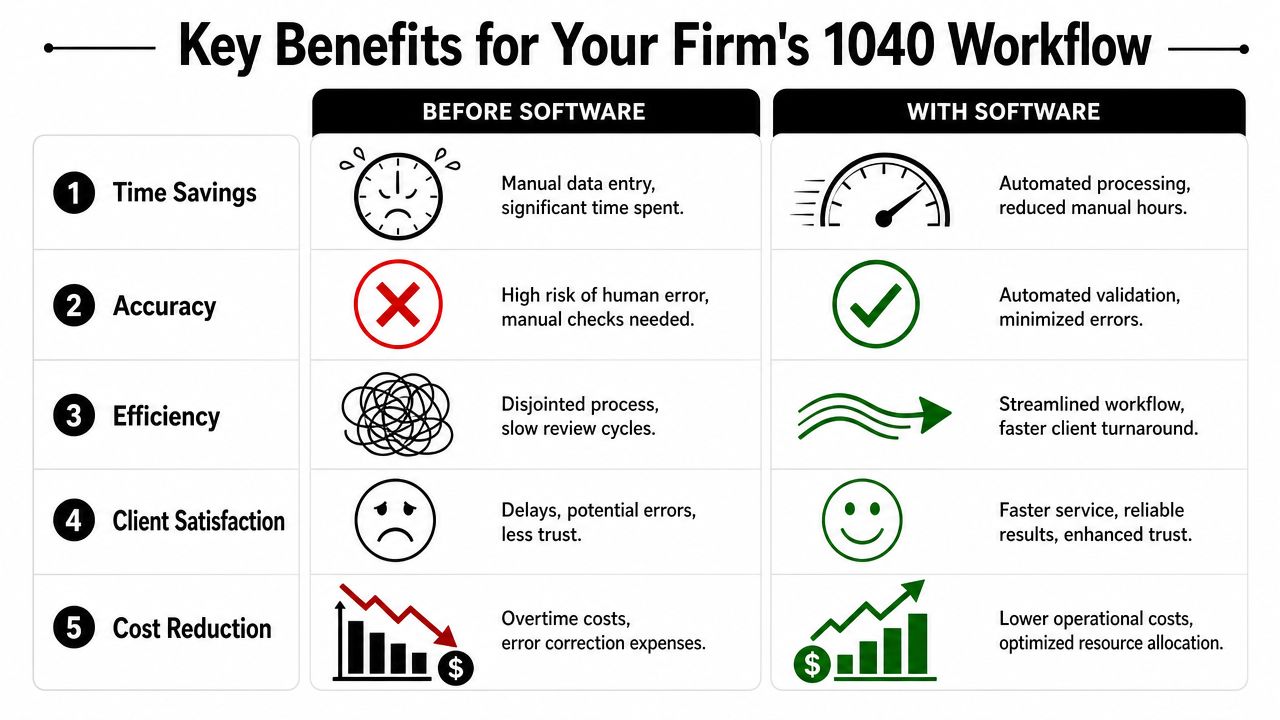
Modern document validation software achieves up to 95% verification accuracy and delivers an approximately 82% reduction in turnaround time compared with manual review processes, according to Research and Markets reporting on document verification. In a tax practice, that isn't just a speed claim. It changes what senior reviewers do all day.
What changes for the review team
Reviewers stop spending hours proving that obvious items are correct. They work from an exception list. That means less screen-to-screen comparison and more direct resolution of actual mismatches, incomplete support, or questionable mappings.
The practical gains tend to show up in four places:
- Faster review cycles: Files move through QC without waiting for a reviewer to recheck every line item manually.
- Higher confidence in routine tie-outs: The system handles repetitive comparison work consistently.
- Cleaner escalation: When something is wrong, the reviewer gets the source context immediately.
- Less burnout: Experienced staff spend more time exercising judgment and less time performing visual reconciliation.
A reviewer's best contribution is deciding what matters, not retyping what a W-2 already says.
What improves at the firm level
The bigger value is operational. Firms often assume review quality depends on having enough strong reviewers. In practice, quality also depends on whether the review method is standardized. Manual tie-out rarely is.
A tax-specific validation workflow gives firms a more uniform process:
- The same source checks happen every time. That reduces variation across offices, reviewers, and seasonal staff.
- The exception queue creates a common language. Preparers and reviewers can discuss specific flagged items instead of vague review notes.
- The file tells its own story. A partner can see what was validated, what was changed, and what remains open.
- Training becomes easier. New staff learn a review system, not just a reviewer's personal habits.
There's also a client service effect, even if firms don't describe it that way internally. Faster QC means fewer avoidable follow-ups, fewer corrections after delivery, and a steadier review pace during peak deadlines. Clients experience that as competence and responsiveness.
The firms that get the most value are usually not the ones chasing a flashy AI narrative. They're the ones trying to solve a very old problem: too much senior time spent proving obvious facts in a file that should already be mechanically reconcilable.
A Modern Tax Review Workflow in Action
The cleanest way to understand this software is to follow a single return through the process.
At intake, the client uploads source documents. The preparer drafts the 1040 in the tax system and assembles the file. In a modern workflow, the preparer also uploads the drafted return and source documents into the validation platform so the system can compare the two sets of information.
A visual overview helps frame the sequence.

Step one through step three
First, the system ingests the documents. It recognizes the W-2s, 1099s, and other source forms, then extracts the relevant values. Next, it compares those validated values against the drafted return. Instead of forcing a reviewer to inspect every page, it identifies exceptions.
That exception queue is where the workflow turns from clerical to efficient. A mismatch in federal withholding, a missing payer amount, or a value that landed in the wrong place on the draft becomes a review task with direct source linkage.
For teams evaluating this model, an interactive tax review workflow demo makes the process easier to picture in practice.
Later in the file, it's useful to see the workflow in motion.
How the handoff improves
The reviewer logs in and sees flagged items only. Each exception should link back to the original document page and the corresponding drafted return value. That reduces the usual scavenger hunt through PDFs and workpapers.
The partner's experience changes too. Instead of receiving a file that merely appears complete, the partner receives a validated review package with clearer evidence of what the team checked and resolved. One example in this category is WP TieOut, which ingests tax source documents, compares validated data against a drafted return, and compiles a source-linked binder with role-based sign-off history.
Here's how the handoff typically improves:
- Preparer to reviewer: The preparer sends a drafted file plus machine-generated discrepancies, not just a stack of documents.
- Reviewer to partner: The reviewer resolves exceptions and leaves a clearer trail of what was checked.
- Partner to final filing: The partner can focus on high-level reasonableness, risk areas, and final approval instead of repeating tie-out work.
The best review files don't just show the answer. They show why the team trusted the answer.
That workflow represents a significant shift. The software doesn't replace reviewer judgment. It protects it from being wasted on repetitive comparison work.
How to Evaluate Document Validation Software
Most vendor evaluations go off track because firms ask broad questions and get polished answers. “Do you support tax documents?” and “Do you have an audit trail?” won't tell you much. You need to press on evidence, workflow fit, and traceability.

Questions that expose weak tools fast
Start with extraction quality in your own file types. Give the vendor a messy sample set, not polished demo files. Include skewed scans, consolidated brokerage packets, and documents with repeated values. Then ask them to show exactly what the system extracted and what it did when confidence was low.
Ask direct questions like these:
- How does the system handle uncertain extraction? You want visible confidence handling, not silent assumptions.
- Can users jump from a flagged field to the exact source page? If they can't, the review still slows down.
- How are duplicate or overlapping documents treated? Tax files often contain replacements, repeats, and partial uploads.
- Can the product reflect our preparer, reviewer, and partner roles? Generic user models often break tax workflows.
Then look hard at auditability. For sensitive financial data, compliance frameworks such as 21 CFR Part 11 require a complete, tamper-evident audit trail linking each field to its source, validation rule, and reviewer action. Failing to maintain that traceability increases regulatory penalty risk by 40–60%, according to ComplianceOnline's overview of software verification and validation documentation.
If audit trail depth matters in your process, review what a dedicated tax audit trail software workflow should produce before you compare vendors.
What to inspect in the product itself
A strong product should let you verify these points with your own eyes:
| Evaluation area | What to look for |
|---|---|
| Review queue | Exception-first interface, not document-by-document clicking |
| Source linkage | Direct jump from discrepancy to original page |
| Sign-off history | Named reviewer actions with timestamps and status changes |
| Exportability | A binder or file package that can leave the system cleanly |
| Security controls | Role-based access and clear handling of sensitive files |
One more caution. Don't confuse identity-document verification features with tax-review capability. A vendor can be excellent at passports, liveness checks, and customer onboarding while still being a poor fit for internal 1040 reconciliation. Those are different problems with different standards of usefulness.
Implementation and Successful Change Management
Even when the software is good, rollout can fail if the firm treats it like a simple add-on. This is a workflow change. People need to understand what they are no longer expected to do by hand.
The market conversation around document validation software still leans heavily toward identity fraud and onboarding. That leaves a gap for firms trying to apply the same category to internal tax reconciliation, as noted in The Digital Project Manager's analysis of document verification software coverage. In tax, adoption succeeds when leaders make the use case concrete: validate source data against drafted returns, then review exceptions.
Start with a pilot, not a firmwide decree
Begin with a contained group. Pick preparers and reviewers who already work well together and aren't afraid of changing process. Use real returns, not training examples, and choose files with enough document variety to expose friction early.
A good pilot usually includes:
- A defined return set: Use a mix of straightforward and moderately complex 1040s.
- A written resolution process: Decide how reviewers will handle flags, overrides, and missing support.
- A feedback loop: Have the pilot group note where the system saved time and where it created confusion.
- A document handling standard: Align naming, intake, and file assembly using documented tax document management practices.
Train reviewers to think differently
The hardest shift is mental. Reviewers who built their reputation on thoroughness may initially distrust exception-based review. That's understandable. The answer isn't to force blind trust in the software. It's to define what the system validates, what still requires human judgment, and how that judgment gets documented.
Don't train staff to “use the tool.” Train them to adopt a new review standard.
That means teaching reviewers when to rely on automated reconciliation, when to inspect source context, and when to escalate a tax issue that software can't decide. Once that boundary is clear, adoption gets easier. Staff stop seeing the platform as replacing review and start seeing it as removing the least valuable part of review.
Take Your First Step to Automated Quality Control
The old 1040 review model asks skilled people to do too much mechanical comparison work. Document validation software changes that by moving the first pass of extraction, tie-out, and discrepancy detection into a system built for repeatability. The human reviewer still matters. The reviewer just spends time where judgment counts.
That's the key gain. Faster turnaround matters. Better accuracy matters. A cleaner audit trail matters. But the deeper improvement is structural. The firm replaces eyeballing with controlled validation and replaces broad rechecking with exception handling.
If your current process still depends on senior staff visually proving each source amount against a drafted return, you don't need a bigger review team first. You need a better review method.
If you want to see how this model works in a tax-specific environment, WP TieOut offers an AI-powered workflow for validating source documents against drafted 1040 returns, surfacing true discrepancies, and producing a source-linked review binder with sign-off history. A live demo is the easiest way to judge whether exception-based review fits your firm's process.