

By late March, most tax firms are running the same exhausting quality control loop. A preparer has entered W-2s, 1099s, and brokerage activity. A reviewer opens scanned source documents on one screen, the draft return on another, and starts ticking and tying line by line. Hours later, the work is technically done, but nobody feels confident that fatigue didn't hide a missed digit, a transposed amount, or an income item buried in a dense statement.
That process survives because it's familiar, not because it still makes sense. The better alternative is income verification software built for document-heavy financial review. For CPA firms, true value isn't generic automation. It's turning tax review from a manual hunt into a controlled exception process with cleaner evidence, faster handoffs, and a record a partner can stand behind.
Table of Contents
- The End of Manual Tick and Tie Tax Reviews
- What Is Income Verification Software
- How AI Extracts and Validates Income Data
- Key Benefits for Modern CPA Tax Workflows
- Essential Evaluation Criteria for Your Firm
- Your Implementation Checklist for Adoption
The End of Manual Tick and Tie Tax Reviews
At 10 PM in the middle of busy season, manual review stops being a quality system and becomes a stamina test. A senior reviewer compares a scanned W-2 to the draft return, checks federal withholding, then moves to a 1099-INT, then a 1099-DIV, then another brokerage page that wasn't labeled clearly. The work is necessary. It's also repetitive, slow, and easy to get wrong when the reviewer is deep into a long queue.
The problem isn't that firms lack discipline. The problem is that line-by-line visual reconciliation doesn't scale well when returns include many source documents, multiple handoffs, and compressed deadlines. The higher the volume, the more likely the firm is relying on reviewer heroics instead of a repeatable control.
Where manual review breaks down
A traditional tick-and-tie review usually fails in predictable places:
- Dense source packages: Brokerage statements, consolidated 1099 packets, and stacked wage documents force reviewers to hunt for amounts across many pages.
- Rekeyed data risk: If a preparer mistypes one figure, the reviewer has to notice it manually. There is no inherent system control.
- Weak documentation: Many firms can tell you a return was reviewed, but not exactly which source amount was checked, by whom, and when.
- Late-night inconsistency: The same reviewer who is excellent at 9 AM is less reliable after hours of repetitive comparison work.
Manual review is still a control. It's just an expensive one, and it weakens when volume rises.
That is why this software category is growing so quickly. The global income verification market is projected to grow from USD 2.1 billion in 2024 to USD 5.8 billion by 2033, reflecting a broad shift away from manual review in high-volume workflows, according to this income verification market projection.
For tax firms, the practical takeaway is simple. The same technology trend that replaced paper-heavy verification in lending and screening can also replace the most tedious parts of tax QC. Firms that already use document validation software for tax review workflows are moving review labor away from basic comparison and toward judgment calls, edge cases, and final sign-off.
What changes in practice
The shift isn't from review to no review. It's from full-population eyeballing to targeted review.
A good system ingests the source documents, extracts the data, checks it against reliable patterns or connected records, and presents the reviewer with exceptions that deserve attention. That means reviewers spend less time proving that obvious matches are correct and more time resolving mismatches, unusual income items, and documentation gaps.
For a partner, that's the key operational change. The firm keeps control, but it stops paying experienced people to do clerical comparison work.
What Is Income Verification Software
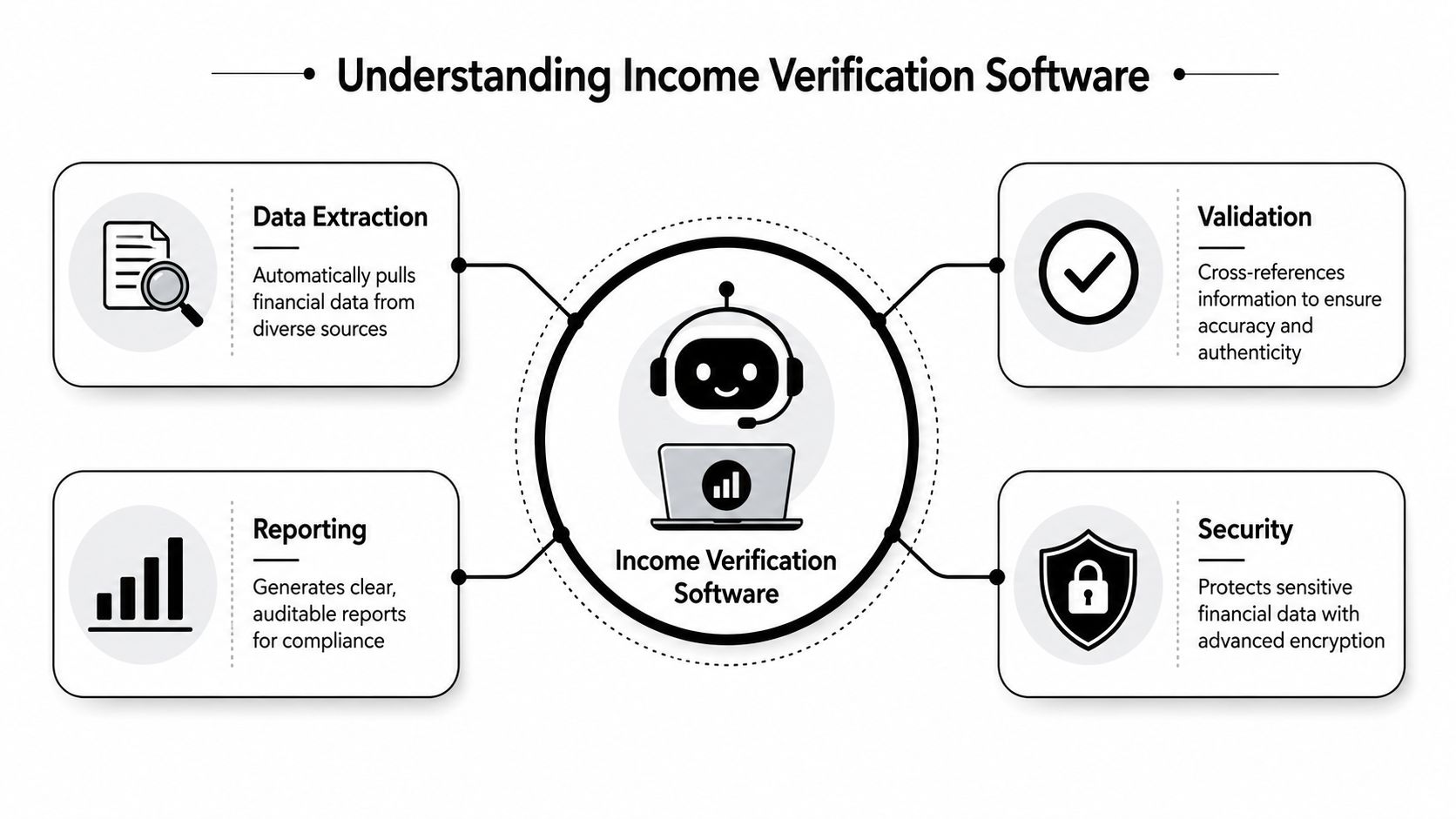
Income verification software is best understood as an automated junior accountant that doesn't get tired. It takes in source records, reads them, organizes the important income data, and checks whether the information is credible before passing the result into the next workflow step.
In other industries, this category is commonly called Verification of Income and Employment, or VOIE. These platforms use secure portals to retrieve and verify financial records directly from payroll providers and banks instead of relying on paper-based reviews, as described in this overview of automated VOIE platforms. For CPA firms, that same operating model matters because the software is not just scanning a PDF. It's creating a verified data layer the reviewer can use.
The three core jobs it performs
Most income verification software handles three jobs in sequence.
| Function | What the software does | Why a tax firm cares |
|---|---|---|
| Ingest | Pulls in pay stubs, W-2s, 1099s, bank records, and related files | Reduces manual gathering and sorting |
| Extract | Identifies relevant fields and structures them into usable data | Cuts rekeying and reduces preparation errors |
| Validate | Checks the extracted data against other sources or expected patterns | Gives reviewers a cleaner starting point |
That sequence matters because basic OCR alone isn't enough. A scanner can read characters. A verification platform has to decide which numbers matter, where they belong, and whether they agree with the rest of the file.
Why this is different from document storage
Many firms already have portals, DMS tools, and PDF organizers. Those systems store documents well, but they usually don't verify the contents. Income verification software sits one layer above storage.
It answers questions like these:
- Does the wage figure extracted from the W-2 match the amount reflected in the prepared return?
- Does the withholding amount appear plausible and consistent within the document set?
- Are there signals that the source itself may be altered or incomplete?
- Can the review file show the source page tied to the tax amount without manual bookmarking?
Practical rule: If the system only stores files or reads text, it isn't enough for tax QC. The real value starts when it validates and explains.
What a reviewer actually receives
A reviewer shouldn't receive a pile of machine-read fields with no context. They need a workpaper that is usable.
The best output usually includes:
- Structured income fields: wages, withholding, dividends, interest, and similar line items mapped into a reviewable format
- Exception flags: mismatches, missing pages, unusual values, or items that need human judgment
- Source linkage: a direct tie from each extracted figure back to the underlying page
- Reporting artifacts: a report or binder the firm can retain as evidence of review
That last point is often underrated. In a tax practice, software adoption succeeds when the output fits the review file, not when the extraction engine looks impressive in a demo.
How AI Extracts and Validates Income Data
The leap from OCR to usable tax review happens when software stops merely reading text and starts interpreting document context. A traditional OCR engine may capture every number on a page. An AI-enhanced system has to determine whether that number belongs to wages, withholding, dividends, or some unrelated field on the same form.
That distinction matters on tax documents because labels are similar, layouts vary, and source packets are inconsistent. A W-2, 1099-DIV, and brokerage summary can all contain multiple boxed fields, footnotes, and subtotal lines. A reviewer can sort that out visually. The software has to do it systematically.

Context first, extraction second
Good extraction engines don't just detect characters. They classify the document, identify the field, and map the value into a tax-relevant structure.
That usually involves several checks happening together:
- Document recognition: Is this a W-2, a pay stub, a bank record, or a 1099 variant?
- Field mapping: Which value belongs to the correct box or line item?
- Internal consistency checks: Do the figures within the document make sense relative to each other?
- Normalization: Are amounts presented in a way that can be compared across sources?
For firms exploring AI tax software for return review and reconciliation, this is the dividing line between a tool that dazzles in a screenshot and one that helps during busy season.
Cross-verification is where the control gets stronger
The biggest gain isn't extraction speed. It's multi-source cross-verification.
Advanced platforms use cross-verification to detect fraud signals and inconsistencies that manual review often misses, including mismatched deposit amounts between pay stubs and bank statements or suspicious round-number paychecks, according to this summary of digital income verification methods.
For tax review, the same logic applies even when fraud isn't the main concern. A mismatch may point to a typo, a missing form, a duplicate upload, or a draft return that didn't capture the final source detail.
What that means in a CPA workflow
Reviewers don't need the software to "decide the return." They need it to produce dependable signals.
A strong workflow looks like this:
- The system ingests source files and classifies them.
- It extracts key income fields into a structured workpaper.
- It compares those fields against related documents or expected patterns.
- It flags exceptions for reviewer judgment instead of forcing a full manual recheck.
If a system can't tell you why it flagged an amount, it hasn't improved review. It has only moved the confusion.
That is why explainability matters. A reviewer should see the extracted number, the source page, and the reason for the flag. Without that chain, the software may still save preparation time, but it won't become a trusted QC control.
Key Benefits for Modern CPA Tax Workflows
The case for income verification software in a CPA firm isn't about novelty. It's about replacing low-value review labor with a cleaner control framework. If the software only makes intake faster, that's helpful. If it changes how reviewers spend their time, that's when the return on adoption gets serious.
A useful way to think about the benefit is this. The software doesn't eliminate review. It changes the unit of review from every line item to every meaningful exception.

Review by exception replaces blanket comparison
Manual tax review assumes every field needs fresh human attention. That's expensive. Review-by-exception assumes the opposite. Most extracted items are matched, traceable, and routine. The reviewer steps in where the system found a discrepancy, a missing source, or a logic issue.
That shift improves workflow in several ways:
- Senior reviewers spend time on judgment calls: basis questions, inconsistent reporting, odd classifications, and missing support
- Preparers get clearer feedback: the flagged item is specific, not buried in markup
- Partners see cleaner queues: returns arrive with known exceptions instead of unresolved uncertainty
Partner lens: Review capacity improves when experienced staff stop proving that matched items match.
A related benchmark from another verification-heavy workflow is instructive. By automating collection and validation, income verification platforms can reduce approval timelines from over 30 days to under 10 and cut operational costs by up to 45% per transaction, according to this income verification platform market analysis. Tax firms shouldn't copy those figures directly into budgeting, but the workflow logic is highly relevant. When collection, extraction, and validation are automated, review bottlenecks shrink.
Here's a short walkthrough of the broader workflow logic in practice:
Defensible audit trails become part of the file
Tax firms often underestimate the value of a source-linked audit trail until a return is questioned internally or externally. At that point, a vague note that "review was completed" doesn't help much.
Good income verification software creates records that support the actual review process:
| Workflow need | Manual approach | Software-assisted approach |
|---|---|---|
| Evidence of source review | Reviewer initials in notes or PDF marks | Source-linked records tied to extracted items |
| Partner sign-off | Email trail or checklist | Timestamped approval path inside the workflow |
| Reperformance | Reopen PDFs and search again | Open the binder or report and follow the documented tie-out |
That changes partner risk in a practical way. Instead of defending a process based on custom and memory, the firm can point to a file that shows which source document supported which amount and where the exception was resolved.
Better staffing leverage during busy season
The hidden gain is staffing efficiency. Firms don't just need speed. They need a way to preserve review quality when document volume spikes and experienced reviewers are scarce.
Income verification software helps because it standardizes the first-pass control. A strong senior still matters, but that senior is no longer forced to do mechanical comparisons all day. The team can spread work more rationally across preparers, reviewers, and final signers.
That doesn't make the firm less technical. It makes the review function more resilient.
Essential Evaluation Criteria for Your Firm
Vendor demos tend to overemphasize extraction accuracy on clean sample files. Tax season doesn't look like that. Real files arrive incomplete, mislabeled, scanned poorly, and mixed with income types that don't fit neat templates. A firm should evaluate income verification software based on what happens in that messy middle.
The first screen to inspect isn't the dashboard. It's the workpaper output and the exception workflow.
Document coverage matters more than marketing language
Many platforms say they support income verification. Fewer handle the full variety of tax-season source documents well.
Ask direct questions about these categories:
- Straightforward wage forms: W-2s and common 1099 variants
- Layered brokerage statements: multi-page packets with summaries and detailed pages
- Self-employed support: irregular income records, platform payouts, and mixed-source documentation
- Edge-case files: low-quality scans, rotated pages, duplicate uploads, and partial documents
This issue becomes critical with non-W-2 income. Up to 70% of manual review work stems from the complexity of verifying income for self-employed and gig workers, which makes nontraditional income handling a key differentiator, as noted in this analysis of fraud signals and manual review pressure.
If a vendor is strong on W-2 extraction but weak on irregular income, the firm may still improve a narrow slice of the workflow while leaving its hardest review population untouched.
Evaluate the workflow, not just the engine
A CPA firm needs more than a recognition model. It needs a review process that supports handoffs.
Look for workflow controls such as:
- Role-based movement: can preparers, reviewers, and partners each complete their part without overwriting one another?
- Exception routing: can the system isolate unresolved items cleanly?
- Sign-off history: does each action show who did it and when?
- Output discipline: can the final file be exported into a review-ready binder or equivalent artifact?
A useful benchmark during demos is to compare the software against your existing review chain, not against a blank slate. Firms doing due diligence often benefit from reviewing a broader tax preparer software comparison for CPA workflows so they can distinguish extraction tools from actual review systems.
A tax tool isn't enterprise-ready for CPA review if it cannot survive a preparer-to-reviewer-to-partner handoff without side spreadsheets and email explanations.
Security and evidence should be concrete
Tax firms don't need vague assurances about data protection. They need to know how the vendor handles access, storage, and review artifacts.
Ask for specifics on:
- Access controls within the application
- Encryption practices for documents and extracted data
- Retention options for workpapers and reports
- Auditability of actions taken inside the system
Then ask one more practical question. If a partner needs to defend a reviewed return months later, what exact output will they open first?
That question cuts through a lot of demo theater. Strong platforms answer it immediately, because they were designed around evidence, not just automation.
Your Implementation Checklist for Adoption
Most firms make one of two mistakes when adopting new review technology. They either hand the project to IT with no workflow ownership, or they try to flip the entire tax practice at once. Both approaches create resistance.
A better rollout is narrow, measurable, and tied to review pain that partners already recognize.
Start with a pilot that has real friction
Don't begin with your easiest return type. Start with a controlled pilot group where manual review is obviously burdensome, such as returns with multiple W-2s, stacked 1099s, or brokerage packets.
A good pilot has these characteristics:
- Limited scope: one office, one return category, or one reviewer group
- Clear file profile: enough document complexity to test the system effectively
- Known baseline pain: slow review, messy workpapers, or repeated correction cycles
The goal isn't to prove the software is perfect. It's to see whether it reliably improves the current review motion on live work.
Map the future-state workflow before launch
Firms often configure software before deciding how people should use it. That's backwards. First define who owns each step.
A simple workflow map should answer:
| Stage | Human owner | Expected system role |
|---|---|---|
| Intake | Preparer or admin | Collect and organize source files |
| Extraction and validation | System with staff oversight | Structure data and identify issues |
| Exception review | Reviewer | Resolve flagged discrepancies |
| Final approval | Partner or manager | Sign off on the documented file |
This exercise usually exposes hidden friction. Maybe preparers are doing too much cleanup before review. Maybe reviewers are rebuilding workpapers that should have been produced automatically. Those are exactly the problems worth solving.
Assign one internal champion
Adoption stalls when everybody is "responsible." One person should own the pilot day to day.
That champion doesn't need to be the most technical person in the firm. They need enough credibility with reviewers and enough patience to translate software behavior into workflow decisions. In many firms, the best choice is a review manager or senior who understands where returns bog down.
The best implementation lead is usually the person who knows why review files bounce, not the person most impressed by AI features.
Judge success by review outcomes
During the pilot, don't chase abstract impressions. Judge the tool by whether it improves review control and staff efficiency.
Use outcome questions such as:
- Did reviewers spend less time on matched items?
- Were exceptions clearer and easier to resolve?
- Did the output support partner sign-off without extra cleanup?
- Did the file preserve a usable history of what was checked?
Keep those measures qualitative if needed. The point is disciplined observation, not forced precision.
Build the adoption plan around the busy season calendar
Timing matters. Firms should avoid dropping a brand-new process into the most chaotic week of filing season. Train before the heaviest load, then expand only after the pilot team has established a repeatable pattern.
A practical rollout cadence usually looks like this:
- Pilot on a narrow file set
- Document the revised review standard
- Train the next reviewer group using actual pilot files
- Expand to more return types once the handoffs are stable
That sequence keeps the change manageable. It also helps partners see the software as a control improvement, not another experimental tool competing for staff attention.
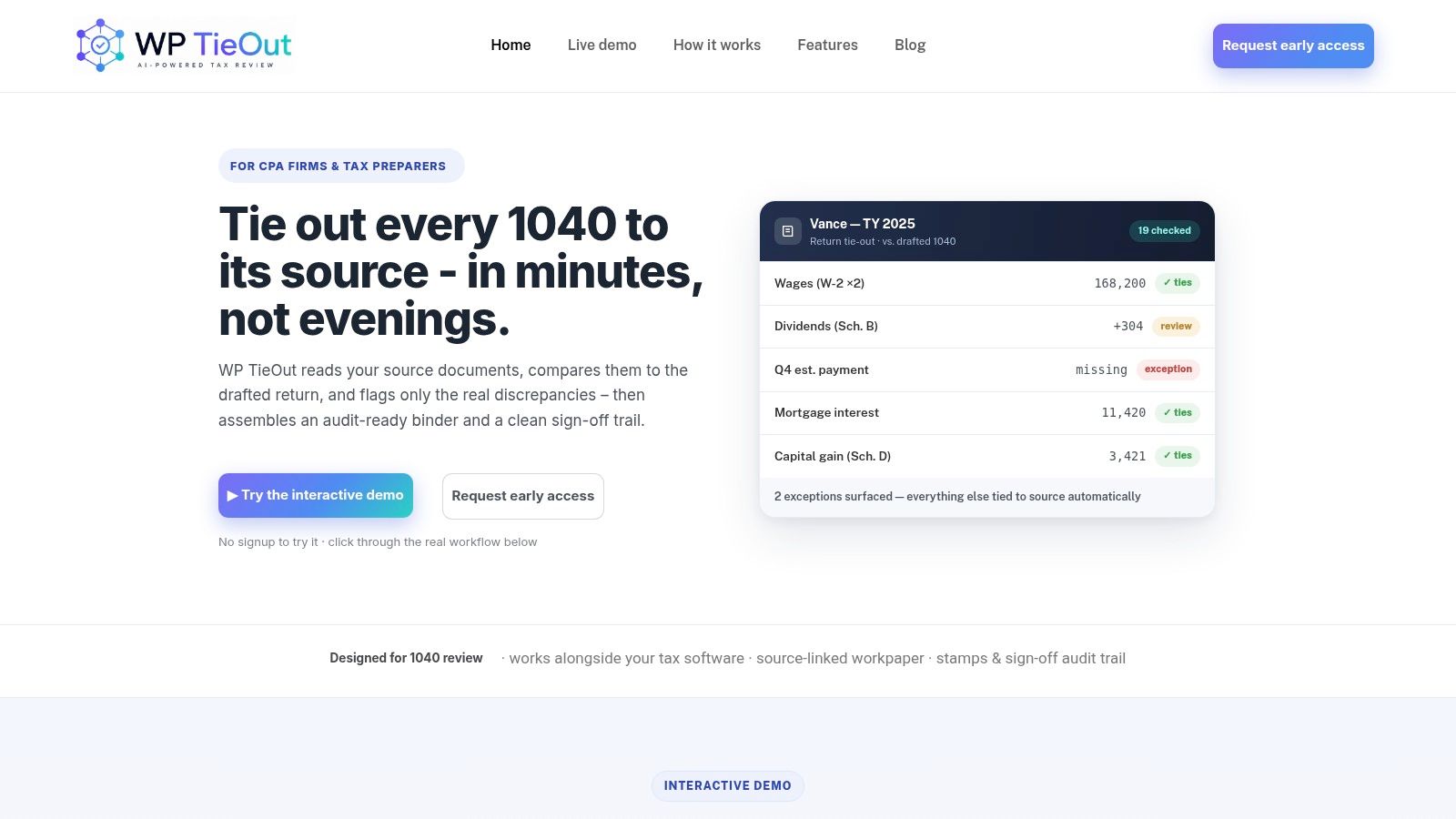
If your firm wants to see what review-by-exception looks like in a tax-specific workflow, WP TieOut is built for drafted 1040 review. It ingests source documents, validates extracted data, compares that workpaper to the drafted return, and surfaces only true discrepancies. The result is faster QC, cleaner handoffs, and a source-linked audit trail that partners can use.