
You open the renewal email, scroll to the bottom, and feel the same irritation you felt last year. The license fee is up. A few line items are vague. The rep is calling it an upgrade, but half of what changed looks like packaging, not capability.
That reaction is justified.
Tax software pricing has become harder to evaluate because vendors rarely sell a simple license anymore. They sell bundles, seats, modules, states, workflow tools, and now AI layers. Some of that adds real value. Some of it just moves cost from one bucket to another. If you only compare sticker prices, you can make a very expensive mistake.
The right way to buy tax software is to treat it like an operating system for the firm, not a seasonal expense. The broader tax software market reached $26.53 billion in 2025 and is projected to grow to $50.50 billion by 2031 at an 11.82% CAGR, which helps explain why vendors keep pressing for higher-value pricing across every tier, according to Market Intelo's tax software market figures.
Table of Contents
- The Annual Shock of the Software Bill
- Decoding the Three Core Pricing Models
- Price Benchmarks for CPA Firms in 2026
- Uncovering Hidden Fees and Licensing Traps
- Your Firm's Cost Comparison Checklist
- Calculating True TCO and Return on Investment
- Matching Your Firm to the Right Pricing Strategy
The Annual Shock of the Software Bill
Every firm partner knows the ritual. Renewal season arrives right when you're trying to close out extensions, hire for the next cycle, or explain realization to people who still think "efficiency" means asking staff to work faster. Then the invoice lands, and the number isn't just the number. It's the beginning of an argument about whether the current platform is still worth it.
The worst part isn't even the increase. It's the uncertainty. You know switching systems is painful. You also know staying put can become lazy purchasing. Most firms sit in that tension for too long and default to renewal because the operational risk of change feels worse than the financial pain of another year.
Practical rule: If your software bill surprises you, the vendor's pricing model is already working better for them than for you.
I've seen firms focus on the wrong question. They ask, "Which package has the most features?" That's a demo-room question. The operating question is different. It is, "Which pricing structure produces the lowest total cost for the way we prepare, review, sign off, and store returns?"
That matters because software spend isn't isolated. A bad fit shows up in reviewer overtime, partner bottlenecks, handoff errors, duplicate data entry, and rework late in the season. A cheap license can create expensive labor. An expensive platform can still be the right purchase if it shortens review cycles and reduces avoidable cleanup.
Decoding the Three Core Pricing Models
Before comparing products, get clear on the billing architecture. Most tax software pricing still falls into three buckets. The labels vary, but the economics don't.

Pay-Per-Return
This is the lowest-risk entry point for a new practice or a low-volume book. You pay as returns are produced rather than committing to a heavier annual contract up front. For a solo preparer with uncertain volume, that can be sensible.
The trap is obvious once volume stabilizes. What looked flexible in year one can become a margin leak in year three. Firms outgrow pay-per-return because each return still feels individually affordable, even while the aggregate spend becomes irrational.
This model works best when your return count fluctuates, your mix is hard to predict, or you're testing a niche.
Tiered annual subscriptions
This approach is common among most established firms. The vendor packages features, forms, e-filing allowances, user counts, or workflow tools into bands. You choose the tier that best matches your client mix and staffing model.
The upside is predictability. Budgeting gets easier, and managers stop debating whether each marginal return is "worth" the software cost. The downside is that many firms buy the tier above what they need because the sales pitch frames headroom as prudence.
That can be smart if growth is real. It can also be expensive optimism.
Custom enterprise licensing
Large firms, multi-office firms, and firms with heavier integration needs usually land here. Pricing is negotiated around users, entities, workflow complexity, data access, support expectations, and sometimes analytics or AI layers.
This model isn't bad in itself. It just requires discipline. Enterprise pricing often hides cost in custom terms rather than public rate cards. If your team doesn't define requirements tightly, the vendor will define them for you, and the price will reflect that.
A custom quote is not a discount. It's usually a transfer of complexity from their price page to your contract.
A useful way to think about the three models:
| Pricing Model | Best Fit | Main Strength | Main Risk |
|---|---|---|---|
| Pay-Per-Return | New, seasonal, or uncertain-volume firms | Low initial commitment | Cost creeps up as volume grows |
| Tiered Subscription | Stable small and mid-sized firms | Predictable annual budgeting | Paying for unused capacity or features |
| Custom Enterprise | Larger firms with workflow complexity | Better fit for integration and control | Opaque terms and harder comparison |
Price Benchmarks for CPA Firms in 2026
A partner approves a tax software renewal at what looks like a tolerable number. Three months later, the full bill shows up in labor. Seniors spend extra time reviewing diagnostics, managers clean up workflow workarounds, and busy-season overtime wipes out whatever looked cheap on the quote. That is why price benchmarks matter only if they help you estimate total cost of ownership, not just the license line.
Public pricing is inconsistent, and vendors often make side by side comparison harder than it should be. The practical benchmark is still useful. Entry-level products usually sit at the low end, mainstream professional suites occupy the middle, and enterprise platforms price higher because they bundle broader form coverage, more workflow controls, and heavier admin capability. The catch is that none of those labels tells you whether your firm will process returns faster, review them with fewer touches, or reduce write-downs.
A practical comparison table
| Firm Size / Tier | Typical Software | Relative Price Position | What You are Usually Paying For |
|---|---|---|---|
| Solo practitioner or entry tier | TaxSlayer Pro Starter | Low | Basic return prep, limited state access, and a lower upfront commitment |
| Small to mid-sized firm | Drake Tax, Lacerte | Mid | Broader form support, more mature review workflows, and better fit for steady volume |
| Mid-tier to enterprise entry | Intuit ProConnect | Mid to high | Flexible scaling, cloud access, and a path into a larger workflow stack |
| Large or enterprise firm | UltraTax CS and comparable enterprise platforms | High | More control over complex returns, multi-user administration, and deeper firm standardization |
Price only makes sense against realization. If your firm is still using old fee assumptions, compare your software spend with current benchmarks for how much CPAs charge for a tax return. A platform that costs more per preparer can still produce the better margin if it cuts review time and helps you hold pricing.
What firms usually get at each price level
Low-cost software can work well for a solo practice or a small book with straightforward returns. The trade-off is usually speed under pressure. Data entry may be fine, but review tools, diagnostics, and multi-state handling often require more manual checking. That matters once volume rises, because partner and manager time is the most expensive line on the engagement.
The middle tier is where many firms find the best operating balance. You usually get enough coverage and enough workflow structure to keep returns moving without paying enterprise rates for complexity you do not have. For a firm with predictable volume, this is often the band where cost per return starts to stabilize.
High-end platforms deserve a more skeptical review than vendors usually get. Some firms buy them because the sales demo looks polished. Others need them because they handle consolidated entities, tiered state filings, or a review process spread across several offices. Those are very different buying cases, and only one of them produces a real return.
AI changes this benchmark discussion. A weaker core tax platform can look affordable until your reviewers spend hours catching issues manually. A stronger platform paired with AI review tools can improve ROI if it reduces second-pass review time, flags inconsistencies earlier, and lets experienced staff handle more returns without adding headcount. If the AI layer is sold separately, include it in the benchmark. If it replaces review labor, give it credit there too.
The right question is simple. What does this software cost per completed, reviewed, billed return after labor, rework, and review technology are included? Firms that answer that question make better software decisions than firms chasing the lowest quoted license.
Uncovering Hidden Fees and Licensing Traps
A firm signs a tax software agreement at a price that looks workable in the partner meeting. Ninety days later, the actual bill shows up through implementation invoices, added users, state access, and support upgrades that suddenly became necessary. That is not a pricing mistake. It is a purchasing mistake.
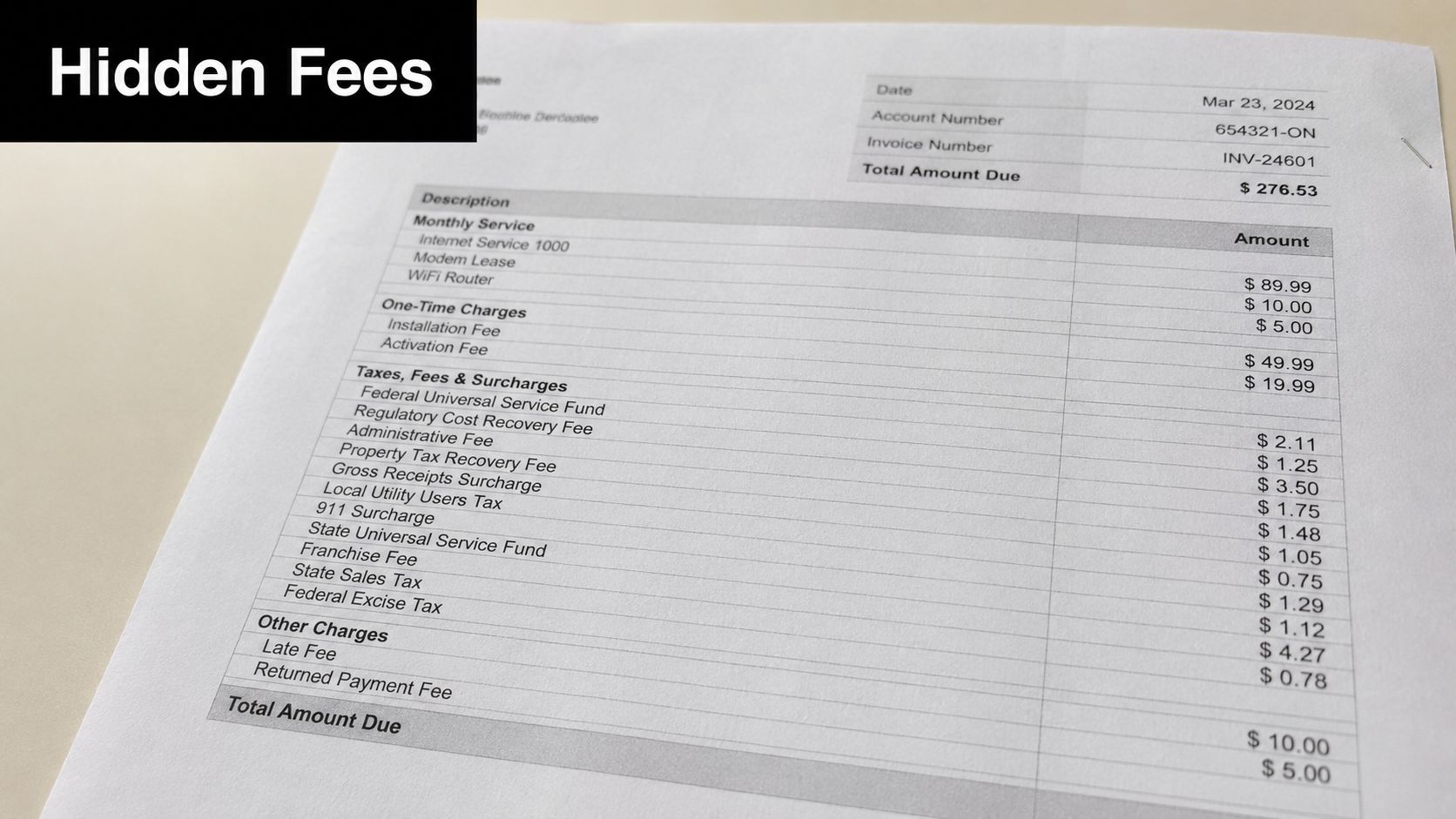
The license fee is only the starting point. Total Cost of Ownership usually climbs in the gaps between what the sales team demonstrated and what your firm needs to process returns, train staff, support reviewers, and get data in and out of the system. AI review tools add another layer. If the core platform misses issues that your reviewers catch manually, the labor cost lands on your firm. If the vendor charges separately for AI diagnostics, anomaly detection, or return review assistance, that add-on belongs in the software budget, not buried in a side note.
Where vendors expand the bill
The common traps are predictable.
- State access: The base package often covers fewer jurisdictions than your client list requires.
- User licensing: Partners, reviewers, admins, and seasonal staff may be counted differently from how your firm staffs busy season.
- Conversion work: Data migration is often described casually during the sale and priced seriously after signature.
- Training: Included onboarding may cover setup calls, not reviewer workflow, organizer configuration, or role-specific training.
- Support tiers: The support level that matters in March and April may sit behind a higher service package.
- Office structure: Multi-office firms, remote teams, and affiliated entities can trigger extra licensing rules.
I also look for charges that never appear in the headline quote but show up later in practice. Template customization. API access. E-signature volume. Portal storage limits. Additional electronic filing capacity. Those items matter because they hit operating cost every year, not just in the first conversion cycle.
If you are comparing products across vendors, a side by side tax preparer software comparison for CPA firms helps expose which features are included and which ones have been split into add-ons.
Contract terms that deserve a hard review
Bad pricing is often hidden in legal language, not in the proposal.
Watch these clauses closely:
- Auto-renewal timing that locks the firm in before leadership can evaluate renewal pricing and service issues.
- Broad user definitions that charge for anyone with login rights, even if they only approve returns or handle admin tasks.
- Termination penalties that make a bad platform expensive to leave.
- Data export restrictions that turn your own client history into a hostage during conversion.
- Feature labeling where a capability exists in name but requires another paid module to work in production.
Ask vendors to mark every excluded item in writing. Ask what happens to pricing after the introductory term. Ask whether AI review functions, advanced diagnostics, and premium support are included at renewal or repriced separately. Those answers tell you more about long-term ROI than the demo ever will.
Your Firm's Cost Comparison Checklist
Most software buying mistakes happen before the first demo. The firm hasn't agreed on its own requirements, so every vendor sounds plausible. Then the decision gets made on interface preference, a promotional concession, or whoever gave the best presentation.
That approach costs money.
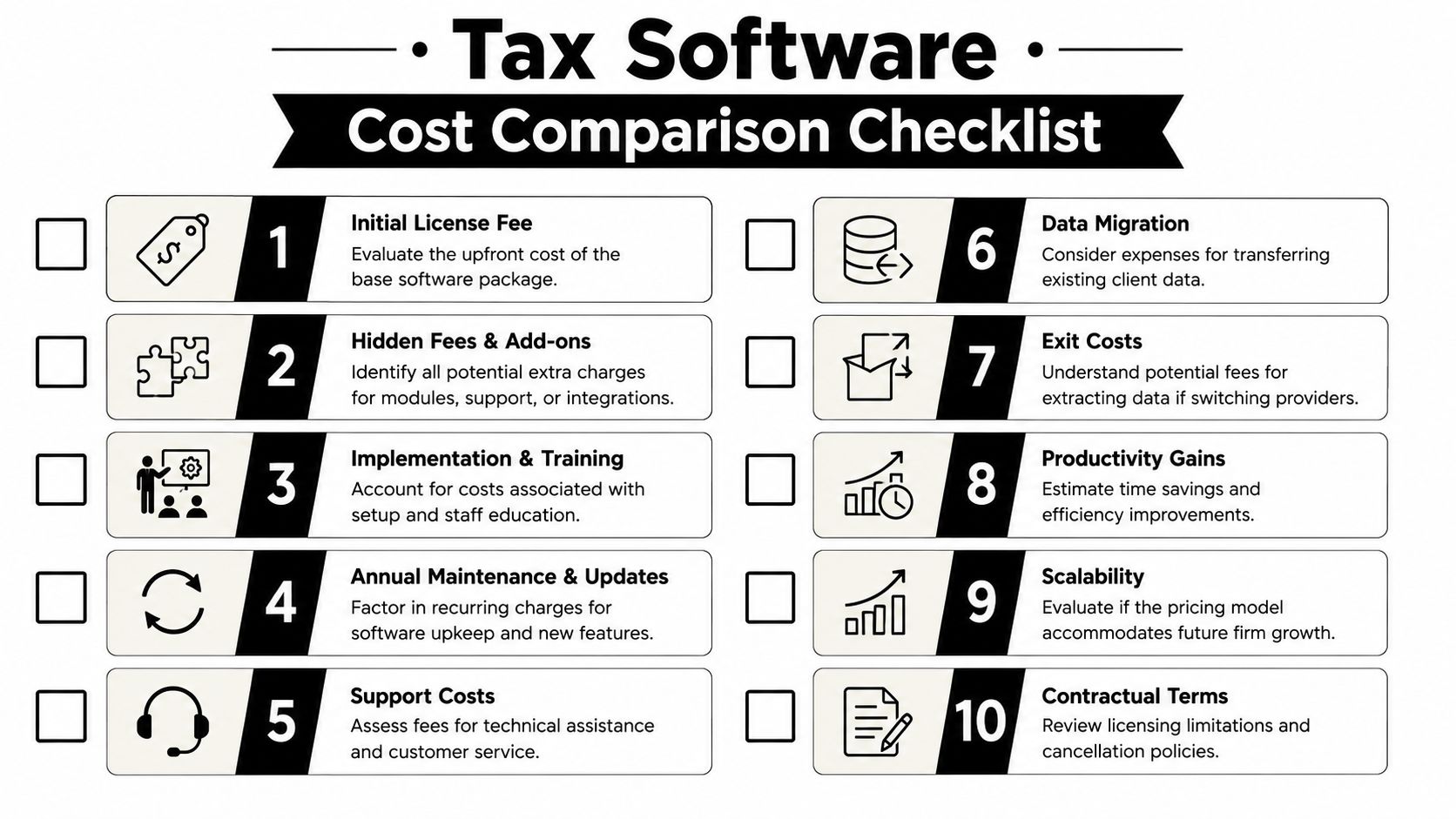
The procurement checklist that keeps teams honest
Use a written scorecard before talking to sales.
- Map your return mix: Know which returns drive volume, which drive complexity, and which create review pain.
- List mandatory forms and states: If the system misses routine work your staff handles every week, the rest of the pitch doesn't matter.
- Define the user model: Count preparers, reviewers, partners, seasonal staff, and administrative users separately.
- Document integration needs: Portals, document management, e-signature, workpaper flow, and export needs should be listed before the demo.
- Set support expectations: Busy-season response time matters more than generic support availability.
- Force a full-price quote: Ask for license, implementation, migration, training, support, add-ons, renewal assumptions, and cancellation terms in one document.
For side-by-side evaluation criteria, this tax preparer software comparison guide is a useful framework for structuring the shortlist.
How to run the demo without getting sold
Don't let vendors control the agenda. Give them scenarios.
Ask them to show:
- A real workflow: Intake through final review, not a polished feature tour.
- Exception handling: What happens when source data is messy, partial, duplicated, or late.
- User permissions: Who can prepare, review, override, and sign off.
- Migration reality: How prior-year data appears after conversion.
- Renewal logic: What changes in year two if your user count or volume shifts.
If the demo avoids your ugliest real-world files, it isn't a demo. It's theater.
Also keep the evaluation team small. One partner, one review manager, one preparer who knows where the bodies are buried. That's usually enough to separate useful software from well-marketed software.
Calculating True TCO and Return on Investment
A partner approves a tax software purchase in July because the license looks reasonable. By March, the firm is paying for it three more ways. Senior reviewers are stuck clearing exceptions by hand, managers are fixing workflow gaps, and partners are writing off time that never appeared on the vendor quote. That is the true TCO calculation.

TCO starts with absorbed labor
License cost matters. It just is not the cost center that usually hurts margin the most.
Count every dollar tied to ownership. Annual license. Implementation. Data conversion. Training hours. Admin time spent managing users and permissions. Add-ons that seemed optional in the sales cycle but become necessary once the team is live. Then price the labor the system creates or removes after go-live.
That second category is where firms fool themselves. A cheaper platform loses its price advantage fast if preparers need workarounds, reviewers have to inspect every line manually, or partners get dragged into exceptions that should have been resolved two levels earlier. The invoice may look lean. Realization will not.
Use a simple operating formula: software spend plus internal labor plus error cost plus admin drag. If you are only comparing subscription fees, you are not doing ROI analysis. You are shopping.
Put a dollar value on review friction
Review is usually the swing factor.
Preparation time is visible. Review waste is harder to isolate because it hides inside manager and partner hours, write-offs, and longer cycle times. A firm can tolerate an average prep tool for a while. It cannot tolerate a review process that burns expensive labor on document matching, tie-out checks, and avoidable back-and-forth.
Start with actual workflow timing from the last busy season. Measure how long a standard return takes to prepare, review, revise, and approve. Separate straightforward returns from complex ones. Then identify where senior people spend time that should have been handled by system controls, standardized workpapers, or automation.
Those hours have a cost. So do amended returns, client callbacks, and missed filing details that trigger rework.
Where AI review tools affect ROI
The tax engine gets the return drafted. The review layer determines whether your highest-cost people are making judgment calls or doing clerical verification.
That distinction matters. If an AI review tool flags inconsistencies, traces amounts back to source support, and gives reviewers a defensible exception list, the gain is not theoretical. The firm gets faster handoffs, fewer avoidable touches, and better use of manager and partner time. Firms evaluating AI tax software for review and workflow control should test that point directly in the ROI model, not treat it as a side purchase.
Do not give AI credit for work your firm still refuses to standardize. If source documents are chaotic, naming conventions are inconsistent, and review policies change by reviewer, the software will expose disorder more than it fixes it. Good operations get the return on the tool. Bad operations get another monthly bill.
A practical TCO worksheet
| TCO Component | What to Count |
|---|---|
| Direct software cost | License, modules, implementation, support, annual increases |
| Internal labor cost | Prep time, review time, admin setup, training, exception handling |
| Error and rework cost | Amended filings, missed items, partner cleanup, client service time |
| Process drag | Waiting on approvals, duplicate data entry, manual tie-out, binder cleanup |
| Return benefit | Hours saved, faster turnaround, improved reviewer capacity, reduced write-offs |
Run the math over at least two years, not one. Year one includes implementation pain. Year two shows whether the workflow scales. If the vendor promises efficiency, ask whether that efficiency appears in preparer hours, reviewer hours, turnaround time, or realization. If it does not show up in one of those places, it is marketing.
Later in the buying process, it helps to see the workflow in motion rather than rely on brochures. This walkthrough gives a practical example of how firms are evaluating automation in review workflows:
One rule has held up across every platform evaluation I have seen. The best return rarely comes from shaving a few points off the license fee. It comes from cutting reviewer drudgery, reducing partner cleanup, and turning senior capacity back into billable judgment.
Matching Your Firm to the Right Pricing Strategy
If you're a new solo preparer with uncertain volume, pay-per-return is usually the least risky place to start. Keep fixed cost low, learn your client mix, and move out of that model once volume becomes predictable.
If you run a stable small or mid-sized firm, a tiered subscription is usually the cleaner answer. Predictable pricing helps budgeting, and the right middle-tier product can support stronger throughput without forcing enterprise complexity on a firm that doesn't need it.
If your firm handles complex multi-state, multi-entity, or multi-office work, enterprise licensing may be justified. But the burden shifts to you. Define requirements tightly, negotiate user terms carefully, and don't accept vague promises about implementation or support.
If your review team is the bottleneck, don't stop at the core tax engine. Budget for the full stack, including review automation. That's where many firms recover margin. This is also why more firms are looking closely at AI tax software for review and workflow control instead of treating tax prep and tax review as one undifferentiated purchase.
The practical answer is rarely the cheapest tool and rarely the biggest suite. It is the pricing structure that fits your volume, your staffing, your return complexity, and your review process with the fewest expensive workarounds.
If your firm wants to improve ROI after the return is drafted, WP TieOut is worth a serious look. It helps CPA firms review 1040 returns by reconciling source documents against the drafted return, surfacing real discrepancies, and producing a source-linked audit trail that cuts down manual review work where the labor cost is usually highest.