
Peak season exposes the same weakness in a lot of CPA firms. Returns move fast, source documents pile up, reviewers start hunting through workpapers for one mismatch, and a clean filing turns into a sequence of manual checks, follow-ups, and late-night corrections. That's the prime buying moment for 1040 tax return software, not when a vendor promises easier data entry, but when your team needs faster review without loosening control.
The market context explains why this category keeps expanding. One major estimate values the global tax software market at USD 22.8 billion in 2024 and projects it to reach USD 66.6 billion by 2034 at an 11.3% CAGR (Market.us). That growth is tied to a broader move toward compliance automation, and it's exactly why CPA firms are now comparing review quality, diagnostics, and workflow depth instead of treating 1040 preparation as a simple questionnaire.
| Evaluation area | What CPA firms should prioritize | Why it matters in 1040 work |
|---|---|---|
| Forms coverage | Complete federal and state libraries | Missed forms slow filing and create rework |
| Diagnostics | Hyperlinked, color-coded error checks | Reviewers need fast exception handling |
| Deployment | Cloud, desktop, or hybrid options | Teams work differently across offices and busy season |
| Integration | Export and import into review tools | Reduces duplicate handling of source documents |
| Auditability | Clear sign-off trail and report output | Supports quality control and internal accountability |
Table of Contents
- Introduction to 1040 Tax Return Software
- Core Features of 1040 Tax Return Software
- Integrations with Tax Review Tools
- Security and Compliance Standards
- Pricing Models and Total Cost of Ownership
- Implementation Checklist for CPA Firms
- Use Cases for CPA Firms
- Decision Matrix and Recommendations
Introduction to 1040 Tax Return Software
A senior reviewer opens a return, sees brokerage data that doesn't line up with the draft, and realizes the mismatch wasn't caught earlier. Another preparer has the correct source documents, but the audit trail is messy, so the reviewer wastes time proving what changed and why. That's the kind of friction that turns a software decision into a workflow decision.
The strongest case for better 1040 tax return software is not convenience, it's verification. Most consumer-facing products frame filing as a guided interview, but professional tax teams are usually fighting exceptions, not data entry. Industry guidance for preparers points to complete federal and state forms coverage, hyperlinked color-coded diagnostics, and deployment flexibility as the differentiators that materially affect throughput and review quality in multi-entity firms (Wolters Kluwer).
Practical rule: if the software helps the preparer finish faster but leaves the reviewer to rebuild the return from scratch, it's shifting labor, not removing it.
That's why the category keeps moving upmarket. As broader tax technology expands toward workflow automation, firms need systems that can surface inconsistencies early, preserve source context, and keep handoffs clean. Software that only supports entry leaves the most expensive part of the process untouched.
Core Features of 1040 Tax Return Software

Professional 1040 platforms are useful only when they reduce reviewer effort, not just preparer keystrokes. The best way to judge them is by asking whether each core feature shortens exception handling, improves traceability, or keeps the return aligned with source data before e-file submission.
Forms coverage and calculation integrity
A complete federal and state forms library matters because missing forms force workarounds, and workarounds create review risk. In multi-state or exception-heavy work, the value isn't just access to forms, it's whether the software keeps schedules, worksheets, and supporting calculations connected in a way that preserves the original logic of the return. That's also where deterministic validation stays important, because benchmark work on tax computation has shown that current AI models still make critical mistakes on IRS tax tables and arithmetic (ColumnTax).
Diagnostics that reviewers can actually use
The highest-value diagnostic systems do more than flag an issue. They point the reviewer to the exact line, show the cross-linked context, and make it obvious what needs adjustment. That's why hyperlinked color-coded diagnostics are such a material differentiator for preparer-focused software. If the reviewer has to search through unrelated screens, the software is adding friction instead of removing it.
Deployment flexibility for real firm workflows
Cloud, desktop, and hybrid deployment options matter because firms don't all work the same way. Some teams want centralized access and lighter IT overhead, while others need workstation-based control or a mixed environment that supports multiple offices and seasonal capacity swings. The right deployment model should fit how your firm reviews returns, not force the firm to reorganize around the vendor.
Data handling and audit-ready output
Import and export depth matters when returns are built from W-2s, 1099s, brokerage statements, and supporting schedules. A strong platform should keep source data tied to the return in a way that supports later review and sign-off. That's where audit-ready reports become more than a nice-to-have, because they help the reviewer see what was entered, what changed, and what was approved.
The feature that saves the most time is often the one that prevents a second pass.
What to compare during vendor demos
- Forms completeness: Ask whether the library covers the return types your firm handles, not just the common ones.
- Diagnostic clarity: Check whether errors are visually linked to the line items your team reviews most often.
- Workflow fit: Confirm whether the platform supports your mix of cloud, desktop, or hybrid users.
- Traceability: Look for exportable reports that preserve reviewer notes and sign-off history.
- Validation discipline: Verify that calculations are rules-based, not dependent on generative shortcuts.
Integrations with Tax Review Tools
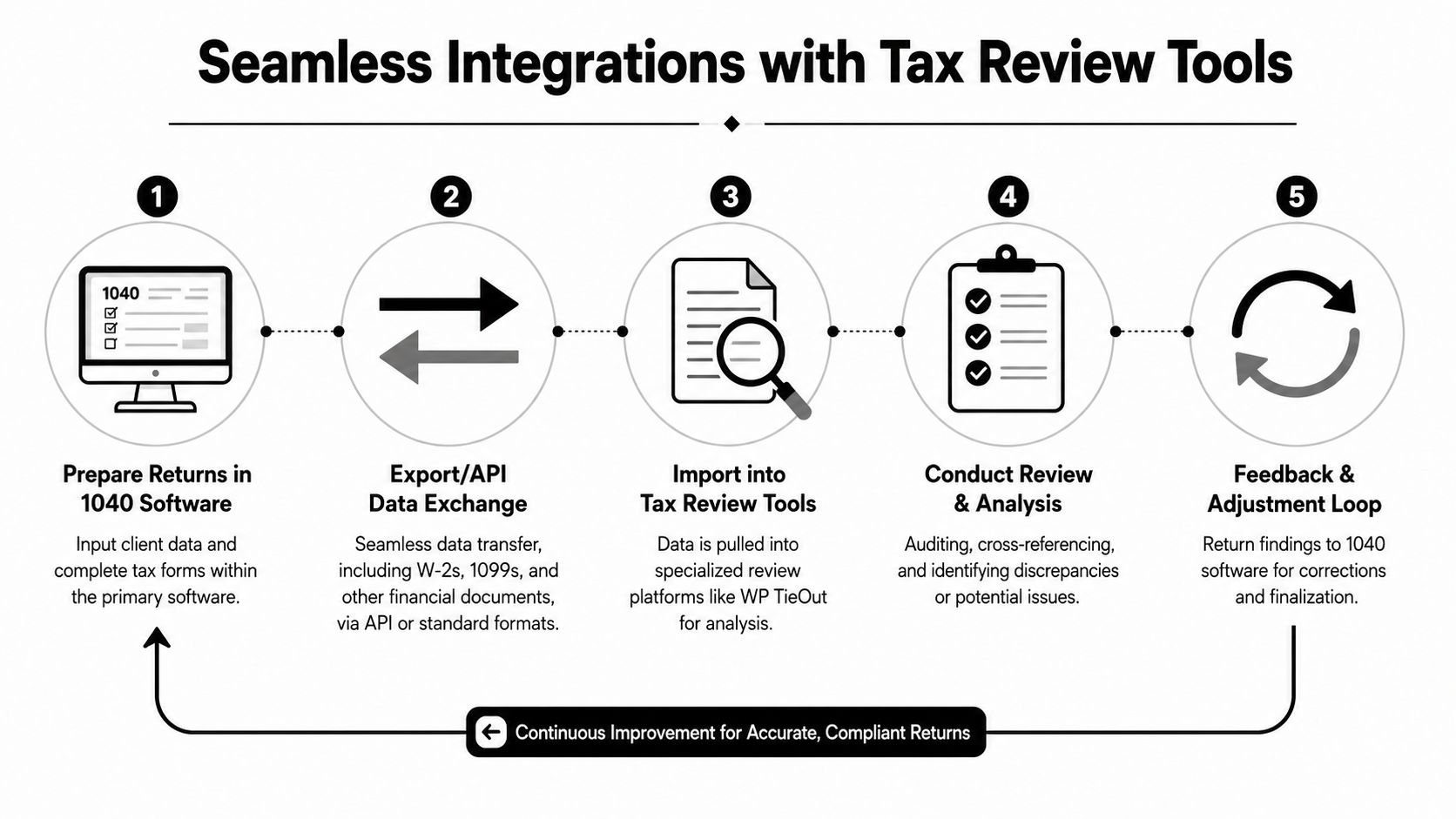
Consumer software usually treats filing as the finish line. CPA firms know that the draft return is only the midpoint, because the detailed review starts when a reviewer compares the return against broker statements, income docs, and source workpapers. That's why integration with review tools matters more than the front-end questionnaire.
Most consumer-facing coverage still frames 1040 tax return software as a guided filing tool, but professional users care more about verification and review quality than entry speed (PCMag). A platform that exports cleanly into review systems reduces the need to recreate the return in a second environment, and that's where the workflow gain happens.
What a strong review workflow looks like
A useful integration path starts with preparation, moves through structured export, and lands in a review environment that can isolate discrepancies. If the output is clean, the reviewer can work by exception instead of reading every line. If it isn't, the reviewer becomes a second preparer.
For firms using specialized review layers, the goal is to keep the source chain intact from intake through final sign-off. One practical example is WP TieOut, which is built around ingesting source documents, validating extracted data, and comparing that data to the drafted return before final approval.
Comparison points that matter
- API or standard export support: Better integrations reduce manual re-keying and limit formatting losses.
- Document handling: W-2s, 1099s, and brokerage statements should move without breaking source context.
- Exception routing: Reviewers should see only what doesn't match, not every line that already reconciles.
- Binder output: Bookmarked files help partners and managers trace decisions later.
- Feedback loop: Corrections should flow back to the drafting system without starting over.
The integration question is really a control question. If your software can't hand off a clean draft to a review layer, you're paying preparers to do work that reviewers repeat.
Security and Compliance Standards
Tax data is sensitive enough that security can't be treated as an add-on. CPA firms need more than a login screen and a privacy statement, they need controls that limit access, preserve evidence, and keep sensitive client records from moving in ways the firm can't explain later. That includes role-based access, audit logs, and encryption across storage and transfer.
The compliance conversation should also include accessibility. The Taxpayer Advocate has said Free File hasn't achieved its objectives and recommended measuring taxpayer satisfaction and testing whether software can complete forms, schedules, and deductions, which points to a deeper gap in usability beyond price and basic filing access (Taxpayer Advocate Service). That matters for firms serving clients who rely on screen readers, keyboard navigation, or other assistive tools.
Security controls to ask about
A serious vendor should be able to describe how it handles authentication, access permissions, logging, and retention without vague language. Firms should also ask how quickly role changes take effect when staff move between preparer, reviewer, and partner responsibilities. If those changes lag, the audit trail becomes less trustworthy.
Accessibility should be part of compliance review
A usable product is not just one that opens. It has to support real interaction for clients and staff with different needs, including screen-reader compatibility and keyboard-only navigation. The Free File discussion makes the point clearly, accessibility is uneven, so firms should test it directly rather than assuming a vendor has covered it.
Audit rule: if a reviewer can't trace who changed a return and when, the system is incomplete for professional use.
Internal accountability matters too. If your team wants a deeper framework for sign-off history and evidence preservation, see the guidance on audit trail software.
Pricing Models and Total Cost of Ownership
Sticker price is a weak way to compare tax software. One vendor can look inexpensive until seat counts, module add-ons, overage fees, and support tiers show up on the invoice. Another can look expensive up front but cost less once the firm factors in review time, fewer handoffs, and less rework.
The U.S. tax preparation software developers sector is estimated at USD 5.5 billion in 2026, with 154 businesses competing for share (PS Market Research). That competitive environment drives varied pricing structures and aggressive promotions, which is why firms need to compare total cost, not just list price.
Pricing model comparison
| Software | Pricing Model | Starting Price | Overage Fees |
|---|---|---|---|
| Vendor A | Per-user | Not publicly standardized | Usage-based or seat-based add-ons may apply |
| Vendor B | Per-return | Not publicly standardized | Extra return volume may trigger charges |
| Vendor C | Flat-fee subscription | Not publicly standardized | Feature modules and support tiers may add cost |
| WP TieOut | Platform subscription | Not publicly standardized | Pricing details should be confirmed with the vendor |
The reason to look beyond pricing architecture is simple. If a firm needs multiple reviewers, the seat model can become expensive fast. If a firm files a high volume of individual returns, per-return pricing can rise with seasonal activity. Flat-fee plans can look clean, but they often hide limits in integrations or advanced functions.
For firms comparing review-focused platforms, the vendor's pricing page should be read with the workflow in mind. You can start that analysis with tax software pricing.
Hidden cost drivers to watch
- User seats: Review managers, partners, and seasonal staff can all affect the final bill.
- Module add-ons: Forms coverage, diagnostics, and export features may be sold separately.
- Training time: A platform with poor usability costs more in onboarding and retraining.
- Review duplication: If reviewers rebuild work instead of validating it, labor costs rise.
- Support coverage: Busy-season responsiveness can matter as much as the software itself.
Implementation Checklist for CPA Firms
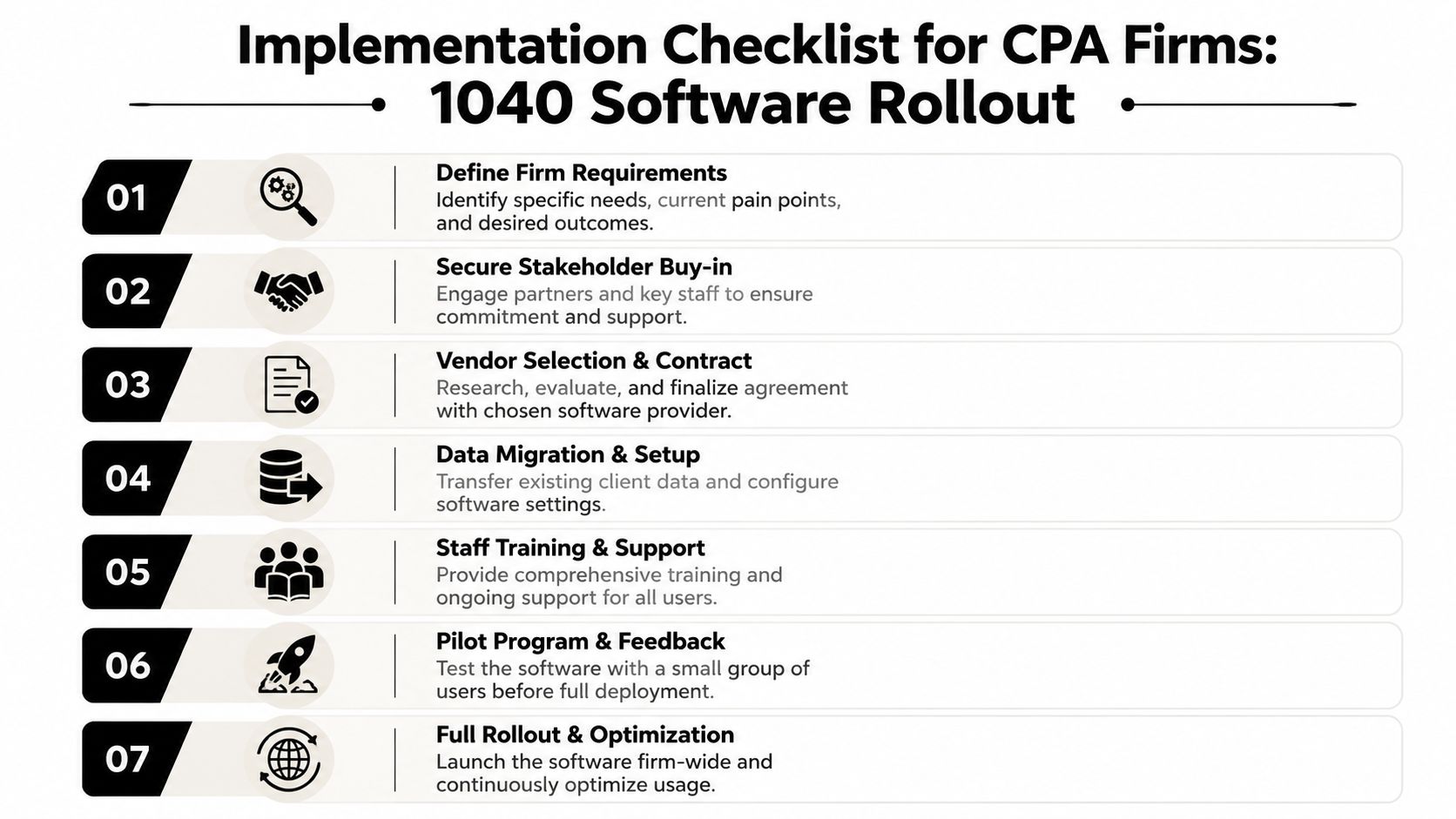
Software rollouts fail when firms buy first and govern later. The smoother path is to define workflows, assign owners, and test the software against real returns before everyone is forced to use it under deadline pressure.
A practical rollout sequence
- Define firm requirements. List the return types, reviewer handoffs, and integration points that matter most.
- Secure stakeholder buy-in. Partners, managers, and senior preparers need to agree on the reason for the change.
- Evaluate vendors with a real return. Demo scripts are useful, but a live case exposes the gaps.
- Plan migration carefully. Legacy data, templates, and permissions need a controlled setup.
- Train by role. Preparers, reviewers, and partners need different workflows.
- Run a pilot. Use a small group first so the firm can catch issues before full deployment.
- Lock in sign-off rules. Audit-trail settings and approval paths should be configured before busy season.
The mistake most firms make is assuming training solves adoption. Training helps, but only when the workflow already matches the way the team works. If the system fights the process, staff will improvise around it.
A good pilot should use one complex return, one straightforward return, and one case that tends to create review friction. That mix tells you whether the platform is helping where the pain lives. If it only works on the easy return, the rollout isn't ready.
Use Cases for CPA Firms
High-volume firms need speed, but not at the expense of review quality. A platform with strong diagnostics and clean exports helps when the same reviewer is moving across many individual returns and can't afford to spend time rebuilding context. In that environment, the software's real value is consistency.
Boutique firms often handle fewer returns, but those returns can be more complex. They may care less about batch throughput and more about how clearly the software handles edge cases, reviewer notes, and custom sign-off paths. In that setting, control beats raw automation.
Mid-tier firms usually sit in the middle, with enough volume to feel every inefficiency but enough variation to avoid a one-size-fits-all process. They need software that can handle routine filing while still catching the exceptions that create partner-level risk. That's where review-by-exception becomes especially useful, because it lets the team focus on mismatches rather than re-checking everything.
Matching workflow to software strength
- High-volume individual returns: Prioritize import quality, diagnostics, and fast reviewer handoffs.
- Complex brokerage and multi-document work: Prioritize source reconciliation and exception handling.
- Hybrid office teams: Prioritize deployment flexibility and clear permissions.
- Client-facing accuracy concerns: Prioritize audit trails and traceable outputs.
The most important question isn't which platform has the longest checklist. It's which one removes the specific bottleneck in your firm's 1040 process. For many teams, that bottleneck is not drafting, it's review.
Decision Matrix and Recommendations

A useful selection model starts with workflow, not brand. If the firm's pain is review inefficiency, the software should be judged on diagnostics, traceability, and how little manual rework it creates after drafting. If the pain is scale, the firm should weigh deployment options, integration depth, and how well the platform handles multiple reviewers.
Decision matrix for CPA firms
| Firm profile | Primary need | Best-fit software traits | Decision weight |
|---|---|---|---|
| Small firm | Simplicity and affordability | Straightforward forms coverage, basic diagnostics, low overhead | Lower implementation burden |
| Mid-sized firm | Review control | Strong diagnostics, clean exports, role-based workflows | Balanced cost and control |
| Large firm | Throughput and governance | Flexible deployment, audit-ready trails, integration depth | Highest workflow discipline |
For firms that want a review layer rather than a replacement drafting system, WP TieOut belongs in the evaluation set because it validates source data and compares it against the drafted return before sign-off. That makes it relevant when the objective is to reduce manual review time without weakening control. The fit is strongest where reviewer workload, source-document reconciliation, and auditability are the dominant issues.
How to choose without overbuying
- Choose for the bottleneck: If review is the pain point, don't pay for features that only help drafting.
- Choose for the team shape: Multi-office or hybrid firms should care about deployment flexibility.
- Choose for traceability: If partner review is part of the process, sign-off history matters.
- Choose for exception handling: The return should be easy to validate line by line when needed, but only where needed.
The decision is easier once you stop treating 1040 software as a filing tool and start treating it as a control system. Firms that buy for review quality tend to get more value out of the same busy season hours. If your team wants to evaluate that approach against a real workflow, start a conversation with WP TieOut.