

On a March Saturday, a senior reviewer sits between two monitors. One screen holds scanned 1040 source documents. The other shows a working trial balance and a draft return. Somewhere in the stack, a W-2 box 12 amount doesn't agree with the return. The client insists the document is correct, so the reviewer starts turning pages, checking transcriptions, and rebuilding the path from source document to final line.
That work is necessary. The way firms perform it is outdated.
AI for CPA firms works best as an exception-based review layer, not as a generic productivity add-on. The system should organize incoming documents, extract tax data, compare source information with the drafted return, and send only meaningful discrepancies to a human reviewer. The reviewer still exercises judgment and signs off. AI stops consuming professional attention on items that already tie.
The adoption data supports moving beyond experimentation. Wolters Kluwer reports that 70% of U.S. accounting firms use AI at least weekly, and 78% plan to increase AI investment. The question for a CPA firm isn't whether AI belongs in the workflow. It's whether the firm will govern it well enough to trust the results.
Table of Contents
- What AI Actually Looks Like Inside a CPA Firm
- The Core Capabilities Behind AI Tax Review
- Where AI Saves the Most Time in 1040 Workflows
- What Reviewers and Partners Gain from Exception-Based Review
- Implementation Considerations Most Firms Underestimate
- How to Evaluate and Select an AI Vendor
- A 90-Day Plan to Pilot AI in Your Firm
What AI Actually Looks Like Inside a CPA Firm
The reviewer's Saturday problem usually begins long before review. Documents arrive through email, portals, scanners, phone photos, and late client uploads. A preparer names files inconsistently, keys values into tax software, assembles workpapers, and moves the return forward. By the time the reviewer sees it, the evidence trail is scattered across folders and screens.
An AI review layer changes the sequence. Documents enter a controlled queue. The system classifies a W-2, 1099, brokerage statement, K-1, or rental statement, then extracts the relevant fields and connects them to the right taxpayer and return. Instead of opening every page in the same order, the reviewer receives a list of exceptions, each linked to the source page and the drafted-return field that needs attention.
That is the operational meaning of review by exception. AI doesn't decide that a questionable item is acceptable. It identifies where the reviewer should spend time.
Practical rule: If the reviewer can't see the source document, extracted value, rule that triggered the exception, and final disposition, the firm has automation without control.
A platform such as WP TieOut's AI workflow automation fits this model by placing source validation, return comparison, and sign-off into one review process. The important design choice isn't the dashboard. It's the preserved chain from original document to extracted field, exception, reviewer action, and approval.
Firms still need disciplined intake. Guidance for CPA firms on AI document extraction emphasizes that text-searchable PDFs, consistent portal naming, and controlled receipt processes improve extraction quality, while phone photos, handwritten items, and poor scans create more exceptions and human review. Normalize the input before blaming the model.
The reviewer's role becomes more valuable, not less. They investigate unusual basis, unclear business purpose, state differences, missing documentation, and client explanations. AI handles the repetitive comparison work. The professional owns the conclusion.
The Core Capabilities Behind AI Tax Review
A dependable tax-review system must connect four capabilities: document ingestion, data extraction, reconciliation, and quality control. If any link fails, staff inherit another manual handoff, and the firm loses the audit trail needed to support a reviewer's sign-off.
Document ingestion
Ingestion starts before extraction. The system should recognize document types, separate pages, identify the taxpayer, and connect each source with the correct return activity. A W-2 belongs with wage income and withholding. A 1099-NEC belongs with business-income review. A K-1 needs the right Schedule E context in the workpaper.
A number attached to the wrong taxpayer remains wrong, even when the OCR read it correctly. Firms should test ingestion with mixed client packets, duplicate pages, multi-taxpayer files, and documents that arrive out of order.
Data extraction
OCR turns scanned text into fields, but tax review requires tax-aware extraction. The system should capture wages, federal and state withholding, interest, dividends, basis, distributions, and payer information. A confidence indicator should separate a clean machine read from a field that needs immediate human inspection.
Difficult multi-page forms often require OCR, tax-specific validation rules, and language models working together. One published CPA-firm case study reports 90%+ extraction accuracy across 14 IRS forms, a 70% reduction in preparation time, and review-cycle compression from 8 weeks to 2–5 days after combining AWS Textract, Google Vertex AI, and LLMs. Those results are case-specific benchmarks, not promises. The figures come from the published tax-document AI case study.
Reconciliation
Reconciliation turns extracted fields into review evidence. The engine compares source documents with the draft return, workpapers, and prior-year information. It can flag a wage mismatch, a missing K-1 amount, an unexpected basis change, or a carryover that no longer appears.
The reviewer should receive the compared values and the reason for the discrepancy, not just a red status icon.
Quality control
Quality control applies firm rules and tax-process checks to validated data. Checks may cover missing dependent information, required due-diligence prompts, income thresholds, and state-conformity questions. Each exception should display the rule, triggering value, source document, and reviewer disposition. That record supports sign-off and later audit review.
Consider a $94,000 W-2 filer with one rental activity:
| Capability | What It Does | Sample 1040 Output |
|---|---|---|
| Document ingestion | Classifies and links source files | W-2 connects to wages and withholding, rental documents connect to Schedule E |
| Data extraction | Converts source pages into structured fields | Wages, withholding, payer data, and rental figures populate review workpapers |
| Reconciliation | Compares related values | W-2 wages are checked against the draft return, rental income is checked against Schedule E |
| Quality control | Applies firm and tax-process rules | Missing documentation, unusual values, or unresolved differences enter the exception queue |
Firms assessing AI document extraction for tax workflows should require a stage-by-stage demonstration. Ask to see the original document, extracted field, confidence signal, comparison result, triggered rule, reviewer action, and final sign-off. A polished final screen can conceal weak ingestion or an incomplete audit trail. The backbone of exception-based 1040 review is traceability, not automation alone.
Where AI Saves the Most Time in 1040 Workflows
The fastest payback usually comes from review, not autonomous preparation. AI can pre-classify documents, populate workpapers, and reconcile source data before the reviewer opens the return. That changes the reviewer's task from reading every page to investigating the items that need judgment.
Tie-outs come next. A system can compare W-2 box 1 with the wage line on the return, 1099-NEC data with Schedule C, K-1 amounts with Schedule E, and prior-year carryovers with current-year inputs. The value isn't just speed. It's consistency. A reviewer gets the same comparison logic across returns instead of relying on memory and personal habits.
Client intake also pays quickly. Organizers and source documents can be classified, missing items identified, and structured fields prepared before a preparer begins. That reduces the amount of time staff spend locating documents and rekeying information. Engagement-letter processing, 1099 preparation, and drafting routine response letters can help too, but they usually sit behind core review and tie-outs in strategic importance.

What adoption data says about the opportunity
CPA.com's 2025 tax-firm survey found that generative AI implementation in tax workflows rose from 8% in 2024 to 21% in 2025, while another 25% planned adoption within 12 months. Its follow-up survey of more than 1,000 U.S. tax professionals found 60% used AI for tax research at least weekly, compared with 33% in 2025.
The pattern is clear. Firms begin with research and summarization, then move toward document analysis, advisory, planning, compliance research, and drafting. The practical opening for 1040 firms is to apply that same progression to source validation and exception review.
Watch the payback curve carefully. Straightforward individual returns with recurring document patterns benefit first. Complex multi-state returns, AMT work, unusual basis questions, and partnership-heavy filings need more rule coverage and more human judgment. Don't promise the same operational result across every return type.
A short walkthrough can help partners see the difference between extraction and review orchestration:
The firm should measure how many exceptions are useful, how often reviewers override the system, and whether the audit trail supports final sign-off. AI quality assurance for CPA workflows should reinforce professional review, not create another untracked spreadsheet.
What Reviewers and Partners Gain from Exception-Based Review
The biggest benefit is better attention. Reviewers spend fewer prime hours on manual cross-footing, PDF transcription, duplicate 1099 checks, and routine movement between source documents and tax software. They can focus on ambiguous facts, unsupported positions, and documented conclusions.
The case study cited earlier reported strong results from a workflow built with AWS Textract, Google Vertex AI, and LLMs, including high extraction accuracy across IRS forms and a substantial reduction in preparation time. Those results demonstrate what an integrated system can achieve in a defined environment. They do not replace testing against the firm's own documents, tax software, rule packs, and reviewer behavior.
The audit trail deserves the same attention as time savings. A defensible system records the original source page, extracted field, validation result, triggered rule, reviewer override, timestamp, and approval. Partners gain more than a faster queue. They gain evidence showing how the firm reached its conclusion.
What changes for each role
Reviewers receive a prioritized exception queue instead of an undifferentiated document pile. They open an exception, inspect the linked source, compare the draft value, record the resolution, and continue.
Preparers get earlier feedback on missing or inconsistent inputs. That reduces late-stage rework and makes review comments more specific.
Partners see unresolved exceptions and sign-off status in one place. They can focus on risk and client decisions rather than repeatedly asking where a number came from.
The broader adoption trend makes this shift difficult to ignore. Wolters Kluwer reports that 76% of high-growth firms use AI weekly and 34% use it daily, while more advanced firms extend use into predictive insights and compliance monitoring. The practical lesson is narrower: frequent use requires a defined workflow, a clear owner, and controls that preserve human approval.
| Metric | Before AI Review | After AI Review |
|---|---|---|
| Source checking | Reviewer reads and compares documents manually | System links source fields and surfaces discrepancies |
| Workpaper preparation | Staff transcribe and format information | Extracted data enters structured review workpapers |
| Exception handling | Issues emerge through line-by-line review | Exceptions appear in a prioritized queue |
| Sign-off evidence | Notes may sit across files and systems | Source, action, reviewer, and timestamp can remain connected |
| Staff experience | High volume of repetitive checking | More time directed toward judgment and resolution |
Morale is another benefit firms often underestimate. Supervised review still carries accountability, but it removes repetitive entry and gives experienced staff more time for work that requires tax judgment. That shift is valuable only when the queue, escalation path, and final sign-off remain clear.
Implementation Considerations Most Firms Underestimate
AI is not a plug-and-play subscription for a tax practice. The firm must rebuild review around exceptions, assign ownership for rules, define sign-off points, and control how documents enter the system. Treat AI as the backbone of exception-based 1040 review, not as a productivity add-on.
Start with intake. As the guidance cited earlier recommends, normalize document formats and naming before deployment because clean, searchable inputs reduce exceptions. Control portal instructions, discourage phone photos, separate client files correctly, and define the response when a scan cannot be read. Poor intake creates review noise before the model has a chance to help.
Controls that belong in the implementation plan
- Review ownership: Assign one person to validate rule behavior and another to approve production use. A vendor demonstration does not establish firm policy.
- Access controls: Use role-based access so preparers, reviewers, and partners see only the information their responsibilities require.
- Security evidence: Request the vendor's SOC 2 Type II report, encryption details for data at rest and in transit, subprocessors, and regional data-residency information.
- Retention rules: Put data-retention and deletion terms in writing. Align them with IRS Publication 4557 and the firm's record-retention requirements.
- Escalation paths: Define the response when extraction confidence is low, a rule conflicts with a reviewer, or a source document is incomplete.
Governance determines whether automation reduces risk or merely moves it into an opaque system. Wolters Kluwer's Future Ready Accountant report says only one in seven firms had a AI strategy, while 70% remained concerned about data security. Adoption enthusiasm does not replace documented controls, reviewer approval, or an audit trail.
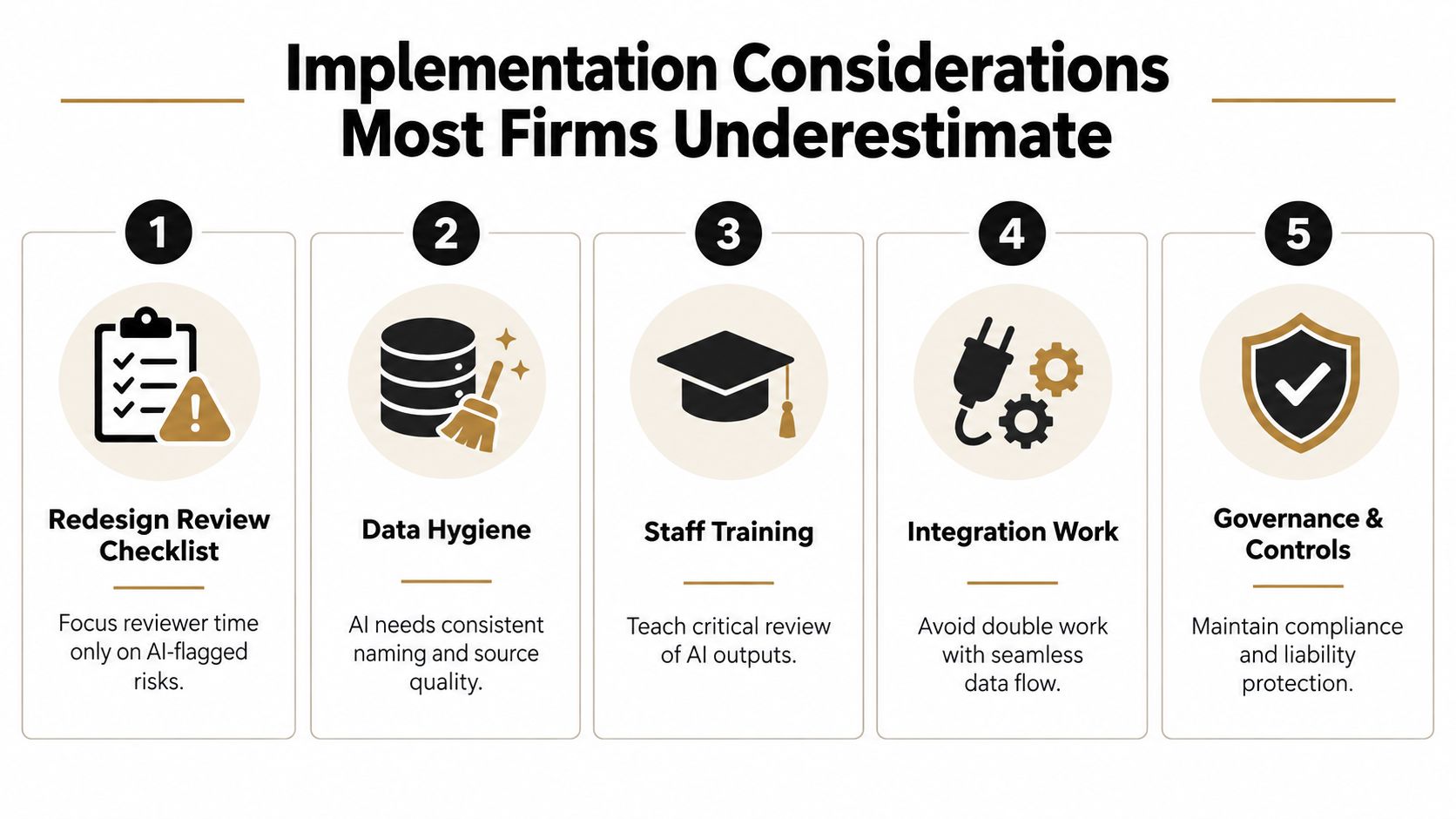
Training must go beyond a tool tour. Reviewers need practice interpreting confidence signals, investigating exceptions, overriding incorrect output, and recording why the final decision differs from the model. Partners must know what the system proves, what it cannot prove, and which approvals remain mandatory.
A firm has implemented AI only when staff can explain and defend every automated step. Every exception needs an owner, every override needs a reason, and every return needs a human sign-off.
How to Evaluate and Select an AI Vendor
Use a scorecard built for tax review, not a generic feature checklist. A polished dashboard is irrelevant if the system can't link a brokerage statement to the right taxpayer, preserve the original page, or show why an exception appeared.
| Evaluation Dimension | What to Score | Red Flag to Walk Away |
|---|---|---|
| Security and compliance | SOC 2 Type II, encryption, access controls, residency, retention | Vendor can't provide security documentation |
| Audit trail | Source links, rule triggers, overrides, timestamps, approvals | Output appears without a review history |
| 1040 fit | W-2s, 1099s, brokerage statements, K-1s, rental documents | Generic OCR claims with no tax-workflow demonstration |
| Integration | Tax software, document management, workpaper, and export compatibility | Staff must rekey data into multiple systems |
| Filing-season support | Response process, escalation ownership, service expectations | Support model is unclear during peak workload |
Don't evaluate the platform with synthetic files alone. Give each finalist three representative client packets from the firm's own prior season, subject to appropriate privacy and vendor-testing controls. Use one clean return, one with Schedule C activity, and one with K-1 activity. Score extraction accuracy, false-positive exceptions, source linking, and time to a review-ready return.
The test should include ugly documents. Add a poor scan, a multi-page statement, a corrected form, and a document with missing information. A vendor that performs well only on perfect PDFs hasn't solved your intake problem.
Ask where taxpayer data goes, which subprocessors touch it, how long it remains available, and how the firm can retrieve or delete it. Require a data-ownership clause, breach-notification timeline, exit and portability terms, and the ability to audit the system on the firm's own data before renewal.
Skip promises of full automation. A tax vendor that says human review is unnecessary is describing a liability problem, not a mature control environment.
A 90-Day Plan to Pilot AI in Your Firm
A useful pilot proves trust and governance before it chases scale. Select one high-volume 1040 workflow, such as business-income review or stock-basis tie-outs, and keep the scope narrow enough that a senior reviewer can compare AI output with the existing process.
Days 1 through 30
Set a baseline for time per return, exception categories, rework, and sign-off steps. Run vendor demonstrations using representative prior-season returns, then document which fields and rules the system handles reliably. Assign a workflow owner before the pilot begins.
Days 31 through 60
Run AI and manual review in parallel on a controlled sample. The supplied roadmap calls for 20–30 returns in this phase, while the broader plan may be extended to 50–100 returns when the firm needs a larger comparison. Record useful exceptions, false positives, missed discrepancies, reviewer overrides, and comments about usability.
The pilot should aim for 90%+ exception accuracy before scaling, using the firm's own definition of a valid, actionable flag. Don't treat raw processing speed as the primary success measure. A fast system that creates noisy queues won't earn reviewer trust.
Days 61 through 80
Add a second workflow, such as client intake or cross-form tie-outs. Update the checklist so reviewers focus on flagged risks, document how extracted data receives approval, and define how the source-linked audit trail is retained.
Days 81 through 90
Present the findings to partners. Compare baseline and pilot results, review staff feedback, approve or reject the next workflow, and name the person accountable for ongoing rule validation. Hold a formal partner review at day 45 and day 90, so governance decisions don't wait until after a failed rollout.

A practical pilot leaves the firm with more than a speed result. It produces a documented review policy, approved exception rules, trained staff, clear escalation paths, and evidence that the partner group can defend the workflow.
WP TieOut provides an AI-powered 1040 review workflow that validates source documents, compares workpapers with drafted returns, surfaces discrepancies, and preserves source-linked sign-off history. Visit WP TieOut to see how exception-based review can fit your firm's intake, reviewer, and partner-approval process.