
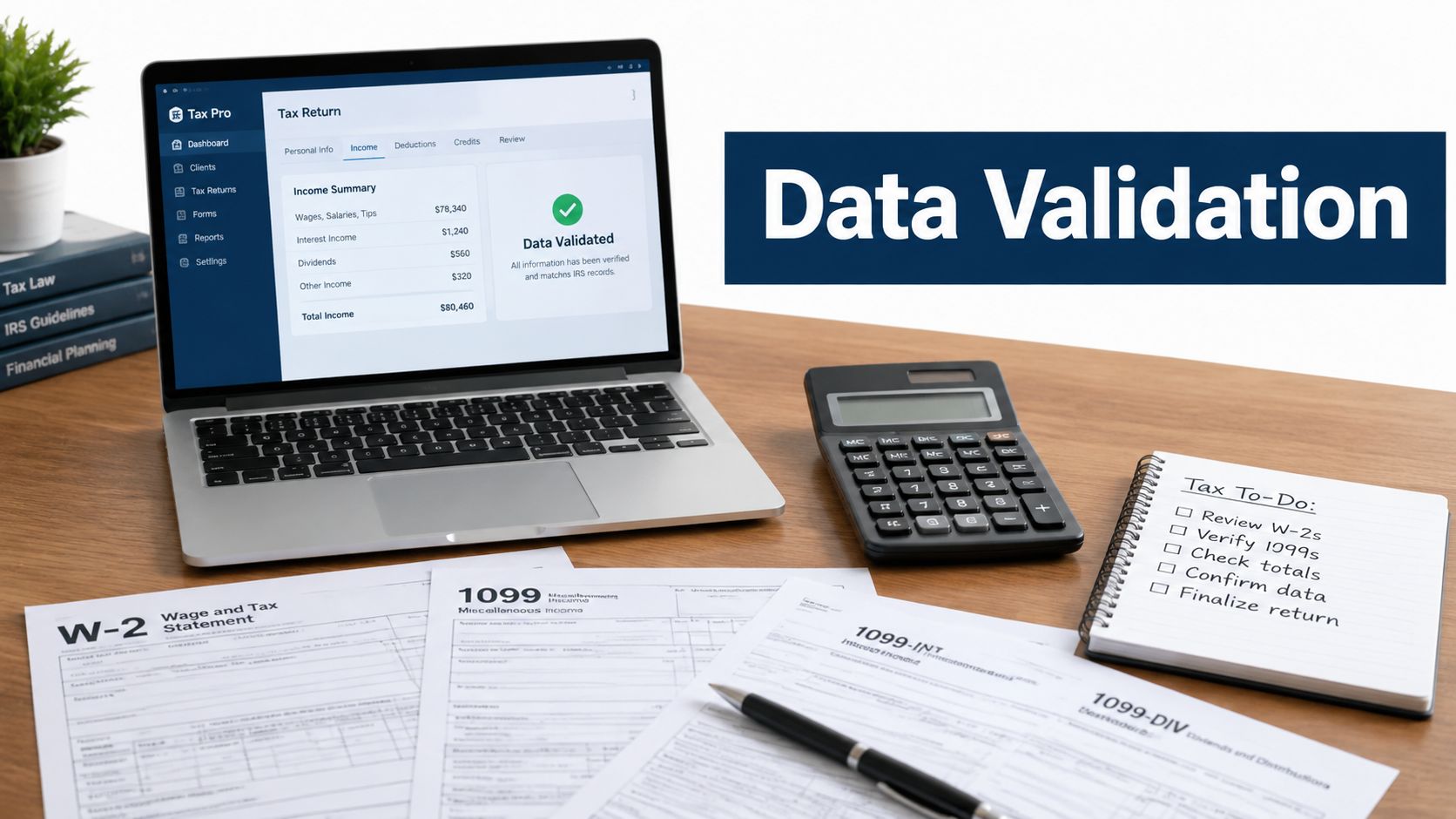
A preparer opens a client's folder and finds W-2s, 1099s, K-1s, and a brokerage statement that runs dozens of pages. The drafted 1040 is already populated, but nobody can explain with confidence whether every amount came from the right document, whether a page was missed, or whether an OCR error changed a critical digit. Review begins with two screens, a calculator, and a familiar instruction: compare everything line by line.
That process feels careful, but it creates a poor control system. Manual review consumes senior attention, hides ownership, and makes it difficult to prove what was checked after the return leaves the preparer's desk. Modern data validation best practices for 1040 quality control should do something more useful: catch preventable discrepancies early, route uncertain items to the right person, and preserve evidence for every decision.
Table of Contents
- The True Cost of Manual Tax Data Review
- Staging Validation Across the 1040 Lifecycle
- Automating Checks for W-2s, 1099s, and Broker Statements
- Designing an Exception-Based Review Workflow
- Building Audit-Ready Traceability and Sign-Off Trails
- Evaluating AI Tax Review Platforms for Your Firm
The True Cost of Manual Tax Data Review
Line-by-line review is often treated as the safest method because a human looks at every number. In practice, it can be one of the least reliable ways to manage a large source-document package. Reviewers become fatigued, switch between PDFs and tax software, and spend valuable time confirming amounts that already match while difficult exceptions receive the same visual treatment as routine fields.
The economics of bad data make early intervention more than a compliance preference. A widely cited data-quality benchmark estimated that poor data costs organizations an average of $12.9 million per year, while earlier MIT Sloan research estimated that bad data can consume 15% to 25% of revenue for many companies. Those figures come from broader organizational data environments, but the operating lesson applies to tax preparation: a source error that survives intake becomes more expensive to investigate after mapping, review, and client communication. The hidden cost of bad data also describes a practical validation economics curve, where prevention costs about $1 per record, later identification and repair costs about $10 per record, and correction after an error affects an event costs about $100 per record.
Why eyeballing breaks down
A reviewer comparing a W-2 with a return may catch a visibly wrong wage amount. They're less likely to notice a transposed digit in withholding, a duplicate 1099-DIV entry, or a missing K-1 buried in a client's upload. Brokerage statements create a different problem because consolidated pages may contain subtotals, supplemental information, state details, and transactions that don't map cleanly to one return field.
Manual review also produces weak evidence. A checked box or reviewer note may show that someone completed a task, but it often doesn't identify the exact source page, extracted value, corrected value, reason for an override, or person responsible for the final decision. That gap becomes painful when a manager asks why an amount changed or when the firm needs to reconstruct its review process.
Practical rule: Use people for judgment and exceptions, not for repeating deterministic comparisons that software can perform consistently.
Early validation changes the order of work. At intake, the system can identify missing document types, unreadable pages, incomplete uploads, and obvious identity mismatches before a preparer starts entering data. At extraction, automated checks can compare recognized fields with document structure and flag low-confidence values. The preparer then begins with a cleaner, more visible queue instead of discovering input problems halfway through preparation.
The operational payoff is not just speed. Firms reduce rework, avoid preventable handoffs, and give reviewers a narrower set of questions that require tax expertise. A practical team-efficiency workflow should therefore measure more than returns completed. It should show where exceptions originate, how long they remain unresolved, and whether reviewers can trace each final amount back to its source.
Staging Validation Across the 1040 Lifecycle
A return shouldn't have one validation gate at the end. Values can be lost or altered when a client uploads documents, when OCR extracts text, when extracted data maps into tax software, and when the final return is assembled. A staged model catches different failure types at the point where they're easiest to correct.
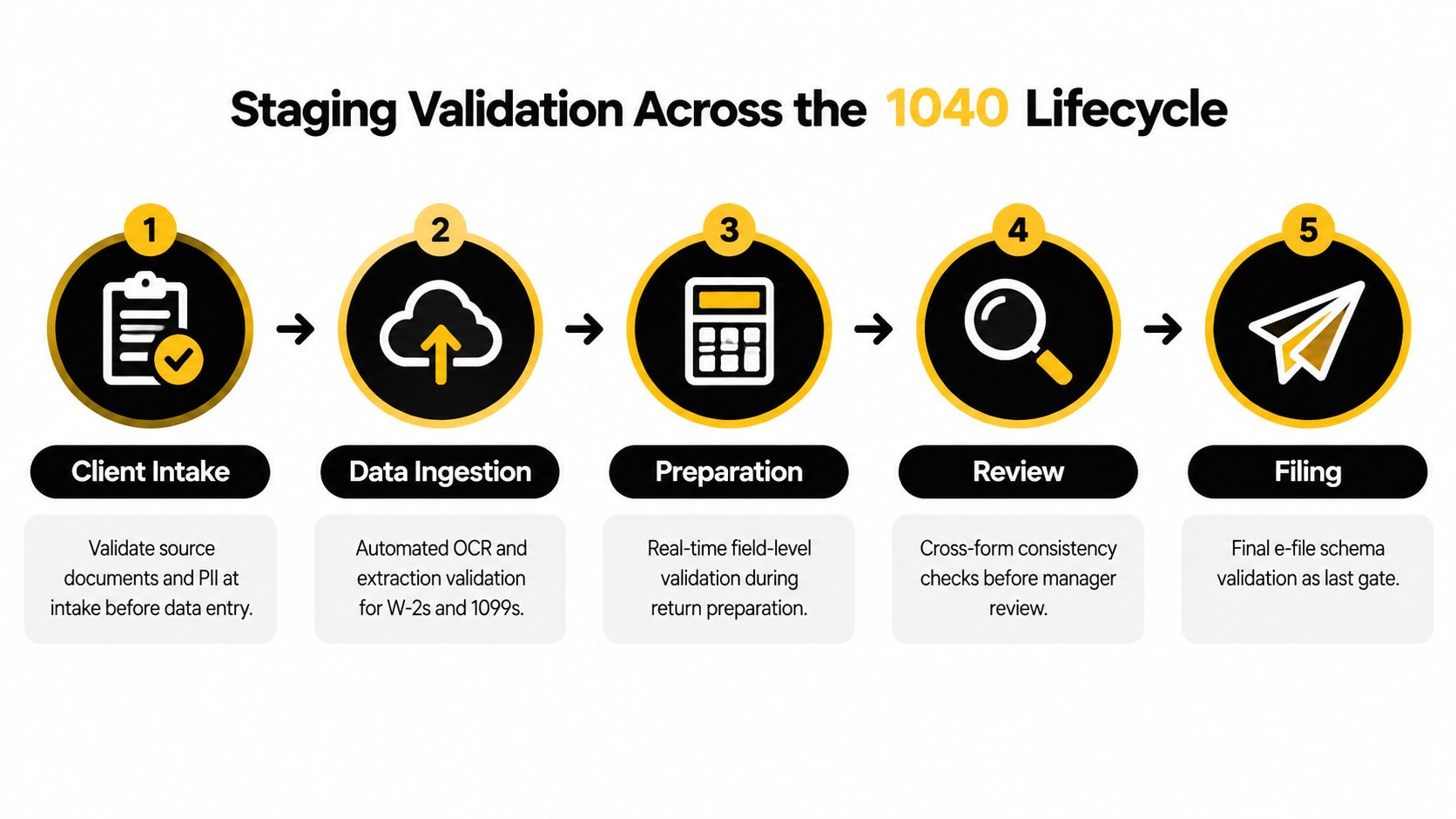
The four core control points are supported by guidance that recommends validation on entry, at the source boundary, after transformation, and before serving or output. Each rule should identify a field, condition, failure disposition, and named owner, so a failed check creates an action rather than an orphaned alert. Data quality through validation and quality checks also recommends profiling data first, reviewing rule firing rates on a schedule, and removing checks that nobody acts on.
1. On entry
Start when the client or staff member uploads documents. Confirm that the expected document package is present, pages are readable, files belong to the correct taxpayer, and sensitive identifiers are associated with the right client record. A missing second page of a W-2 or an incomplete brokerage export should create an intake exception, not wait for a reviewer to discover it near filing.
Define the disposition before deployment. A missing required document may block preparation, while a blurry supplemental page may route to staff for clarification. Assign ownership to an intake coordinator, preparer, or reviewer instead of sending every issue to a general queue.
2. At the source boundary
OCR or an AI extraction service turns a document into structured values. Validate that the extracted employer identification number, wages, withholding, payer information, dates, and taxpayer identifiers conform to expected formats and appear in plausible document locations. Preserve the original page beside the extracted value so a reviewer can resolve uncertainty without searching through the entire binder.
3. After transformation
Mapping extracted information into tax software introduces a separate risk. Check that the source value reached the intended form and field, that signs and units were preserved, and that related amounts remain consistent after normalization. A value can be accurate in the extraction layer and still become wrong during field mapping or aggregation.
4. Before output
The final control point compares the prepared return with validated source data and checks output completeness. Review totals across forms, confirm required schedules are present, test e-file schema requirements, and make sure every unresolved exception has an owner and disposition. Statistical and verification guidance emphasizes multiple comparison measures, holdout tests, explicit uncertainty, and replication when validating measurement processes, principles that translate into stronger final tie-outs than a single pass/fail check. National Academies verification and validation guidance provides that broader framework.
For firms modernizing their process, document validation software for tax workflows should fit these control points rather than create another isolated review screen. The test is simple: can the firm see where a discrepancy entered, who owns it, and what evidence supports its resolution?
The lifecycle is easier to understand in motion, so use a short demonstration after mapping the control points to your current process.
Automating Checks for W-2s, 1099s, and Broker Statements
Tax documents need domain-specific validation, not just generic checks for nulls, formats, and duplicate rows. A document may be structurally valid while still producing an incorrect return because the wrong box was extracted, a consolidated statement was only partially captured, or a transaction was mapped to the wrong tax treatment.
W-2 checks
For W-2s, begin with document identity and field placement. Verify that employer and employee identifiers are present, that the employer identification number follows the expected pattern, and that wage and withholding fields were read from the correct boxes. Then test relationships among related values instead of treating every box as an isolated number.
A validation engine should flag an extracted amount that appears in an unexpected location, conflicts with the document's form structure, or differs from the value used in the drafted return. It should also preserve the page image and extracted text, because a reviewer needs to distinguish a true source discrepancy from an OCR recognition problem.
Interest and dividend reporting
For 1099-INT and 1099-DIV, compare individual forms with consolidated brokerage statements and the amounts carried into the return. The system should identify duplicate payer records, omitted forms, inconsistent taxpayer identifiers, and totals that don't reconcile. A consolidated statement may include ordinary dividends, qualified dividends, tax-exempt interest, foreign tax, and state information, so a single total comparison won't provide enough assurance.
Use field-level rules for required values and cross-field rules for relationships. Then add distribution profiling to highlight unusual changes against the client's historical pattern, while routing those changes for review rather than declaring them wrong. A large dividend amount may be legitimate after a security sale or distribution event.
Brokerage statements and 1099-B
1099-B work requires more than matching proceeds. Validate transaction counts, proceeds, cost basis where reported, holding-period indicators, wash-sale information, and the relationship between the form and supplemental pages. Missing supplemental information can affect the preparer's treatment even when the main 1099-B appears complete.
Cost basis also deserves a deliberate exception policy. A missing basis value may be an expected reporting condition that requires tax judgment, not an extraction failure. The validator should distinguish “not reported,” “not found,” and “not reconciled,” because those states lead to different actions.
Profiling without false alarms
Statistical profiling helps reviewers see whether extracted data fits the client record and the document package. Useful measures include mean, median, standard deviation, quantiles, null rate, distinct count, and domain-specific outlier analysis. Representative sampling across the value range helps prevent a benchmark from reflecting only easy or typical documents. Data validation techniques and verification metrics outlines these measures and connects them with uncertainty analysis and holdout testing.
A firm can use these metrics to flag a sudden change in a client's interest income, an unusual withholding pattern, or a payer that appears once when similar documents usually recur. Those flags shouldn't automatically block preparation. They should tell the reviewer where the source document, prior-year context, and drafted return need closer examination.
For teams building a broader reconciliation process, income verification software for tax operations should support source matching, extraction review, and return-level comparison rather than only checking whether a file uploaded successfully.
Designing an Exception-Based Review Workflow
Strict validation sounds responsible until every small mismatch stops the workflow. A rounding difference, a changed payer name, or an expected basis omission can generate the same blocking alert as a missing wage document. Preparers then learn to dismiss warnings, managers face crowded queues, and important discrepancies lose visibility.
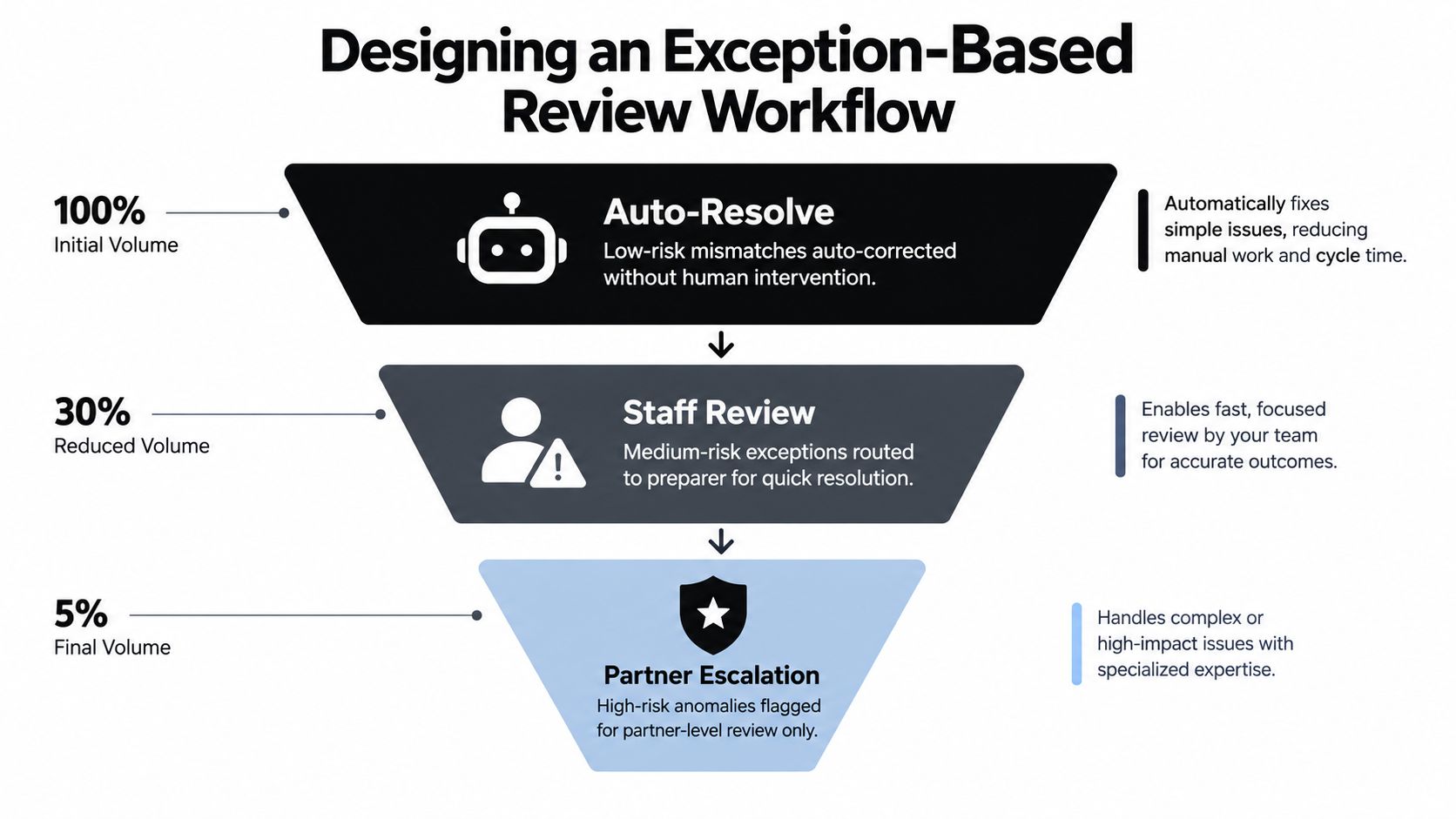
The better design is review by exception. Automate what can be resolved safely, route medium-risk issues to the preparer, and reserve high-impact or ambiguous items for experienced reviewers. The system should preserve the original record and explain why an item surfaced.
Separate defects from review items
Not every failed rule deserves the same response. A missing required taxpayer identifier may prevent meaningful preparation. A minor difference caused by document rounding may need confirmation but shouldn't hold the entire return. A legitimate outlier in dividend income may require context rather than correction.
Build severity into the rule definition:
- Critical exceptions: Block the affected workflow step when the document is missing, unreadable, assigned to the wrong client, or materially conflicts with the return.
- Review exceptions: Route uncertain extraction, unmatched payer records, unusual values, and reconciliation differences to the preparer or reviewer.
- Informational items: Record expected conditions, such as a field that isn't reported on a particular source form, without creating unnecessary work.
Tolerance thresholds should reflect the business meaning of the field. A small presentation difference may be acceptable for a displayed total, while a mismatch in an identifier or withholding amount may require exact resolution. Don't apply one global tolerance to every tax field.
Route alerts to people who can act
A useful queue tells the recipient what happened, which source page supports the alert, what value was extracted, what value reached the return, and what decision is required. It shouldn't ask a partner to investigate a basic OCR issue that a preparer can resolve in seconds.
Keep an audit history when a user accepts, edits, overrides, or rejects an alert. The original value must remain available, even after correction. That record protects the process from silent edits and helps managers identify recurring extraction or mapping problems.
The aim isn't zero exceptions. It's fast identification of the exceptions that deserve human judgment.
Review queues also need maintenance. Profile which rules fire, how often staff resolve them, and whether the same alert repeatedly produces no action. Retire stale checks, adjust thresholds, and add rules when a recurring failure pattern appears. Otherwise, the system becomes another source of noise that people work around instead of trust.
Building Audit-Ready Traceability and Sign-Off Trails
A validation rule without evidence has limited value in a tax practice. A manager needs to know not only that a check passed, but which source supported it, when the review occurred, who made the decision, and whether someone changed the value afterward. The record should follow the amount from original document to extracted field, prepared return, exception resolution, and approval.
Link every value to its source
For each material field, retain a source reference that identifies the document and page. A reviewer should be able to open the exact W-2 box, 1099 line, or brokerage supplemental page that supports the value without manually searching the client's folder.
The evidence record should distinguish at least four states:
- Source value: What appears on the original document.
- Extracted value: What OCR or automation recognized.
- Prepared value: What entered the tax software or workpaper.
- Approved value: What the reviewer or partner accepted for filing.
That distinction matters when the source is correct but extraction is wrong, or when extraction is correct but a preparer intentionally changes treatment after review. Without separate states, the firm may preserve only the final number and lose the reasoning behind it.
Make handoffs explicit
Role-based review is more defensible than an informal chain of comments. Assign responsibility to the preparer for resolving preparation exceptions, the reviewer for testing the return and evidence, and the partner for escalated judgments or final approval. Each action should carry a user identity and timestamp, with the relevant source page and explanation attached.
A clean handoff record answers practical questions:
- What did the system flag?
- Which document and page supported the investigation?
- What did the preparer change or explain?
- What did the reviewer verify?
- Did the partner approve, reject, or request more work?
The history should also preserve overrides. An override isn't necessarily a failure. It can represent a valid professional judgment, provided the user records the reason and supporting evidence. A silent override, by contrast, leaves the firm unable to distinguish a deliberate decision from an accidental edit.
Treat logs as working evidence
Audit-focused guidance increasingly emphasizes that teams need validation evidence, not merely a list of rules. The broader gap is especially visible in tax work, where documents and drafted returns rarely align perfectly and the firm must prove that each discrepancy was resolved or consciously accepted. Operational validation and measurement guidance highlights the importance of validating across ingestion, transformation, and activation while logging results for traceability.
A source-linked PDF binder can turn that principle into a practical deliverable. Preserve original pages, add bookmarks and annotations, attach exception decisions, and include the sign-off sequence at the end. The binder becomes a chain of custody rather than a folder of disconnected files.
That structure also improves internal management. Review leaders can see whether a recurring error comes from client intake, extraction, mapping, or preparation. They can coach the right role, revise the rule at the right control point, and avoid treating every defect as an individual performance problem.
Evaluating AI Tax Review Platforms for Your Firm
Choosing a tax review platform requires more than watching a polished demo. Ask the vendor to process the documents that cause trouble in your practice, including multi-page brokerage statements, low-quality scans, duplicate uploads, missing supplements, amended source documents, and returns with legitimate outliers. A platform that performs well on clean samples may still create extra work in production.

Start with document coverage
Confirm that the platform ingests the source documents your firm receives, including W-2s, 1099s, brokerage statements, K-1s, and supporting schedules. Ask how it handles rotated pages, handwritten annotations, duplicate files, missing pages, and consolidated statements. Extraction should retain the original page and show the recognized value beside it.
A useful demo should show the complete path from upload to exception. Don't accept a generic statement that the system “uses AI.” Ask which fields it validates, how it represents uncertainty, and whether users can correct an extraction without losing the original value.
Test reconciliation and tax-software fit
The platform should compare validated source data with the drafted 1040 and related forms. Ask how it handles one source amount mapped to multiple return fields, aggregated payer records, state withholding, cost-basis conditions, and values that require human judgment.
Integration matters because a separate dashboard can create another manual handoff. Determine whether the tool exports review results, links back to the workpaper, and fits the firm's existing tax software and document-management process. The practical question is whether reviewers spend less time switching systems, not whether the vendor has the longest feature list.
Inspect the evidence model
Ask to see an actual exception record and final binder. It should show the source page, extracted value, drafted value, discrepancy description, resolution, user identity, timestamp, and approval state. If the system only displays a green checkmark, it may be difficult to defend the review later.
Review the exception queue as a manager. Can staff filter by severity, owner, client, document type, and unresolved status? Can the firm distinguish auto-resolved items from those that received professional judgment? Can stale or ineffective rules be reviewed and changed without relying on the vendor for every adjustment?
Verify security and operational controls
Sensitive tax records require strict access management. Ask about encryption, role permissions, retention, tenant separation, administrator controls, logging, and procedures for deleting or exporting client data. Request current compliance documentation and understand which safeguards are included in the product versus the firm's own environment.
A useful evaluation checklist includes:
- Source coverage: Test real W-2, 1099, K-1, and brokerage packages, not only clean sample files.
- Validation depth: Confirm field, cross-form, reconciliation, and output checks.
- Exception handling: Verify severity levels, routed queues, tolerance policies, and override records.
- Traceability: Inspect source-linked pages, bookmarks, annotations, user IDs, timestamps, and sign-off history.
- Workflow integration: Map intake, preparation, review, partner approval, and export to the current process.
- Security controls: Review access restrictions, encryption, retention, and available compliance evidence.
WP TieOut is one example of a platform built around this operating model. It ingests W-2s, 1099s, brokerage statements, and other source documents, validates extracted data, compares the validated workpaper with a drafted 1040, and surfaces discrepancies for exception-based review. It also compiles source-linked bookmarked PDF binders and records preparer, reviewer, and partner sign-offs, giving firms a concrete way to evaluate whether their desired audit trail exists in practice.
The final decision should come from a controlled pilot. Select representative returns, define what counts as a successful exception, measure reviewer effort qualitatively, and inspect the exported evidence. A platform earns a place in the workflow when it reduces repetitive checking without hiding uncertainty or weakening accountability.
If your firm is still reviewing 1040 source documents line by line, start by mapping the four validation control points and identifying where evidence disappears. WP TieOut provides source-document ingestion, return comparison, exception-based review, and sign-off trails that can help turn that map into an audit-ready workflow.