
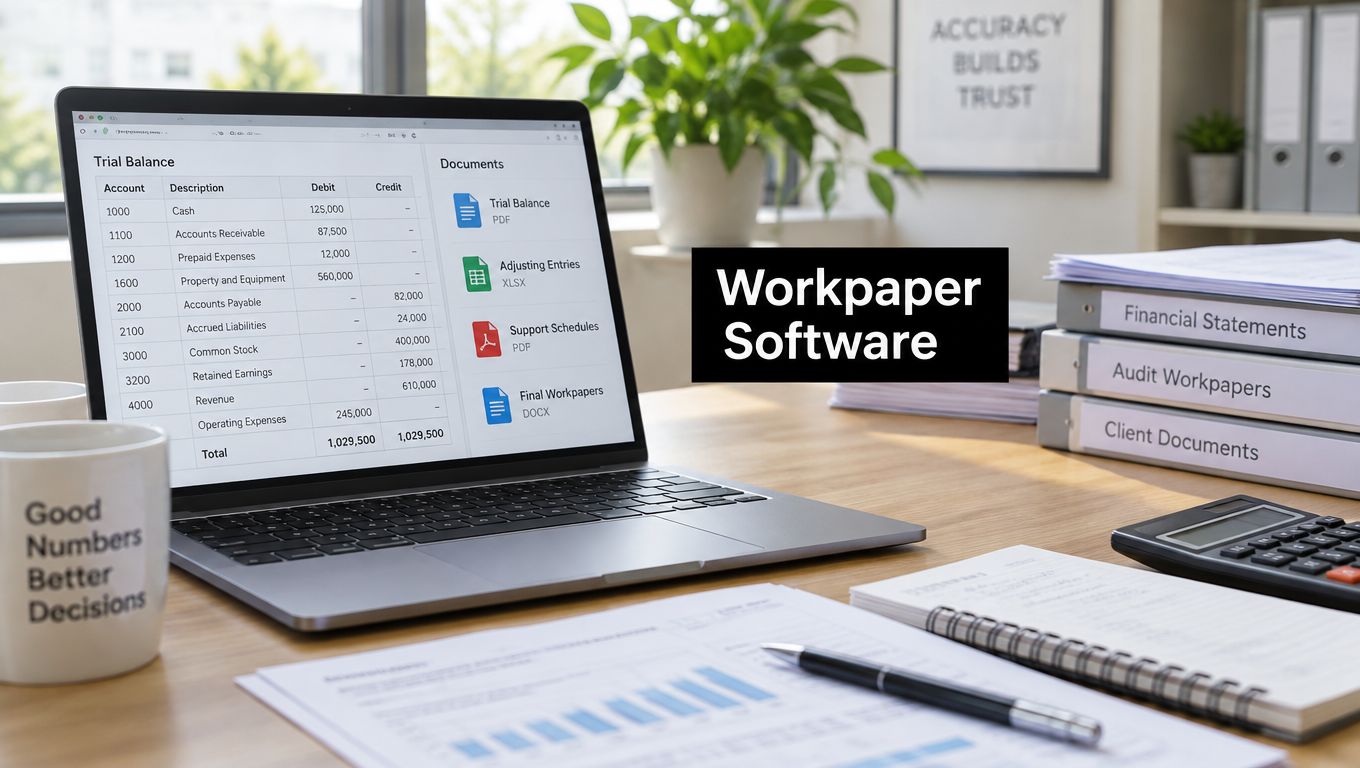
Paperless is not the same as controlled. A PDF in OneDrive can still depend on email attachments, manual tickmarks, spreadsheet formulas, and a reviewer's memory of what was checked last season. The file is digital, but the review process remains informal.
That distinction matters because a tax file has two jobs. It must preserve evidence control, meaning you can show which source document supports each reported figure. It must also preserve reviewer accountability, meaning you can show who checked the item, when they checked it, what they found, and what happened next.
Electronic workpaper software is valuable only when it strengthens both controls. A shared folder improves storage. A real workpaper system connects evidence, calculations, exceptions, approvals, and an enduring review history. Going paperless is a storage decision. Going better reviewed is a control decision, and firms confuse the two every day.
Table of Contents
- Why Going Paperless Is Not the Same as Going Better Reviewed
- What Electronic Workpaper Software Actually Does in a 1040 Workflow
- Core Features That Separate Real Review Tools from Document Vaults
- Compliance Architecture Built In or Bolted On Later
- How Review by Exception Changes the Day of a Tax Professional
- Adopting AI Workpapers Without Losing Human Accountability
- A Practical Checklist for Evaluating Electronic Workpaper Software Fit
Why Going Paperless Is Not the Same as Going Better Reviewed
Many firms have replaced the manila folder with a digital folder and stopped there. Source documents sit in a document management system, the drafted return lives in tax software, review notes arrive by email, and the preparer maintains a spreadsheet to track what remains open. Nothing is technically on paper, but the reviewer still reconstructs the engagement from disconnected pieces.
That workflow creates a familiar problem. A reviewer may see a number on Schedule C, a PDF bank statement in another folder, and a preparer comment in an email, but there's no reliable relationship between those items. The firm has electronic records, not necessarily electronic workpapers.
Historical adoption research makes the point. A survey of 140 accounting firms comparing electronic work environments in 2005 with 2003 found that electronic use increased across 25 accounting tasks, with reported increases ranging from 14% to 92% for all but two tasks. Yet only 59% of respondents stored all audit workpapers in a paperless audit application in 2005, showing that adoption grew gradually while mixed workflows remained common. The findings are documented in this survey of electronic work environments in accounting firms.
Storage answers the wrong question
A document vault answers, “Where is the file?” A review system answers, “What supports this figure, who assessed it, and can another reviewer reproduce the conclusion?”
Those questions require different capabilities:
- Evidence linkage: Each important return figure should connect to the relevant source document, calculation, and document version.
- Work performed: The file should record the reconciliation, comparison, inquiry, or judgment applied to the evidence.
- Review status: An open issue should remain visibly open until a named person clears, defers, or escalates it.
- Version integrity: The reviewer should know which file state supported the sign-off.
- Accountability: The audit trail should identify the user and time associated with each meaningful action.
A PDF export can preserve the appearance of a completed file while losing the relationships that make the file defensible. If the preparer changes a spreadsheet after approval, or replaces a source document without preserving the original, the final PDF may not tell the complete story.
Practical rule: Don't evaluate electronic workpaper software by asking whether it eliminates paper. Ask whether it makes unsupported numbers, unexplained changes, and undocumented review decisions difficult to hide.
A separate questionnaire of auditors from 38 audit firms found meaningful but uneven use of electronic working papers. Nearly half reported using them, while 23.7% said they used the application extensively. At the same time, more than 50% had never used computer-assisted audit tools beyond electronic spreadsheets. The audit technology adoption study illustrates why a digital repository alone doesn't create a mature review process.
The recommendation is straightforward. Keep a document management system if it serves the firm, but don't call it a review control. Require the workpaper layer to connect documents to return lines, calculations, reviewer decisions, and final approval.
What Electronic Workpaper Software Actually Does in a 1040 Workflow
Start with a common 1040 engagement. The preparer receives a W-2, several 1099s, a K-1, and a brokerage statement. In a folder-based process, the preparer opens each document, types values into tax software, saves copies in a client folder, and relies on a spreadsheet or checklist to remember what was reviewed.
Electronic workpaper software should turn that sequence into a structured engagement. The preparer imports the source documents, and the system extracts relevant values while preserving the original files. The preparer validates the extracted data, resolves unreadable fields or ambiguous entries, and connects each accepted value to its source page.
That validation step matters. Extraction is not evidence by itself. The original document remains the authority, and the preparer must be able to see what the system read before the value enters a reconciliation.
A reconciliation should produce a decision
Take Schedule C gross receipts. The workpaper can connect the reported amount to a 1099-NEC, a bank statement, and any other evidence the preparer has included. It can compare the source-backed total with the drafted return and identify an unreconciled difference.
The reviewer doesn't need to open every page and repeat every keystroke. The reviewer sees the difference, the documents supporting both sides, the preparer's explanation, and the current status of the item. The reviewer can clear it, request additional support, defer it with a reason, or escalate it to a partner.
The system should preserve that handoff. A cleared exception needs a named reviewer, a timestamp, the evidence considered, and the conclusion reached. A deferred exception needs a reason and a follow-up status. An escalated exception needs to show who made the final decision.
Three layers of a useful workpaper system
The distinction between these layers prevents bad buying decisions:
- Document storage keeps files available. It may provide folders, search, permissions, and retention.
- Preparation workpapers record calculations, schedules, source references, and preparer explanations.
- Review workpapers connect evidence and calculations to exceptions, reviewer judgment, sign-off, and version history.
The third layer is where electronic workpaper software earns its place. It doesn't merely store the W-2. It helps prove how the W-2 affected the return and how a reviewer assessed the result.
The workflow also supports staff transitions. A new reviewer shouldn't need a call with the preparer to understand why an item was accepted. The file should carry the source, the calculation, the question, the response, and the approval history.
My operating standard is simple: another qualified professional should be able to open the engagement and understand the path from source document to return position without relying on someone's memory. If the software can't support that path, it's a digital filing cabinet with extra screens.
Core Features That Separate Real Review Tools from Document Vaults
Feature lists are easy to produce. A reviewer's sequence is harder to fake. Evaluate electronic workpaper software in the same order that a reviewer encounters risk, starting with the documents and ending with the sign-off.
Ingest and validation come first
The system should ingest common individual tax documents, preserve the original pages, and show the extracted values beside the source. It should identify missing fields, conflicting values, unreadable pages, and documents that need human attention.
A weak implementation extracts text and immediately treats it as truth. A stronger one makes validation explicit. The preparer confirms the value, corrects the extraction when needed, and leaves a record of that correction.
The system should also distinguish a source document from a calculated workpaper. A brokerage statement is evidence. A capital gain schedule is an analysis based on evidence. Those objects need different roles, references, and review treatment.
Reconciliation must be more than an attachment
Attaching a PDF to a return file doesn't establish support. The reviewer needs to see the relationship between a reported number and the specific document, page, calculation, or explanation behind it.
Look for source-linked workpapers, line-level references, variance detection, and visible document versions. If the system only says that a folder of documents belongs to a return, the reviewer still has to perform the linking manually.
The CPA document management software overview is useful as a comparison point, but don't let document management terminology obscure the test. Ask the vendor to demonstrate one number moving from source document to validated workpaper to drafted return.
The audit trail must survive scrutiny
A useful audit trail records who created, changed, reviewed, and approved a workpaper. It should identify the document version involved and make the event history resistant to silent alteration.
AICPA SAS 103 states that systems must allow firms to determine when and by whom documentation was created, changed, or reviewed, while protecting integrity when files are shared or transmitted electronically. The AICPA SAS documentation guidance supports a design using role-based permissions, append-only events, version identifiers, and reviewer sign-offs tied to a specific file state.
A cryptographic hash can strengthen that design because a changed file produces a changed hash. It isn't a substitute for access control or review discipline, but it can expose whether the archived file differs from the file that was reviewed.
Sign-off and security are control features
Preparer and reviewer permissions should be distinct. The system should prevent a preparer from approving their own work, rather than relying on a policy that nobody can enforce inside the application.
Ask about encryption at rest and in transit, multifactor authentication, granular permissions, independent security attestations such as SOC 2 or an equivalent, administrative access, and export controls. Also ask what happens when an employee leaves. Access removal should be immediate and auditable.
Vendors that promote “AI review” but can't produce a clean, exportable review log are selling a feature, not a control. A clever flag has limited value if the firm can't prove what the system saw and what the reviewer did with the result.
Compliance Architecture Built In or Bolted On Later
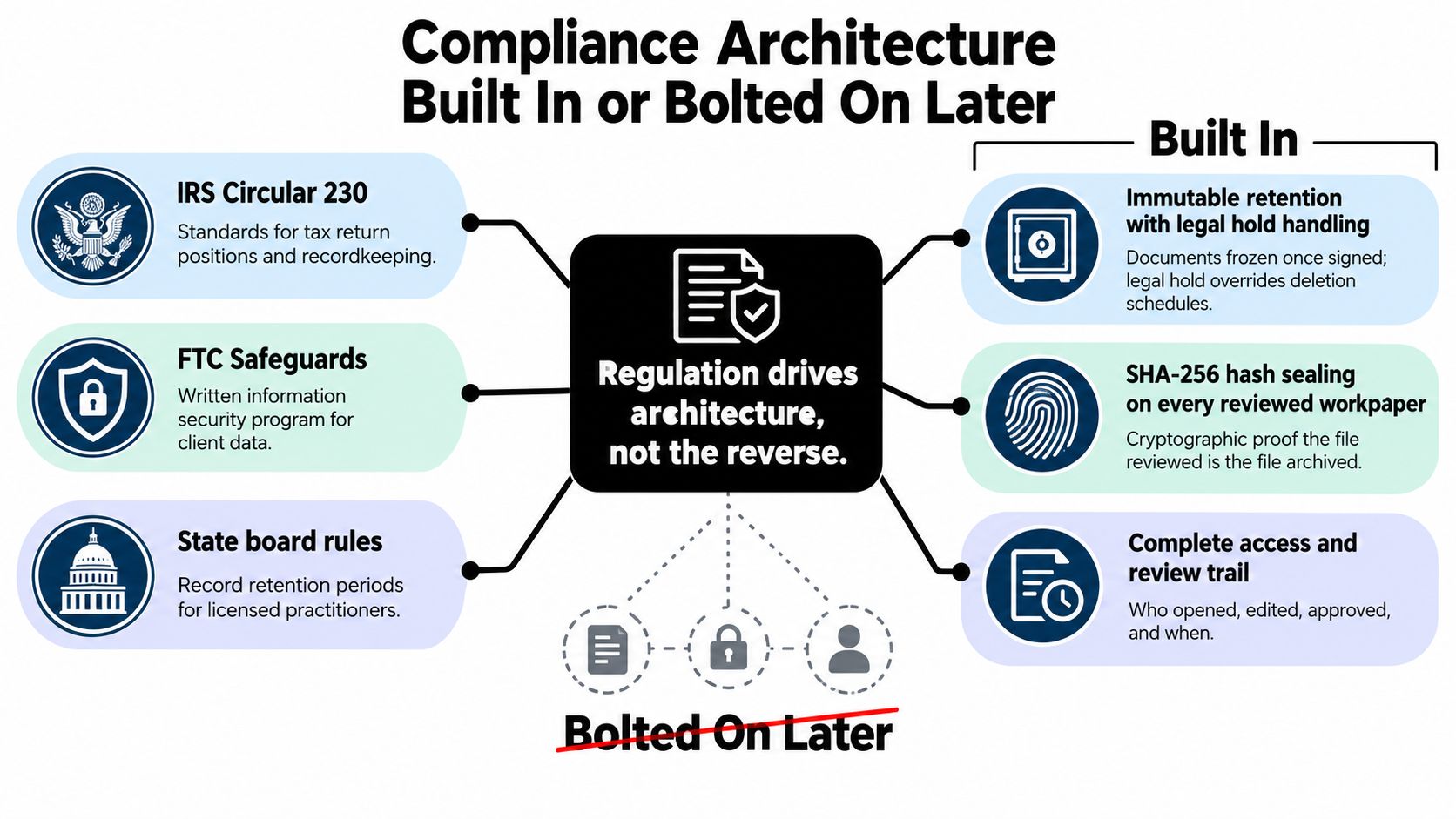
Compliance shouldn't begin when someone exports a PDF for a regulator, insurer, or internal investigation. By then, the system may already have lost the source link, overwritten the spreadsheet, or separated the review note from the file it addressed.
Treat retention, integrity, and access history as data-model requirements. A signed workpaper should enter an immutable state, while the system should still permit clearly identified post-completion additions when policy allows them. A legal hold should override an ordinary deletion schedule, and the hold itself should be recorded.
Build the evidence chain into the record
A practical architecture includes:
- Immutable retention: Freeze documents and approved workpapers after sign-off, with controlled additions for later information.
- Hash sealing: Store a cryptographic hash for each reviewed workpaper and preserve the relationship between the hash and the document version.
- Role separation: Enforce preparer, reviewer, and partner permissions in the application, not only in a written procedure.
- Timestamped notes: Keep review questions, answers, overrides, and approvals with the engagement record.
- Retrievable exports: Produce records in a usable format without stripping metadata, source references, or review history.
AICPA guidance cited in the available materials calls for retaining audit documentation for at least five years after the auditor's report, while PCAOB requirements commonly use seven years for public-company engagements. The audit documentation retention guidance also highlights the need for files to remain accessible, retrievable, confidential, and usable throughout the retention period.
The practical implication for a tax firm is broader than a retention setting. Test whether the system can restore a backup, search an old engagement, reproduce the native-file context, preserve source links, and provide controlled read-only access. A final PDF that loses the underlying history may be easy to store but hard to defend.
Bolted-on controls fail at the edges
Suppose a preparer's spreadsheet is replaced after approval and the firm creates a new PDF overlay showing a later sign-off. The overlay may show an approval date, but it won't necessarily prove which calculations, source pages, and formulas existed when the reviewer approved the return.
The same weakness appears when a preparer's account is deleted and the system removes the associated review notes. The firm may still possess the final return, but it has lost the identity and reasoning behind the work.
Build the control into the record before the engagement reaches approval. A malpractice carrier, state board, or internal quality reviewer should receive a coherent history, not a collection of reconstructed explanations.
How Review by Exception Changes the Day of a Tax Professional
Spreadsheet review forces the reviewer to inspect the whole return because the spreadsheet rarely knows which items deserve attention. The reviewer opens the return, scans every schedule, checks familiar lines, compares selected documents, and leaves comments wherever memory or instinct raises a question.
That approach can catch issues, but it spends the reviewer's best time on routine confirmation. It also makes the quality of the review dependent on personal habits. One reviewer may investigate a missing basis document immediately. Another may notice it only after a partner asks about the result.
Review by exception changes the assignment. The system compares validated source data with the drafted return and routes only defined discrepancies or risk signals to the reviewer. Examples include mismatched wage and 1099-R totals, unusual Schedule C relationships, missing basis support, and significant prior-year changes.
The workflow shift
| Step | Spreadsheet Workflow | Exception-Based Workflow |
|---|---|---|
| Intake | Preparer saves documents in folders and re-keys values | Preparer imports documents, validates extraction, and preserves source references |
| Comparison | Reviewer manually compares selected documents with return lines | System compares validated workpapers with the drafted return |
| Attention | Reviewer scans the complete return for possible issues | Reviewer starts with flagged discrepancies and defined risk conditions |
| Questions | Notes move through email, chat, or spreadsheet cells | Questions remain attached to the item under review |
| Resolution | Preparer may overwrite or explain the spreadsheet separately | Preparer responds within the exception, preserving the prior state |
| Approval | Reviewer signs a checklist or marks a file complete | Reviewer clears, defers, or escalates each relevant exception before sign-off |
The review by exception workflow is the right concept to test in a demonstration. Don't ask whether the vendor has a dashboard. Ask the vendor to show a mismatch, the source pages behind it, the preparer response, the reviewer decision, and the final export.
The aim isn't to review less carefully. It's to stop spending equal attention on unequal risk.
What the reviewer does with the recovered time
A reviewer should spend more time on judgment, not less time thinking. That means questioning unsupported basis, investigating an unexplained business-income movement, assessing whether a response resolves the discrepancy, and escalating ambiguous positions.
The system also creates a handoff record. A cleared item shows the conclusion. A deferred item shows why it remains open. An escalated item shows the person who accepted responsibility for the decision. That record is more useful than a green checkbox because it preserves the reasoning behind completion.
Review by exception isn't automatically better. Poor thresholds create noise, and weak extraction creates false flags. The firm must monitor whether exceptions are understandable, evidence-backed, and resolved by a human with the right authority.
Adopting AI Workpapers Without Losing Human Accountability
AI-assisted review becomes a control liability when the firm treats a model output as an approval. The system may identify a likely mismatch, but it may also misread a document, infer a reconciliation that doesn't exist, calculate basis incorrectly, or behave differently after a tax-law or model update.
The small firm doesn't need a grand AI laboratory. It needs a narrow operating model that keeps responsibility visible. The reviewer of record must remain a person, and the file must show what the system suggested, what the staff member accepted or rejected, and why.
AI adoption concerns are already substantial among tax firms. 76.4% of tax-firm respondents cited inaccurate outputs as a concern, while 70.5% cited privacy and confidentiality and 70.1% cited broader data-security concerns, according to this industry discussion of AI's impact on tax and accounting. Smaller firms need controls that are simple enough to operate consistently, not promises that the model is always right.
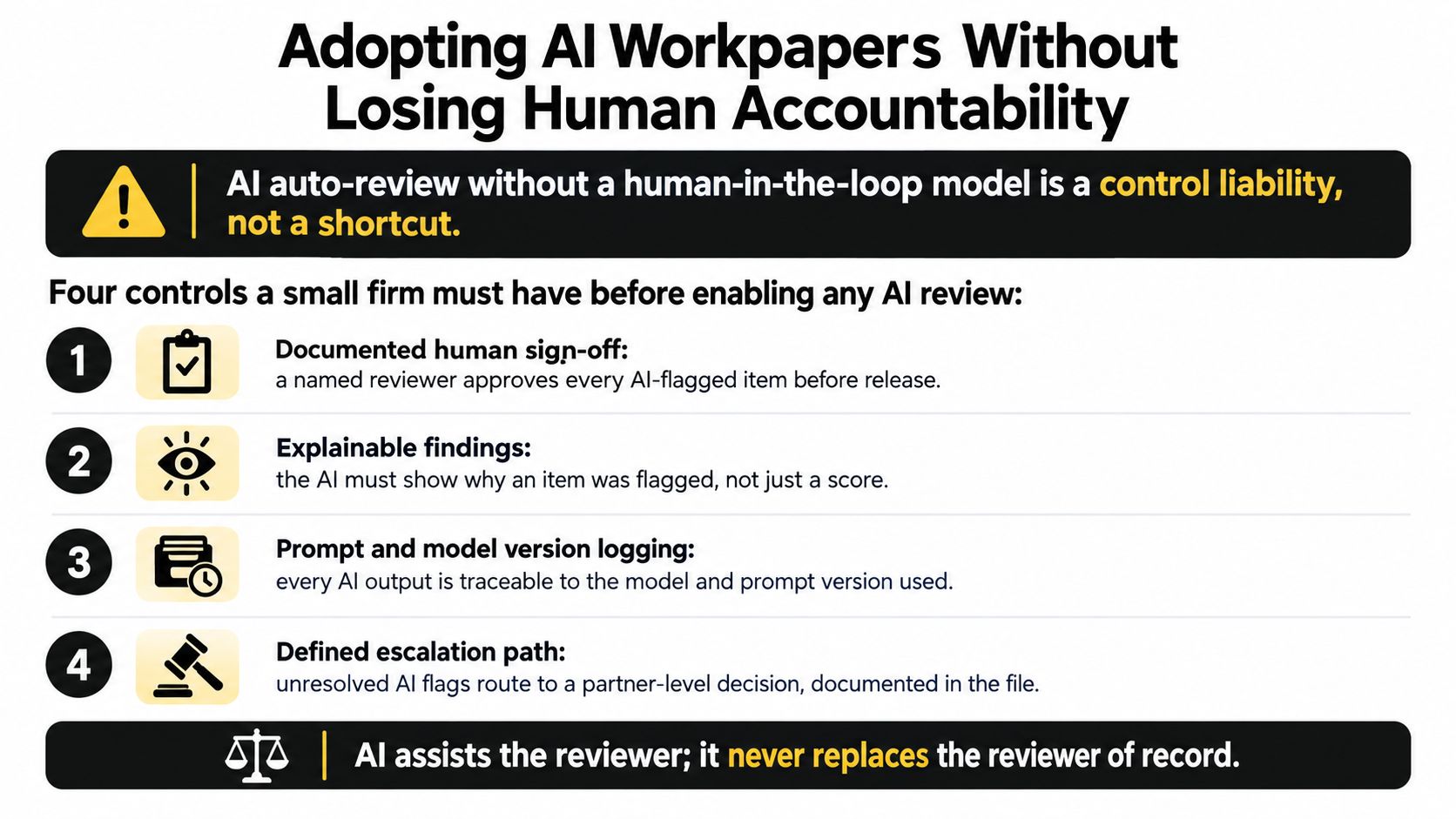
Four controls belong in the operating policy
Set a hard risk boundary. AI can suggest an extraction or flag a discrepancy, but it can't sign off above a defined risk threshold. Complex basis, unusual transactions, identity concerns, and unresolved source conflicts should route to a human reviewer.
Log every override. When a preparer rejects an AI suggestion, the system should record the original suggestion, the correction, the user, the reason, and the affected workpaper. An override hidden in a spreadsheet teaches the firm nothing and weakens accountability.
Sample AI-cleared work. A reviewer should inspect a deliberate sample of items the system did not flag. Otherwise, the firm measures only visible exceptions and has no way to detect consistent false negatives.
Publish a written AI policy. Staff should know what client data enters the system, what the AI may do, what it may not do, how errors are reported, and who owns the final decision. The policy should require acknowledgement and periodic review.
The AI quality assurance framework should be treated as an operational control, not a marketing appendix. Require explainable findings, prompt and model-version logging, and a documented escalation path for unresolved flags.
Keep humans accountable for the conclusion
An AI tool should assist with evidence-backed extraction and discrepancy detection. It shouldn't generate an unsupported explanation because a plausible sentence completes the workflow.
Use confidence thresholds carefully. A low-confidence extraction should return to source validation. A high-confidence extraction can still be wrong if the document context is unusual. The reviewer must be able to inspect the original page and understand why the system reached its finding.
The investment trend doesn't answer the control question. 57% of tax professionals identified AI as their top technology investment priority, up from 47% in 2025 and 35% in 2024, while 44% automated up to one-quarter of their tax workflow and 27% automated up to half, as reported in this tax industry technology trends analysis. Adoption tells you that firms are buying. It doesn't prove that review quality has improved.
A Practical Checklist for Evaluating Electronic Workpaper Software Fit
Run the evaluation as a pass-or-fail demonstration, not a feature tour. Give the vendor one ordinary 1040 scenario and require the system to show the complete path from intake through approval.

Ingest integrity
Ask whether the system preserves the original source file, records its identity on ingest, and shows the extracted value beside the source page. Test a poor scan, a duplicate document, and a source with conflicting totals. If the system replaces or normalizes the source without explicit notice, fail the test.
Reviewer control
Ask whether the firm can assign preparer, reviewer, and partner roles without custom development. The reviewer should be able to lock a workpaper, sign a specific version, reopen it through a controlled process, and preserve the prior approval history.
Audit evidence
Request an export containing source documents, workpapers, annotations, open and cleared exceptions, user identities, timestamps, and document versions. Don't accept a polished binder if the underlying event history disappears during export.
AI guardrails
Ask what happens before an AI finding becomes final. The correct answer includes human validation, explainable evidence, logged overrides, model or prompt version history, and escalation for unresolved items. If the vendor can't demonstrate a human approval gate, the AI is operating as an ungoverned reviewer.
Total cost
Get the complete commercial picture. Ask about users, storage, document processing, exports, integrations, implementation, support, and future price changes. A low initial quote isn't useful if the firm must buy separate tools to preserve the review trail.
WP TieOut fits this evaluation as an option for firms focused on individual returns. It provides 1040-oriented source-document ingestion, validated electronic workpapers, comparison against a drafted return, review-by-exception dashboards, source-linked PDF binders, tamper-evident review history, and preparer, reviewer, and partner handoffs. Treat those capabilities as claims to verify in a live demonstration, then score them against the same grid you use for every alternative.
The broader buying decision is less complicated than vendors make it. Choose the system that can prove what entered the file, what changed, what the reviewer saw, and who approved the conclusion. Feature count comes second to control architecture.
If your firm wants faster 1040 review without surrendering human accountability, use WP TieOut to evaluate source validation, exception handling, and exportable sign-off in one workflow. Start with a live demonstration, run the five pass-or-fail tests above, and decide based on the evidence trail rather than the AI feature list.