

A new tax workflow rarely fails because the team can't learn where to click. It fails when nobody knows who owns a discrepancy, which document is authoritative, or what evidence proves a return was reviewed. During busy season, those gaps turn a simple handoff into another email thread, another spreadsheet, and another opportunity for a material error to reach approval.
An effective end to end onboarding process treats implementation as an operational control lifecycle. Access, training, role assignment, document validation, exception handling, approval, and audit logging all belong to onboarding. A team hasn't finished onboarding when users attend a demonstration. It's finished when each role can move a representative return through the workflow and produce a defensible sign-off record.
Table of Contents
- The Real Cost of Manual Tax Onboarding
- Ingesting and Validating Source Documents
- Assigning User Roles and Permissions
- Training Your Team for Quick Adoption
- Common Pitfalls to Avoid During Setup
- Achieving Sign-Off with Confidence
The Real Cost of Manual Tax Onboarding
At 8:15 a.m., a preparer forwards a client email containing a W-2, three 1099s, and a brokerage statement. A second email arrives with a missing page. The reviewer downloads both messages, renames the files, and compares them with a draft return saved in another system. The partner later asks whether the withholding figure came from the original document or from an edited spreadsheet.
Nothing in that sequence looks catastrophic. The problem is that every handoff depends on memory. Someone must remember which attachment is current, whether all expected forms arrived, whether a value was transcribed correctly, and whether the person who cleared a discrepancy had authority to do so. Manual onboarding creates work before substantive tax review even begins.

Why email intake creates hidden work
Email is convenient for a single document. It becomes fragile when a return includes multiple sources, late supplements, amended pages, and several people working at different stages. Files get duplicated, naming conventions drift, and the review team can't easily distinguish an unresolved exception from a question that someone already answered.
Firms also pay for this friction through interruptions. Preparers stop production to answer status questions. Reviewers repeat checks because the prior evidence is hard to locate. Partners approve work without a consistent view of open items. The client experiences the result as repeated requests and unclear communication, even when every employee is working carefully.
A structured tax firm software workflow should give the engagement a single location for documents, status, ownership, and decisions. That doesn't mean every task should be automated. It means routine progression should be visible, while uncertain or material items should stop in a controlled queue.
Operational rule: If a reviewer has to reconstruct the history of a return from inboxes and personal notes, onboarding hasn't created control. It has only created access to another tool.
Onboarding affects continuity, not just setup
Strong onboarding is associated with an 82% improvement in new-hire retention and more than a 70% increase in productivity, according to research attributed to Brandon Hall Group and summarized by employee onboarding research from Chanty. Those figures apply to employee onboarding broadly, but the operational lesson carries directly into tax practice: structured guidance, role clarity, manager involvement, and checkpoints matter after initial access.
For tax teams, the useful test is practical. Can a preparer identify the expected source set? Can the reviewer see why a value was flagged? Can the partner approve only after the required evidence is present? If the answer depends on informal coaching, the firm has created a person-dependent process that will strain as volume and staffing change.
Ingesting and Validating Source Documents
Trust in an AI-assisted tax workflow starts with the source document, not the drafted return. A system may extract fields quickly, but extracted data remains an interpretation until it has been checked against the original page and assigned a clear status.

Start with a completeness gate
Create the engagement first, then define what the return is expected to contain. The inventory may include W-2s, 1099s, brokerage statements, K-1s, mortgage interest statements, charitable contribution records, and supplemental schedules. The exact list depends on the taxpayer and prior-year profile, but the control is consistent: reviewers shouldn't begin substantive reconciliation until the team knows what should be present.
Use a controlled portal or authenticated intake channel rather than unmanaged email. NIST's identity-proofing guidance requires a protected channel, validation that submitted evidence is genuine, confirmation that the claimed identity exists, verification that the evidence belongs to the person presenting it, protection of personally identifiable information, and retention of each verification step. The NIST identity proofing model provides the relevant control logic, even though a tax document workflow has a different purpose.
A practical intake sequence looks like this:
- Create the engagement: Attach the taxpayer, tax year, preparer, reviewer, and approval role to the case.
- Collect the source set: Receive documents through the controlled channel and preserve original pages.
- Parse the documents: Extract fields such as taxpayer identification details, wages, withholding, interest, dividends, basis, and payments.
- Validate against originals: Compare extracted values with the relevant page, account, tax year, and taxpayer.
- Assign status: Mark each item as validated, incomplete, low-confidence, or requiring human review.
Let exceptions interrupt the workflow
Automation should move clean cases forward and stop uncertain ones. A low-confidence extraction, missing page, duplicate form, or material mismatch shouldn't disappear into a general task list. It should carry enough context for a reviewer to resolve it without reopening the entire file.
A useful exception record includes the source page, return line, observed variance, materiality, assigned owner, status, resolution note, and approval timestamp. Teams can then measure where work accumulates instead of arguing about whether the platform is “accurate” in the abstract. More detailed data validation best practices should support the firm's own extraction and review policy.
Don't treat an extracted value as authoritative merely because it looks plausible. Trust is earned when the value agrees with the original evidence, the taxpayer context, and the drafted return. That sequence protects reviewers from spending time on every line while preserving human judgment where the evidence is incomplete.
Assigning User Roles and Permissions
Role assignment is a governance milestone, not an administrative afterthought. A user who can open a return isn't automatically qualified to validate source data, clear an exception, or give final approval. The system should make those distinctions visible before the first production case enters the queue.
Define decision rights before inviting users
Begin with the engagement, not the user list. Assign the people responsible for preparation, review, and approval, then map each role to the actions it may perform.
- Preparer: Ingests documents, reviews extraction results, adds context, and resolves items within the preparer's authority.
- Reviewer: Tests source values against the draft, evaluates exceptions, requests corrections, and records review conclusions.
- Partner or approver: Confirms that required review is complete, considers material unresolved matters, and authorizes final sign-off.
The names vary by firm, but the separation matters. A preparer shouldn't be able to approve their own unresolved work without oversight. A partner shouldn't need to inspect every extraction detail to determine whether the reviewer completed the required control. A permission model based on role-based access control for tax workflows can encode these boundaries while limiting access to sensitive taxpayer information.
Make handoffs explicit
A handoff should change both ownership and status. For example, once the preparer submits a return for review, the reviewer becomes responsible for the open exception queue. The preparer can respond to questions, but shouldn't close a reviewer-owned decision without a recorded reason.
Configure permissions around four questions:
- Who can see the case? Limit access according to engagement responsibility and firm policy.
- Who can change source data? Preserve the original document and record any correction separately.
- Who can resolve an exception? Require evidence and a resolution note for material items.
- Who can approve the return? Reserve final sign-off for the designated approval role.
Avoid broad administrator access as a shortcut for implementation. It may make the first demonstration easier, but it obscures whether the production workflow works under real permissions. Test each role with a representative return, including a missing document, a corrected extraction, and an unresolved discrepancy. Onboarding is complete only when the right person can take the right action, and the wrong person can't bypass the control.
Training Your Team for Quick Adoption
Generic software tours create familiarity with menus. They don't prepare a tax professional for a brokerage statement with an unclear page, a duplicate 1099, or a withholding figure that doesn't reconcile to the draft. Training should use realistic exceptions because those are the moments when governance and judgment matter.
Technology adoption research identifies accuracy concerns as the leading AI-adoption barrier at 61%, followed by data privacy at 54% and insufficient knowledge or training at 52%, according to a 2025 accounting-firm technology survey. The same source reports that only 28% of firms say their training programs fully meet modern demands, while the Intuit survey cited in the research reports that 75% of firms have increased emphasis on technology skills when hiring. Those figures point to a governance problem: training must explain not only how the system works, but who remains accountable for its output.

Train by role and exception
Give preparers practice with intake, extraction review, and escalation. Give reviewers practice with reconciliation, evidence requests, and resolution notes. Give partners practice with approval queues, sign-off conditions, and audit-history export. A single shared tutorial may be efficient to deliver, but it won't establish decision rights.
Use a small pilot during a manageable production window rather than asking the whole firm to change at once. The team should process representative returns, record where users hesitate, and revise the checklist before a broader rollout. Protect production by setting clear rules for when staff use the new workflow and when they continue with the existing process for a case that falls outside the pilot.
Time to value should include more than the first successful login or demonstration. A 2026 analysis reports a median SaaS time-to-value of 4.2 days, compared with 8.1 days in 2022, and a median time-to-second-value of 18.4 days. The analysis is summarized in 2026 customer onboarding benchmarks. For tax teams, first value may mean intake and validated documents. Second value is stronger evidence of adoption, such as a completed exception-based review with approval and an exportable history.
Common Pitfalls to Avoid During Setup
The most dangerous setup errors often look efficient. Accepting OCR output without checking the source saves a moment. Giving everyone the same permissions avoids configuration work. Letting a preparer clear every exception keeps the queue moving. Each shortcut removes a control that the firm may need later.
Tax operations teams should compare speed at setup with reliability in production. The right question isn't whether a workflow can process a clean return quickly. It's whether the workflow behaves predictably when documents are missing, values disagree, or an approval is challenged.
| Pitfall | Best Practice |
|---|---|
| Accepting OCR output as final | Compare extracted fields with the original page and assign a validation status |
| Starting review before confirming completeness | Create an expected-document inventory and stop incomplete cases at intake |
| Allowing one person to prepare, resolve, and approve | Separate preparer, reviewer, and partner decision rights |
| Clearing mismatches without evidence | Require the source page, return line, variance, resolution note, and timestamp |
| Treating email as the system of record | Preserve documents, status, ownership, and decisions in a controlled case |
| Giving broad access for convenience | Grant the minimum permissions needed for each role |
| Training only on clean examples | Use missing pages, duplicate forms, low-confidence fields, and material variances |
| Measuring only setup completion | Track production gates such as exception resolution and sign-off completeness |
The manual-review lesson
During the 2019 filing season, the IRS sent 13.9 million individual returns, or 9% of 155.8 million total returns, to its Error Resolution System for manual review, while 138 million returns, or 89%, were e-filed, according to the IRS Oversight report on filing-season error resolution. The point isn't that automation removes the need for people. It's that large-scale tax processing still needs a deliberate path for human intervention.
A weak workflow sends everything to a person. Another weak workflow sends nothing to a person. A defensible design uses rules to advance validated cases and routes exceptions with enough evidence for a focused decision. That balance protects capacity without pretending that extracted data or automated comparison can replace professional responsibility.
Achieving Sign-Off with Confidence
Sign-off should be the end of a controlled chain, not a button at the bottom of a screen. The partner needs to know what was received, what was validated, what changed, which exceptions were resolved, and who made each decision. If the record can't answer those questions, the final approval may be technically present but operationally weak.
Build the approval path around evidence
Start with a checklist that follows the return from identity to filing readiness:
- Taxpayer and engagement validation: Confirm the case belongs to the correct taxpayer, tax year, and engagement.
- Source completeness: Confirm that expected documents are present or that missing items have a documented disposition.
- Source-to-return reconciliation: Compare validated values for identity, filing status, income, withholding, basis, deductions, credits, and payments.
- Exception disposition: Require every flagged item to have an owner, evidence, status, resolution note, and appropriate approval.
- Final authorization: Record the reviewer's completion and the partner's approval with the user identity and event time.
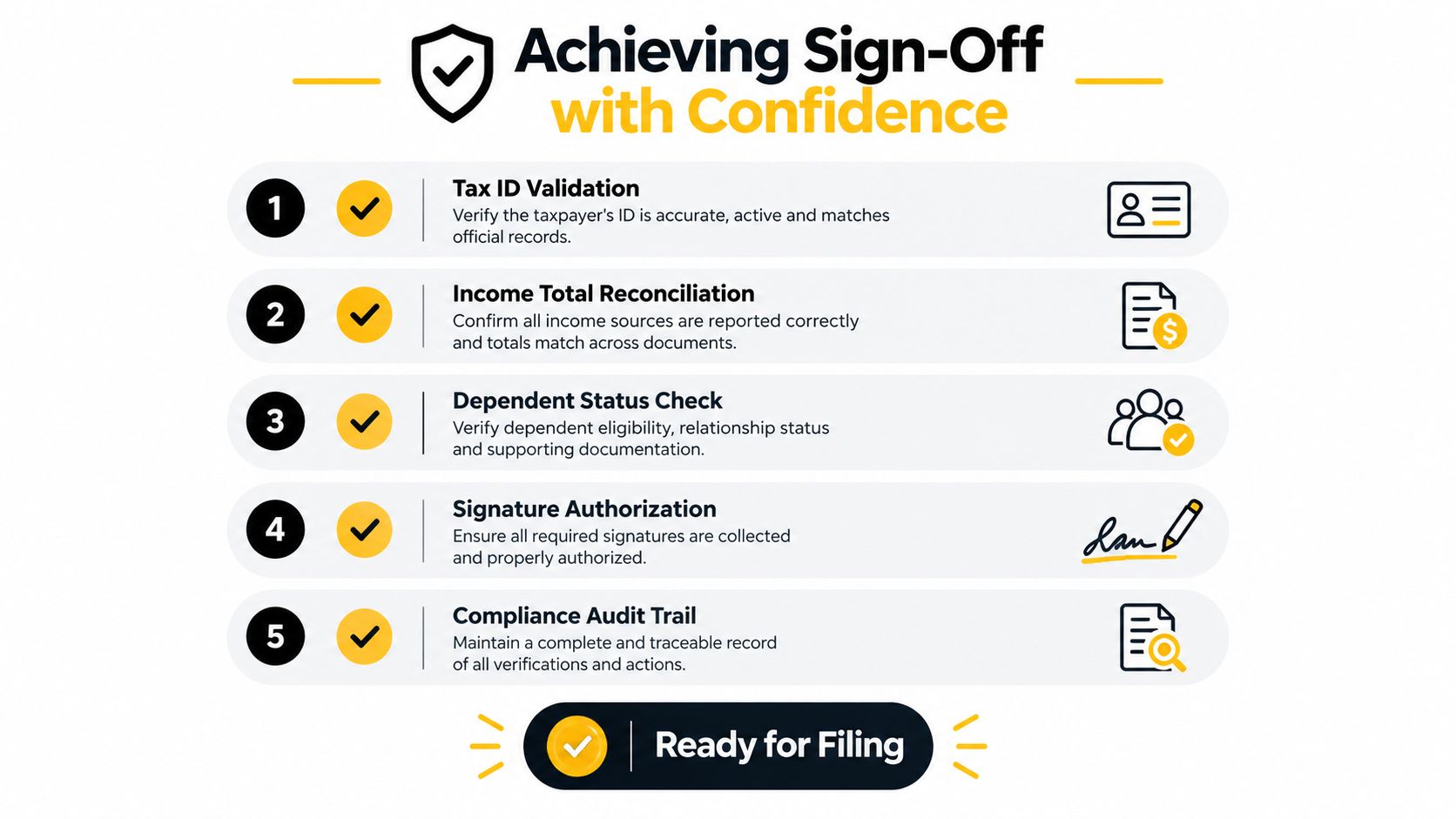
This structure prevents a common mistake: treating “no visible exceptions” as equivalent to “review completed.” A clean queue may mean the team resolved every issue, or it may mean the rules never identified the issue. The audit trail must distinguish those outcomes.
Assign ownership for AI-assisted decisions
“Human in the loop” is too vague to serve as a control. Someone must own the decision to accept an extracted value, override a comparison, request more evidence, or escalate a discrepancy. The reviewer's presence matters only when the firm has named decision rights and source-linked proof.
Use an escalation matrix for common conditions:
- Low-confidence extraction: The preparer checks the original page and submits a correction or escalation.
- Source and draft mismatch: The reviewer evaluates the variance, materiality, and supporting evidence.
- Missing or contradictory evidence: The case remains blocked until the taxpayer or responsible staff member supplies a resolution.
- Material unresolved issue: The partner decides whether the return can proceed, what limitation applies, and what documentation is required.
- Approval exception: The final approver records the reason for accepting, returning, or deferring the case.
Audit records should be access-controlled or immutable, attributable to a specific user and event time, and exportable for internal quality review or examination. Preserve the original source pages alongside the workpaper and annotations. A reviewer should be able to follow the path from source document to extracted value, from extracted value to drafted-return comparison, and from discrepancy to approval.
Measure onboarding after go-live
Completion of a product demonstration is a weak success measure. A stronger scorecard follows the workflow into production:
- Document-completeness rate: How often does a case pass the intake gate without a preventable request for missing evidence?
- Extraction correction rate: How often does a user change an extracted value after checking the original?
- Exception aging: How long do unresolved items remain with an owner?
- First-pass approval rate: How often does a return reach approval without being sent back for a preventable control failure?
- Role adoption: Are preparers, reviewers, and partners each using the assigned workflow?
- Sign-off completeness: Does every completed case contain the required identities, timestamps, evidence, and dispositions?
These measures reveal whether the process is reducing uncertainty or merely moving it between queues. They also help managers improve rules without blaming individual users for system design problems.
Treat onboarding as a recurring control
The process shouldn't end when the pilot finishes. Sample completed cases after go-live, review overrides, examine aged exceptions, and ask whether the escalation matrix still matches the firm's risk tolerance. Train new staff with the same exception cases and require them to demonstrate the relevant decision rights before they work independently.
The strongest end to end onboarding process connects technical setup, workflow execution, and governance evidence. It gets documents into a controlled case, validates the evidence before comparison, routes exceptions to the right person, separates preparation from approval, and leaves a history that another professional can understand. That is what turns AI assistance from an isolated feature into a repeatable tax operating model.
WP TieOut helps CPA firms ingest W-2s, 1099s, brokerage statements, and other source documents, validate extracted data, surface true discrepancies, and preserve a source-linked sign-off trail across preparer, reviewer, and partner roles. Visit WP TieOut to explore the end to end workflow and evaluate how it can support your firm's onboarding and review controls.