

At 9 p.m., a review partner is still moving between a drafted 1040, W-2s, 1099s, brokerage statements, and a workpaper full of figures that look almost right. One interest amount doesn't match. A dividend line may have been omitted. A document is sitting in the file, but nobody can tell whether its income made it into the return. The reviewer keeps flipping pages because the process requires checking nearly everything by eye.
That approach puts skilled judgment in the wrong place. Reviewers spend their attention confirming clean items while deadlines approach and the riskier discrepancies compete for the same limited focus. Exception reporting software changes the assignment. Instead of asking a reviewer to inspect every line, it validates the available evidence, compares the source data with the drafted return, and presents the items that need a decision.
Table of Contents
- Why Review Season Breaks Good Firms
- What Exception Reporting Software Actually Does
- The Five Capabilities That Matter Most
- How Review by Exception Beats Eyeballing
- Choosing the Right Exception Reporting Tool
- How WP TieOut Handles the Workflow End to End
- Your Next Steps Toward Exception-Based Review
Why Review Season Breaks Good Firms
The problem usually isn't a lack of care. A competent preparer can create a well-supported return, and a conscientious reviewer can still miss an inconsistency after hours of repetitive checking. The review queue creates a difficult combination: large document sets, similar-looking figures, frequent interruptions, and pressure to release returns on schedule.
Consider a common 1040 workflow. The preparer enters wages from a W-2, interest from several 1099-INT forms, dividends from brokerage statements, and other income from client-provided documents. The reviewer then compares the drafted return with the source file, often switching between tax software, PDFs, spreadsheets, and email attachments. A discrepancy may be obvious once someone sees it, but finding that discrepancy among otherwise consistent information takes time.
The hidden cost of checking everything
Line-by-line review feels thorough because it leaves no visible item untouched. It can also make the reviewer's attention less reliable. Repetition encourages pattern recognition, and pattern recognition can cause a reviewer to accept a familiar-looking figure without tracing it back to the original page.
The cost isn't limited to a missed number. A late correction can trigger another preparer handoff, another partner review, a revised client request, or a rushed filing decision. Even when no error survives, the firm has used senior review capacity to confirm information that didn't require professional judgment.
Practical rule: A reviewer should spend time deciding whether an unusual or unsupported item is acceptable, not proving for the hundredth time that a clean value copied correctly.
What exception reporting changes
Exception reporting software shifts the review from exhaustive inspection to controlled investigation. The system handles routine comparisons in the background, then places a mismatch, missing value, failed tie-out, or unresolved judgment call in a queue. The reviewer can open the exception, trace it to the supporting document, decide what should happen, and record the outcome.
This doesn't remove professional review. It gives professional review a narrower and more defensible target. The firm still needs people to interpret unusual facts, resolve ambiguous source documents, and approve the final return. The difference is that people aren't asked to discover every issue through sustained visual effort.
The market has formalized exception reporting and related exception-management software as an enterprise category. A 2026 market report estimated policy exception management software at $2.8 billion in 2025 and projected growth to about $4.7 billion by 2030, with risk management and audit management among the reported use cases, according to the market overview of exception reporting software. For tax professionals, the relevant question isn't whether the category is growing. It's whether a particular tool can reconcile a 1040 and preserve evidence for every review decision.
What Exception Reporting Software Actually Does
Think of exception reporting software as a spell-checker for a drafted return. A spell-checker doesn't rewrite every sentence. It checks the text continuously and brings unusual or potentially incorrect items to the writer's attention. The writer still decides whether a flagged word is wrong, a proper name, or an intentional choice.
A tax review system applies the same principle to source documents and return data:
- It collects source information. W-2s, 1099s, brokerage statements, and other documents enter a controlled workflow.
- It validates what was extracted. The system checks whether the captured values and document references are usable for comparison.
- It compares source information with the drafted return. Matching values stay out of the active review queue.
- It surfaces exceptions. Mismatches, missing support, and unresolved items become reviewable work.
- It records the decision. The record should show what the reviewer examined and what happened next.
The output isn't a second copy of the return. It's a focused list of items that need human judgment, supported by enough context to investigate them without reconstructing the file manually.

Separating similar software categories
Buyers often encounter four labels that sound interchangeable: exception reporting, exception management, error monitoring, and observability. They aren't automatically the same product. Recent roundup content describes a market that now means “five different things,” ranging from narrow monitors to observability suites and analytics platforms, as discussed in this explanation of error-monitoring software categories.
An error monitor may tell an engineering team that a process failed. An observability platform may help diagnose system behavior across applications. An enterprise exception-management tool may route policy breaches through queues, approvals, and dashboards. Those functions can be valuable, but they don't necessarily reconcile a W-2 or 1099 against a drafted 1040.
For a tax practice, the job is more specific. The software needs to validate source-level data, compare it with the return, link each exception to evidence, and support preparer, reviewer, and partner decisions. A useful working definition is:
Exception reporting software for tax professionals identifies differences between validated source documents and a drafted return, then routes only those differences that require human review into a traceable sign-off workflow.
A more detailed explanation of that workflow is available in this guide to what exception reporting means for tax review.
The Five Capabilities That Matter Most
A useful system isn't just an alert screen. It behaves like a connected pipeline. Documents enter at one end, validated information moves through comparison rules, exceptions reach the right reviewer, and the entire process remains protected and traceable.
1. Source document ingestion
The first requirement is reliable intake. The system should handle the documents clients provide, including W-2s, 1099s, brokerage statements, and supporting schedules. It should preserve the relationship between an extracted value and the original document page.
Suppose a client sends multiple 1099-INT forms. A practical workflow captures the payer, interest amount, and page reference rather than placing one unexplained total into a spreadsheet. If the drafted return contains a different interest figure, the reviewer should be able to open the relevant source evidence directly.
2. Extraction validation
Extraction is not the same as accuracy. A system can read a document and still capture a value incorrectly, omit a field, or associate information with the wrong taxpayer. Validation checks whether the extracted record is complete and usable before it becomes the basis for a comparison.
For example, an extracted interest amount should remain connected to the form that supports it. If the document is unclear or a required value is missing, that problem should be visible before the system treats the comparison as complete.
3. Review-by-exception comparison
The comparison layer asks whether the validated workpaper agrees with the drafted return. A matching value can be treated as a clean item. A mismatch becomes an exception with context, not just a red warning.
The distinction matters. If the workpaper shows interest from a 1099-INT and the return contains a different amount, the reviewer needs to see both values, the source page, and the relevant return location. The system should help answer whether the difference is an input error, a legitimate adjustment, or an item that needs client clarification.
4. Audit trail and ownership
An exception queue becomes useful when every item has an owner, status, evidence, and history. The reviewer should be able to see whether an issue is open, under review, resolved, approved, or overridden. The record should also preserve who took the action and when.
This is the difference between a temporary alert and a review record. Guidance on exception reporting software emphasizes the value of source-level traceability because reviewers can move from a flagged variance to the underlying transaction or document without rebuilding the case.
5. Security and access control
Tax files contain sensitive identity, income, and financial information. Security therefore belongs in the selection criteria, not as an afterthought. Ask how the platform protects files, limits access, separates roles, and preserves activity history.
A preparer may need to resolve an extraction issue, while a reviewer evaluates the discrepancy and a partner gives final approval. Those responsibilities should be visible in the workflow. Encryption and strict access controls help protect the data, while role separation helps protect the review process.
Together, these capabilities create a controlled path from document intake to sign-off. If ingestion lacks source references, the reviewer can't trace the result. If validation is weak, comparison produces unreliable alerts. If the queue lacks ownership and history, the firm can't prove how an exception was handled.
How Review by Exception Beats Eyeballing
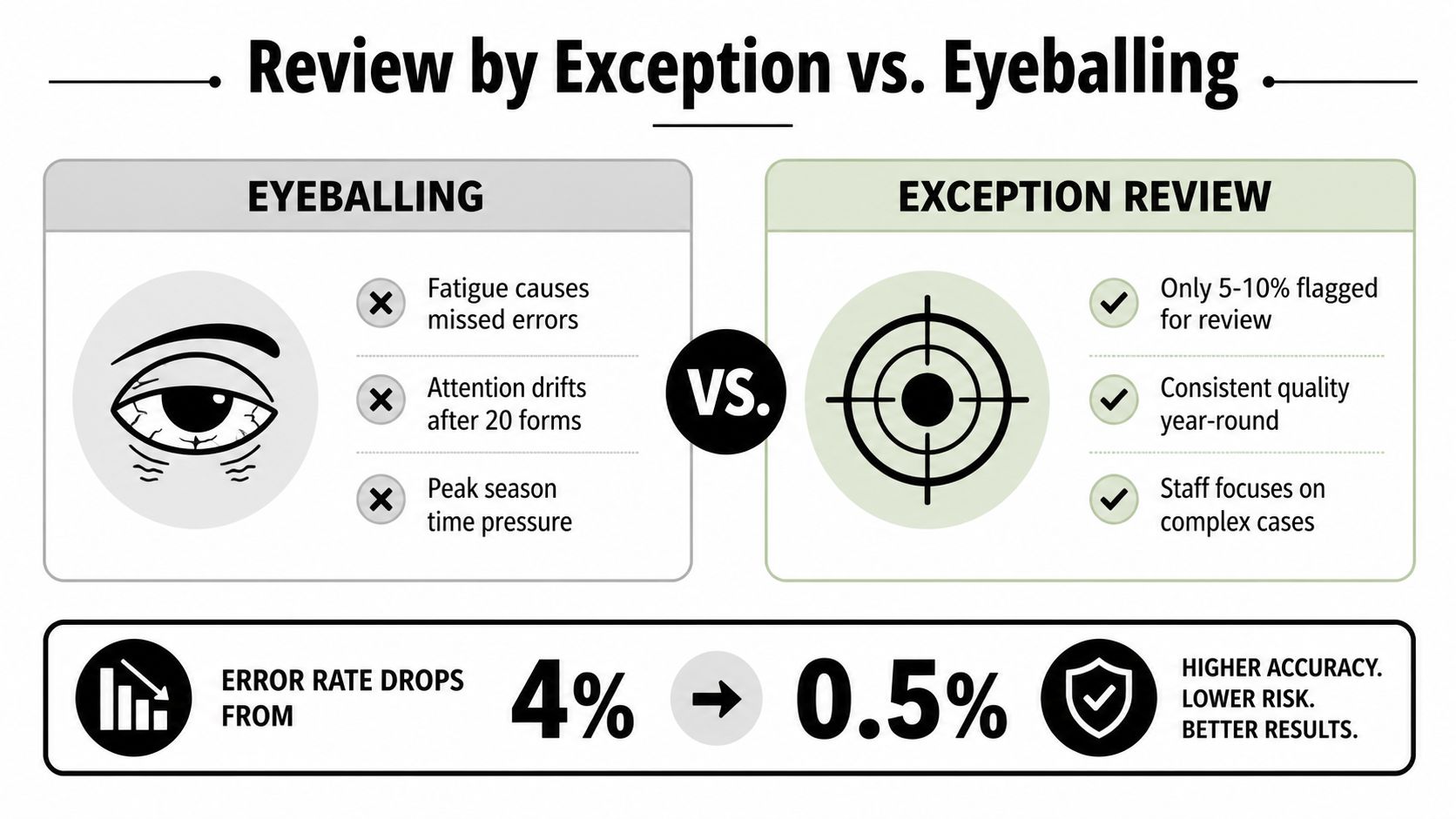
A full-scope visual review asks a person to maintain the same level of attention across every line, even when most lines are consistent. That isn't how people work under sustained deadline pressure. Attention drifts, familiar patterns become easy to accept, and a reviewer may spend too much time on low-risk confirmations while a meaningful mismatch remains buried.
Review by exception assigns the machine a narrow task and the reviewer a professional task. The system identifies differences. The reviewer interprets them, investigates their support, and decides whether the return should change.
A 2022 global error-monitoring study covering 237 organizations reported that 100% of respondents used some form of error-monitoring solution. It also found that 74% used software for detection only, 26% used software for both detection and diagnosis, and 68% were using or considering advanced analytics for error diagnosis, as reported in the error-monitoring study summary. The same source reported that nearly half of teams that detected errors reduced incidents by more than 50% as a result.
Those findings don't prove that every tax practice will achieve the same outcome. They do support the operating logic: isolate anomalies, diagnose the underlying cause, and direct human effort toward the items that need it.
The partner's quality-control objection
A partner may reasonably ask whether skipping clean lines weakens quality control. The answer depends on what the system considers clean and whether it preserves the evidence behind that conclusion.
Undocumented eyeballing can look thorough without leaving a clear record of what the reviewer checked. A controlled exception workflow can show the comparison performed, the source document used, the discrepancy identified, the person who reviewed it, and the action taken. That makes the process easier to supervise and easier to explain.
The reviewer still needs authority to override an automated result. A legitimate difference may arise because the return includes a permitted adjustment, a source document was superseded, or the client supplied an explanation. The system shouldn't force every difference into a correction. It should make the decision visible.
Review-by-exception for tax teams is therefore not a shortcut around review. It's a different allocation of review effort. Routine agreement is documented by the system, while professional attention concentrates on mismatches, missing support, and judgment calls.
Choosing the Right Exception Reporting Tool
Start with the workflow, not the product label. Ask what the firm needs to prove after a reviewer finishes a 1040. If the answer is only that an alert appeared and disappeared, a generic monitoring tool may be enough. If the answer includes source pages, review ownership, approvals, overrides, and timestamps, the evaluation needs to be much stricter.
A tax-specific platform should answer the following questions during a demonstration:
| Selection Criterion for Exception Reporting Software in Tax Practices | Why It Matters for Your Firm |
|---|---|
| Document coverage | The system needs to handle the W-2s, 1099s, brokerage statements, and other source documents your clients actually submit. |
| Extraction validation | Reviewers need confidence that captured values are complete and tied to the correct source before comparison begins. |
| Source-linked exceptions | A reviewer should reach the original document page from the flagged discrepancy without searching through a separate file. |
| Role-based workflow | Preparer, reviewer, and partner responsibilities should remain clear through resolution and approval. |
| Override history | The system should preserve the reason an exception was accepted, changed, or escalated. |
| Exportable evidence | The completed file should support internal review and examination without requiring a reconstruction of the process. |
| Security controls | Encryption and access restrictions should protect sensitive tax documents and limit actions according to role. |
Alerting isn't reconciliation
Generic enterprise tools often excel at queues, routing, ownership, and dashboards. Those functions matter, and exception management platform guidance from Trintech describes how centralized queues can include ownership, status, approvals, supporting evidence, and timestamped actions. That creates a continuous audit trail for monitoring remediation and recurring failures.
But a tax reviewer needs more than a queue. The reviewer needs to know which W-2 or 1099 supports the value, where that value appears in the drafted return, and whether the item was resolved with a correction or a documented judgment. A dashboard that says “income mismatch” without source-level evidence just moves the search to another screen.
Test the uncomfortable cases
Don't evaluate a tool only with a clean return. Use a test file with multiple payers, an omitted form, a figure that differs between the workpaper and return, and an item requiring partner judgment. Ask the vendor to show the complete history after each person takes an action.
Pay attention to what happens when the reviewer rejects the proposed correction. Can the system preserve the original values? Can the reviewer attach an explanation? Can a partner see open exceptions without searching email? Can the firm export the completed record in a form that makes sense outside the platform?
Those questions separate a reconciliation-grade workflow from an alerting product. The right tool should reduce searching while increasing the evidence available at the end.
How WP TieOut Handles the Workflow End to End
Take one individual return from intake to approval. The firm receives the client's W-2s, 1099s, brokerage statements, and related source documents. WP TieOut ingests those materials, validates the extracted data, and organizes the evidence so the comparison starts with identifiable source records rather than disconnected totals.

The validated workpaper is then compared with the drafted 1040. A matching wage amount doesn't demand another manual investigation. A different interest amount, missing dividend entry, or unsupported value becomes an exception that the reviewer can open and examine against the relevant source page.
A handoff that keeps responsibility visible
The preparer can resolve extraction questions and address straightforward mismatches. The reviewer can assess whether the proposed correction agrees with the source evidence and tax work. The partner can review unresolved judgment calls and give final approval. Each role operates within the same record instead of passing a marked-up PDF through a chain of email messages.
WP TieOut also compiles a source-linked, bookmarked PDF binder. The binder preserves original pages and can include stamps and annotations, so the final file retains the evidence behind the review rather than only the outcome. A firm evaluating tax workflow software for this process should ask whether the product preserves this connection from source document to exception and then to sign-off.
The sign-off history records who checked each item and when. That history gives the firm an exportable record for internal review or examination. Encryption and strict access controls address the protection of the underlying tax documents, while the role structure limits who can perform each step.
The interactive demo shows the workflow from intake through partner sign-off. It gives a firm an opportunity to test the handoffs, exception queue, source links, binder output, and approval history before onboarding the process.
Your Next Steps Toward Exception-Based Review
Adoption doesn't need to begin with a firm-wide process change. Choose a bounded pilot involving a defined group of 1040 returns and one complete review cycle. Include ordinary files as well as returns with multiple source documents, missing support, and discrepancies that require judgment.
Assign ownership to a review manager or partner who understands the current pain. That person should define what counts as a successful review and make sure preparers and reviewers follow the same process during the pilot.
Track the measures that reflect the firm's real burden:
- Reviewer effort: Record how much time reviewers spend locating documents, comparing clean items, and resolving exceptions.
- Exception quality: Note which flagged items represent genuine discrepancies, missing support, or legitimate differences.
- Resolution discipline: Check whether every exception has an owner, status, explanation, and final action.
- Handoff clarity: Confirm that preparers, reviewers, and partners know what remains open and who must act next.
- Evidence quality: Inspect whether the completed file links decisions to original source pages and preserves the approval history.
Don't judge the pilot only by the size of the exception queue. A useful system may surface more issues at first because it makes previously informal discrepancies visible. The meaningful test is whether reviewers can classify those items efficiently and whether the final record explains how each one was handled.
A practical evaluation should include an interactive demonstration before the firm commits to changing its process. Use the demo to test a real review scenario, not just a feature list. Ask where the reviewer finds the source page, how an override is recorded, and what the partner receives at sign-off.
The reviewer who once searched through every page can then focus on the short list that needs judgment. The firm still applies professional skepticism, but it applies that skepticism to visible exceptions with a defensible record behind each decision.
WP TieOut provides an end-to-end workflow for validating source documents against drafted 1040 returns, managing exceptions, and preserving source-linked sign-off evidence. Visit WP TieOut to explore the interactive demo and evaluate whether exception-based review fits your firm's tax workflow.