
The popular advice is to buy tax software that extracts documents faster. That's only half the decision. A firm can automate W-2 and 1099 data entry and still leave reviewers hunting through PDFs, reconciling numbers manually, and proving sign-off through email threads. Tax workflow software earns its keep when it connects intake, validation, review, approval, and evidence into one controlled process.
That distinction matters because tax season rarely fails at one isolated task. It fails at the handoff between tasks. A document arrives late, a preparer misses a mismatch, a reviewer repeats work already completed, and nobody can quickly show why a return was approved. The strongest systems don't merely produce a draft return. They make exceptions visible, assign responsibility, and preserve the evidence behind every decision.
Table of Contents
- The Automation Illusion in Tax Practice
- Core Features That Define Tax Workflow Software
- Measuring Real Outcomes, Capacity, Cycle Time, and Risk
- The Market Landscape, Fragmented But Mature
- How to Evaluate Tax Workflow Software for Your Firm
- The Hidden Trap of Good Enough Automation
- The Future of AI in Tax Review Workflows
The Automation Illusion in Tax Practice
At 6 p.m. during filing season, a preparer is still comparing a client's draft 1040 with a stack of source documents. The software has already extracted data from several forms, but the reviewer must open each PDF, locate the relevant page, check the return field, and note the result somewhere else. One discrepancy gets corrected. Others remain buried in a crowded review queue.
The firm hasn't rejected technology. It has adopted technology in pieces. That's why the team feels busy but not necessarily safer. Extraction may be automated, while reconciliation, exception routing, reviewer sign-off, and documentation remain manual.

The real gap is workflow maturity
A 2026 Thomson Reuters report found that 44% of firms automate no more than a quarter of their tax workflow, while only 11% automate more than half. The figures, reported in Thomson Reuters' analysis of the cost of not upgrading tax software, suggest that many firms have moved beyond purely manual work without reaching an end-to-end operating model.
The important distinction is between isolated automation and exception-based review. Isolated automation completes a task, such as reading a form or transferring a value. Exception-based review connects that task to the next control. The system identifies a difference, shows the source page and return field involved, routes the item to the right person, and records the disposition.
Practical rule: If the reviewer still has to rebuild the evidence trail manually, the firm has automated a task, not the workflow.
A mature process changes the reviewer's job. Instead of inspecting every line with equal attention, the reviewer focuses on missing information, unusual values, failed validations, and judgment items. That doesn't eliminate professional responsibility. It makes responsibility more visible and concentrates it where human judgment matters.
The test is simple. Ask whether the software reduces the number of places a preparer or reviewer must look, the number of handoffs they must remember, and the amount of proof they must assemble after approval. If the answer is no, the firm may be working faster at the wrong part of the process.
Core Features That Define Tax Workflow Software
Tax workflow software should be evaluated as a connected architecture, not a feature list. A polished extraction screen is useful, but it can't compensate for a broken link between source documents, workpapers, the draft return, and final approval.
The six connected layers
1. Intake and document ingestion. The workflow begins when the system receives W-2s, 1099s, brokerage statements, and related client documents. Centralized intake reduces the chance that a form stays in an inbox or a local folder outside the return file.
2. Extraction and validation. An AI or rules-based engine identifies fields, then checks whether the information is complete and plausible within the workflow. The useful question isn't only whether the system can read a value. It's whether it can flag uncertainty or missing information before that value reaches the draft return.
3. Reconciliation and tie-out. The platform compares validated workpaper data with the drafted return. Extraction becomes operationally valuable at this stage. The system should distinguish a genuine discrepancy from a harmless formatting or presentation difference, so reviewers don't spend their time investigating noise.
4. Review by exception. The reviewer sees the items that need attention, rather than recreating a line-by-line comparison. According to WP TieOut's explanation of AI for CPA firms, the technically valuable model links each discrepancy to the exact source page, triggering rule, and draft-return field.
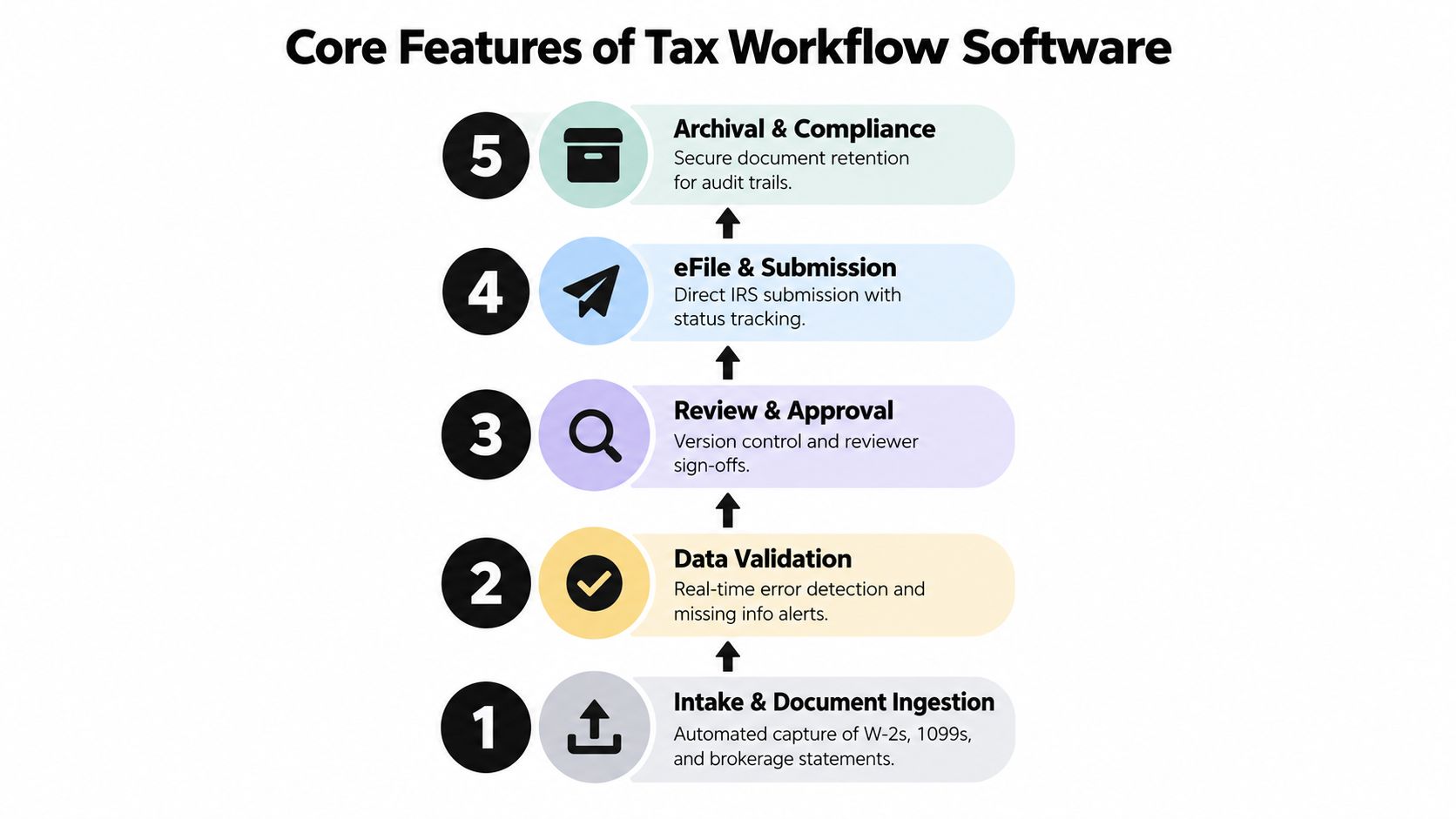
5. Audit trail and sign-off. Every review item should retain timestamps, source references, comments, and reviewer dispositions. A completed return then has more than a final status. It has an explainable history that supports internal review and exam preparation.
6. Security and controlled access. Preparers, reviewers, and partners shouldn't all have identical responsibilities. Role-based access, encryption, and controlled handoffs help firms limit unnecessary access while keeping accountability clear.
A product such as tax workpaper automation for CPA firms illustrates why these layers need to operate as one chain. If ingestion works but extraction loses source references, traceability weakens. If reconciliation finds an issue but doesn't route it, the exception becomes another manual task. If approval occurs without a durable record, the final control is difficult to defend.
The same principle applies to e-filing and archival. Submission status and secure retention matter, but they come after the firm has established that the data was validated, the exceptions were resolved, and the reviewer's decision was recorded.
Measuring Real Outcomes, Capacity, Cycle Time, and Risk
Features are easy to demonstrate. Operating outcomes are harder to fake. A firm should measure whether tax workflow software changes the amount of work a preparer can complete, how long a return remains in process, and how much effort a reviewer spends proving that the return is correct.
A practical benchmark reported for AI-assisted document extraction and first-draft preparation is about 35 minutes per standard 1040, with turnaround of around 2.5 business days and capacity of roughly 380 returns per preparer per season. The figures and the associated estimate of about a 36% capacity increase without additional headcount appear in UpTax's tax preparation efficiency metrics.
Those figures shouldn't be treated as a promise for every practice. Client complexity, staffing, review policies, document quality, and integration choices will change the result. They're useful because they point to the right measurement model. Extraction accuracy by itself doesn't tell a partner whether the workflow improved.
Measure the handoffs, not just the keystrokes
Track the point where work waits:
- Intake delay: How long does a complete document package take to become available for preparation?
- Draft-to-review time: How long does a prepared return wait before a reviewer starts?
- Exception aging: Which discrepancies remain open, and who owns them?
- Rework: How often does a return move backward because a source document, validation step, or reviewer note was missing?
- Sign-off completeness: Can the firm show what was checked, by whom, and when?
The mechanism behind capacity gains is straightforward. Automated intake and extraction reduce manual keying, while exception-based review directs professional attention toward judgment items. That can compress cycle time without pretending that human oversight is unnecessary.
Risk measurement needs equal weight. A source-linked discrepancy is easier to investigate than a note saying “reviewed.” A timestamped disposition is stronger than an approval implied by an email. When the system preserves original pages, source references, and reviewer decisions, the firm reduces the hidden cost of reconstructing its own process later.
Speed matters only when the firm can still explain how the return moved from source documents to approval.
The Market Landscape, Fragmented But Mature
The tax software market isn't waiting for a single winner. CPA firms use several established platforms, and the adoption pattern shows that preparation software is a mature operational category rather than a niche purchase.
The 2023 Journal of Accountancy tax software survey reported usage among respondents across several products:
| Software | Usage share | YoY change |
|---|---|---|
| UltraTax CS | 23.8% | Up 3.8 percentage points |
| Drake Tax | 15.8% | Not specified |
| Lacerte | 14.8% | Not specified |
| ProSeries | 10.5% | Down 2.3 percentage points |
| CCH Axcess Tax | 10.1% | Not specified |
| CCH ProSystem fx | 9.7% | Not specified |
| ATX | 5.8% | Not specified |
The remaining six products each had under 9% usage in that survey. That distribution matters during evaluation. A firm shouldn't assume that the most widely used preparation platform automatically provides the review orchestration it needs. Preparation, document management, workpaper reconciliation, workflow routing, and sign-off can sit at different layers.
Preparation platforms and review systems solve different problems
A core tax platform may handle form calculations, diagnostics, e-filing, and return production. Workflow software may focus on assignment, status visibility, document movement, and next actions. A review-oriented system addresses another pain point, the comparison between source documents, validated workpapers, and the drafted return.
These categories can overlap, but they aren't interchangeable. A dashboard that shows whether a return is open doesn't necessarily prove that each high-risk discrepancy was resolved. An extractor that reads a brokerage statement doesn't necessarily show which return field received the value or who approved the tie-out.
The broader market direction reinforces the need for careful evaluation. MarketsandMarkets valued the global tax tech market at USD 15.77 billion in 2023 and projected USD 36.72 billion by 2030, at a 12.1% CAGR, as reported in its tax technology market overview. Growth expands the number of choices, but it also makes category boundaries less obvious.
The practical conclusion is to evaluate the workflow gap, not the vendor's position. If the firm already has dependable preparation software, the next purchase may need to strengthen review control rather than replace the entire tax engine.
How to Evaluate Tax Workflow Software for Your Firm
Start with the firm's actual path from document receipt to partner sign-off. Don't begin with a vendor demo, where every workflow looks clean because the sample files are complete and the exceptions are conveniently simple.
Map the process before scoring products
Write down each handoff. Identify where a document enters, where extracted data is checked, where the draft return is compared, where exceptions are assigned, and where final approval is recorded. Include the unofficial steps, such as spreadsheet trackers, email reminders, shared folders, and messages sent when a return is waiting.
Then score prospective software against these criteria:
End-to-end coverage. Does the system connect ingestion, extraction, validation, reconciliation, exception review, approval, and exportable evidence? If it stops after document reading, you'll still need a control for the review bottleneck.
Source traceability. Select a discrepancy and ask for a live demonstration. Can the reviewer move directly to the source page, see the triggering rule, identify the draft-return field, and record the resolution?
Role-based handoffs. A preparer, reviewer, and partner should have distinct responsibilities. Look for clear ownership, reassignment controls, and a record of who completed each action.
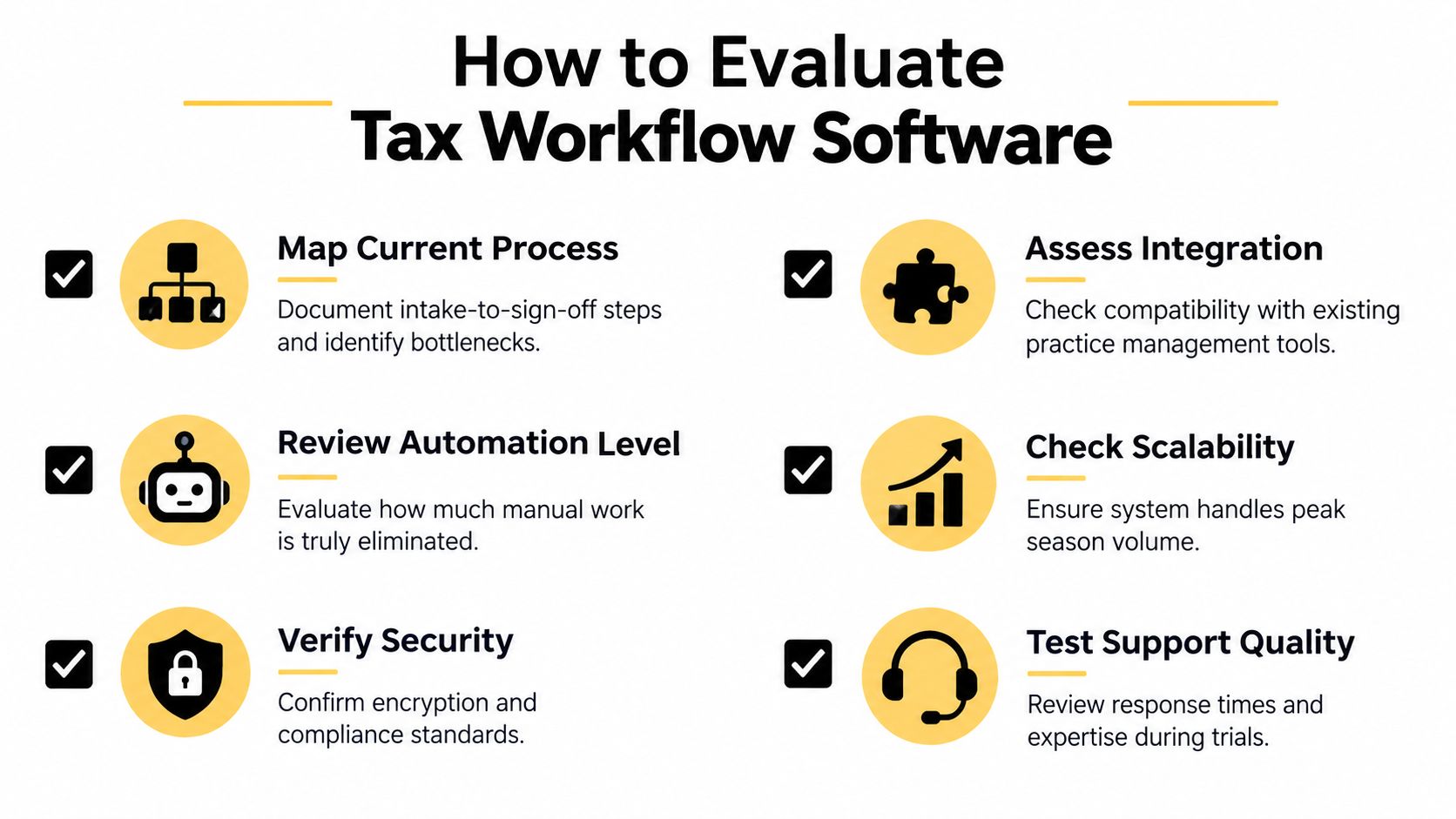
Audit-ready output. Ask what the firm can export after approval. A useful binder should preserve source documents, annotations, timestamps, and reviewer dispositions in a form another professional can understand without interviewing the original preparer.
Integration fit. Test the connection with the tax preparation platform, document management system, and practice management tools already in use. A technically impressive application can create more work if staff must repeatedly download, rename, and re-upload files.
Operational support. During a trial, ask who handles an extraction problem, how the team reports an incorrect match, and what happens when a workflow stalls during peak season. Product support is part of the control environment.
Use a difficult file, not a polished demo
Give vendors a representative return with multiple source types, incomplete information, and realistic review complications. Watch what happens when the system encounters an exception. Does it explain the issue, retain the source context, and route the item, or does it produce a warning that someone must interpret elsewhere?
A review platform such as CPA review software from WP TieOut can be assessed through this lens. The relevant question isn't whether it has an attractive interface. It's whether its source validation, drafted-return comparison, role handoffs, and sign-off history close a specific gap in the firm's existing process.
Evaluation standard: Buy the system that removes a handoff and preserves its evidence, not the one that adds the longest feature list.
The Hidden Trap of Good Enough Automation
“Good enough” automation can look successful because a demonstration usually ends at the first completed extraction. The system reads a W-2, places a value in a workpaper, and shows immediate savings on data entry. The harder test comes later: can the reviewer prove that the value matches the drafted return, and can another professional find that proof without reconstructing the process?
Extraction alone shifts the bottleneck. Reviewers continue comparing source documents manually. Preparers answer follow-up questions across email and chat. Managers see status labels without knowing whether an exception was resolved, reassigned, or easily overlooked.

Extraction satisfaction isn't review satisfaction
A 2026 survey found that only 36% of corporate tax accountants were satisfied with current workpaper tools and processes. The result points to a buying mistake: faster extraction can coexist with frustration about workpaper structure, review controls, and sign-off evidence.
The warning signs are specific:
- The reviewer receives data without context. A value appears in a workpaper, but the source page and return destination require separate searching.
- Exceptions have no owner. The system flags a mismatch, then staff return to email or a spreadsheet to decide who handles it.
- Approval is only a status. “Complete” appears on the return, but the file does not preserve the reviewer's decision, rationale, and supporting evidence.
- Rework stays hidden. Managers can see throughput, yet cannot identify how often returns return for missing documents or unresolved discrepancies.
A stronger evaluation measures rework, cycle time, reviewer effort, and audit defensibility. Automated field counts are easy to present, but they do not show whether the firm has reduced risk from fragmented handoffs.
The practical question is, “What does the reviewer no longer have to reconstruct?” A mature workflow connects source context, exception ownership, and approval evidence in the same review record. If the tool only completes the first extraction step, it has made the old process faster without making it more controlled.
The Future of AI in Tax Review Workflows
AI is moving deeper into tax operations, but faster processing alone will not define the next useful generation of tools. 60% of respondents used AI for tax research at least weekly in 2026, compared with 33% in 2025, according to CPA.com's survey coverage. Research assistance matters, but it represents only one layer of a defensible return workflow.
Workflow maturity remains the harder test. A 2026 Thomson Reuters finding reported that 44% of firms automate no more than a quarter of their workflow. Document extraction may be useful while review still depends on disconnected spreadsheets, email, and manual follow-up.
Reviewers need to see which document supplied a value, which rule triggered an exception, what changed in the draft return, and who accepted the result. AI earns a place in tax review when it prepares that evidence, exposes uncertainty, assigns exceptions, and preserves sign-off decisions.
That is the purpose of AI workflow automation in tax review. The next generation will support reviewers rather than hide their judgment.
WP TieOut ingests source documents, validates workpaper data, compares it with drafted 1040 returns, and surfaces discrepancies for exception-based review with source-linked sign-off records. Visit WP TieOut to assess whether it addresses review and audit-trail gaps in your firm.